


Your finance team still spends hours chasing approvals, re-keying invoice data, and reconciling spreadsheets that should sync automatically. That manual grind is exactly what workflow automation was built to eliminate. If you’ve heard the term thrown around by your ERP vendor or IT team but never gotten a straight answer on what it actually means, you’re not alone.
In plain terms, workflow automation uses software rules to move a task, approval, or data entry from one step to the next without a person having to trigger each action. Instead of emailing a PO for sign-off, the system routes it, flags exceptions, and logs the decision automatically. It works by mapping a repeatable process, applying conditional logic, and connecting the systems that need to talk to each other, whether that’s your ERP, CRM, or accounts payable tool.
This article breaks down exactly how workflow automation functions, the concrete financial and operational benefits it delivers, and real examples of it running inside finance, order management, and supply chain processes. By the end, you’ll know how to spot where automation fits in your own operations and why it’s become a core piece of any ERP investment worth its cost.
Why workflow automation matters for finance leaders
Manual processes cost money in ways that never show up on a single line item. Every re-keyed invoice, every approval sitting in someone’s inbox for three days, every reconciliation done by hand in a spreadsheet adds friction that compounds across a fiscal year. For a CFO or finance director, that friction shows up as slower closes, delayed cash collection, and audit trails full of gaps. Workflow automation matters here because it attacks the root cause, not the symptom: it removes the manual handoffs that create delay and error in the first place.
The real cost of manual approval chains
Consider a typical purchase order approval. A manager emails a request, someone forwards it to a director, the director is traveling and doesn’t see it for two days, and by the time it’s approved, the vendor discount window has closed. Multiply that by hundreds of transactions a month and you have a measurable drag on margin. Automated routing eliminates the guesswork: the system knows who approves what, at what dollar threshold, and escalates automatically if someone doesn’t respond within a set window.

Every hour a finance team spends chasing a signature is an hour it isn’t spending on analysis that actually grows the business.
What automation returns to the finance function
The benefits aren’t abstract. They show up in specific, trackable metrics that finance leaders already report on to the board or ownership group.
| Manual Process Pain Point | Automated Outcome |
|---|---|
| Invoice matching takes days, prone to duplicate payment | Three-way match runs automatically, flags exceptions only |
| Month-end close takes 10-15 business days | Automated journal entries and reconciliations cut close time by 30-50% |
| Approval delays push past vendor discount windows | Rules-based routing captures early-payment discounts consistently |
| Manual data entry across systems introduces errors | Data flows between ERP, CRM, and AP tools without re-keying |
| Limited visibility into where cash is tied up | Real-time dashboards show approval status and cash position |
Gains like these are exactly why ROI accountability has to be built into the automation project from day one, not bolted on afterward as a hopeful side effect.
Why this is a finance leadership issue, not just an IT one
Some finance leaders still treat automation as an IT initiative that happens to touch their department. That’s a mistake. You own the P&L impact of every process that runs through your team, so you should own the business case for automating it. Questions worth asking before any automation project gets funded:
- Which manual process is costing us the most in labor hours or missed discounts right now?
- Do we have a way to measure the before-and-after impact in dollars, not just in “efficiency”?
- Who on the finance team will own the automated workflow once it’s live?
- What happens when an exception falls outside the automated rules, and who gets alerted?
Organizations that let IT drive the project without finance input often end up with a system that automates the wrong steps or misses the metrics that actually matter to the CFO’s office.
The compounding effect over time
Because workflow automation removes friction from repeatable processes, its value compounds the longer it runs. A single automated approval chain might save a few hours a week in year one, but as volume grows, that same rule set scales without adding headcount. That’s a different kind of return than most technology purchases deliver. Software licenses depreciate in value the moment you sign the contract; a well-built automated workflow gets more valuable as your transaction volume increases, because the labor cost you avoided grows right alongside it.
Finance leaders who treat automation as a cost center to minimize are missing the bigger picture. Treated correctly, it’s a lever tied directly to cash flow, margin, and the accuracy of every number that ends up in your financial statements. That’s the frame this article uses going forward: not automation for its own sake, but automation as a direct input to the financial outcomes you’re already accountable for.
How workflow automation works
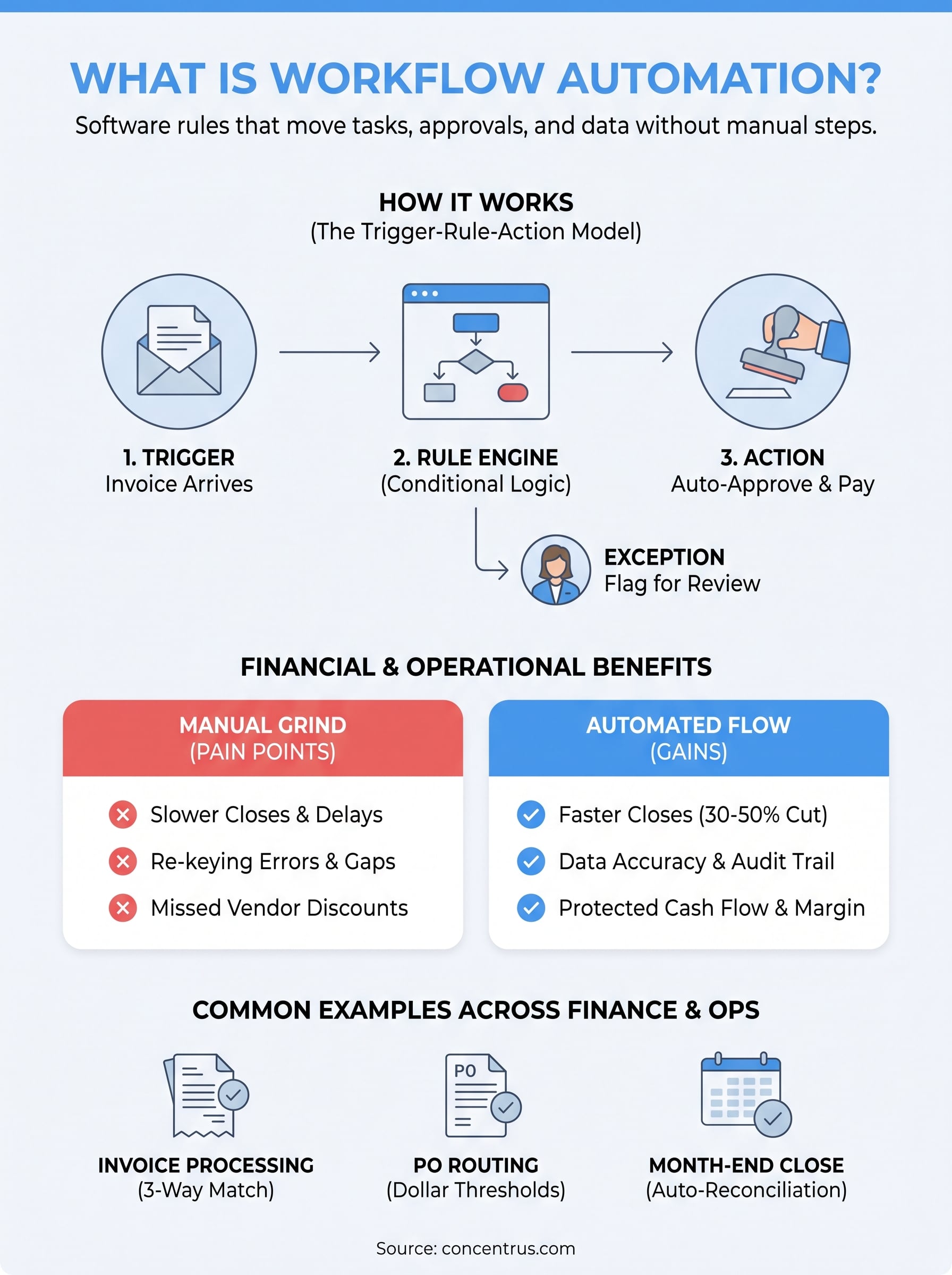
Workflow automation isn’t magic, it’s a set of rules layered on top of software you probably already own. Every automated workflow breaks down into three parts: a trigger that starts the process, a rule engine that decides what happens next, and an action that carries out the decision without a human clicking a button. When a new invoice lands in your accounts payable system, that’s the trigger. The rule engine checks it against the purchase order and receiving report. If everything matches within tolerance, the action fires: the invoice gets approved and queued for payment automatically.
The three components of every automated workflow
Understanding these parts matters because they’re what you’ll evaluate when picking software or scoping a project with your ERP team.
- Trigger: an event that starts the workflow, like a new record, a date, or a status change
- Conditional logic: if/then rules that route the item based on dollar amount, department, vendor, or risk level
- Action: the automated step that follows, such as routing for approval, updating a record, or sending a notification
- Exception handling: a fallback rule that flags anything the logic can’t resolve on its own
Automation only works because someone mapped the decision logic first; the software just executes it faster than a person can.
How systems connect to make it happen
None of this works if your systems sit in silos. Connection happens through integrations, usually APIs, that let your ERP, CRM, and AP tools pass data back and forth in real time instead of through manual exports and re-entry. This is where platforms like NetSuite and Acumatica earn their keep: they’re built with native workflow engines and integration frameworks specifically so a purchase order in one module can trigger an approval routing in another without a developer writing custom code for every use case. According to the National Institute of Standards and Technology, well-designed system interoperability reduces error rates precisely because data moves once and gets reused, rather than being retyped at every handoff (nist.gov).
A simple example walkthrough
Picture a mid-sized distributor processing vendor invoices. Here’s how the workflow actually runs once it’s built:

- An invoice arrives electronically and lands in the ERP’s AP queue (trigger)
- The system checks it against the matching purchase order and receiving record (rule)
- If it matches within a set tolerance, it’s auto-approved and scheduled for payment (action)
- If it doesn’t match, it’s routed to a controller with the discrepancy flagged (exception)
Quantifying results comes next, once you understand that every workflow you automate follows this same trigger-rule-action pattern, whether it’s a two-step approval or a twelve-step order-to-cash cycle.
How to implement workflow automation in your business
Rolling out workflow automation isn’t a single software purchase, it’s a project with sequencing that matters. Skip a step, like mapping the process before you configure the tool, and you end up automating a broken workflow faster. Get the sequence right, and you build something your finance team actually trusts enough to stop double-checking manually.
Start with the process, not the software
Before anyone opens a system configuration screen, document the process as it actually runs today, not how the procedures manual says it should run. Sit with the people doing the work, whether that’s AP clerks or a controller, and write down every handoff, every approval threshold, and every exception that comes up regularly. This process mapping step is where most projects either succeed or quietly fail later, because software can only automate a decision that’s already been made clearly.
Map the decision logic before you automate anything
Once the process is documented, translate it into explicit rules: who approves what dollar amount, what triggers an escalation, and what counts as an exception that needs a human. Vague logic produces a workflow nobody trusts, so be specific.
- Define every approval threshold in dollars, not judgment calls
- Assign a named owner for each exception path, not just “finance team”
- Set a time limit for each approval step before it escalates automatically
- Confirm which systems need to exchange data at each step
A workflow is only as reliable as the decision logic someone wrote down before the software ever touched it.
Pilot on one process before scaling
Resist the urge to automate every process at once. Pick one high-friction workflow, invoice matching or PO approvals are common starting points, and run it as a pilot for a full reporting cycle. Measure the before-and-after numbers: hours saved, error rate, days shaved off the close. Those numbers become your business case for expanding automation elsewhere, and they give your finance team confidence the system behaves the way you designed it before you bet the whole department on it.
Assign ownership and build in review
Someone on your team needs to own the workflow once it’s live, checking exception queues, reviewing escalations, and adjusting rules as the business changes. Treat this like any other financial control: it needs an owner, a review cadence, and documentation. Without that ownership, workflows drift out of date as vendor terms, approval thresholds, or org charts change, and nobody notices until an exception slips through unnoticed.
Loop in your ERP partner early
Platforms like NetSuite and Acumatica already ship with native workflow engines, so the fastest path to a working automation usually runs through configuration, not custom development. Getting your implementation partner involved during the mapping stage, rather than after you’ve already built rules in a vacuum, keeps the project aligned with what the platform can actually do out of the box, saving both budget and rework down the line.
Workflow automation examples across finance and operations
Abstract definitions only get you so far. Seeing workflow automation applied to the processes you already run every day makes it obvious where the opportunity sits inside your own operation. The examples below come from the same finance and operations functions most midsized companies manage in NetSuite or Acumatica, and each one follows the trigger-rule-action pattern covered earlier.
Accounts payable and invoice processing
Invoice processing is the most common starting point because the volume is high and the rules are usually already well understood. A vendor invoice arrives, the system matches it against the purchase order and receiving report, and anything within tolerance gets approved without a person touching it. Exceptions, like a price mismatch or a missing receipt, route automatically to the right person instead of sitting in a shared inbox. This is where automated three-way matching delivers the fastest, most measurable win for most finance teams.

The first workflow you automate should be the one costing you the most labor hours right now, not the one that seems easiest.
Order-to-cash and credit approvals
Sales orders that exceed a customer’s credit limit or fall outside standard terms need review before they ship. Automated workflows check the order against the customer’s credit status the moment it’s entered, route it to a credit manager only when a rule is triggered, and let everything else flow straight to fulfillment. That keeps cash flow protected without slowing down the orders that never needed a second look.
Financial close and reconciliation
Month-end close involves dozens of repeatable steps: recurring journal entries, intercompany eliminations, bank reconciliations. Automating the recurring, rules-based pieces frees your accounting team to spend the close period on judgment calls and variance analysis instead of data entry. Below is how a few common close tasks typically change once automated.
| Close Task | Manual Approach | Automated Approach |
|---|---|---|
| Recurring journal entries | Re-entered each month by hand | Auto-generated on a schedule, reviewed by exception |
| Bank reconciliation | Line-by-line manual matching | System matches transactions automatically, flags mismatches |
| Intercompany eliminations | Spreadsheet-based, error prone | Rules-based elimination runs automatically at close |
Procurement and purchase order routing
Procurement teams use workflow automation to route purchase requisitions based on dollar thresholds and department budgets. A request under a set amount might auto-approve; anything above it routes to a director, then escalates to a VP if it isn’t acted on within a defined window. Purchasing gets faster without loosening spending controls.
Supply chain and inventory management
Supply chain operations benefit from automation tied to inventory thresholds and shipping status. When stock on a key SKU drops below a set reorder point, the system can automatically generate a purchase order or alert procurement, rather than relying on someone noticing a low-stock report. Shipment tracking updates, backorder alerts, and warehouse transfer approvals follow the same pattern, cutting the lag between an event happening and someone acting on it.
Workflow automation vs. RPA and process automation
Confusion between these three terms costs companies money, because vendors often use them interchangeably to sell whatever they happen to offer. Workflow automation, robotic process automation (RPA), and business process automation (BPA) solve related but distinct problems, and picking the wrong one means paying for capability you don’t need or missing the automation that would actually fix your bottleneck.
Defining the differences
Workflow automation, as covered throughout this article, routes tasks and decisions between people and systems based on rules, think approvals, notifications, and data handoffs inside a platform like NetSuite or Acumatica. RPA is narrower: it uses software bots to mimic a human’s clicks and keystrokes, usually to move data between systems that don’t have a native integration, like copying figures from a legacy report into a spreadsheet. Process automation, sometimes called BPA, is the broadest term, describing the automation of an entire end-to-end business process, which often combines workflow automation, RPA, and system integrations together.
If a bot is clicking buttons to mimic a human, that’s RPA; if a rule is routing a decision between systems, that’s workflow automation.
Comparing the three approaches
Seeing them side by side makes the distinction concrete and helps you scope a project correctly before you talk to any vendor.
| Term | What It Automates | Typical Use Case |
|---|---|---|
| Workflow automation | Task and decision routing based on business rules | Invoice approval, PO routing, credit review |
| RPA | Repetitive clicks and data entry across systems | Copying data from a legacy system into an ERP |
| Process automation (BPA) | An entire multi-step business process | Full order-to-cash or procure-to-pay cycle |
Why the distinction matters for your ERP strategy
Most midsized companies running NetSuite or Acumatica don’t need RPA bots at all, because the ERP’s native workflow engine already handles the rule-based routing that RPA would otherwise be patched in to fix. RPA earns its keep when you’re stuck with a legacy system or a third-party tool that has no API and no native integration path. Reaching for RPA before exhausting your ERP’s built-in workflow capability usually means paying for bot licenses to solve a problem your existing platform could have handled with configuration.
Process automation is the right frame when you’re redesigning an entire cycle, not a single step. If you’re only trying to speed up invoice approvals, you need workflow automation. If you’re rebuilding procure-to-pay from requisition through payment, you’re doing process automation, and workflow automation becomes one piece of that larger design. Knowing which term actually describes your problem keeps the conversation with your ERP partner focused on the right tool, instead of buying automation capability that duplicates what your system already does out of the box.
The bottom line on workflow automation
Workflow automation is a set of rules that move approvals, data, and decisions between systems without someone manually pushing each step forward. It works because you mapped the process first, defined the logic clearly, and connected the right systems, whether that’s your ERP, AP tool, or CRM. Once it’s running, the benefit isn’t just fewer manual tasks, it’s faster closes, protected cash flow, and fewer errors sitting on your financial statements. That’s why this belongs on a CFO’s desk, not just IT’s project list.
If you’re evaluating where automation fits inside your own NetSuite or Acumatica environment, or you’re stuck with a workflow that was never built around measurable ROI, that’s exactly the gap Concentrus closes. Talk to Concentrus about building an ERP workflow tied to real financial outcomes before your next fiscal quarter starts.