

Accounts payable is one of those back-office functions that quietly drains time, money, and sanity when it’s not running well. Manual invoice processing, payment errors, and compliance headaches pile up fast, especially for midsized companies scaling their operations. That’s exactly where Tipalti AP automation comes in, promising to streamline the entire payables workflow from invoice capture to global payment execution.
But does it actually deliver? And more importantly, is it the right fit for your ERP environment? At Concentrus, we help CFOs and finance leaders get measurable ROI from their NetSuite and Acumatica ERP investments, and AP automation is a critical piece of that puzzle. We’ve seen firsthand how the right payables solution accelerates financial close cycles and strengthens cash flow visibility, and how the wrong one creates expensive headaches.
This article breaks down Tipalti’s core features, pricing structure, and real pros and cons so you can make an informed decision before committing. Whether you’re evaluating Tipalti as a standalone tool or as an integration with your existing ERP, you’ll walk away with the clarity you need to move forward confidently.
Why AP teams consider Tipalti
AP teams at midsized companies deal with problems that spreadsheets and basic accounting tools can’t fix at scale. Manual invoice handling creates bottlenecks, duplicate payments, and compliance gaps that grow more costly as your vendor base expands. Tipalti targets the operational friction that finance teams face daily, particularly when managing high volumes of global payments across multiple currencies and supplier types.
The volume problem
When your AP team processes hundreds of invoices per month, errors compound quickly. Payment delays damage vendor relationships and can trigger late fees that erode your margins over time. Tipalti automates the repetitive, rules-based tasks so your team can focus on exceptions and strategic decisions instead of manual data entry.
Companies that automate AP processes consistently report lower cost-per-invoice and significantly faster processing times compared to manual workflows.
Compliance and global payments
One area where Tipalti genuinely stands out is multi-currency and cross-border payment support. If you work with international suppliers or contractors, managing tax withholding, sanctions screening, and local payment preferences manually creates serious regulatory exposure. Tipalti handles:
- W-9 and W-8 tax form collection directly from suppliers through a self-service portal
- OFAC sanctions screening applied to every payment run
- VAT compliance tracking across multiple jurisdictions
ERP integration pressure
Most finance teams evaluating Tipalti AP automation are not replacing their ERP, they are extending it. NetSuite and Acumatica users often turn to Tipalti to fill gaps in native AP functionality, specifically around supplier self-service portals and automated payment reconciliation.
Understanding how Tipalti actually fits into your existing tech stack matters before you sign a contract. The next step is to look at how the end-to-end workflow runs once you go live.
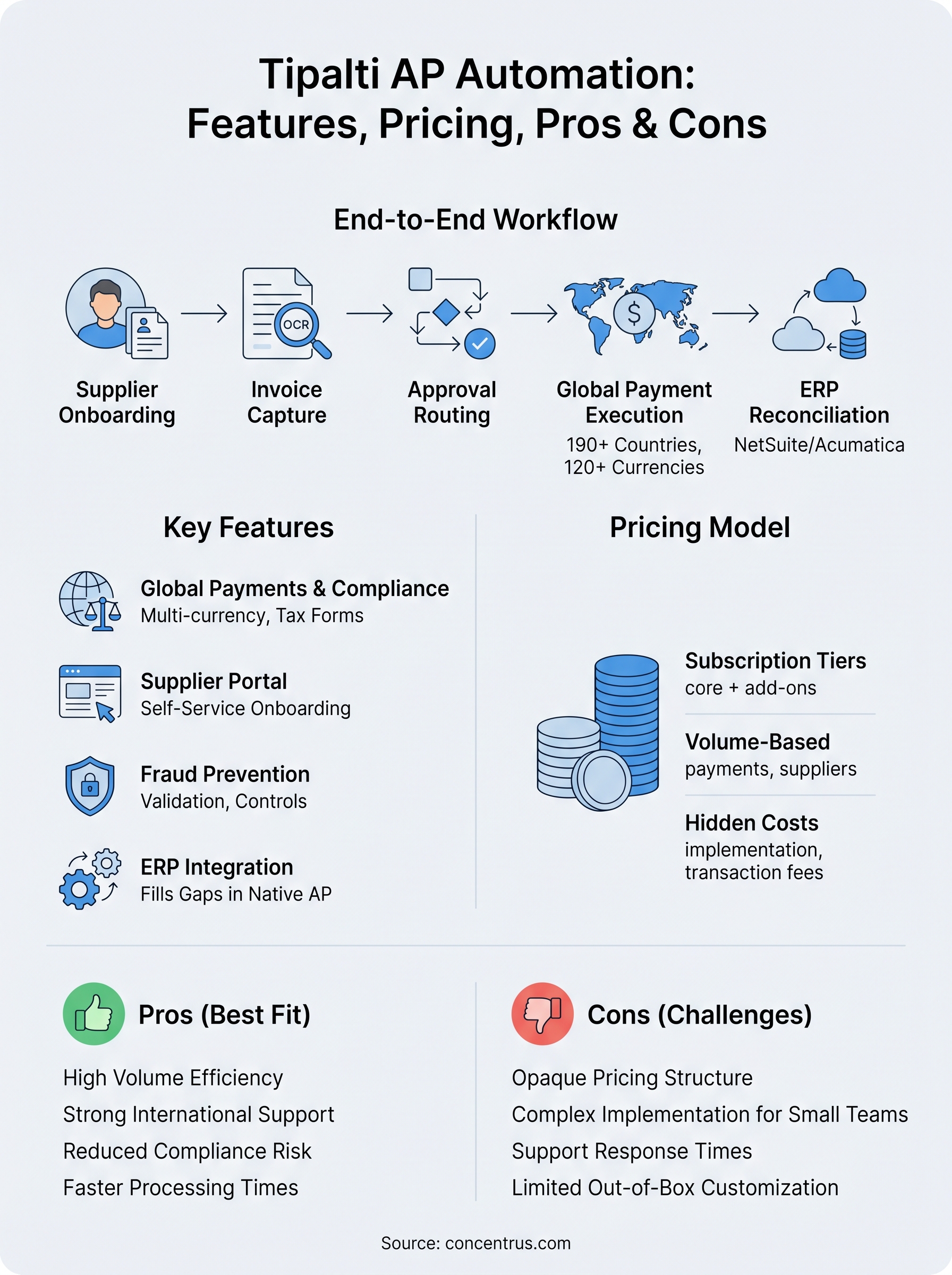
How Tipalti AP automation works end to end
Tipalti AP automation runs as a connected workflow, not a collection of disconnected tools. Once you configure it and connect it to your ERP, the system handles each stage of payables automatically, reducing manual intervention at every step. Understanding this flow helps you evaluate whether it fits your current processes and team structure.
Supplier onboarding and invoice intake
Your suppliers register through a self-service onboarding portal where they submit their information directly, without requiring your AP team to chase them down. Invoices then enter the system via email, upload, or API, and optical character recognition (OCR) extracts the relevant data fields automatically without manual keying.

The portal collects:
- Banking details and payment preferences
- W-9 or W-8 tax forms based on supplier location
- Currency and payment method selections
Approval routing and payment execution
Once an invoice clears intake, configurable approval workflows route it to the right stakeholders based on rules you define, such as spend thresholds or department assignments.
After approval, Tipalti executes payments across more than 190 countries and 120 currencies and posts confirmed payment data back to your ERP automatically, eliminating the need for manual reconciliation on your team’s end.
Closing the payment-to-reconciliation loop automatically is where Tipalti removes the most manual work from your AP team’s daily operations.
Tipalti features to evaluate
Not every feature on a vendor’s spec sheet matters equally to your business. When evaluating Tipalti AP automation, focus on the capabilities that directly affect your team’s daily workload and your organization’s financial controls, rather than getting distracted by features you’ll never use.
Invoice management and OCR accuracy
Your team’s efficiency depends heavily on how reliably the system captures invoice data. OCR extraction accuracy determines how many invoices require manual correction, and even a small error rate compounds quickly across high volumes. Tipalti’s invoice management includes three-way matching against purchase orders and receipts, which reduces duplicate payments and catches discrepancies before approval routing begins.
Weak OCR accuracy is one of the top sources of hidden labor cost in AP automation tools, so test it with your actual invoice formats before you commit.
Payment controls and fraud prevention
Tipalti includes built-in payment fraud detection through bank account validation and duplicate payment checks on every run. Your finance team can configure role-based access controls to limit who can approve payments at different spend thresholds, which strengthens your internal controls without layering in additional process complexity. These controls matter most if you manage a large or geographically distributed supplier base.
Tipalti pricing and total cost factors
Tipalti does not publish its pricing publicly, which means you need to go through a sales conversation to get a number. Subscription costs vary based on your payment volume, number of suppliers, and the modules you activate. For midsized companies, expect annual contract pricing that scales with usage rather than a flat monthly fee.
Subscription tiers and what’s included
Your pricing structure with Tipalti centers on core AP automation plus add-on modules for features like procurement and expense management. The base subscription typically covers invoice processing, supplier onboarding, and payment execution, but advanced features like purchase order management require separate licensing.

Always request a detailed breakdown of what your specific tier includes before you sign, because assumptions here cost real money later.
Hidden costs to watch for
Beyond the subscription fee, implementation and integration costs can add significantly to your total investment, particularly if you connect Tipalti AP automation to a complex NetSuite or Acumatica environment.
Your team should also account for transaction fees on international payments, which vary by payment method and destination country. Clarifying training, change management, and ongoing support fees upfront keeps your total cost of ownership accurate before you commit.
Pros, cons, and best-fit scenarios
Knowing a tool’s strengths and weaknesses in context helps you make a faster, more confident decision. Tipalti AP automation fits certain business profiles very well and creates friction for others, so mapping your situation against both sides saves you from a costly mismatch.
Where Tipalti delivers real value
Tipalti performs best when payment volume and supplier diversity are high. Finance teams managing hundreds of global vendors consistently report faster processing times and fewer compliance errors after implementation.
The strongest ROI from Tipalti typically appears in organizations already running high transaction volumes with international payment complexity.
- Strong multi-currency and cross-border payment execution
- Automated tax form collection reduces compliance risk
- Supplier self-service portal cuts onboarding labor significantly
Where Tipalti falls short
Tipalti’s pricing and implementation complexity make it a harder sell for smaller AP teams with simple domestic payment workflows. If your vendor base is limited and your payment methods are straightforward, the cost-to-benefit ratio works against you.
- Limited out-of-box customization for complex NetSuite or Acumatica environments
- Opaque pricing requires a full sales cycle before you know your number
- Customer support response times can lag during peak periods
Next steps
Tipalti AP automation works well for midsized companies dealing with high payment volumes, global suppliers, and compliance complexity. If your team fits that profile, it deserves a serious evaluation. If your payment workflows are mostly domestic and low volume, the pricing and implementation overhead may not justify the investment, and a lighter tool or native ERP functionality could serve you better.
Before you commit to any AP automation platform, make sure it integrates cleanly with your NetSuite or Acumatica ERP and aligns with the financial outcomes your organization actually needs to hit. AP automation is one piece of a larger ROI picture, and getting the full system working together is what separates a technology purchase from a real business result.
If you want guidance on building an ERP and AP strategy that ties directly to measurable financial outcomes, connect with the Concentrus team to start the conversation.