

Your AP team is buried in paper invoices, chasing approvals through email threads, and manually keying data into spreadsheets. Meanwhile, you’re trying to close the books faster and get a clear picture of cash flow. If you’ve started asking what is AP automation, you’re likely at the point where manual accounts payable processes are actively holding your finance team back, and costing your organization real money in late-payment penalties, duplicate payments, and lost early-pay discounts.
AP automation replaces those manual, error-prone steps with software that captures invoice data, routes approvals, and executes payments with minimal human intervention. For CFOs at midsized companies, it’s one of the highest-ROI improvements you can make inside your ERP environment, and it’s exactly the kind of operational efficiency gain we build into every NetSuite and Acumatica implementation at Concentrus. Through our ROI Roadmap™ methodology, we help finance leaders identify where automation delivers measurable financial outcomes, and AP is almost always near the top of that list.
This guide breaks down how AP automation actually works, from invoice capture to payment execution, along with the specific benefits that matter to finance leaders: faster closes, tighter controls, and better cash visibility. We’ll also cover what to look for in AP automation tools and how they integrate with your ERP system, so you can make a confident, informed decision about your next move.
What AP automation is and is not
AP automation is a category of software functionality, not a single product or a magic fix. Before you evaluate vendors or build a business case, you need a clear definition of what the term actually covers, because the boundaries matter when you are scoping an implementation and setting realistic expectations with your finance team. The term gets used loosely across vendor marketing and industry conversations, and that creates confusion about what you are actually buying and what outcomes you can reliably expect.
What AP automation actually is
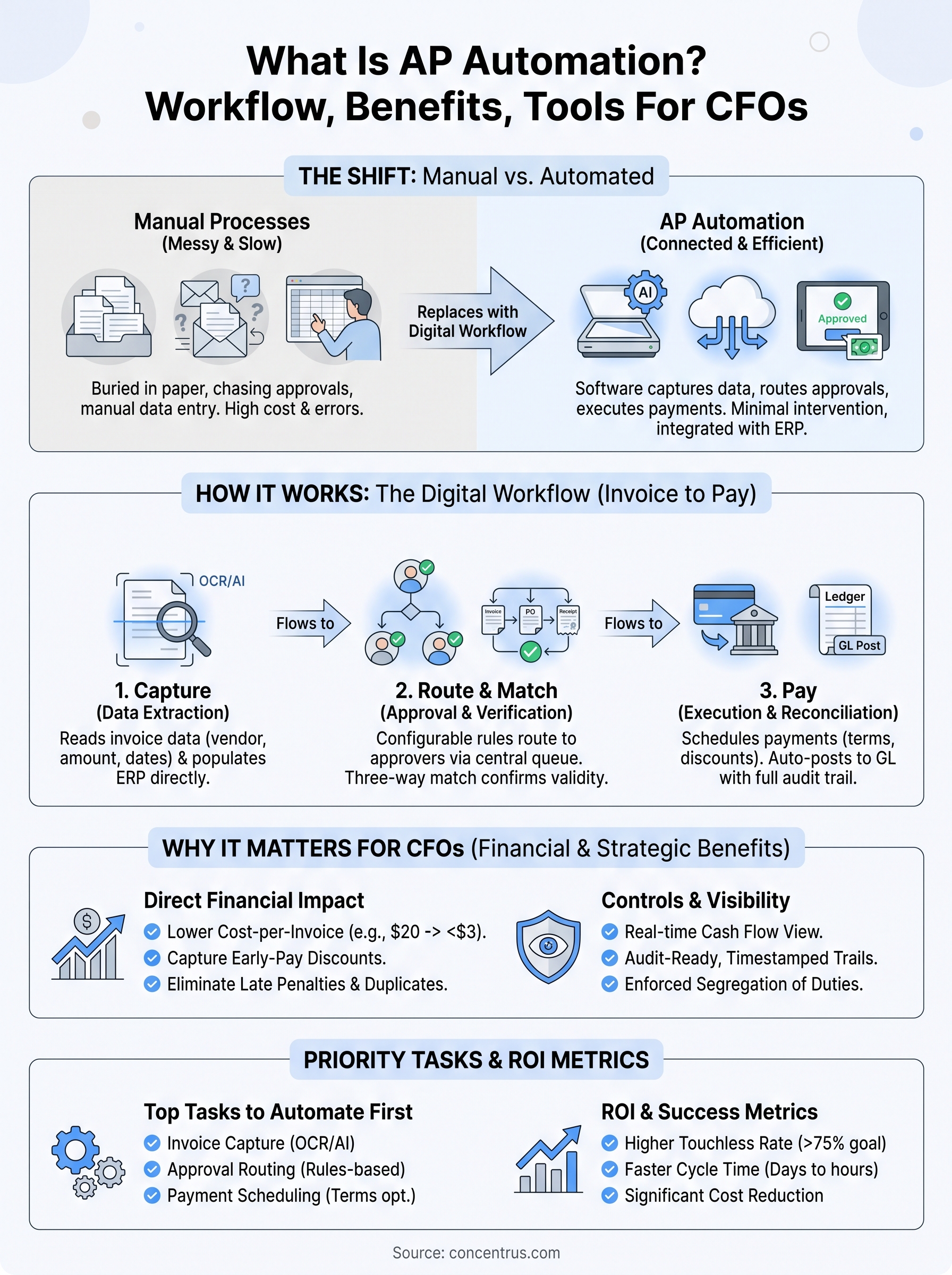
Understanding what is AP automation starts with recognizing it as a set of connected digital workflows that replace the manual steps across your entire invoice-to-pay cycle. When an invoice arrives, whether by email, electronic data interchange, or a supplier portal, automated capture technology reads the document and extracts the relevant data: vendor name, invoice number, line items, amounts, and due dates. That data moves directly into your ERP or financial system without anyone retyping it.

From that point, automated routing logic sends the invoice through a predefined approval workflow based on rules you configure: dollar thresholds, department codes, cost centers, or project numbers. Approvers receive digital notifications, review invoices in a centralized queue, and approve or flag exceptions without touching paper or searching through email threads. Once approved, the system runs a three-way match against the corresponding purchase order and goods receipt, then schedules payment according to your negotiated terms.
AP automation is not a single feature. It is an end-to-end workflow layer that connects invoice capture, approval routing, three-way matching, and payment execution into one auditable, traceable process inside your financial environment.
The core components that a complete AP automation solution covers include:
- Invoice capture and data extraction via OCR or AI-based recognition
- Automated approval routing with configurable rules and escalation paths
- Three-way PO matching against purchase orders and receiving documents
- Exception management queues for invoices that fail matching rules
- Payment scheduling and execution aligned to your cash flow strategy
- Audit trail and document storage for every step in the workflow
Each component builds on the previous one. Skipping or underbuilding any of them creates gaps that push work back into manual processes and undermine the ROI case.
What AP automation is not
AP automation is not the same as scanning invoices and saving them as PDFs in a shared folder. Digitizing paper is a start, but it does not eliminate manual data entry or automate approvals. True automation removes human intervention from routine, rules-based tasks so your AP staff can redirect their time toward vendor relationship management, exception resolution, and strategic cash flow planning instead of data entry.
It is also not a replacement for your ERP system. AP automation tools work best when they are deeply integrated with your core financial platform, whether that is NetSuite, Acumatica, or another system. Your ERP remains the system of record for vendor master data, chart of accounts, open liabilities, and financial reporting. AP automation extends that system by managing the workflow layer between invoice receipt and the resulting journal entry, not by replacing the financial foundation underneath it.
Finally, AP automation is not something you configure once and walk away from. Your approval hierarchies, payment policies, and exception-handling rules are specific to your organization’s structure and risk tolerance. The software needs to be configured to match how your business actually operates, not how a vendor demo assumes you operate. The quality of your implementation determines whether you achieve a high touchless-processing rate or end up with a system your team quietly works around because it creates more friction than it removes.
Why AP automation matters for CFOs
As a CFO at a midsized company, your AP function sits at the center of cash flow management, vendor relationships, and financial close accuracy. When that function runs on manual processes, every inefficiency compounds: delayed approvals slow down your close, inconsistent coding creates reporting errors, and missed early-pay discounts quietly drain margin over time. Understanding what is AP automation is not just an IT conversation, it is a financial strategy conversation, and the numbers behind it give you a clear business case.
The direct financial impact on your bottom line
Manual invoice processing carries a cost most finance leaders underestimate. Industry benchmarks consistently place the cost per invoice between $15 and $40 when you factor in staff time, error correction, and late-payment penalties. Automated AP processing routinely brings that figure below $3. At a volume of 1,000 invoices per month, that difference represents real margin recovery worth tracking directly against your ERP investment.
The gap between manual and automated cost-per-invoice is not a marginal improvement, it is a structural shift in how your finance team generates value.
Beyond cost reduction, early-pay discount capture becomes a reliable revenue lever once your approval cycle compresses from days to hours. Most midsized companies leave significant discount dollars on the table simply because invoices sit in approval queues too long to qualify for net-10 or net-15 terms.
The visibility CFOs need to manage cash
Your ability to forecast cash requirements accurately depends on knowing your outstanding payables at any given moment. Manual AP processes create blind spots: invoices received but not yet entered, approvals in progress with no timestamp, and payments queued with no clear timing. AP automation surfaces all of that in real time inside your ERP, giving you a live payables picture you can use to make informed decisions about timing, working capital, and short-term borrowing needs.
Beyond forecasting, audit readiness and compliance improve significantly when every invoice carries a timestamped approval record and a full document trail from receipt through payment. For finance leaders managing multiple entities, multiple currencies, or complex approval hierarchies, that visibility is not optional, it is foundational to running a clean financial operation.
How AP automation works from invoice to pay
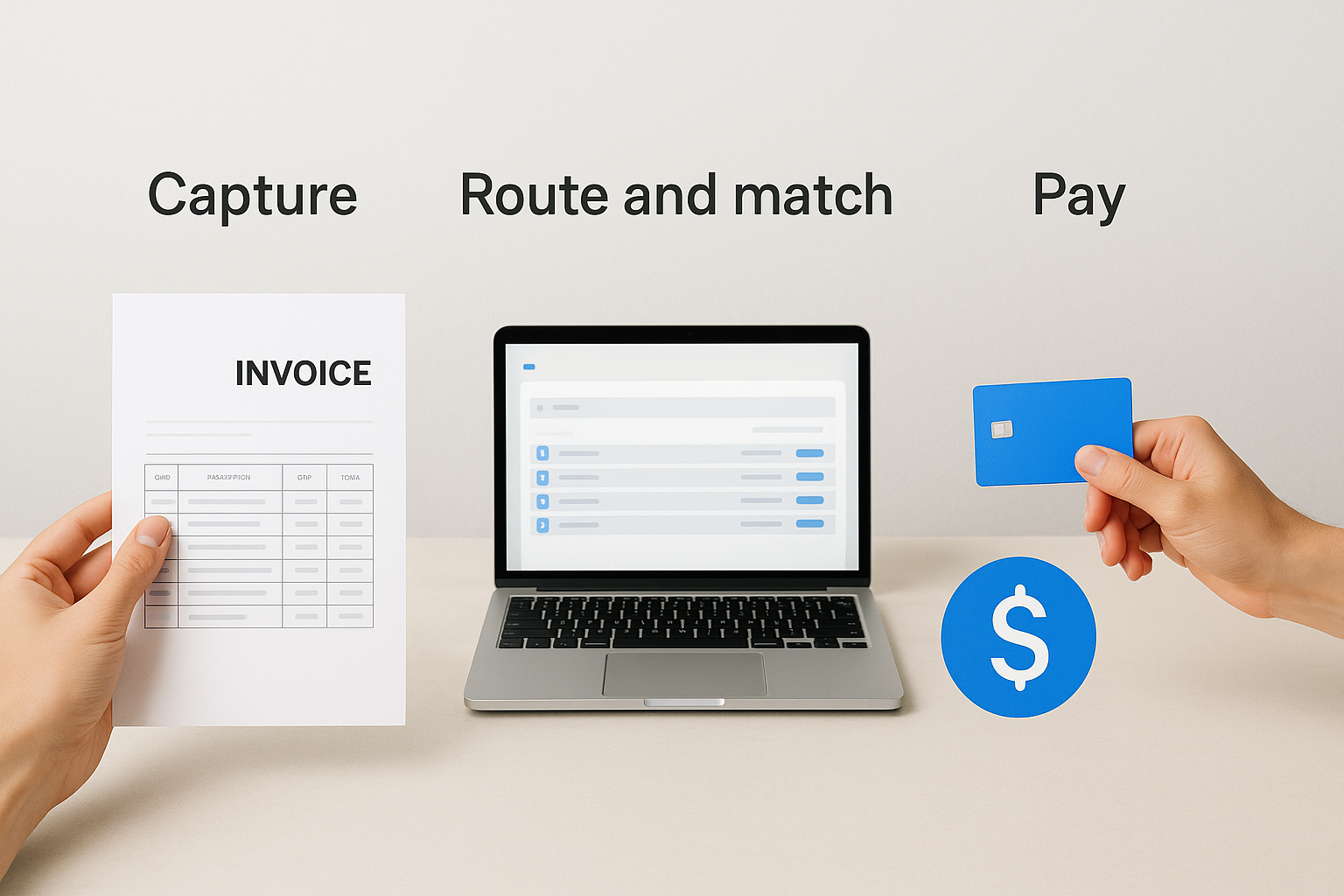
When you understand what is AP automation at a process level, the decision to implement it becomes much easier to justify. The workflow follows a linear sequence from the moment an invoice enters your environment to the moment payment clears your bank account. Each stage hands off to the next automatically, with human intervention required only when an exception breaks the flow.
Capture: getting invoice data into your system
Every AP automation workflow starts with structured data extraction. When a vendor sends an invoice, whether by email attachment, EDI feed, or a supplier portal, the system uses optical character recognition (OCR) or AI-based document processing to read the document and pull out the relevant fields: vendor name, invoice date, invoice number, line items, amounts, and payment terms. That data populates directly into your ERP without manual keying.
This step eliminates the most labor-intensive part of manual AP and removes the transcription errors that create downstream problems in your general ledger. The accuracy of your capture layer determines how many invoices flow through the rest of the process without touching a human hand.
Route and match: approvals and three-way verification
Once the system captures invoice data, automated routing logic pushes the invoice to the right approvers based on rules you define: dollar thresholds, cost centers, department codes, or project numbers. Approvers work from a centralized digital queue rather than email threads, which gives you a complete timestamp record of every action taken on every invoice.
The three-way match is where your controls live. Matching the invoice against the original purchase order and the goods receipt record confirms that you are paying only for what you ordered and actually received.
Invoices that pass the match move automatically to payment scheduling. Invoices that fail trigger an exception queue where your AP team resolves the discrepancy before any payment is authorized.
Pay: executing and reconciling payments
With approvals confirmed and the match complete, the system schedules payment according to your configured terms, factoring in due dates, early-pay discount windows, and your current cash position. Payments execute through your preferred method, whether ACH, check, or virtual card, and the resulting journal entries post automatically to your ERP. Your accounts payable balance updates in real time, and every document from invoice receipt through payment confirmation stays linked in a single auditable record.
The AP tasks to automate first
Not every AP task carries the same automation potential. When you are building a business case or scoping a phased implementation, prioritizing by volume and error rate gives you the fastest path to measurable ROI. The tasks that consume the most staff hours and generate the most exceptions are the ones you want to address first, and three areas consistently deliver the highest return when you automate them early.
Invoice capture and data entry
Manual data entry is the first task to eliminate. Every invoice your team keys in by hand carries a risk of transcription error that compounds downstream: wrong amounts, incorrect vendor codes, and mismatched line items that create reconciliation work at close. Automating capture with OCR or AI-based extraction removes that risk at the source.
The volume multiplier matters here. A 1% error rate on 500 invoices per month means five corrections per cycle. At 2,000 invoices per month, that same rate creates 20 exceptions that each require staff time to trace and fix.
Capture automation also standardizes how invoices enter your system regardless of format, whether a vendor sends a structured PDF, a scanned paper document, or an EDI file. That consistency is what allows the rest of your workflow to operate at scale without manual intervention.
Approval routing and escalation
Approval bottlenecks are one of the clearest signs that a manual AP process is breaking down. When invoices move through email threads, approvers miss notifications, context gets lost, and there is no reliable timestamp showing when an invoice was received versus when it was approved. Automating routing replaces that fragmented chain with a configurable rule-based workflow that routes every invoice to the right person based on dollar threshold, department, or cost center, and escalates automatically when an approval sits idle past a defined window.
This is directly tied to what is ap automation delivering in practice: fewer late payments, more early-pay discount captures, and a complete digital record of every approval decision your team makes.
Payment scheduling and terms optimization
Once approvals are complete, manual payment scheduling introduces another opportunity for errors and missed timing. Automating payment scheduling based on vendor terms and your current cash position lets you capture discounts systematically rather than opportunistically. Your team configures the rules once, and the system executes against those rules consistently across every vendor and every payment cycle without anyone monitoring due dates in a spreadsheet.
Controls, compliance, and fraud prevention
Manual AP processes create control gaps that expose your organization to fraud, compliance failures, and audit findings. Understanding what is AP automation from a controls perspective means recognizing that the workflow layer itself becomes your first line of defense. When every invoice follows a defined, auditable path from receipt through payment, your internal controls are no longer dependent on individual employees following the right procedures every time.
Separation of duties and approval thresholds
One of the most common internal control weaknesses in manual AP environments is inadequate separation of duties. When the same person can enter an invoice, approve it, and execute payment, you have an exposure that auditors flag and fraud exploits. AP automation enforces configurable approval hierarchies that prevent any single user from completing the entire payment cycle without a second independent review.

Separation of duties is not just a best practice, it is a foundational control that your auditors and your board expect to see documented and operating consistently.
Your approval thresholds become codified rules inside the system rather than informal policies that depend on manager availability. Invoices above a defined dollar amount automatically route to a senior approver. Changes to vendor banking details trigger additional review steps. The system enforces those rules on every transaction, not just the ones that happen to get spot-checked.
Audit trails and regulatory compliance
Regulatory requirements across industries demand that you maintain complete, timestamped records of your financial transactions. AP automation generates a full audit trail automatically: when the invoice arrived, who reviewed it, what matching results were returned, when approval was granted, and when payment executed. That documentation exists without any additional effort from your team.
Your compliance reporting also becomes faster and more reliable when every document is stored and linked inside your ERP. Tax compliance, vendor verification, and year-end audit preparation all pull from the same structured dataset rather than scattered email threads and file folders.
Duplicate payment detection and vendor fraud
Duplicate payments are among the most common and preventable AP losses midsized companies face. AP automation runs systematic checks against your existing invoice records before processing any new payment, flagging invoices that share a vendor number, invoice number, or amount combination that already exists in your system.
Vendor master controls also reduce exposure to fraud schemes where bad actors attempt to redirect payments by submitting change requests for banking details. Automated workflows route those changes through a verification step that requires documented approval before any update takes effect.
AI capabilities that increase touchless processing
When you explore what is AP automation at its current state, you find that AI has fundamentally changed what “touchless” means in practice. Basic OCR reads structured invoices reliably, but AI-based document processing goes further: it learns from your vendor formats, handles unstructured layouts, and improves its accuracy over time without manual rule updates. That shift from static templates to adaptive models is what pushes touchless processing rates from the 50 to 60 percent range typical of legacy OCR systems toward 80 to 90 percent or higher in mature implementations.
Intelligent data extraction and document learning
Traditional OCR requires templates: you define where the invoice number lives on a specific vendor’s document, and the system reads that field. When a vendor changes their invoice format, the template breaks and your team steps back in manually. AI-based extraction removes that dependency by recognizing document structures contextually rather than positionally. The system reads a vendor’s invoices across multiple cycles, identifies patterns, and generates confidence scores for each extracted field rather than treating every read as binary pass or fail.
The practical result is that your AP team handles exceptions rather than routine extraction, which is exactly the labor shift that drives measurable cost reduction.
Your confidence thresholds become a control lever. When the AI scores an extraction above your defined threshold, the invoice flows through automatically. Below that threshold, it routes to a reviewer with the flagged fields highlighted, so your team resolves a targeted discrepancy rather than re-keying the entire document from scratch. That distinction keeps your staff focused on judgment calls instead of data entry.
Predictive coding and GL account mapping
AI also handles one of the most time-consuming judgment calls in manual AP: assigning each invoice to the correct GL account. When your team codes manually, inconsistencies develop over time. Different employees apply different logic to the same vendor or expense category, which creates noise in your financial reporting and slows your month-end close.
Predictive coding models analyze your historical coding and approval patterns to suggest the correct account mapping for each new invoice automatically. The model learns from every correction your team makes, so accuracy improves with volume. Combined with your configured approval rules, this gives you a workflow where the majority of invoices move from capture to payment queue without human intervention beyond the authorization steps your controls already require.
ROI and cost model for AP automation
When finance leaders ask what is AP automation worth financially, the answer starts with understanding your current cost structure. Most midsized companies do not have a precise figure for what each invoice actually costs them to process, but building that baseline number is the first step toward a credible ROI calculation. Once you know your starting point, the improvement potential becomes concrete rather than theoretical.
Cost-per-invoice reduction
Your cost-per-invoice in a manual environment includes staff time for data entry, approval coordination, exception resolution, and payment scheduling, plus the indirect costs of late-payment penalties and missed early-pay discounts. Industry benchmarks consistently place manual processing costs between $15 and $40 per invoice when you account for all of those inputs. Automated AP processing brings that figure to under $3 per invoice in mature implementations.
At 1,500 invoices per month, moving from $20 per invoice to $3 per invoice frees up roughly $255,000 annually, an improvement that shows up directly in your operating cost structure.
That savings compounds when you factor in discount capture. If your vendors offer 2/10 net 30 terms and your approval cycle currently prevents you from meeting that 10-day window, you are leaving a 2% savings on every qualifying invoice unrealized. At meaningful invoice volume, that recovered discount alone can cover a significant portion of your software costs in the first year.
Building a payback timeline
To build a reliable payback model, you need four inputs: your current monthly invoice volume, your estimated cost-per-invoice today, your projected cost-per-invoice after automation, and your annual software and implementation cost. The table below gives you a framework to apply your own numbers.

| Input | Example Value | Your Value |
|---|---|---|
| Monthly invoice volume | 1,500 | |
| Current cost per invoice | $20 | |
| Post-automation cost per invoice | $3 | |
| Monthly savings | $25,500 | |
| Annual savings | $306,000 | |
| Total implementation cost | $120,000 | |
| Payback period | ~5 months |
Most midsized implementations reach full payback within 6 to 12 months when configured correctly and connected to a well-structured ERP environment. The payback timeline compresses further when you include staff reallocation value, specifically the hours your AP team redirects from manual processing toward higher-judgment work like vendor negotiations and cash flow analysis.
KPIs that prove AP automation success
Once you deploy AP automation, you need a defined set of metrics to confirm the system is delivering what you built the business case around. When finance leaders ask what is AP automation supposed to prove over time, the answer lives in your KPI dashboard. Tracking the right numbers from your baseline forward gives you the evidence you need to report results to your leadership team and justify further investment in your ERP environment.
Efficiency and cycle time metrics
Your first set of KPIs focuses on how fast and how cleanly invoices move through your system. These metrics reveal whether your automation is actually reducing human intervention or just shifting the bottleneck from one stage to another.
Your touchless processing rate is the single most direct measure of whether your AP automation is performing as configured, not as promised.
The core efficiency KPIs to track include:
- Touchless processing rate: the percentage of invoices that complete the full capture-to-pay cycle with no manual intervention. A well-configured implementation should reach 75% or higher within the first year.
- Invoice cycle time: the number of days from invoice receipt to payment authorization. Manual environments typically run 10 to 20 days; automated environments compress that to 2 to 5 days.
- Exception rate: the percentage of invoices that fail matching and require manual resolution. A rising exception rate signals a data quality issue in your vendor master or PO process that needs attention upstream.
- Approval SLA compliance: the percentage of invoices approved within your defined window. This metric directly ties to your early-pay discount capture rate.
Financial impact metrics
Efficiency metrics tell you the process is working. Financial impact metrics tell you the investment is paying off. These are the numbers that belong in your CFO reporting and your ROI Roadmap review.
Your cost-per-invoice is the foundational financial KPI. Track it monthly against your pre-automation baseline and report the cumulative savings. Alongside it, monitor your early-pay discount capture rate, expressed as a percentage of eligible invoices where you met the qualifying payment window. An improvement from 20% to 70% discount capture represents recoverable margin that flows directly to your bottom line.
Duplicate payment incidence and late-payment penalty costs round out your financial picture. Both should trend toward zero once your matching logic and payment scheduling operate consistently across your full invoice volume.
How to select and implement AP automation
Selecting an AP automation solution is a sourcing and integration decision, not just a software evaluation. Before you compare vendors, you need clarity on how invoices currently enter your environment, where your highest exception volumes originate, and what your ERP can support natively versus through a third-party integration. Those answers define your requirements and prevent you from over-buying features you will never configure or under-buying a system that creates new manual workarounds inside your existing workflow.
Align your selection criteria to your ERP and process gaps
When evaluating what is AP automation vendors offer versus what your operation actually needs, your ERP integration depth is the most critical criteria to assess. A solution that syncs vendor master data, PO records, and GL codes in real time with your NetSuite or Acumatica environment will deliver far better touchless rates than one that requires manual exports and imports between systems. Ask every vendor for a live demonstration of their ERP integration using your specific platform, not a generic walkthrough of their own sandbox environment.
The vendors who can show you a working, configured connection to your ERP in a demo are the ones worth taking to a detailed scoping conversation.
Beyond integration, evaluate user experience for your approvers, not just your AP staff. If your department managers find the approval interface confusing or slow, they will default to email approvals and your digital audit trail breaks immediately. Adoption across the full approval chain determines whether your touchless processing rate reaches its potential.
Phase your rollout to generate early wins
Your implementation sequence should follow invoice volume and complexity. Start with your highest-volume, lowest-complexity vendor invoices: recurring vendors with consistent formats, clear PO backing, and straightforward GL coding. Automating that subset first lets your team build confidence in the matching logic and approval workflows before you introduce more complex scenarios like multi-entity invoices or custom project coding.
Establish your baseline KPIs before go-live. Tracking cost-per-invoice and touchless processing rate from day one gives you the comparison data you need to report ROI at 30, 60, and 90 days post-launch. That data also surfaces configuration gaps early, when they are far cheaper to fix than after a full rollout has locked in process habits across your entire AP team.
Next steps
You now have a complete answer to what is AP automation and a practical framework for turning that understanding into a business case your leadership team can act on. The gap between where your AP function operates today and what a well-configured automated workflow can deliver is not a technology problem. It is a configuration and integration problem, which means the quality of your implementation partner matters as much as the software you select.
Start by benchmarking your current cost-per-invoice and tracking your touchless processing rate from day one. Those two numbers will define your ROI story and keep your implementation accountable to real financial outcomes rather than vendor promises. Every decision you make, from your approval hierarchy design to your ERP integration depth, should connect back to the measurable results you committed to before go-live.
If you want a partner who ties every AP automation project directly to measurable financial outcomes, connect with the ERP and ROI experts at Concentrus to start building your roadmap.