


NetSuite ERP ROI: How CFOs Should Actually Measure ValueWhy Industry Fit Matters More Than Features in NetSuite ERP ImplementationsIf your month-end close still takes ten or twelve days, the problem usually isn’t your team. It’s the tooling. Financial close management software replaces spreadsheet reconciliations and email chains with automated workflows, so your controllers spend less time chasing numbers and more time reviewing them. For CFOs at midsized companies running NetSuite or Acumatica, the right tool can turn a painful close cycle into a predictable, auditable process with real visibility into every account.
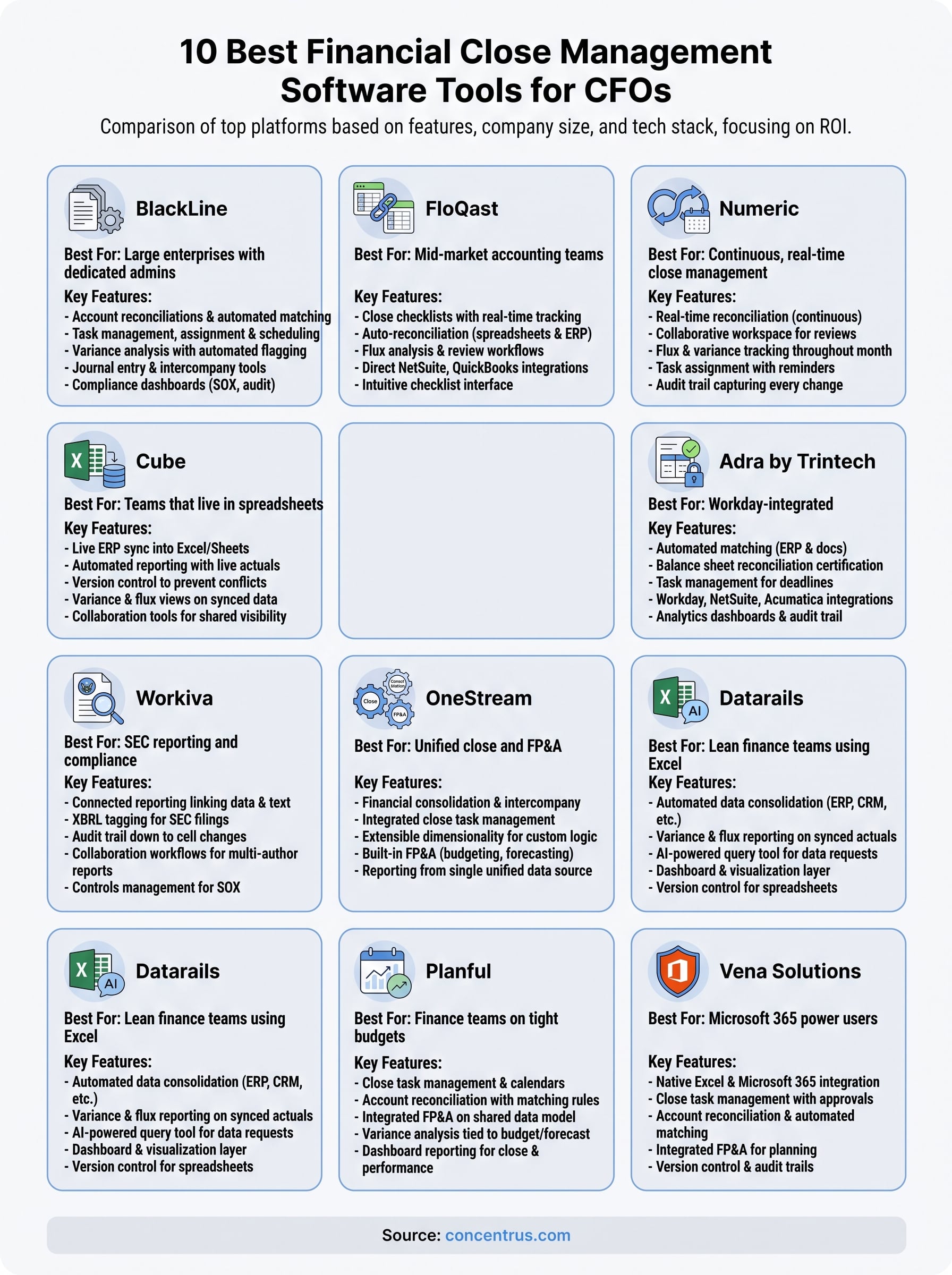
This article compares the ten platforms finance leaders actually shortlist in 2026, from dedicated close automation suites to tools built to plug directly into your ERP. You’ll see how each one handles reconciliation automation, task management, and reporting, plus where each fits based on company size and existing tech stack. No vague feature lists, just what each tool does well and where it falls short.
We built this comparison from the same lens we use with clients: ROI. A close tool only earns its cost if it shortens your cycle, reduces errors, and gives your finance team measurable time back. By the end, you’ll know which platforms deserve a demo and which ones aren’t worth your team’s time.
1. BlackLine: best for large enterprises with dedicated admins
BlackLine practically invented the modern category of financial close management software, and it still sets the bar for what a fully automated close looks like at scale. Companies with hundreds of legal entities, thousands of accounts, and a dedicated close team lean on BlackLine because it was built for that volume from day one. If you’re running a lean five-person accounting department, though, you’ll feel the platform’s weight before you feel its value.

How it works
BlackLine centralizes every close task, journal entry, and reconciliation into a single workflow engine that assigns owners, tracks status, and flags exceptions automatically. Your team logs into one dashboard to see exactly which accounts are reconciled, which are pending review, and which are stuck waiting on a variance explanation. Transaction matching runs in the background, pulling data from your ERP and bank feeds to auto-clear routine items so staff only touch the exceptions that actually need judgment. Variance analysis flags anomalies against thresholds you set, which means surprises surface during the close instead of during the audit.
A tool this powerful only pays off when someone owns it full time; otherwise the automation sits half-configured and the close stays slow.
Key features
BlackLine’s feature set reflects its enterprise roots. The core modules cover the full close lifecycle rather than a single piece of it.
- Account reconciliations with automated matching rules and certification workflows
- Task management that assigns, schedules, and escalates close activities across teams
- Variance analysis with configurable thresholds and automated flagging
- Journal entry management with approval routing and audit trails
- Consolidation and intercompany tools for multi-entity organizations
- Compliance dashboards built for SOX documentation and external audit support
Best for
BlackLine fits large enterprises with a dedicated close administrator or a small internal team whose job is to configure, maintain, and tune the platform. Organizations with dozens of subsidiaries, complex intercompany eliminations, or heavy SOX compliance requirements get the most value here, since the automation scales with entity count in a way spreadsheets never could. Midsized companies running lean finance teams without a systems owner tend to underuse the platform and end up paying enterprise pricing for mid-market functionality.
Pricing
Pricing isn’t published, and BlackLine sells through custom quotes based on user count, transaction volume, and which modules you license. Expect implementation timelines and costs that reflect enterprise software, often running into the tens of thousands annually once you add reconciliation, task management, and compliance modules together. Ask any vendor rep directly for a per-module breakdown before you sign, since bundled quotes make it hard to see what you’re actually paying for.
Pros and cons
Teams that have implemented BlackLine consistently praise its depth and audit readiness, but the same depth creates a real learning curve for smaller teams.
| Pros | Cons |
|---|---|
| Deep automation across the full close lifecycle | Steep learning curve and long implementation timeline |
| Strong audit trail and SOX compliance support | Pricing scales up quickly with entities and modules |
| Handles complex multi-entity consolidations well | Requires a dedicated admin to configure and maintain |
| Mature platform with extensive third-party integrations | Overkill for teams closing fewer than a handful of entities |
Companies evaluating BlackLine should honestly assess whether they have the internal capacity to run it, not just the budget to buy it. Underutilized enterprise software is one of the most common ROI drains we see when we review a client’s existing ERP and close stack.
2. FloQast: best for mid-market accounting teams
FloQast built its reputation by layering close management on top of the spreadsheets your team already uses, instead of asking you to abandon them. That approach makes it the default choice for mid-market accounting teams who want structure and accountability without ripping out Excel entirely. If BlackLine feels like buying a freight truck to deliver groceries, FloQast is the right-sized vehicle for most companies between 50 and 500 employees.
How it works
FloQast connects directly to your existing Excel or Google Sheets workbooks and your ERP, then wraps them in a checklist-driven workflow that tracks who owns each task and when it’s due. Your team keeps working in the spreadsheets they built over years, but now every reconciliation ties back to a centralized close checklist with sign-offs, supporting documentation, and automatic status updates. The platform’s auto-reconciliation feature matches transactions between systems in the background, cutting down the manual tie-out work that eats up the first week of every close.
The best close software doesn’t fight your existing habits, it makes them auditable.
Key features
FloQast focuses on a tighter set of capabilities than BlackLine, aimed squarely at teams that need visibility without enterprise complexity.
- Close checklists with real-time status tracking across the whole team
- Auto-reconciliation that matches transactions between spreadsheets and source systems
- Flux analysis for spotting account variances before they become audit findings
- Sign-off and review workflows that replace email approval chains
- Direct integrations with NetSuite, QuickBooks, and other common mid-market ERPs
Best for
FloQast suits controllers and accounting managers at mid-market companies who need better close visibility but don’t have a systems administrator to babysit a heavyweight platform. It works especially well for teams already running NetSuite that want to add structure without a full platform migration. Companies still growing past their first ERP implementation often find FloQast the natural next step once spreadsheets alone stop scaling.
Pricing
FloQast doesn’t publish pricing publicly, but it’s generally positioned below BlackLine, with quotes based on user count and modules like reconciliation or compliance management. Expect a sales process built around a demo and a custom quote rather than a self-serve checkout, which is standard for this software category.
Pros and cons
| Pros | Cons |
|---|---|
| Works with existing spreadsheets, low adoption friction | Less depth than BlackLine for large multi-entity consolidations |
| Faster implementation than enterprise close suites | Reporting and analytics are lighter than dedicated FP&A tools |
| Strong NetSuite and QuickBooks integrations | Pricing climbs as you add modules and users |
| Intuitive checklist interface accountants adopt quickly | Not built for heavy compliance or SOX documentation needs |
3. Numeric: best for continuous, real-time close management
Numeric takes a different bet than BlackLine or FloQast: instead of compressing a once-a-month scramble, it pushes reconciliation and review work into the days leading up to close so nothing piles up at month-end. That shift toward continuous close management appeals to finance teams tired of the same week-one crunch every single cycle. It’s a newer platform than most on this list, which means less enterprise baggage but also a shorter track record to lean on.
How it works
Numeric syncs with your ERP and general ledger in real time, so reconciliations and variance checks happen throughout the month rather than piling up after period-end. Your team works from a live dashboard that shows account status continuously, with automated matching handling routine entries and flagging exceptions as they appear instead of waiting for a formal close window to surface them. Review notes, supporting documents, and sign-offs all live inside the same workspace, so there’s no separate system to reconcile against your reconciliations.
Closing faster starts with closing less all at once, and that’s the core idea behind continuous close.
Key features
Numeric’s feature set centers on keeping close work spread out rather than concentrated into a single sprint.
- Real-time reconciliation that runs continuously against ERP and bank data
- Collaborative workspace for review notes, comments, and documentation
- Flux and variance tracking updated throughout the month, not just at close
- Task assignment with automated reminders tied to your close calendar
- Audit trail capturing every change and approval for later review
Best for
Numeric fits growing companies, often venture-backed or private equity-owned, that want to shorten close cycles without adding headcount. It suits controllers who already have decent ERP data hygiene and want to catch discrepancies weekly instead of discovering them on day eight of close. Teams still cleaning up chart-of-accounts issues or inconsistent ERP data probably need that fixed first, since continuous reconciliation only helps once the underlying data is trustworthy.
Pricing
Numeric doesn’t list pricing publicly and sells through demos and custom quotes based on team size and transaction volume. Expect a positioning closer to FloQast than BlackLine, though as a newer entrant its pricing structure is still evolving, so get quotes in writing before comparing against incumbents.
Pros and cons
| Pros | Cons |
|---|---|
| Continuous reconciliation reduces month-end crunch | Smaller company with a shorter track record than incumbents |
| Modern, collaborative interface teams adopt quickly | Fewer third-party integrations than established players |
| Strong fit for fast-growing, ERP-native companies | Less proven at large multi-entity scale |
| Real-time visibility into account status year-round | Requires clean, consistent ERP data to deliver full value |
4. Cube: best for teams that live in spreadsheets
Cube skips the checklist-and-workflow model entirely and instead turns Excel or Google Sheets into a live connection to your ERP. It’s built for finance teams who have no intention of leaving spreadsheets, whether that’s for close, reporting, or planning, but who need those spreadsheets to pull real numbers instead of stale exports. This makes Cube less of a pure close tool and more of a FP&A and reporting layer with close-adjacent features, so it suits a slightly different buyer than BlackLine or FloQast.
How it works
Underneath, Cube connects directly to NetSuite, Acumatica, or other source systems and syncs data into your spreadsheets without breaking existing formulas or formatting. Your team keeps building models the way they always have, but every cell can now pull live actuals instead of a manually pasted export. During close, this means variance checks and account rollups update automatically as new transactions post, cutting out the copy-paste cycle that eats hours every month.
If your team refuses to give up Excel, the smarter move is making Excel accurate, not fighting the habit.
Key features
Cube’s feature set leans toward reporting and planning, with close support built around keeping spreadsheet data current.
- Live ERP sync into existing Excel and Google Sheets models
- Automated reporting that refreshes without manual data pulls
- Version control to prevent conflicting or outdated spreadsheet copies
- Variance and flux views built on synced actuals
- Collaboration tools for shared visibility across finance
Best for
Lean finance teams that have built years of institutional knowledge into spreadsheet models get the most value from Cube, since it protects that investment instead of replacing it. Companies without a dedicated close administrator, and without appetite for a full workflow platform, tend to prefer this lighter-touch approach. Larger teams juggling dozens of entities or complex sign-off chains will likely outgrow it fast.
Pricing
Cube prices through custom quotes based on user count and data volume, with positioning generally below dedicated close suites like BlackLine. Expect a demo-driven sales process, and confirm whether close-specific features are bundled or sold as an add-on to the core reporting product.
Pros and cons
| Pros | Cons |
|---|---|
| Keeps existing spreadsheet models intact | Lighter on dedicated close workflow than FloQast or BlackLine |
| Fast adoption since staff already know Excel | Less structured task management and sign-off tracking |
| Strong for combined reporting and close needs | Not built for heavy compliance documentation |
| Reduces manual data pulls significantly | Best value depends on staying spreadsheet-centric |
5. Adra by Trintech: best for Workday-integrated reconciliations
Adra by Trintech targets a narrower job than most tools on this list: automating balance sheet reconciliations and matching for companies already running Workday, NetSuite, or similar cloud ERPs. Trintech built its name on enterprise reconciliation software, and Adra is the scaled-down version aimed at mid-market finance teams that want that same rigor without the enterprise price tag. It’s a good fit if reconciliation, not the full close checklist, is your biggest bottleneck.
How it works
Adra pulls transaction and balance data from your ERP and automatically matches it against supporting documentation, flagging exceptions that need a human to review. Your team certifies each reconciliation inside the platform rather than in a spreadsheet, which creates a clean audit trail by account instead of a folder of disconnected files. Task management sits on top of the reconciliation engine, so managers can see which balances are certified and which are still open as the close deadline approaches.
Reconciliation is usually the slowest part of close, so fixing it first delivers the fastest payback.
Key features
Adra’s strength is depth in one area rather than breadth across the whole close process.
- Automated matching between ERP transactions and supporting documents
- Balance sheet reconciliation certification with built-in sign-off workflows
- Task management tied to close deadlines and account ownership
- Workday, NetSuite, and Acumatica integrations for direct data sync
- Analytics dashboards showing reconciliation status and exception trends
Best for
Adra suits mid-market companies, particularly those on Workday, that want strong reconciliation automation without buying a full close management suite. Controllers dealing with high transaction volume across many bank accounts or intercompany balances benefit most, since that’s where manual matching wastes the most hours. Teams needing broader task orchestration across the entire close calendar, not just reconciliations, will likely need to pair Adra with another tool or look elsewhere.
Pricing
Trintech sells Adra through custom quotes tied to transaction volume, account count, and which modules you need, with no public pricing available. Positioning generally lands below full BlackLine implementations but above lighter tools like Cube, so get a demo and a written quote before comparing against competitors.
Pros and cons
| Pros | Cons |
|---|---|
| Strong, focused reconciliation automation | Narrower scope than full close management suites |
| Solid Workday and ERP integrations | Less robust task management outside reconciliations |
| Clear audit trail for certified balances | Reporting and analytics lighter than dedicated FP&A tools |
| Scales well with transaction volume | Custom pricing makes upfront budgeting harder |
6. Workiva: best for SEC reporting and compliance
Workiva solves a different problem than most tools on this list. It’s less about speeding up the daily close and more about what happens after the numbers are locked: turning financial data into the filings, disclosures, and reports regulators and auditors demand. Public companies and pre-IPO businesses gravitate toward Workiva because it connects the close directly to SEC reporting instead of treating reporting as a separate downstream task. If you don’t file with the SEC or manage heavy board and regulatory disclosures, this platform is more than you need.

How it works
Workiva links your source financial data, spreadsheets, and narrative text into a single connected document, so when a number changes in one place, every linked report, footnote, and table updates automatically. Your team builds 10-Ks, 10-Qs, and board decks inside the platform rather than copying figures between Word, Excel, and PDF exports by hand. Version control and audit trails track every edit down to the cell level, which matters enormously when auditors or the SEC ask who changed what and when.
Once your reporting requires SEC-grade documentation, connected data isn’t a convenience, it’s a control requirement.
Key features
Workiva’s core value sits in linking data to narrative disclosure, not in close task management itself.
- Connected reporting that links data across spreadsheets, documents, and presentations
- XBRL tagging built for SEC filing requirements
- Audit trail and version history down to individual cell changes
- Collaboration workflows for multi-author financial reports
- Controls management for SOX and internal audit documentation
Best for
Workiva fits public companies, pre-IPO businesses, and heavily regulated organizations whose finance teams spend real time each quarter on SEC filings, board reporting, or ESG disclosures. Controllers and financial reporting managers who currently reconcile numbers across a dozen linked spreadsheets before every filing see the fastest payback. Midsized private companies without SEC obligations rarely need this level of reporting infrastructure and should look elsewhere on this list.
Pricing
Workiva sells through custom quotes based on modules, user count, and filing complexity, with no public pricing tiers available. Expect costs that reflect its compliance focus, generally positioned above mid-market close tools like FloQast, since you’re paying for regulatory-grade connected reporting rather than close checklists alone.
Pros and cons
| Pros | Cons |
|---|---|
| Best-in-class connected reporting for SEC filings | Overbuilt for companies without regulatory filing needs |
| Strong audit trail and controls documentation | Limited day-to-day close task management |
| Reduces manual copy-paste across reports | Pricing scales quickly with modules and users |
| Widely trusted by public company finance teams | Steeper learning curve for narrative-heavy reporting |
7. OneStream: best for unified close and FP&A
OneStream takes a different approach than the specialist tools above: instead of picking one piece of the finance stack, it tries to own the whole thing, close, consolidation, and FP&A, on a single platform. Companies that outgrow separate point solutions for reconciliation, reporting, and planning often land on OneStream because it eliminates the data hand-offs between systems that cause version-control headaches every quarter. That ambition comes with real implementation weight, so this is a platform for finance organizations ready for a multi-month rollout, not a quick fix.

How it works
OneStream runs on a single data model that feeds close, consolidation, and planning modules from the same source, so a number entered during close flows straight into forecasts and board reports without a separate export or reload. Your team manages journal entries, intercompany eliminations, and consolidations inside one workflow engine, then pivots to budgeting and scenario planning using the same underlying data set. Extensible dimensions let finance teams add custom logic, like industry-specific allocations, without breaking the core platform during upgrades.
Unifying close and planning on one data model kills the reconciliation-between-systems problem that most finance stacks never solve.
Key features
OneStream’s platform spans far more than close management alone, which is the whole point of choosing it.
- Financial consolidation with automated intercompany eliminations
- Close task management integrated with the same data model as planning
- Extensible dimensionality for custom business logic without core code changes
- Built-in FP&A covering budgeting, forecasting, and scenario modeling
- Reporting and analytics pulling from a single, unified data source
Best for
OneStream suits midsized to large companies running multiple ERPs or entities that want to retire separate consolidation, close, and planning tools in favor of one platform. Finance teams tired of reconciling numbers between their close system and their FP&A tool get the most value here, since that gap disappears entirely. Smaller companies with a single entity and straightforward reporting needs will likely find OneStream far more platform than they need.
Pricing
OneStream sells through custom, quote-based pricing tied to modules, entity count, and user licenses, with implementation costs that reflect its enterprise scope. Expect a sales cycle involving multiple demos and a scoping exercise, since the platform’s value depends heavily on how many modules you deploy together.
Pros and cons
| Pros | Cons |
|---|---|
| Single data model unifies close and FP&A | Long, complex implementation timeline |
| Strong for multi-entity consolidation | Pricing and total cost run high for smaller teams |
| Reduces data hand-offs between systems | Requires dedicated internal ownership to maintain |
| Highly extensible for custom business logic | Overkill if you only need close task management |
8. Datarails: best for lean finance teams using Excel
Datarails takes the same core bet as Cube, that your team isn’t giving up Excel anytime soon, but points that bet more toward FP&A and reporting than close workflow. Lean finance teams without a dedicated systems administrator like it because it layers automation onto spreadsheets they already trust, rather than forcing a migration to a new interface mid-close. If your accounting department is three or four people wearing multiple hats, Datarails removes grunt work without adding a platform nobody has time to learn.
How it works
Datarails connects to your ERP, CRM, and payroll systems, then pulls that data into a centralized database that feeds directly into your existing Excel workbooks. Your team keeps building reports and reconciliations in the spreadsheets they already know, but formulas now reference live, synced data instead of static exports someone copied in manually last week. A companion AI chat layer lets finance staff query numbers in plain language, like asking for a variance by department, without opening a separate reporting tool.
When Excel is the interface your team trusts most, the fix isn’t replacing it, it’s feeding it better data.
Key features
Datarails leans toward reporting and planning, with close-adjacent capabilities built around keeping spreadsheet data current and consistent.
- Automated data consolidation from ERP, CRM, and payroll sources into Excel
- Variance and flux reporting built on synced actuals
- AI-powered query tool (FP&A Genius) for plain-language data requests
- Dashboard and visualization layer for board-ready reporting
- Version control to stop conflicting spreadsheet copies from circulating
Best for
Datarails suits controllers at small and midsized companies who need faster reporting and cleaner data but have no appetite for a full close workflow platform. It fits teams running NetSuite or QuickBooks that want to eliminate manual data pulls without retraining staff on new software. Companies with complex multi-entity consolidations or heavy SOX documentation needs will outgrow it quickly, since deep compliance tracking isn’t the core focus here.
Pricing
Datarails prices through custom quotes based on user count and data source complexity, with no public pricing tiers published. Positioning generally sits below dedicated close suites like BlackLine or FloQast, making it a reasonable starting point for teams not ready for a bigger platform investment.
Pros and cons
| Pros | Cons |
|---|---|
| Keeps teams working in familiar Excel models | Lighter close-specific workflow than FloQast or Numeric |
| AI query tool speeds up ad hoc reporting | Not built for heavy compliance or audit documentation |
| Fast adoption with minimal retraining | Less structured task and sign-off tracking |
| Strong ERP and payroll data consolidation | Best value depends on staying spreadsheet-centric |
9. Planful: best for finance teams on tight budgets
Planful started life as Host Analytics, and its FP&A roots still show in how it approaches close, treating close management as one module inside a broader planning and reporting suite rather than a standalone product. That framing suits finance teams on tight budgets who want close automation without buying yet another point solution for their tech stack. It won’t out-muscle BlackLine on reconciliation depth, but it doesn’t try to, and that restraint keeps the price and implementation timeline reasonable.
How it works
Planful runs close management alongside budgeting, forecasting, and reporting on one shared platform, so account reconciliations and task tracking pull from the same data model your team already uses for planning. Your staff work from a structured close calendar that assigns tasks, tracks certifications, and flags overdue items, while variance checks run against the budget and forecast data already sitting in the system. Because close and FP&A share a data layer, a number finalized during close flows straight into forecast updates without a separate export or manual reload.
Buying close and FP&A together only makes sense if your team actually uses both, otherwise you’re paying for a module you’ll never touch.
Key features
Planful’s close module is deliberately lighter than dedicated close suites, built to complement its planning tools rather than compete with reconciliation specialists.
- Close task management with calendars, assignments, and status tracking
- Account reconciliation with configurable matching rules
- Integrated FP&A for budgeting, forecasting, and reporting on shared data
- Variance analysis tied directly to budget and forecast figures
- Dashboard reporting for close status and financial performance in one view
Best for
Planful fits small to midsized finance teams that want close management and FP&A from a single vendor instead of stitching two platforms together. Controllers already frustrated by exporting close data into a separate planning tool get the clearest win, since Planful removes that hand-off entirely. Companies needing enterprise-grade reconciliation automation or heavy multi-entity consolidation should look toward BlackLine or OneStream instead.
Pricing
Planful sells through custom quotes based on modules, user count, and company size, with no public pricing published. It’s generally positioned as one of the more affordable options on this list, particularly for teams that adopt both the close and FP&A modules together rather than close alone.
Pros and cons
| Pros | Cons |
|---|---|
| Combines close and FP&A in one platform | Reconciliation depth lags dedicated close tools |
| Reasonable pricing for smaller finance teams | Less suited to complex multi-entity consolidation |
| Shared data model cuts export and reload work | Smaller ecosystem of third-party integrations |
| Faster implementation than enterprise suites | Best value requires using both close and FP&A modules |
10. Vena Solutions: best for Microsoft 365 power users
Vena Solutions bets on the same instinct as Cube and Datarails, that finance teams don’t want to leave Excel, but it goes further by embedding directly inside Microsoft 365 rather than syncing to it from outside. If your close, budgeting, and reporting already happen in Excel and Outlook every day, Vena feels less like new software and more like an upgrade to tools your team never stopped using. Companies without a Microsoft-centric stack will find less to love here, since the platform’s biggest advantage disappears outside that ecosystem.
How it works
Vena adds a native Excel add-in that connects your spreadsheets to a central database, so close templates, reconciliations, and reporting models pull live data from your ERP without breaking the formulas and formatting your team built over years. Task management, approvals, and sign-offs happen inside a workflow layer that sits alongside Excel, tracking who owns each close item and flagging what’s overdue. Because Vena runs on Microsoft 365 infrastructure, teams already using Teams and SharePoint get close documentation and approvals routed through tools they open daily anyway.
The fastest software adoption happens when the interface never actually changes for the people doing the work.
Key features
Vena’s feature set centers on making Excel enterprise-ready rather than replacing it outright.
- Native Excel and Microsoft 365 integration for templates and reporting
- Close task management with workflow, approvals, and audit trails
- Account reconciliation with automated matching against ERP data
- Integrated FP&A for budgeting and forecasting on the same platform
- Version control to prevent conflicting spreadsheet copies across teams
Best for
Vena suits finance teams already standardized on Microsoft 365 who want structure around close and planning without abandoning Excel as the primary interface. Controllers at midsized companies who’ve resisted other close platforms specifically because staff didn’t want to learn a new tool tend to find the fastest adoption here. Organizations running Google Workspace instead of Microsoft, or those needing deep multi-entity consolidation, should look toward BlackLine or OneStream instead.
Pricing
Vena sells through custom quotes based on user count, modules, and company size, with no public pricing tiers available. Positioning generally lands in the mid-market range, similar to FloQast and Planful, making it worth a direct comparison quote against both before committing.
Pros and cons
| Pros | Cons |
|---|---|
| Deep native Excel and Microsoft 365 integration | Less value outside a Microsoft-centric tech stack |
| Combines close and FP&A on one platform | Reconciliation depth trails dedicated close specialists |
| Low training burden for Excel-fluent staff | Can encourage over-reliance on spreadsheet templates |
| Solid audit trail and version control | Custom pricing complicates upfront budget planning |
Finding the right fit for your close process
None of these ten tools fixes a close problem on its own. Financial close management software only pays off when it matches your entity count, your existing ERP, and how your team actually works day to day. A five-person accounting department drowning in BlackLine’s configuration screens wastes money just as fast as an enterprise skipping Adra’s reconciliation depth to save a few dollars a seat.
Before you sign anything, map your close bottlenecks to the categories above: reconciliation volume, spreadsheet dependency, compliance load, or FP&A overlap. That mapping tells you which shortlist actually matters instead of every vendor’s sales deck.
Still closing slow after picking a tool? The software usually isn’t the whole problem, your ERP configuration probably is. Talk to Concentrus about aligning your NetSuite or Acumatica setup with a close process built around measurable ROI, not just automated checklists.