

Your sales team quotes a price your finance team never approved. Your AR clerk chases a customer who already upgraded contracts last week. These aren’t training problems, they’re symptoms of disconnected systems. The integration of ERP and CRM connects your customer-facing data with your financial and operational backbone, so sales, service, and finance all work from the same numbers.
At its core, CRM ERP integration means linking your customer relationship platform (think Salesforce or HubSpot) with your ERP (like NetSuite or Acumatica) so orders, invoices, inventory, and customer history flow automatically between systems. No more manual re-entry, no more stale reports, no more finance and sales arguing over whose numbers are right. Done well, this erp and crm integration gives you real-time visibility into revenue, margins, and customer profitability in one place.
This article breaks down what the integration actually involves, the concrete benefits CFOs and finance leaders care about (faster closes, cleaner data, better forecasting), and the best practices that separate a smooth rollout from a costly mess. If you’re weighing whether to connect these systems, or fixing an integration that’s already underperforming, you’ll find a clear, practical answer here.
Why ERP and CRM integration matters for finance leaders
Finance leaders don’t care about software architecture. You care about close speed, cash flow accuracy, and whether the numbers you present to the board actually hold up. ERP CRM integration matters because it removes the manual reconciliation that eats your team’s time and introduces errors into every report that touches revenue, receivables, or customer profitability. When sales data lives in one system and financial data lives in another, someone has to bridge that gap by hand, and hand-bridging is where mistakes creep in.
Faster closes and cleaner financial data
A disconnected CRM and ERP means your accounting team spends days each month pulling sales orders from one system, matching them against invoices in another, and chasing down discrepancies that shouldn’t exist in the first place. Integration crm erp projects eliminate that lag by syncing order data, pricing, and customer records the moment a deal closes in the CRM. Your ERP picks up the order automatically, generates the invoice against the correct terms, and posts revenue without a finance person re-typing anything.
When sales and finance stop arguing over whose numbers are right, you get your close done days faster, every month.
That speed compounds. A close that used to take ten business days can drop to five or six once the manual data transfer disappears. And because the data only exists in one place, you’re not reconciling two versions of the truth every period.
Better cash flow and forecasting visibility
CFOs live and die by forecast accuracy, and forecasts are only as good as the data feeding them. With crm and erp integration, you can see the full customer lifecycle in one view: pipeline in the CRM, open invoices and payment history in the ERP, and everything connected by a single customer record. That means your AR aging reports reflect what sales actually promised, and your revenue forecasts account for real contract terms instead of guesses.

Here’s what typically improves once the systems talk to each other:
| Finance metric | Before integration | After integration |
|---|---|---|
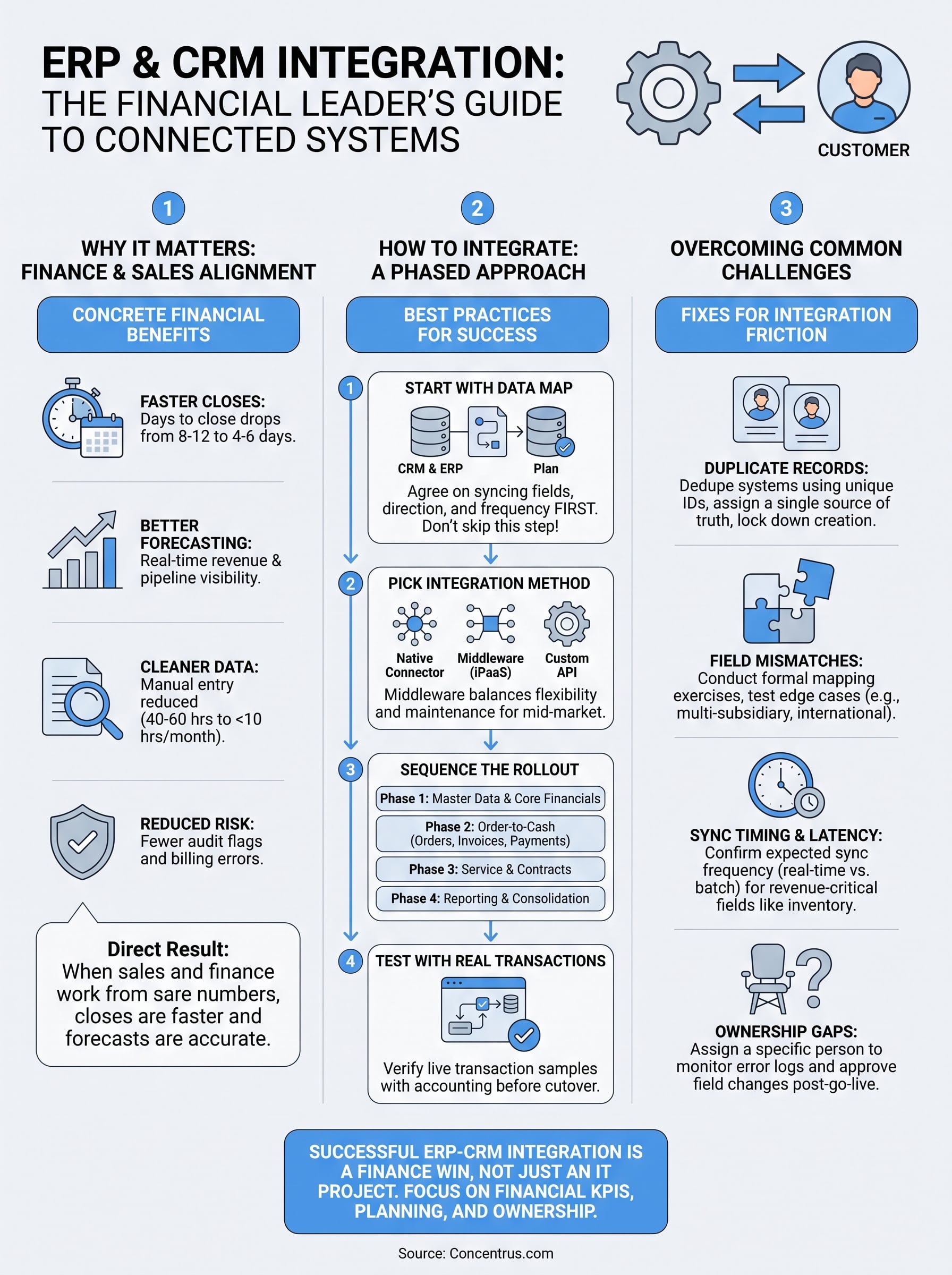
| Days to close | 8-12 days | 4-6 days |
| Manual data entry hours/month | 40-60 hours | Under 10 hours |
| Revenue recognition errors | Frequent, caught in audit | Rare, caught at entry |
| Customer profitability visibility | Siloed, delayed | Real-time, unified |
These aren’t hypothetical gains. They’re the direct result of removing the re-entry step where errors and delays originate.
Reduced risk from data silos
Disconnected systems don’t just slow you down, they create real financial risk. Sales teams quote discounts finance never sees until the invoice is wrong. Customer service issues refunds that don’t match the original contract terms in the ERP. Contracts get renewed at old pricing because nobody updated the CRM. Every one of these scenarios shows up eventually as a variance you have to explain, usually during month-end close when you have the least time to investigate.
Erp crm integration benefits extend beyond convenience into compliance and audit readiness. When your CRM and ERP share a single source of truth for pricing, contract terms, and customer status, you cut down the number of exceptions your auditors flag each year. That matters more for regulated industries, but every finance leader benefits from fewer surprises at close.
Why finance leaders should own this decision
Too often, CRM-ERP integration gets treated as an IT project, and that’s a mistake. Finance leaders should be at the table from day one, because the ROI of this integration shows up in your numbers, not in a system uptime report. According to the U.S. Small Business Administration, accurate, timely financial data is one of the strongest predictors of a company’s ability to secure financing and manage growth, and that starts with the systems generating the data in the first place.
Owning the decision means setting the KPIs upfront: close time, forecast accuracy, DSO, and customer profitability tracking. Without those targets defined before the project starts, you risk ending up with a technically successful integration that never actually moves the financial metrics you care about. That’s the gap between an IT win and a finance win, and it’s the difference Concentrus builds every ERP project around.
How to integrate your ERP and CRM systems
Getting CRM integration with ERP right isn’t about picking the fanciest connector on the market. It’s about mapping the data that actually matters to finance, then choosing an integration method that keeps that data accurate as your business scales. Skip the planning step and you’ll end up with a technically connected system that still can’t answer a simple question like “what’s this customer’s total lifetime revenue.”
Start with the data map, not the tools
Before anyone touches software, sit down with your finance and sales teams and agree on which fields need to sync, in which direction, and how often. Customer records, pricing rules, order status, and payment terms are the usual suspects, but every business has its own edge cases. Skipping this step is the single most common reason integration of CRM with ERP system projects go over budget, because teams end up rebuilding the data map mid-project once they discover gaps.
An integration built without a data map first is a rebuild waiting to happen.
Pick your integration method
Once you know what needs to move, you choose how it moves. Three approaches dominate mid-market ERP-CRM projects:
- Native connectors: Built by the ERP or CRM vendor, these handle common fields (contacts, orders, invoices) out of the box and require the least setup, but offer limited customization.
- Middleware platforms (like Celigo or similar iPaaS tools): Sit between your systems, handle complex field mapping, and give you more control over transformation logic and error handling.
- Custom API integration: Built specifically for your business logic, offering maximum flexibility but requiring ongoing developer support to maintain as either system updates.
Most midsized companies land on middleware, because it balances flexibility against the maintenance burden of a fully custom build. Native connectors work fine if your needs are simple and you don’t expect much customization down the road.
Sequence the rollout in phases
Don’t try to sync every object between systems on day one. Start with the data that touches revenue directly, customer records, orders, and invoices, get that running cleanly, then expand to service history, marketing data, or custom fields. Phasing the rollout gives your finance team a chance to validate that numbers reconcile correctly before you add complexity.
Phase 1: Customer master data + core financial fields
Phase 2: Order-to-cash sync (orders, invoices, payments)
Phase 3: Service, support, and contract renewal data
Phase 4: Reporting and dashboard consolidation
Test with real transactions, not sample data
Run a parallel period where both systems process live transactions before you cut over completely. Pull a sample of orders through the new integration and have your accounting team verify every number against what the old manual process would have produced. This step catches mapping errors, currency mismatches, and tax logic problems before they hit your books, and it’s far cheaper to fix a mapping error in testing than to unwind a misposted revenue entry after close.
Real-world examples of ERP and CRM integration
Abstract benefits are easy to nod along to. Seeing how erp and crm integration plays out in an actual workflow is what convinces a skeptical CFO to fund the project. Here are three scenarios drawn from the industries Concentrus works in most often: manufacturing, distribution, and professional services.
Manufacturing: quote-to-cash without the phone tag
A mid-sized parts manufacturer used to run sales quotes through Salesforce and production orders through NetSuite, with no connection between them. Sales would approve a custom quote, then someone had to manually re-key the specs into the ERP for scheduling. That handoff added two to three days before a job even hit the production floor, and pricing errors slipped through whenever a rep forgot to apply the latest material surcharge. After connecting the two systems, an approved quote in the CRM automatically generates a sales order in NetSuite with the correct bill of materials, current pricing, and customer credit status attached. Production scheduling starts the same day the deal closes instead of days later.

Distribution: inventory visibility that actually matches reality
A wholesale distributor selling through both a direct sales team and an e-commerce storefront ran into a recurring problem: reps in the CRM were promising delivery dates based on inventory numbers that were already a day old by the time they checked. Once crm erp integration synced inventory levels from Acumatica back into the CRM in near real time, reps could see actual available-to-promise quantities before making a commitment. Customer complaints about missed delivery dates dropped, and the finance team stopped fielding calls about credits for orders that should never have been promised in the first place.
Professional services: billing that matches the contract
A services firm billing on retainer and project milestones had a persistent gap between what account managers negotiated in the CRM and what actually got billed in the ERP. Contract renewals with updated rates sat in the CRM for weeks before finance found out, which meant customers got billed at old rates and the firm ate the difference.
The fastest way to lose margin is to let your billing system run on stale contract terms nobody updated.
After integration, contract terms, renewal dates, and rate changes flow directly from the CRM into the ERP’s billing module, so invoices reflect the current agreement automatically.
| Industry | Pain point before | Result after integration |
|---|---|---|
| Manufacturing | Manual quote-to-order handoff, 2-3 day delay | Same-day production scheduling |
| Distribution | Stale inventory data shown to reps | Real-time available-to-promise visibility |
| Professional services | Billing on outdated contract terms | Invoices auto-match current agreements |
Each of these examples shares the same root fix: removing the manual step where financial data went stale or got re-typed by hand.
Common CRM-ERP integration challenges and fixes
Every crm and erp integration project hits friction somewhere. The difference between a rescue project and a smooth one usually comes down to whether the team anticipated these problems or discovered them after go-live. Here are the four that come up most often in mid-market rollouts, and what actually fixes them.
Duplicate and conflicting customer records
Merging two systems that have run independently for years almost always surfaces duplicate customer records, one created by sales in the CRM, another created by finance in the ERP, each with slightly different names, addresses, or tax IDs. Left alone, this causes invoices to go to the wrong contact and revenue to get misattributed across accounts. Fix it before you sync live data: run a deduplication pass on both systems using a matching rule (tax ID or account number, not name alone), assign one system as the system of record for customer master data, and lock down who can create new customer records after go-live.

Field mapping mismatches
A “customer” in your CRM and a “customer” in your ERP rarely map one-to-one. CRM systems often track a company and its individual contacts as separate objects, while ERP systems care about billing entities and subsidiaries. When teams skip a formal field mapping exercise, you get orders that sync but land against the wrong billing address, or pricing tiers that don’t carry over correctly. The fix is the data map from the planning phase, revisited and tested with actual edge cases: multi-subsidiary customers, contacts who work at more than one account, and international addresses with different formatting rules.
Sync timing and data latency
Real-time sync sounds ideal until you realize some integrations only update every few hours, which means a rep quoting inventory or credit status might be working from stale numbers without knowing it. This is where crm erp integration meaning gets misunderstood, teams assume “integrated” means instant, when the actual sync frequency depends on the method chosen. Confirm expected latency for every data type during setup, and flag any field where even a few hours of delay creates financial risk, like credit holds or available inventory.
If your team doesn’t know how fresh the synced data is, they’ll eventually make a decision based on numbers that are already wrong.
Ownership gaps after go-live
Integrations that work fine at launch often break quietly six months later, when someone adds a custom field to the CRM without updating the corresponding ERP mapping. Without a clear owner, error logs pile up unnoticed until finance finds a revenue discrepancy at close. Assign a specific person, not a department, responsible for monitoring sync errors and approving any field changes on either system:
- Weekly review of integration error logs
- Sign-off required before adding or removing synced fields
- Quarterly audit comparing a sample of CRM and ERP records for drift
Catching these issues early costs a few hours of review. Catching them during an audit costs a lot more.
Choosing the right integration approach and partner
Picking the right integration method matters, but picking the right partner to build it matters more. Two firms can implement the exact same middleware platform and produce wildly different results, because the quality of the data map, the testing discipline, and the post-launch support vary so much between vendors. Before you sign anything, treat the integration of ERP and CRM as a financial project with a technology component, not the other way around.
Match the partner’s experience to your platforms
Ask any prospective partner how many NetSuite or Acumatica implementations they’ve done that involved a CRM connection, not just how many ERP rollouts they’ve handled in general. CRM erp integration work requires fluency in both systems’ data models, and a partner who’s only touched one side will underestimate the mapping work every time. Request references from clients in your industry, since a manufacturing quote-to-cash workflow looks nothing like a services firm’s contract billing setup.
Evaluate against financial outcomes, not just technical delivery
Many firms will hand you a project plan full of milestones like “connectors configured” or “testing complete” with no mention of what those milestones mean for your close time or forecast accuracy. Push back and ask how the partner ties implementation phases to measurable financial results. That’s the gap Concentrus built its ROI Roadmap™ methodology to close, tying every phase of an erp crm integration project to specific KPIs like days-to-close, DSO, and customer profitability visibility, so you know exactly what improves and when.
A partner who can’t tell you which financial metric improves in which phase probably hasn’t planned the project around your numbers.
Questions to ask before you sign
Run any partner through this checklist before committing:
- How many joint NetSuite/Acumatica and CRM integrations have you completed in the past two years?
- What’s your process for handling duplicate customer records during migration?
- How do you define and test data latency for financial fields like credit holds and inventory?
- Who owns error monitoring after go-live, and what’s the response time for a broken sync?
- Can you tie project milestones to specific financial KPIs we care about?
- What happens if we need to rescue a failed or underperforming integration later?
Weigh build versus buy versus rescue
If you’re starting from scratch, a phased middleware build usually wins on cost and flexibility. If you’ve already got a broken or underperforming integration, don’t default to ripping it out and starting over; a targeted rescue that fixes the specific mapping and ownership gaps is often faster and cheaper. Concentrus works both sides of this, building new CRM and ERP integration projects from the ground up and repairing ones that stalled under a different vendor, always anchored to the financial outcomes the project was supposed to deliver in the first place.
Making integration work for your business
Connecting your CRM and ERP isn’t a technology upgrade, it’s a finance decision with a technology component. The integration of ERP and CRM pays off when you plan the data map before picking tools, phase the rollout around revenue-critical fields, and assign real ownership after go-live. Skip those steps and you’ll end up with two systems that technically talk to each other but still can’t answer basic questions about customer profitability or forecast accuracy.
Getting this right the first time, or fixing an integration that already went sideways, takes a partner who ties every phase to the financial metrics you actually care about: close time, DSO, and margin visibility. That’s the standard Concentrus holds every project to. If you’re ready to connect your systems around measurable ROI instead of just system uptime, talk to Concentrus about your ERP and CRM integration.