

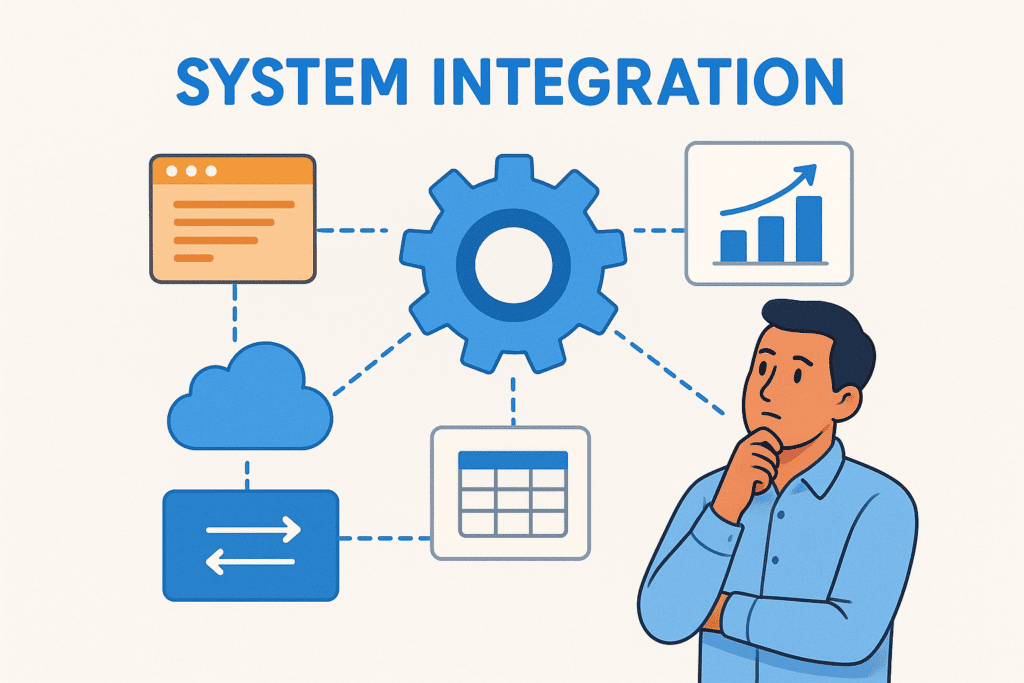
Your ERP doesn’t operate in isolation. It connects to CRM platforms, e-commerce systems, warehouse management tools, and dozens of other applications that run your business. Getting system integration explained in practical terms helps you understand why some ERP projects deliver ROI while others become expensive headaches, the difference often comes down to how well systems talk to each other.
For CFOs evaluating technology investments, understanding integration isn’t optional. The approach you choose directly impacts financial outcomes: faster closes, accurate reporting, and operational efficiency all depend on data moving seamlessly between applications.
This article covers what system integration actually means, the main types and methods available, and real-world examples of how it works in practice. Whether you’re implementing NetSuite or Acumatica, or rescuing an underperforming ERP, these fundamentals help you ask better questions and make smarter decisions. At Concentrus, we see integration challenges derail projects regularly, so we’re sharing what every finance leader should know before moving forward.
Why system integration matters for finance teams
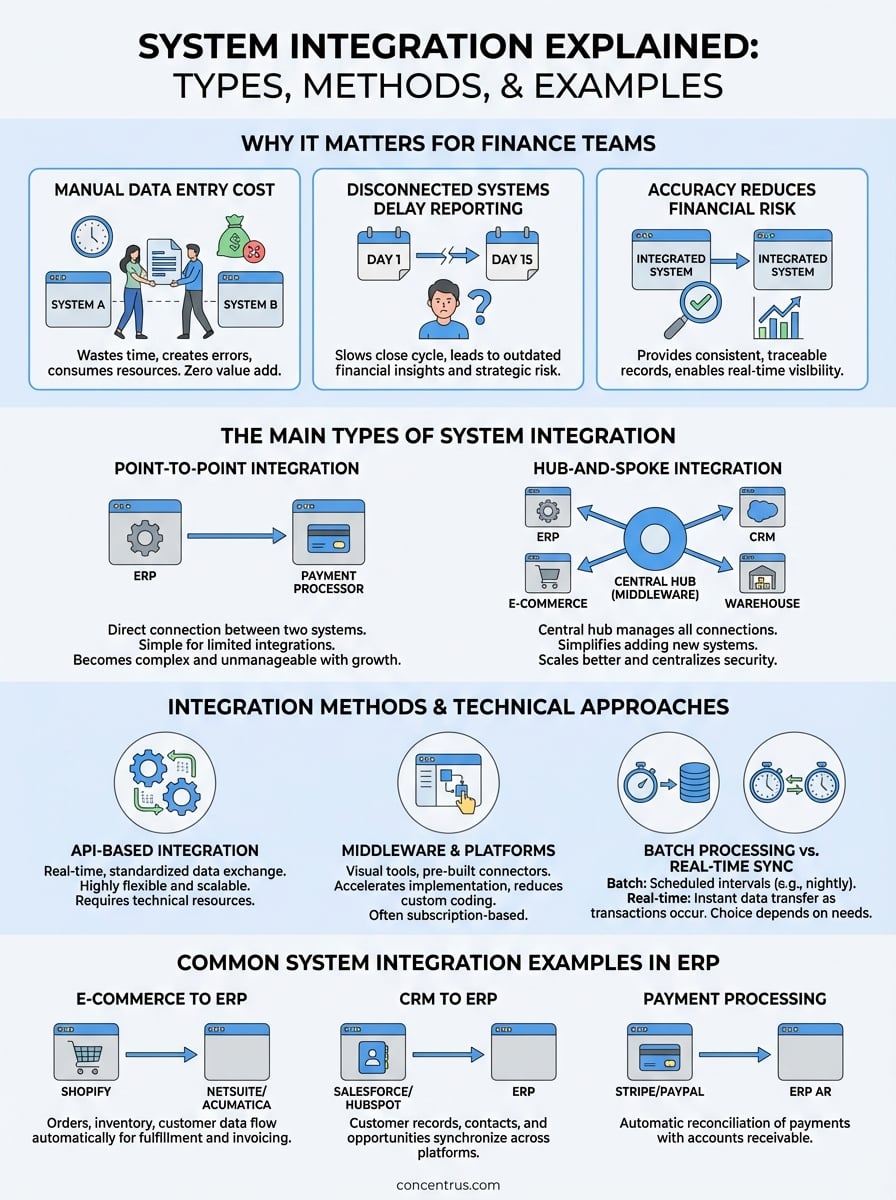
Your finance team wastes hundreds of hours each quarter reconciling data between systems that don’t communicate. When your ERP operates separately from your CRM, e-commerce platform, or payment processor, you’re forcing employees to manually transfer information between applications. This approach doesn’t just create inefficiency, it introduces errors that ripple through your financial statements, regulatory filings, and strategic decisions. Finance leaders who understand system integration explained in practical terms recognize these disconnected systems as direct threats to accurate reporting and operational efficiency.
Manual data entry costs you time and money
Every time someone exports a CSV file, reformats columns, and imports data into another system, you’re paying for unnecessary labor that adds zero value. Your accounting team might spend 20 hours each month moving order data from Shopify into NetSuite, updating customer records between Salesforce and your ERP, or reconciling inventory counts across multiple platforms. These manual processes consume salary dollars that could fund strategic analysis, process improvements, or system optimization. Beyond the obvious time cost, manual entry creates bottlenecks that slow your entire operation when key employees are out sick or overwhelmed during peak periods.
Manual data transfer doesn’t just waste time, it multiplies the risk of expensive errors that require even more time to identify and correct.
Disconnected systems create reporting delays
You can’t close your books quickly when critical financial data lives in separate applications that don’t sync automatically. Modern businesses generate transactions across multiple platforms: orders flow through e-commerce systems, payments process through merchant accounts, inventory moves through warehouse management software, and expenses track through corporate card systems. Without integration, your team needs to wait for each system’s data before consolidating reports. This waiting game extends your close cycle from days to weeks, delaying the insights executives need for decisions. When you’re operating with two-week-old financial information, you’re making strategic choices based on outdated reality, putting your competitive position at risk in fast-moving markets.
Integration accuracy reduces financial risk
Your auditors, board members, and regulatory bodies expect consistent, traceable financial records across all business operations. Integrated systems create automatic audit trails that document every transaction from origin to financial statement. When your payment processor feeds directly into your ERP, you eliminate the reconciliation gaps that raise red flags during audits. This automated accuracy matters even more for companies operating across multiple entities, currencies, or tax jurisdictions. You need real-time visibility into cash positions, receivables aging, and expense patterns to manage working capital effectively. Disconnected systems force you to make treasury decisions based on incomplete data, potentially missing early warning signs of cash flow problems or inventory buildups that tie up capital unnecessarily.
Integration transforms your ERP from a reporting tool into a real-time control system that gives you confidence in every number. Finance teams operating with properly integrated systems spend less time chasing data and more time analyzing what the numbers mean for business strategy.
The main types of system integration
Understanding the main approaches to system integration explained helps you choose the right strategy for your organization’s needs. Each integration type offers different benefits and tradeoffs in terms of cost, complexity, and scalability. Your choice depends on how many systems you’re connecting, your technical resources, and your long-term growth plans. Finance teams need to evaluate these options based on reporting requirements, data volume, and the critical nature of real-time accuracy.
Point-to-point integration
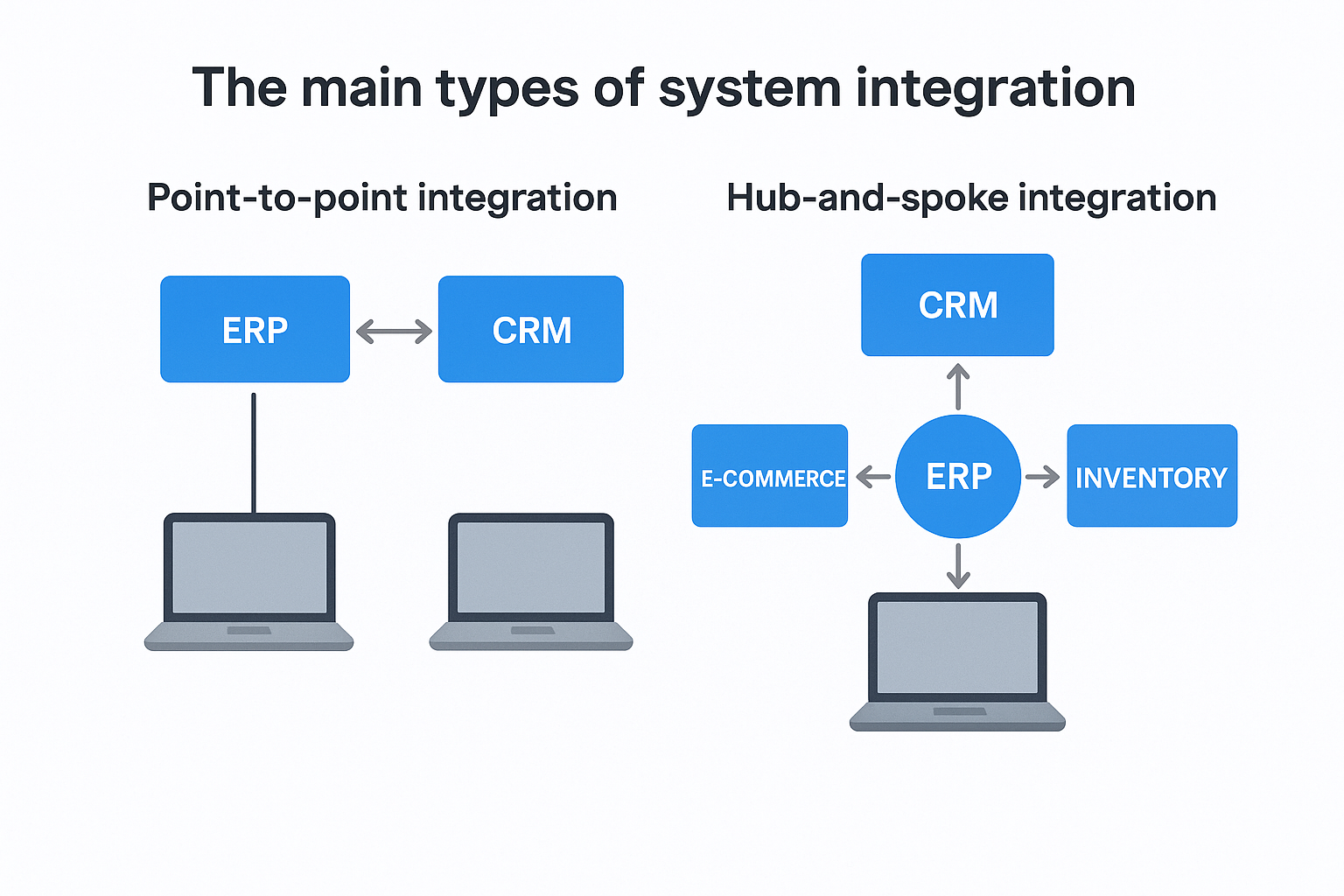
Point-to-point integration creates direct connections between two specific systems. Your ERP might connect directly to your payment processor, or your CRM might link straight to your accounting software. This approach works well when you have limited systems to integrate and need a quick solution to move data between applications. You build one custom connection for each pair of systems that need to communicate, creating a straightforward path for information flow.
The simplicity of point-to-point integration becomes a liability as your technology stack grows. Each new system requires separate connections to every other application it needs to communicate with, creating a web of individual integrations that become difficult to maintain. If you’re connecting five systems, you might need ten separate point-to-point connections to enable full communication. This multiplication of connections increases technical debt and makes troubleshooting problems more complex when data issues arise.
Hub-and-spoke integration
Hub-and-spoke integration uses a central hub that manages all connections between your systems. Instead of building direct links between applications, each system connects only to the central hub, which handles data translation and routing between platforms. Your ERP becomes the hub in many configurations, receiving data from all peripheral systems like CRM, e-commerce, and inventory management tools.
Hub-and-spoke architecture reduces the number of connections you maintain and simplifies adding new systems to your technology environment.
This centralized approach scales better than point-to-point because adding a new system requires only one connection to the hub rather than connections to every existing application. You gain better visibility into data flows and can implement consistent security policies and error handling across all integrations. The tradeoff involves higher upfront investment in the hub infrastructure and potential bottlenecks if the central system experiences performance issues.
Integration methods and technical approaches
The technical method you choose for system integration explained in your ERP project determines how quickly data moves, how much it costs to maintain, and whether your finance team can trust the numbers they see. Different approaches serve different business needs, and understanding these options helps you avoid overengineering simple connections or underbuilding critical data flows. Your integration strategy should match your reporting requirements, transaction volumes, and technical capabilities within your organization.
API-based integration
Application Programming Interfaces (APIs) provide the most flexible and scalable integration method for modern ERP systems. APIs allow your applications to communicate directly through standardized protocols that exchange data in real time. When a customer places an order in your e-commerce system, an API call sends that transaction immediately to your ERP, updating inventory, creating invoices, and triggering fulfillment processes without human intervention. NetSuite and Acumatica both offer robust REST APIs that enable custom integrations with almost any modern business application.
API-based connections give you the control to build exactly the data flows your business needs while maintaining system independence and upgrade flexibility.
You maintain full control over what data moves, when it transfers, and how errors are handled in API integrations. This precision matters for finance teams that need specific field mappings, data transformations, or validation rules applied before information enters the ERP. The tradeoff involves higher initial development costs and the need for technical resources who understand both systems’ data structures and can troubleshoot connection issues.
Middleware and integration platforms
Integration platforms like Dell Boomi, Celigo, or MuleSoft provide pre-built connectors and visual mapping tools that reduce custom coding requirements. These middleware solutions sit between your applications and handle data transformation, error handling, and connection management through user-friendly interfaces. You configure integrations through drag-and-drop workflows rather than writing code, making it easier to maintain connections as systems evolve.
Middleware platforms accelerate implementation timelines and reduce ongoing maintenance costs by providing templates for common integration scenarios. Your team can implement a Salesforce-to-NetSuite integration in weeks rather than months using proven connectors. These platforms typically charge subscription fees based on transaction volume or number of connections, which creates predictable operating costs but adds another vendor relationship to manage.
Batch processing vs. real-time sync
Batch processing moves data in scheduled intervals, such as hourly or nightly uploads, while real-time sync transfers information immediately as transactions occur. Your finance close process might require overnight batch transfers of general ledger entries from subsidiary systems, accepting the delay in exchange for controlled timing and system performance. Customer orders or payment confirmations often need real-time synchronization to maintain accurate inventory and prevent overselling products.
A step-by-step system integration process
Successful integration projects follow a structured approach that minimizes risks and ensures your systems communicate accurately. Getting system integration explained through a practical process helps you avoid the common mistakes that derail ERP implementations and create costly rework. Your finance team needs a methodical framework that addresses technical requirements while maintaining focus on business outcomes and ROI metrics that matter.

Define requirements and map data flows
You start by identifying which data needs to move between systems and what business processes depend on that information. Your team documents every field that requires synchronization, determining whether customer addresses need to flow from CRM to ERP or if inventory levels must update e-commerce platforms in real time. This mapping phase reveals data quality issues and field mismatches between systems before you build anything, saving weeks of troubleshooting later.
Requirements definition also establishes validation rules, error handling procedures, and security protocols for each integration point. You decide what happens when duplicate customer records appear, how to handle failed transactions, and which team members receive alerts when data transfers encounter problems. These decisions prevent the data chaos that emerges when integrations run without proper controls.
Build and test connections
Your technical team constructs the integration using the chosen method, whether APIs, middleware platforms, or custom code. Development happens in sandbox environments that mirror production systems without risking live financial data. You configure field mappings, set up transformation rules, and implement the error handling procedures defined in your requirements phase.
Testing validates that data moves accurately under various scenarios, including edge cases that might occur during high-volume periods or system failures. Your team verifies calculations remain correct, audit trails capture all transactions, and performance meets the speed requirements your business operations demand.
Thorough testing in non-production environments prevents the integration failures that corrupt financial data and require expensive emergency fixes after go-live.
Deploy and monitor performance
You move tested integrations to production during controlled deployment windows that minimize business disruption. Your team monitors initial data flows closely, watching for unexpected errors or performance bottlenecks that didn’t appear during testing. This monitoring continues beyond the first few days, establishing baseline metrics for transaction volumes, processing speeds, and error rates that help you identify problems before they impact financial reporting or customer experience.
Common system integration examples in ERP
Real-world integration examples show how system integration explained in practical terms delivers measurable value for finance operations. Your ERP connects to external applications that handle specific business functions, and these connections determine whether your technology investment accelerates operations or creates bottlenecks. Understanding common integration patterns helps you evaluate your current setup and identify opportunities to streamline processes that consume your team’s time without adding strategic value.
E-commerce to ERP integration
Your online store generates orders that need to flow automatically into your ERP for fulfillment, invoicing, and revenue recognition. When customers purchase products through Shopify, BigCommerce, or WooCommerce, that transaction data moves into NetSuite or Acumatica without manual entry. The integration creates sales orders, updates inventory counts, triggers shipping workflows, and generates customer invoices that match your revenue recognition policies. You eliminate the data entry that bogs down your accounting team during high-volume periods and reduce errors that occur when order details get transcribed incorrectly.
E-commerce integration transforms your ERP from a back-office reporting system into a real-time engine that drives customer experience and operational efficiency.
These connections also sync inventory levels back to your storefront, preventing overselling and the customer service headaches that follow. Your finance team gains immediate visibility into daily sales performance instead of waiting for manual uploads that delay reporting by hours or days.
CRM to ERP synchronization
Your sales team manages customer relationships in Salesforce or HubSpot while your finance team needs that customer data for credit decisions, collections, and revenue forecasting. CRM-to-ERP integration keeps customer records, contact information, and opportunity data synchronized across both platforms. When your sales rep updates a billing address or adds a new contact, that change flows automatically to your ERP without requiring duplicate data entry or reconciliation between systems.
Payment processing connections
Payment processors like Stripe, PayPal, or Authorize.net collect funds from customers and need to reconcile automatically with your ERP’s accounts receivable. Integration eliminates the manual matching process where your team compares bank deposits to open invoices. Your system applies payments to the correct customer accounts, updates cash positions in real time, and creates the audit trails your controllers need for month-end close.
Key takeaways
System integration explained in practical terms comes down to connecting your ERP with the applications that run your business. You need integration strategies that match your reporting requirements, transaction volumes, and technical capabilities. Point-to-point connections work for simple scenarios, while hub-and-spoke architectures scale better as your technology stack grows. Your integration method, whether APIs, middleware platforms, or batch processing, determines how quickly data moves and how much maintenance your team handles.
Finance leaders who understand integration fundamentals make better decisions about ERP investments and avoid the costly mistakes that turn technology projects into money pits. Your integration approach directly impacts close cycles, reporting accuracy, and the ROI your ERP delivers. Common connections like e-commerce, CRM, and payment processing integrations eliminate manual data entry that wastes time and introduces errors.
Concentrus specializes in NetSuite and Acumatica implementations that prioritize integration strategy from day one. Our ROI Roadmap™ methodology ensures your ERP connects properly to deliver measurable financial outcomes.