

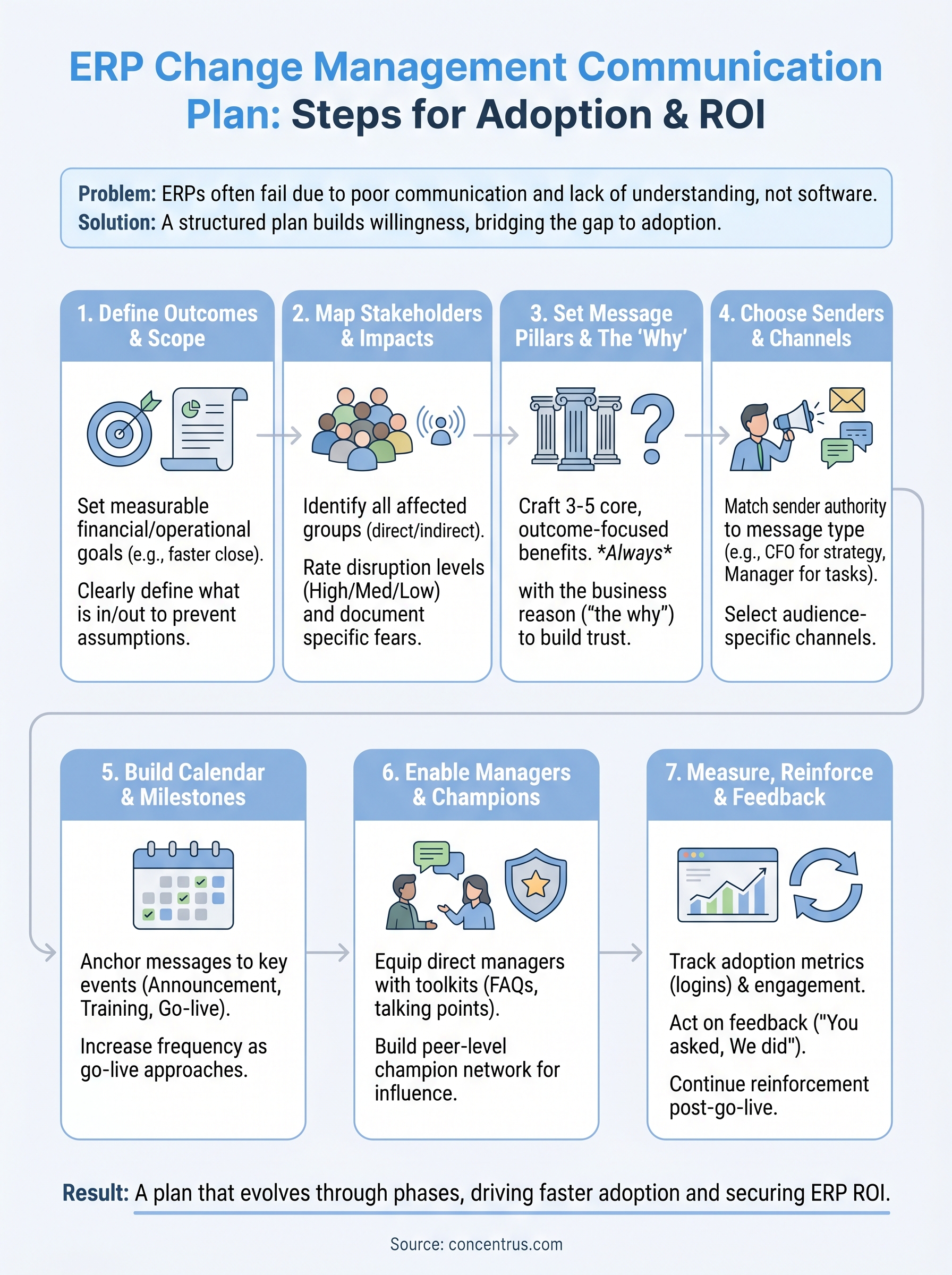
Most ERP projects don’t fail because of bad software. They fail because the people expected to use the system never understood why it was changing, what it meant for their role, or when key shifts would happen. A structured change management communication plan bridges that gap, it turns a technology rollout into something your team actually adopts, rather than resists. For CFOs and finance leaders at midsized companies, where resources are tight and margins for error are slim, getting communication right isn’t optional. It’s the difference between an ERP that delivers ROI and one that collects dust.
At Concentrus, we’ve implemented and rescued enough NetSuite and Acumatica ERP projects to see this pattern firsthand. The organizations that build a deliberate communication strategy before go-live consistently outperform those that wing it. Our ROI Roadmap™ methodology bakes stakeholder communication into every phase precisely because we’ve measured what happens when it’s missing: delayed adoption, ballooning costs, and frustrated teams.
This guide walks you through the exact steps to build a communication plan tailored to ERP initiatives, from identifying stakeholders and choosing the right channels to setting message cadences and measuring effectiveness. You’ll also find practical templates and tools you can adapt immediately, whether you’re kicking off a new implementation or course-correcting one that’s already underway.
What an ERP change communication plan covers
A change management communication plan for an ERP project is more than a list of emails and town halls. It’s a structured framework that answers four questions your stakeholders will always ask: what is changing, why now, how will it affect me, and what do I need to do next. Without clear answers to each of these, even a technically sound implementation runs into adoption problems that drag out timelines and inflate costs well past the original budget.
Core components every plan should include
Most plans that fail do so because they skip foundational elements in favor of announcements. A solid ERP communication plan treats strategy, content, channels, timing, and measurement as interconnected layers, not separate tasks you handle in isolation. Each component depends on the one before it.
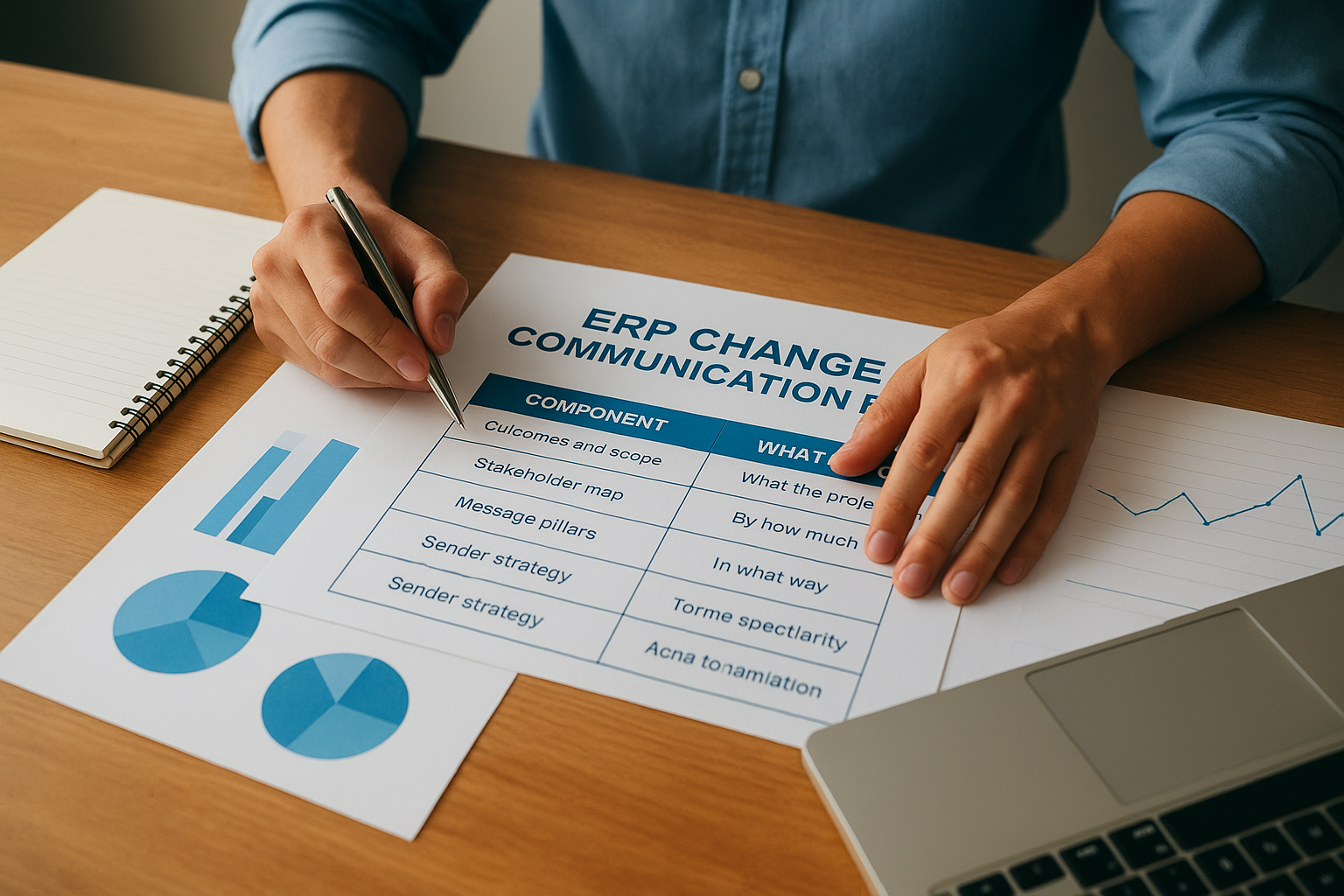
Here’s what a complete plan includes:
| Component | What it defines |
|---|---|
| Outcomes and scope | What the project delivers and what’s out of scope |
| Stakeholder map | Who is affected, by how much, and in what way |
| Message pillars | The core reasons and benefits that anchor all communication |
| Sender strategy | Who delivers each message and through which channel |
| Communication calendar | Specific messages, owners, dates, and formats |
| Feedback loops | How you collect, route, and respond to concerns |
| Reinforcement plan | Post-go-live communication that sustains adoption |
How ERP communication differs from standard change communication
ERP rollouts affect nearly every department at the same time, which makes them structurally different from most other change initiatives your organization has managed. A policy update might touch one team; an ERP implementation touches finance, operations, warehouse staff, sales, and IT simultaneously, each group carrying different concerns and very different levels of technical comfort.
The mistake most organizations make is sending one message to everyone. A warehouse supervisor needs to know how picking workflows change. A CFO needs to know what the month-end close cycle will look like. Treating them the same produces confusion for both.
Your plan has to balance audience-specific messaging with consistency in the overarching narrative. That tension between personalization and alignment is exactly what the message pillar framework in Step 3 resolves, so neither message nor meaning gets lost in translation across departments.
What a plan is not
Many teams confuse a project status update schedule with a communication plan. Status updates tell people where the project stands. A communication plan shapes how people understand and respond to the change itself, building the willingness they need to act differently the moment the new system goes live. Those are two very different outcomes.
A plan is also not a one-time document you finish before kickoff and shelve. It evolves across four distinct phases: pre-announcement, active implementation, go-live preparation, and post-go-live reinforcement. Each phase has different goals, different audiences in focus, and different channels that perform best. Treating the plan as static means you risk sending the wrong message to the wrong people at exactly the wrong moment, which is often when resistance spikes hardest.
Why this matters for ROI
Poor communication is not just a morale issue. It directly delays adoption, which directly delays the financial returns your ERP investment was supposed to generate. Every week a team works around the new system rather than inside it represents lost efficiency, extended parallel processing costs, and deteriorating data quality that compounds over time.
Think of your communication plan as a financial protection strategy, not just a project management formality. The effort you put into it now determines how quickly the system pays for itself.
Step 1. Define outcomes, scope, and timeline
Before you write a single message, you need to know what you’re communicating toward. Vague project goals produce vague communication, and vague communication produces the exact confusion that kills adoption. This first step anchors your entire change management communication plan to specific, measurable targets so every message you send later connects back to a concrete result your stakeholders can recognize.
Nail down what success looks like
Start by defining two to three primary outcomes the ERP project must deliver, written in financial or operational terms your stakeholders can recognize. “Improved reporting” is not an outcome. “Reducing month-end close from 12 days to 6 by Q2” is. Outcomes written this way give you message material that resonates with finance leaders and front-line staff alike because they describe real change, not software features.
If you can’t state the outcome in a sentence that a warehouse supervisor and a CFO would both find meaningful, you haven’t defined it clearly enough yet.
Use this template to capture each outcome before you build any messaging:
| Outcome | Current state | Target state | Owner | Target date |
|---|---|---|---|---|
| Month-end close time | 12 days | 6 days | Controller | Q2 2026 |
| Inventory accuracy | 78% | 95% | Ops Director | Q3 2026 |
| Manual journal entries | 220/month | 40/month | Finance Lead | Q2 2026 |
Set scope boundaries early
Scope defines what the project covers and, critically, what it does not. Without clear boundaries, your stakeholders fill the gaps with assumptions, and those assumptions usually involve far more disruption than reality warrants. Document your scope clearly before any announcement goes out.
At minimum, your scope statement should cover:
- Which modules go live in phase one
- Which integrations are included
- Which workflows remain unchanged until a later phase
- Which locations or business units are affected
Sharing this proactively prevents panic and builds credibility with skeptical teams who might otherwise assume the worst.
Lock in the phase timeline
Your communication calendar in Step 5 depends entirely on knowing when key milestones occur. Map your phases now: discovery, configuration, testing, training, go-live, and stabilization. Flag the three moments that trigger the most stakeholder anxiety: the announcement date, the training start date, and go-live day.
Assign realistic dates to each phase and treat those three anchor points as non-negotiable communication triggers. Every major message you send will orbit around one of them.
Step 2. Map stakeholders and impacts by role
Once you have your outcomes locked down, your next move is identifying who gets affected and how significantly. Most ERP projects underestimate the number of stakeholder groups involved. Finance, operations, IT, sales, and customer service don’t all experience the same disruption, and your change management communication plan has to treat them differently from the start.
Identify every group the ERP touches
Start by listing every role or department that will interact with the new system, directly or indirectly. Direct users will log in, run processes, and generate reports. Indirect stakeholders like senior leadership may never touch the system but will feel the output of it through faster reporting, changed service processes, or altered data flows. Both groups need communication, just not the same kind.
Use this table as a starting template:
| Stakeholder Group | Direct or Indirect | Primary Contact |
|---|---|---|
| Finance / Accounting | Direct | Controller |
| Warehouse / Operations | Direct | Ops Director |
| Sales / Customer Service | Direct | Sales Manager |
| Executive Leadership | Indirect | CFO |
| IT / System Admins | Direct | IT Lead |
| External Vendors | Indirect | Procurement Lead |
Rate the level of disruption per group
Not everyone on your list faces the same level of change. A warehouse associate shifting to new pick-and-pack workflows experiences far more day-to-day disruption than an executive reviewing monthly dashboards. Rating disruption levels helps you prioritize where communication effort and frequency need to be highest.
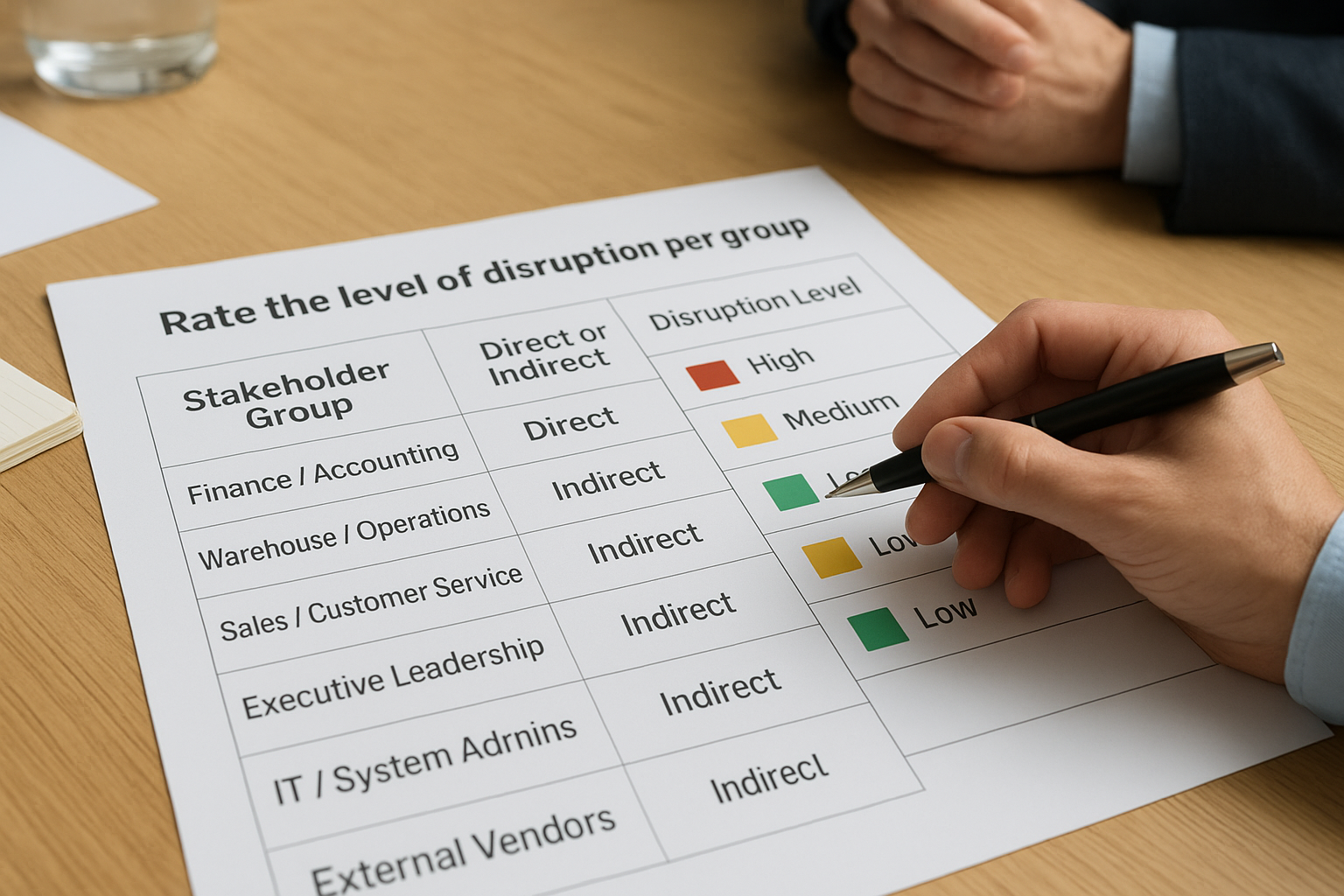
The groups that face the highest disruption are the ones most likely to resist the system at go-live, which means they need the most proactive, detailed outreach before training even begins.
Assign each group one of three disruption ratings:
- High: Daily workflow changes substantially; requires frequent, targeted communication
- Medium: Some tasks shift, but core routines remain largely intact
- Low: Output or reporting changes with minimal direct process impact
Document what each group fears most
Each stakeholder group carries a distinct set of concerns that will surface if you don’t address them head-on. Finance teams typically worry about reporting accuracy during cutover. Warehouse staff worry about downtime affecting order fulfillment. Capturing these fears before you write a single message lets you build targeted communication that answers real objections, not generic reassurances that build no trust with skeptical teams.
Add a “primary concern” column to your stakeholder map. That column becomes your message brief for every audience-specific communication you send throughout the project.
Step 3. Set message pillars and the why
Message pillars are the two to five core statements that anchor every piece of communication you produce across the entire project. They ensure that whether a team leader sends a Slack message or your CFO presents in an all-hands meeting, the fundamental story stays consistent. Without pillars, each department ends up hearing a slightly different version of the change, and that inconsistency breeds confusion faster than silence would.
Build three to five core message pillars
Your pillars should not describe software features. They should describe outcomes your people care about, framed around what changes for the better. A pillar like “faster, more accurate financial reporting” lands differently than “new GL module deployment.” One connects to real work; the other sounds like an IT announcement.
Use this template to define each pillar before you write any project communications:
| Pillar # | Core statement | Supporting proof point | Audience relevance |
|---|---|---|---|
| 1 | We’re reducing close time from 12 days to 6 | Current bottlenecks in reconciliation | Finance / Controller |
| 2 | Inventory data becomes real-time across all locations | Current blind spots causing stockouts | Operations / Warehouse |
| 3 | Manual data entry drops by 80% | Current volume of journal entries per month | Finance / Accounting |
| 4 | One system replaces three disconnected tools | Current integration failures and workarounds | All departments |
Each pillar needs a proof point tied to your current-state data from Step 1. Vague benefits don’t build trust with skeptical teams. Specific numbers do.
Lead every message with the why
Your change management communication plan will fail to generate buy-in if it leads with what is changing before it explains why the change is necessary. People resist change when it feels arbitrary, and it feels arbitrary when the reason isn’t stated clearly and early. Make the “why” the first sentence of every significant communication, not a paragraph buried below project timelines and technical details.
The single most common mistake in ERP communication is burying the business case. If your team can’t recite in one sentence why the project is happening, your messaging has not done its job.
Frame the “why” around the pain your organization is solving, not the solution you’re deploying. “We can’t scale with our current system” is more persuasive than “we selected NetSuite.” One reflects your team’s lived experience; the other reads like a vendor announcement. Ground every message in that shared experience first, then connect it to the solution.
Step 4. Choose senders and channels
Who delivers a message matters as much as what the message says. A communication sent from the wrong person carries the wrong weight, no matter how well-written it is. Before you schedule a single message in your change management communication plan, decide deliberately which sender owns each type of communication and which channel reaches each audience most effectively.
Match the sender to the message
Your stakeholders assign credibility based on the perceived authority and proximity of the person delivering the message. That means executive announcements should come from executives, training updates should come from project managers or HR, and day-to-day operational guidance should come from direct managers. A single communications owner handling all messages flattens that credibility and signals to your teams that the project is being managed from a distance.
The fastest way to lose trust with a skeptical team is to send an impact-heavy message from someone who has no visible stake in the outcome.
Use this sender assignment table to map message types to the right voice:
| Message type | Recommended sender | Reason |
|---|---|---|
| Project launch announcement | CFO or CEO | Signals organizational priority |
| Business case and outcomes | CFO or Finance Director | Ties message to financial credibility |
| Workflow-level changes | Department Manager | Closest to the daily impact |
| Training schedules and logistics | Project Manager or HR | Operational, not strategic |
| Go-live readiness updates | Project Manager | Tactical ownership and accountability |
| Post-go-live reinforcement | Change Champions | Peer-level influence drives adoption |
Select the right channel for each audience
Different audience groups consume information through different channels, and choosing the wrong one means your message gets ignored even when your timing and content are right. Executive stakeholders typically respond to structured briefings and direct email, while warehouse or operations staff are better reached through team huddles, printed quick-reference guides, or supervisor-delivered updates. Defaulting to company-wide email for every announcement is the most common channel mistake ERP projects make.
Audit which channels each stakeholder group actually uses before you assign them in your plan. For most midsized organizations, your channel mix will include email for formal announcements, team meetings for department-level updates, your intranet for documentation, and direct manager conversations for high-disruption groups. Matching channel to audience reduces the friction between sending a message and having it actually land.
Step 5. Build the communication calendar
Your communication calendar is where strategy becomes execution. It converts everything you’ve defined in Steps 1 through 4 into a scheduled, owned, and trackable sequence of messages that runs from project announcement through post-go-live stabilization. Without it, communication happens reactively, meaning you send updates when problems surface rather than before your stakeholders need the information to prepare.
Map messages to milestones
Every significant message in your change management communication plan should attach to a project milestone, not a random calendar date. Your three anchor milestones from Step 1 (announcement, training start, and go-live) generate the highest communication volume, so build your calendar outward from those three points first. Then fill in the phases between them with lower-stakes touchpoints that keep momentum and trust steady.
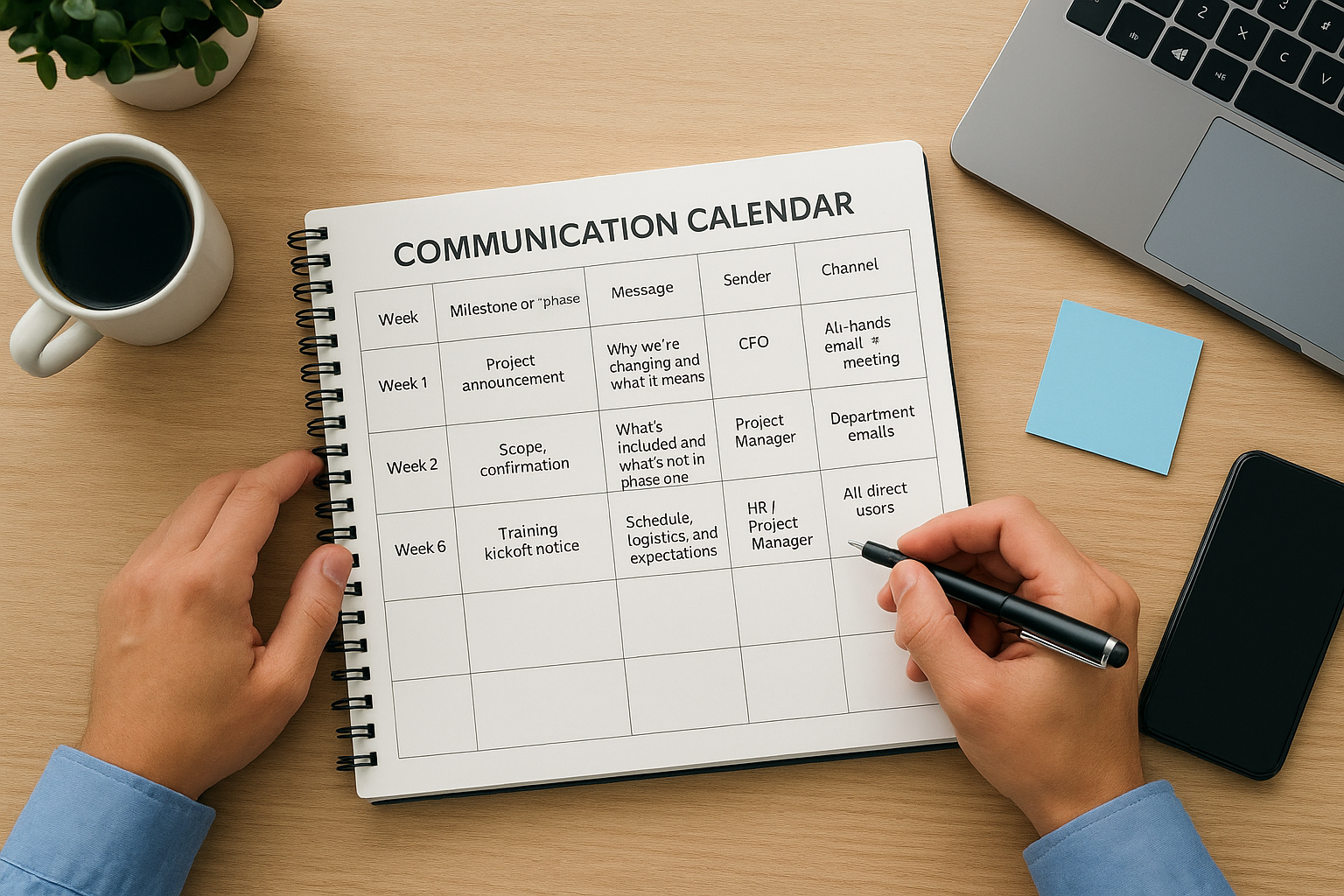
The goal of your calendar is not to communicate constantly. It’s to ensure no stakeholder reaches a critical moment, like their first training session or the cutover weekend, without having received relevant information in advance.
Use this template as your starting framework:
| Week | Milestone or phase | Message topic | Sender | Channel | Audience |
|---|---|---|---|---|---|
| Week 1 | Project announcement | Why we’re changing and what it means | CFO | All-hands email + meeting | All staff |
| Week 2 | Scope confirmation | What’s included and what’s not in phase one | Project Manager | Department emails | Direct users |
| Week 6 | Training kickoff notice | Schedule, logistics, and expectations | HR / Project Manager | Email + intranet post | All direct users |
| Week 8 | Training begins | What to expect in your first session | Department Manager | Team meeting | High-disruption groups |
| Week 10 | Pre-go-live readiness | Final checklist and support contacts | Project Manager | Email + huddle | All direct users |
| Week 11 | Go-live day | System is live, here’s where to get help | CFO + Project Manager | Email + Slack | All staff |
| Week 13 | Two-week check-in | How it’s going, what we’re fixing | Change Champions | Team meetings | All direct users |
Set frequency by phase
Message frequency should increase as you approach go-live and taper off during stabilization. During discovery and configuration, monthly updates are usually enough to maintain awareness without overwhelming teams who aren’t yet directly involved. Once training begins, shift to weekly touchpoints for high-disruption groups. During the final two weeks before cutover, daily or near-daily communication to direct users keeps anxiety manageable and questions answered before they turn into resistance on go-live day.
Assign a named owner to every row in your calendar. Shared ownership means no ownership, and messages that have no single accountable person reliably get delayed at exactly the moments your stakeholders need them most.
Step 6. Enable managers and change champions
Your change management communication plan can be perfectly structured, but it still breaks down at the last mile if your managers aren’t prepared to carry the message to their teams. Direct managers are the most trusted source of information for most employees during any major organizational shift, and an ERP rollout is no exception. Equipping them with the right talking points, tools, and confidence before your communications go out is not optional support work; it’s a core execution step.
Equip managers to carry the message
Before any major announcement reaches the broader organization, brief your managers first. Give them at minimum 24 to 48 hours of lead time so they can absorb the information, anticipate questions from their teams, and respond from a position of preparation rather than surprise. A manager who hears about go-live details from their team before you’ve briefed them loses credibility immediately, and that credibility is very hard to rebuild.
The moment a manager says “I don’t know, I heard the same thing you did” is the moment your communication plan loses the ground-level trust you need for adoption.
Provide each manager with a manager communication toolkit that includes the following:
| Toolkit element | Purpose |
|---|---|
| Talking points document | Consistent language for team conversations |
| FAQ sheet by department | Pre-answered responses to common concerns |
| Escalation contact list | Who to call when questions exceed their knowledge |
| Communication schedule | When to hold team check-ins and what to cover |
Build a change champion network
Change champions are peer-level advocates embedded in each department who reinforce the project narrative through daily interactions rather than formal announcements. Unlike managers, they don’t carry positional authority, which is exactly why they work. A skeptical warehouse associate is more likely to ask a trusted colleague for an honest take than to accept reassurance from leadership.
Identify one to two champions per department early in the project, before training begins. Choose people who already influence opinion informally, not necessarily the most senior person in the room. Train them on your message pillars from Step 3, give them early access to the system so they build genuine confidence, and schedule brief weekly syncs where they share what concerns they’re hearing on the floor. Those signals feed directly into your feedback loop in Step 7.
Step 7. Measure, reinforce, and manage feedback
Most teams treat communication as done the moment a message goes out. That’s where adoption problems quietly compound. Your change management communication plan only delivers results if you close the loop, measuring whether messages landed, collecting real concerns from the floor, and reinforcing the narrative well past go-live. This step is where you convert one-way broadcasting into a two-way system that actually sustains change.
Track adoption and communication effectiveness
You need concrete signals that tell you whether your communication is working, not assumptions. Two categories of data matter here: adoption metrics that show how people are using the system, and engagement metrics that show how people are responding to your messages. Both are necessary because high open rates on emails mean nothing if login rates in the new ERP are flat.
If your adoption numbers are lagging three weeks after go-live, your communication probably failed to address a specific group’s concerns before training started, not after.
Use this tracking template to monitor both categories on a weekly cadence during stabilization:
| Metric | Target | Week 1 | Week 2 | Week 3 | Owner |
|---|---|---|---|---|---|
| System login rate (direct users) | 90%+ | IT Lead | |||
| Training completion rate | 100% by go-live | Project Manager | |||
| Help desk ticket volume | Declining weekly | IT Lead | |||
| Communication open rate | 70%+ | Comms Owner | |||
| Champion feedback submissions | Weekly per dept. | Change Champions |
Review this table weekly with your project manager and at least one change champion. Patterns in the data tell you exactly where to redirect reinforcement effort before minor friction becomes active resistance.
Close the feedback loop
Collecting feedback means nothing if people never see a response to what they raised. Visibly acting on concerns is the fastest way to build the trust your team needs to commit to new workflows. When a warehouse team flags a pain point and sees it addressed in the next week’s update, they learn that raising concerns is worth their time.
Create a simple, named feedback channel for each high-disruption group: a shared inbox, a standing question box in team meetings, or a brief weekly survey. Route submissions to the relevant project owner within 48 hours and publish a brief “you asked, we did” summary every two weeks that documents what changed as a result of frontline input.
Keep the change moving after go-live
Go-live is not the finish line for your change management communication plan. The weeks immediately after cutover are when adoption either solidifies or slips, and your communication effort needs to match that reality. Schedule a 30-day and 60-day review with your change champions to assess adoption metrics from Step 7, surface lingering friction by role, and send a brief all-staff update that acknowledges what’s working and what you’re actively improving. That transparency reinforces trust in a way that no launch announcement ever can.
Your long-term reinforcement plan should include quarterly check-ins that measure progress against the outcome targets you set in Step 1, keeping the business case visible well beyond the stabilization period. ERP value compounds over time, but only when teams continue using the system as designed. If you want a partner who builds communication accountability into every phase of your ERP project, talk to the team at Concentrus.