

ERP implementations fail more often than most executives want to admit, and the root cause is rarely the technology itself. It’s the people side. A poorly executed change management process is the single biggest risk to your ERP investment, whether you’re rolling out NetSuite, Acumatica, or any other platform. When employees resist new workflows, when departments aren’t aligned, and when leadership hasn’t clearly communicated the “why,” even the best-configured system collects dust instead of delivering ROI.
At Concentrus, we’ve seen this pattern play out hundreds of times across midsized companies. Our ERP rescue practice exists largely because organizations skipped or underestimated change management during their initial implementation. The financial consequences, delayed closes, broken reporting, manual workarounds, hit the CFO’s desk first. That’s why we built our ROI Roadmap™ methodology to address not just the technical configuration, but the organizational readiness that determines whether an ERP project actually pays for itself.
This guide breaks down the change management process into concrete steps, defines who owns what, and gives you templates you can put to work immediately. You’ll get a structured framework that applies to ERP rollouts, system migrations, and operational overhauls, the kinds of changes that directly affect your financial performance and team productivity. Whether you’re planning a new implementation or trying to course-correct one that’s gone sideways, this is the playbook to get your people and your technology moving in the same direction.
What the change management process is and why it fails
Most organizations treat change management as a checklist item they handle after the real work is done. That thinking is exactly why so many projects stall, overspend, or get quietly abandoned. Change management is the structured approach you use to move people, teams, and entire organizations from a current state to a desired future state in a controlled, repeatable way. When you apply it correctly, it acts as the connective tissue between your technical rollout and the human behavior changes your system actually depends on.
A working definition
The change management process is a sequence of coordinated activities that prepares people for change, equips them with the skills to operate in the new environment, and reinforces new behaviors until they become the default. It is not a single kickoff meeting, a training day, or a memo from the executive team. It spans from the moment you identify a need for change all the way through adoption tracking and ownership transfer.
Effective change management is what separates a system that gets used from a system that gets worked around.
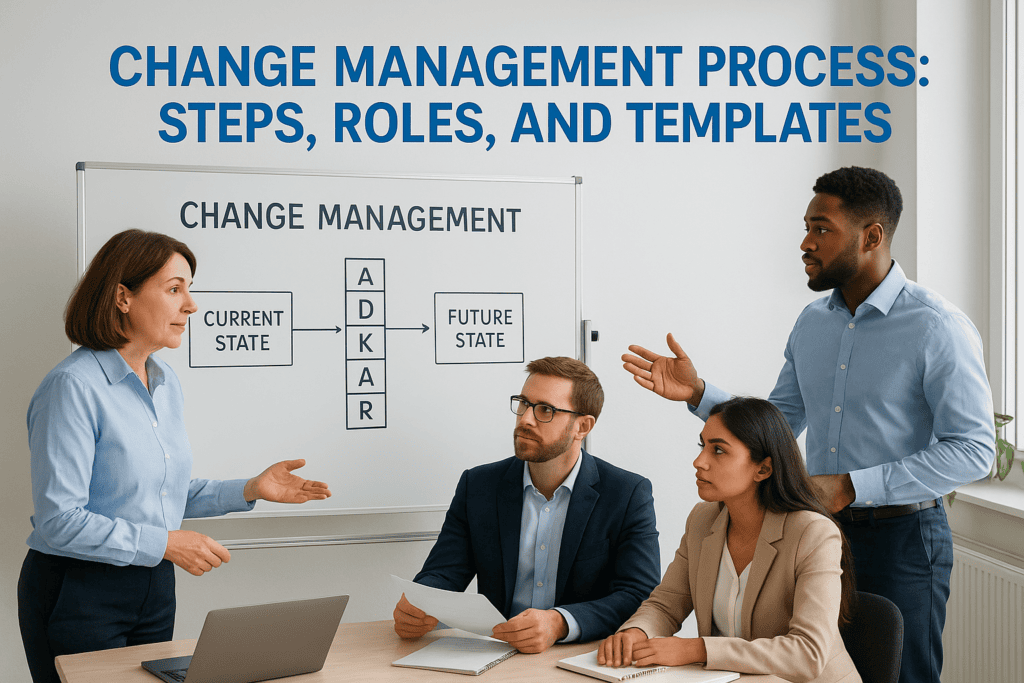
Frameworks like Prosci’s ADKAR model and Kotter’s 8-step process both reinforce the same core idea: awareness, desire, knowledge, ability, and reinforcement must each be addressed in sequence. You cannot jump straight to training without building awareness first, and you cannot expect reinforcement to stick without visible leadership support throughout. Each phase depends on the one before it.
Why most change initiatives fall short
Research consistently shows that roughly 70% of change initiatives fail to achieve their intended outcomes. The causes are not mysterious. They follow predictable patterns that show up across industries and project types. Understanding them is the first step toward avoiding them.
The most common failure points include:
- No clear sponsor: When senior leadership delegates change management to a project manager without staying visible and vocal, employees read the silence as low priority.
- Change announced, not managed: A single all-hands meeting or email does not constitute a communication plan. People need repeated, relevant messaging tied to their specific roles.
- Training delivered too early or too late: Training that happens weeks before go-live gets forgotten. Training that happens the day of go-live creates panic.
- Resistance treated as obstruction: When managers label skeptical employees as “difficult,” they miss legitimate feedback that could prevent bigger problems downstream.
- No measurement of adoption: If you’re not tracking whether people are actually using the new system or process, you have no way to catch backsliding before it becomes the norm.
Each of these failures carries a direct financial cost. Workarounds consume staff time. Delayed adoption pushes your ROI timeline out. Poor data quality from inconsistent system use corrupts reporting and slows financial closes.
What this means for ERP projects specifically
ERP implementations concentrate every one of these failure risks into a single high-stakes project. You’re asking finance, operations, sales, and warehouse teams to simultaneously abandon familiar tools, learn new workflows, and maintain daily output, often under a tight go-live deadline. The complexity is not just technical; it’s organizational.
When a CFO signs off on a NetSuite or Acumatica investment, the ROI assumption baked into that decision depends on people entering data correctly, running processes through the system rather than around it, and trusting the reports the system generates. None of that happens automatically. It happens because someone built a deliberate plan to bring people along, addressed their concerns before go-live, and tracked adoption through the stabilization period.
Skipping or compressing this work doesn’t save time. It creates the kind of expensive, drawn-out post-go-live chaos that brings consultants back in for rescue engagements. The change management process is not overhead, it’s the mechanism by which your technology investment actually delivers what was promised.
Roles and responsibilities that make change stick
No change management process succeeds without clear ownership. When everyone assumes someone else is handling the people side of the project, critical tasks like stakeholder communication, resistance management, and adoption tracking fall through the gaps. Before you design a single training session or draft a communication plan, you need to define who owns what and make sure those people have the authority and time to do the job.

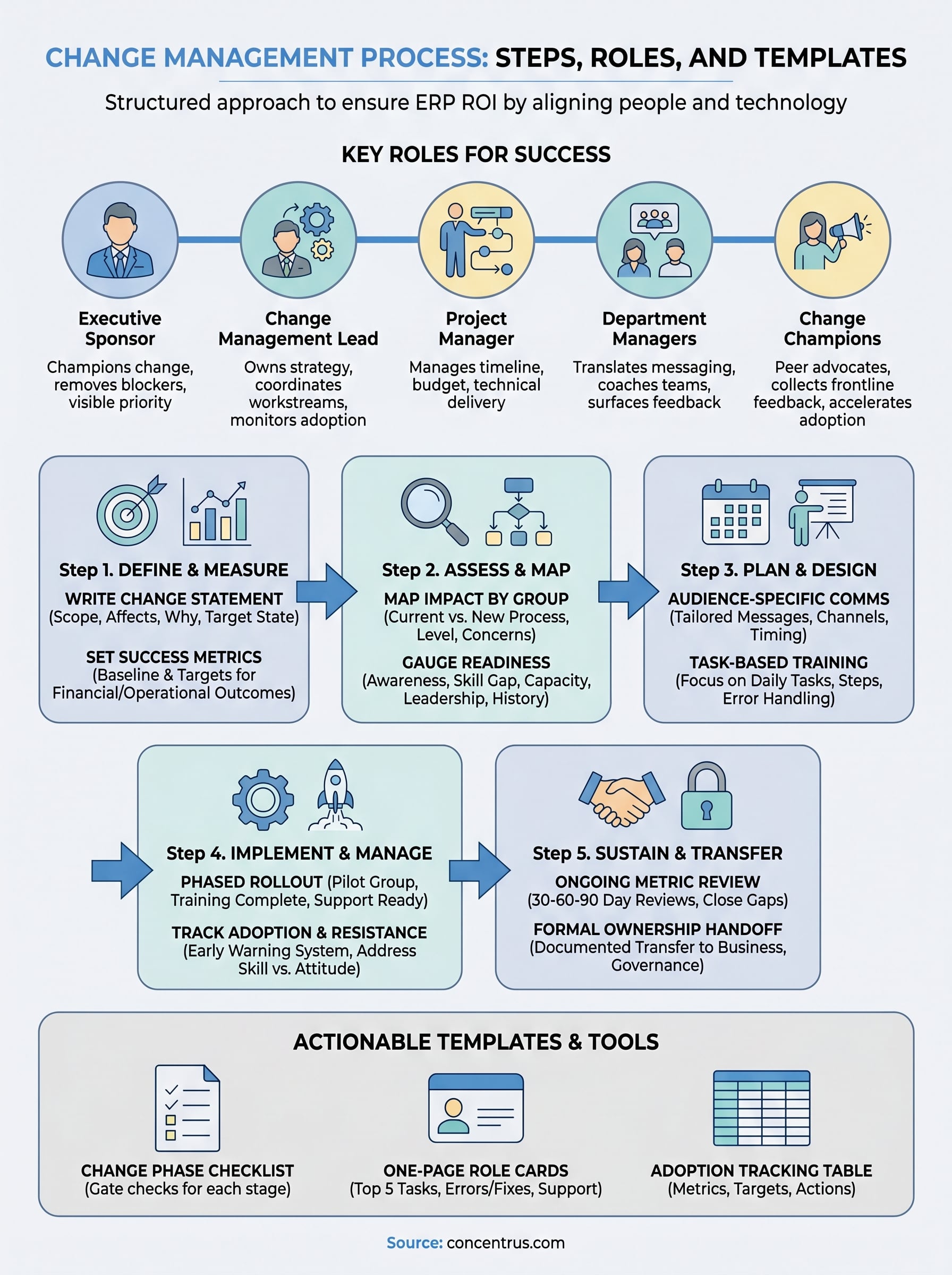
The core roles every project needs
Each role below carries distinct responsibilities. Overlapping them onto one person, or leaving any of them unfilled, is one of the fastest ways to create confusion during go-live.
| Role | Primary Responsibility | What Failure Looks Like |
|---|---|---|
| Executive Sponsor | Visibly champions the change, removes blockers, and signals organizational priority | Employees perceive the project as low stakes and deprioritize adoption |
| Change Management Lead | Owns the overall strategy, coordinates all workstreams, and monitors adoption metrics | No single point of accountability; plans drift and milestones get missed |
| Project Manager | Manages timeline, budget, and technical deliverables in parallel with change activities | Change work gets cut when technical tasks run over schedule |
| Department Managers | Translate organizational messaging into team-specific context and coach direct reports through the transition | Employees get conflicting signals from their immediate supervisors |
| Change Champions | Act as peer-level advocates, collect frontline feedback, and surface resistance early | Leadership hears only what filtered reports show, not what’s actually happening on the floor |
The executive sponsor’s visibility is not optional. Employees calibrate their effort level to what they see leadership prioritizing, so a sponsor who disappears after kickoff sends a clear message.
How these roles work together
The mistake most organizations make is treating these roles as parallel tracks rather than an integrated team. Your change management lead needs a standing connection to the project manager so that technical delays trigger automatic updates to your communication and training schedule. Your department managers need a feedback loop back to the change management lead so that emerging resistance gets addressed before it hardens into refusal.
Your change champions are the most underused resource on this list. These are frontline employees who understand both the old workflows and the new system, and their peers trust them in ways that formal leadership simply cannot replicate. Give them a structured channel to report what they’re hearing, act on that feedback visibly, and they become your most effective adoption accelerators without adding headcount or budget to the project.
Step 1. Define the change and success metrics
Every effective change management process starts with a precise definition of what you’re actually changing and how you’ll know the change succeeded. This sounds obvious, but most organizations skip directly to planning activities without documenting the specifics. The result is a project that drifts, teams that interpret scope differently, and no clear baseline to measure ROI against once go-live passes.
Write a change statement that removes ambiguity
A change statement is a one-to-three sentence description that specifies what is changing, who it affects, why it’s happening, and what the target state looks like. Without this document, your project team and stakeholders are each working from their own mental model of the change, which guarantees conflicting decisions under pressure.
Copy and adapt this template before you schedule a single stakeholder meeting:
“We are replacing [current system/process] with [new system/process] for [affected teams/departments] by [target date]. This change is driven by [business reason]. Success means [specific, measurable outcome] is achieved within [timeframe].”
Fill in every blank completely. If you cannot finish the template, your project definition is not ready, and starting anyway will cost more time than the pause.
A change you cannot describe in three sentences has not been scoped clearly enough to manage.
Set measurable success metrics before you start
Your success metrics must be defined at this stage, not after go-live. Metrics set retroactively get shaped by outcomes rather than objectives, which strips away their ability to hold the project accountable. Tie each metric directly to a financial or operational outcome your CFO can track and verify.
Use this table structure to build your baseline before the project kicks off:
| Metric | Current Baseline | Target | Measurement Method | Review Date |
|---|---|---|---|---|
| Financial close cycle time | 10 days | 6 days | ERP reporting | 90 days post go-live |
| Manual data entry hours/week | 40 hours | 8 hours | Time tracking | 60 days post go-live |
| System adoption rate | 0% | 90% active users | Login and transaction data | 30 days post go-live |
| Report accuracy rate | 78% | 98% | Variance audit | 90 days post go-live |
Each metric in your table needs a named owner who is responsible for pulling the data and reporting it at defined intervals. Without ownership, metrics become aspirational rather than actionable, and no one is accountable when the numbers fall short of the target.
Step 2. Assess impacts and readiness
Once you’ve defined the change and locked in your success metrics, the next step is to understand exactly who gets affected and whether your organization is ready to absorb the disruption. Skipping this assessment is like scheduling surgery without reviewing the patient’s chart. The change management process cannot be planned accurately until you know the full scope of human and operational impact, and that requires structured analysis, not gut instinct.

Map who gets affected and how
Every change touches different teams in different ways. A finance leader rolling out a new ERP module may assume the biggest impact sits in accounting, but warehouse supervisors, sales ops, and procurement teams often face equally significant workflow shifts that go unaddressed until go-live. Your impact map needs to document each affected group, the specific processes changing for them, and the level of disruption they’ll experience.
Use this table as your starting template and complete one row per affected group:
| Department / Role | Current Process | New Process | Impact Level (Low/Med/High) | Key Concerns |
|---|---|---|---|---|
| Accounts Payable | Manual invoice entry in spreadsheets | Automated three-way match in ERP | High | Data entry retraining, approval workflow changes |
| Warehouse | Paper-based receiving | Mobile scan-based receiving | High | Device comfort, process speed |
| Sales Operations | Manual order entry | Customer portal + ERP integration | Medium | Order accuracy, exception handling |
| Finance Leadership | Month-end close via Excel | Real-time ERP reporting | Medium | Report format changes, new close checklist |
The higher the impact level, the more targeted your communication and training plan needs to be for that group.
Gauge organizational readiness
Knowing the impact is only half the picture. You also need an honest assessment of whether your teams have the capacity, skills, and willingness to adopt the change on the timeline you’ve set. Organizations that skip this step routinely discover resistance at go-live that a short survey or a few focused interviews would have surfaced weeks earlier.
Run a readiness assessment with these five questions for each high-impact group:
- Awareness: Do team members understand why the change is happening and what it means for their daily work?
- Skill gap: What specific skills are missing that training must close before go-live?
- Capacity: Does this team have bandwidth to complete training while maintaining daily output?
- Leadership alignment: Is the department manager actively supporting the change or passively tolerating it?
- Prior change history: Has this team been through recent disruptions that could increase resistance?
Score each question on a simple 1-to-3 scale, then aggregate scores by department to identify which groups need heavier support before you finalize your communication and training plan. Any group scoring below 2 on leadership alignment should be flagged immediately for executive sponsor attention before the project moves forward.
Step 3. Plan communications, training, and support
Your impact assessment and readiness scores now give you the raw material to build three coordinated plans: communications, training, and ongoing support. These three elements of your change management process work together. Communication builds awareness and desire. Training builds knowledge and ability. Support sustains both after go-live. Running them as separate workstreams instead of an integrated plan is one of the most common reasons teams feel blindsided when the new system launches.
Build a communication plan by audience
Generic all-staff emails about your ERP rollout accomplish almost nothing. People tune them out because the message doesn’t connect to their specific workflow or their daily concerns. Your communication plan needs to segment by audience, map the message to what each group actually cares about, and schedule touchpoints at the right moments in the project timeline, not just at kickoff and go-live.
Use this template to build out your communication plan before a single message goes out:
| Audience | Key Message | Channel | Timing | Owner |
|---|---|---|---|---|
| Finance team | Close cycle drops from 10 to 6 days | Team meeting + email | 8 weeks before go-live | CFO |
| Warehouse staff | Mobile scanning replaces paper receiving | Supervisor briefing | 6 weeks before go-live | Ops Manager |
| Sales Operations | Order entry moves to customer portal | Demo session | 6 weeks before go-live | Sales Lead |
| All staff | Go-live date and first-week support hours | Company-wide email | 2 weeks before go-live | Change Lead |
Send the right message to the right audience at the right time, and you reduce resistance before training even begins.
Design training around the skill gap, not the system
Most ERP training programs make the same mistake: they walk users through every feature the system offers instead of focusing on the specific tasks each role performs daily. Your readiness assessment from Step 2 already identified the skill gaps by department. Use those gaps as your training curriculum, not the vendor’s default walkthrough.
Structure each training session around three elements: the task the user performs, the exact steps in the new system, and what to do when something goes wrong. That last element is the one most training plans skip, and it’s exactly what employees need most in the first two weeks after go-live. Build a short reference guide for each role that covers the top five error scenarios they’re likely to encounter. Keep it to one page. Employees will use a one-page reference card during a high-pressure week. They will not re-read a 40-page manual.
Step 4. Implement change and manage resistance
Your communication and training plans are built, your stakeholders are aligned, and your go-live date is on the calendar. Now the change management process moves from planning to execution, and that shift exposes a new set of risks. Go-live week is where the most carefully designed projects hit unexpected friction, because no amount of preparation fully eliminates the uncertainty employees feel when they use a new system under real business pressure for the first time.

Execute the rollout in phases
Launching every module, every workflow, and every user group on the same day is the fastest way to overwhelm your support capacity and your people simultaneously. A phased rollout limits the blast radius of any single problem and gives your team real adoption data before you extend the change to the next group. Start with a pilot group of engaged, capable users who can surface issues early without derailing operations for the entire organization.
Run your go-live against this checklist before you flip the switch on each phase:
- Training complete: Every user in this phase has completed role-specific training and passed a basic competency check.
- Support coverage confirmed: Helpdesk hours, on-floor support staff, and escalation contacts are communicated and staffed.
- Fallback documented: You have a documented rollback or manual workaround plan if a critical process fails in the first 48 hours.
- Adoption baseline set: You have a starting measurement for system login rates and transaction volume so you can track progress from day one.
- Champion availability confirmed: At least one change champion per department is available and reachable during the first week of go-live.
A phased rollout is not a sign of low confidence in the system. It’s how experienced teams protect ROI by catching issues before they scale.
Recognize and respond to resistance early
Resistance during implementation is normal and expected. The problem isn’t that people push back. The problem is when resistance goes unaddressed long enough to harden into workarounds, shadow systems, or outright refusal to use the new process. Your change champions are your early warning system here. Give them a simple weekly reporting structure: what’s working, what’s breaking down, and where people are reverting to old habits.
When you identify resistance, categorize it before you respond. Skills-based resistance (the user doesn’t know how to do the task) requires additional training or a one-page reference guide. Attitude-based resistance (the user doesn’t see the value) requires a direct conversation from their manager tied to a specific business outcome they care about. Treating both types the same way wastes time and frustrates the people you’re trying to bring along.
Step 5. Sustain outcomes and transfer ownership
Go-live is not the finish line. It is the point where the change management process shifts from rollout management to outcome protection. Most organizations declare victory after the system launches and pull the project team back to other priorities. That move is premature. The 30-to-90-day period after go-live is when adoption either hardens into a sustainable habit or slowly erodes back into spreadsheets, manual workarounds, and the old behavior patterns you spent months trying to replace. Sustaining outcomes requires deliberate effort, not just time.
Track adoption and close the feedback loop
Your success metrics from Step 1 now become your primary management tool. Pull the data on schedule, share it with stakeholders, and act on gaps immediately rather than waiting for the next project review cycle. Adoption that drops in week three rarely recovers on its own.
Use this tracking structure at each review interval after go-live:
| Metric | 30-Day Target | 30-Day Actual | Gap | Action Owner |
|---|---|---|---|---|
| Active system users | 90% | 74% | -16% | Change Lead + Dept. Managers |
| Manual workaround rate | Less than 10% | 22% | +12% | Change Champion audit |
| Financial close cycle time | 8 days | 9 days | -1 day | CFO review |
| Support ticket volume | Declining | Flat | No improvement | Training refresh for AP team |
When you spot a gap, trace it to the root cause before assigning a response. A spike in support tickets usually points to a training gap or a process design issue, not user unwillingness. Fix the right problem and you’ll see the metric move within two to three weeks.
Metrics that no one reviews become decoration. Schedule a named owner and a fixed review date for each one before go-live ends.
Transfer ownership to the business
At some point, the project team steps back and the business owns the system and the processes it supports. That transfer needs to be planned and documented, not assumed. A clean handoff defines who is responsible for system governance, who approves future configuration changes, and who owns ongoing user training as the organization grows or turnover brings new employees into the system.
Document the ownership transfer with a simple handoff record:
- System administrator: Named individual responsible for user access, configuration updates, and vendor coordination.
- Process owners: One named contact per department who owns the workflow documentation and trains new hires.
- Escalation path: Clear steps for reporting issues that exceed the process owner’s authority.
- Review cadence: A scheduled quarterly review of adoption metrics and system performance tied to the original ROI targets.
Completing this transfer on paper and confirming it with each named owner in a brief meeting closes the formal project and keeps the financial outcomes you built the project around from drifting once day-to-day pressure returns.
Templates and checklists you can copy and use
Every section of this article has introduced a specific document you need to run a complete change management process. This section consolidates the most critical ones into a single place so you can copy them directly into your project without rebuilding them from scratch. Use each template as a working document, not a formality. Adjust the fields to match your project scope, assign owners, and set concrete dates before you share them with your team.
Change management phase checklist
Before you move from one phase of the process to the next, you need a gate check. Skipping this step is how projects arrive at go-live with unresolved training gaps or unconfirmed sponsorship, both of which slow adoption and push your ROI timeline out.
| Phase | Checklist Item | Owner | Complete? |
|---|---|---|---|
| Define | Change statement written and approved | Change Lead | |
| Define | Success metrics documented with baselines | CFO / Change Lead | |
| Assess | Impact map completed for all affected departments | Change Lead | |
| Assess | Readiness scores gathered and reviewed | Change Lead | |
| Plan | Communication plan finalized by audience | Change Lead | |
| Plan | Training curriculum mapped to skill gaps | Training Lead | |
| Plan | Support coverage confirmed for go-live week | Project Manager | |
| Implement | Pilot group trained and competency confirmed | Training Lead | |
| Implement | Change champions briefed and available | Change Lead | |
| Implement | Rollback plan documented | Project Manager | |
| Sustain | 30-day adoption metrics pulled and reviewed | Change Lead | |
| Sustain | Ownership handoff document signed by all owners | Sponsor |
A checklist item without a named owner is an assumption, not a plan.
One-page role reference card template
Your employees will not reread a training manual during a high-pressure go-live week. What they will use is a single-page reference card tailored to their specific role. Build one card per affected role group using this structure:
ROLE: [Job title or team name]
SYSTEM: [ERP platform and module]

TOP 5 DAILY TASKS
1. [Task name] > [Menu path or shortcut]
2. [Task name] > [Menu path or shortcut]
3. [Task name] > [Menu path or shortcut]
4. [Task name] > [Menu path or shortcut]
5. [Task name] > [Menu path or shortcut]

COMMON ERRORS AND FIXES
Error: [What the user sees]
Fix: [Exact steps to resolve it]

Error: [What the user sees]
Fix: [Exact steps to resolve it]

SUPPORT CONTACTS
First stop: [Change champion name + contact]
Escalation: [Helpdesk or project manager contact]
Print this card and post it at each workstation for the first 30 days. Once the team reaches consistent adoption, the card becomes optional rather than essential, which is exactly the milestone you’re tracking in your 30-day metrics review.
Wrap up and keep momentum
You now have a complete change management process built around the parts that actually drive adoption: clear ownership, structured communication, role-specific training, and disciplined adoption tracking. The frameworks, tables, and templates in this guide are ready to use. Your next step is to open your project plan, assign an owner to each phase, and set a review date for your 30-day adoption metrics before any other planning work begins.
The organizations that get the most from their ERP investments are not the ones with the most advanced configurations. They are the ones where leadership stayed visible, resistance got addressed early, and success metrics were tracked without exception. Every step in this guide connects directly to a financial outcome your business can measure and defend.
If your current ERP implementation needs a more structured approach to deliver the ROI it promised, connect with the Concentrus team to see how the ROI Roadmap™ methodology puts accountability at the center of every phase.
Why Industry Fit Matters More Than Features in NetSuite ERP Implementations