

Every ERP system worth its weight connects to something else, your payment processor, your ecommerce platform, your shipping provider, your CRM. Those connections run on APIs. And when API integration best practices get ignored, what should be a seamless data pipeline turns into a mess of duplicate records, security gaps, and broken workflows that erode the ROI your ERP was supposed to deliver.
At Concentrus, we implement and rescue NetSuite and Acumatica ERP systems for midsized companies. A huge part of that work involves integrating third-party applications through our Concentrus Partner Network™, tools like Avalara, Celigo, and ShipHawk that extend what your ERP can do. We’ve seen firsthand what happens when integrations are treated as an afterthought: data inconsistencies pile up, finance teams lose trust in their numbers, and the entire system underperforms.
This article breaks down 10 practical, field-tested guidelines for building API integrations that are secure, scalable, and aligned with your business goals. Whether you’re planning a new ERP implementation or untangling a troubled one, these practices will help you protect your data, reduce maintenance headaches, and get more value from every system in your tech stack.
1. Align every integration to an ROI roadmap
Most ERP integration projects start with a technical question: “What needs to connect?” But the better first question is: “What financial outcome does this connection need to drive?” Every API you build or configure should trace back to a measurable business goal, whether that’s a faster month-end close, a shorter order-to-cash cycle, or a reduction in inventory errors.
What this best practice means in ERP programs
Aligning integrations to ROI means treating each connection as a business investment, not just a technical task. Before you scope any integration, define the KPI it will move, the data it needs to touch, and how you’ll measure success after go-live. In ERP programs, this discipline prevents scope creep, reduces over-engineering, and gives finance leaders a direct line between technology spend and financial results.
Connections without a defined outcome tend to accumulate. Teams build integrations because they seem useful, not because they’re tied to a specific metric. Over time, you end up with undocumented pipelines that nobody fully owns, and when something breaks, the business impact is unclear until finance starts asking hard questions.
Every integration you build should answer one question first: what does this improve on the income statement, the balance sheet, or the cash flow statement?
How to implement it in NetSuite and Acumatica
Both NetSuite and Acumatica expose robust REST APIs and support middleware platforms like Celigo, which makes it technically easy to connect almost anything. That accessibility also makes it easy to build integrations reactively. Instead, map each planned integration to a specific financial KPI in your project charter before you configure a single endpoint.
In NetSuite, use Saved Searches and SuiteAnalytics to baseline the metric you want to improve before the integration goes live. In Acumatica, the reporting and dashboard tools let you set a pre-integration benchmark so you have a real number to measure against afterward. Treating this step as non-negotiable is one of the core api integration best practices that separates high-performing ERP programs from ones that stall after go-live.
Mistakes that derail ROI and how to avoid them
The most common mistake is treating integration as a technical milestone rather than a financial one. Teams celebrate when data flows successfully between systems, but flow alone does not equal value. If the data arriving in your ERP is incomplete, misclassified, or delayed, the integration is not delivering what it promised regardless of whether the sync runs on schedule.
Avoid scoping integrations in isolation from your finance team. Your CFO and controller should sign off on what each integration is supposed to accomplish financially, not just technically. When finance owns the outcome, accountability stays clear and the integration gets properly maintained over its full lifecycle rather than becoming an invisible liability.
2. Choose the right integration pattern for your architecture
The pattern you choose for connecting systems shapes everything downstream: how easy changes are to make, how failures propagate, and how much maintenance your team carries year after year. Picking the wrong pattern at the start of an ERP project is one of the most expensive technical decisions to undo later.
When to use point-to-point, hub-and-spoke, or iPaaS
Point-to-point integration works when you have two systems that need a direct, simple connection with low change frequency, like syncing a single payment processor into NetSuite. It is fast to build but brittle at scale. Hub-and-spoke puts a central middleware layer in control, routing data between systems through one orchestration point, which is a better fit when multiple platforms need to share data consistently. An iPaaS platform like Celigo adds managed connectors, logging, and error handling on top of that hub model, reducing the custom code your team has to write and maintain.

The right pattern reduces both your integration debt and your operational risk over the life of the ERP system.
How to decide based on volume, complexity, and change rate
Start with three questions: how much data will move, how many transformations does it need, and how often will the source or destination system change? High-volume, high-transformation flows that touch financial records need a structured middleware layer, not a direct connection. Low-volume, stable integrations between two well-documented systems can stay point-to-point without introducing unnecessary overhead.
Change rate is often the most overlooked variable in this decision. If a vendor updates their API schema annually, you need a pattern that isolates that change to one place rather than forcing updates across every dependent system.
How to keep ERP customizations under control
Following api integration best practices means treating ERP customizations as a liability to manage, not a feature to accumulate. Every custom field mapping or workflow trigger you add to accommodate a poorly designed integration increases your upgrade risk. Design integrations around your ERP’s native data model first, and only extend it when a documented business requirement demands it.
3. Standardize authentication and least-privilege access
Authentication is where security failures in ERP integrations most often start. Inconsistent credential management across integrations creates attack surface that grows silently, and when one credential gets compromised, the damage can reach financial records, vendor data, and customer information before anyone notices. Following api integration best practices means treating authentication as a design requirement, not a setup step you handle at the end.
Picking OAuth, API keys, and service accounts responsibly
OAuth 2.0 is the right choice for integrations where a user context matters or where you need token expiration and refresh built in. API keys work for simpler, server-to-server connections where token rotation is manageable, but they carry more risk if not handled carefully. Service accounts should be purpose-built for each integration, not shared across systems, so that a credential tied to your shipping connector never has access to your payroll data.
A compromised shared credential can expose every system it touches, not just the one you were trying to connect.
Designing scopes, roles, and permission boundaries
Give each integration only the access it needs to do its specific job. In NetSuite and Acumatica, both platforms support role-based access controls that let you define narrow permission sets at the API level. Map out exactly which records each integration reads or writes, then build a role that covers only those objects. Overly broad permissions are a fast path to unintended data exposure, especially when integrations touch sensitive financial workflows like AR, AP, or payroll.
How to store, rotate, and audit credentials safely
Never store API credentials in source code, configuration files, or shared documents. Use a secrets manager like those offered by major cloud providers to store and retrieve credentials programmatically. Set a rotation schedule for every credential in your integration inventory, and audit access logs regularly to confirm that only expected systems are making calls. Log every authentication event so your team can detect anomalies before they become incidents.
4. Define data contracts and mapping rules before you build
Starting an integration without a documented data contract is like writing a financial report without agreeing on the chart of accounts first. Undefined field mappings and ownership rules create compounding data quality problems that are far more expensive to fix after go-live than before. Settling these details upfront is one of the most underrated api integration best practices in ERP programs.
The minimum data contract you need for stable integrations
A data contract is a formal agreement between two systems about what data they exchange, in what format, and at what frequency. At minimum, your contract should define the source of truth for each field, the accepted data types, the required versus optional fields, and the expected sync cadence. Document this in writing before any developer writes a single line of mapping logic, and treat it as a controlled artifact that requires formal approval to change.
A data contract that lives in someone’s head is not a contract; it is a liability.
Field mapping, transformations, and master data ownership
Field mapping connects a field in your source system to its counterpart in your ERP. Transformations define what happens to that data in transit, whether you are formatting a date, splitting a name, or converting a currency code. Master data ownership answers which system wins when the same record exists in two places; your ERP should almost always serve as the system of record for financial and operational data.
How to handle nulls, defaults, and data type mismatches
Null values and type mismatches cause more silent data corruption in ERP integrations than nearly any other mapping error. Decide upfront how your integration handles a null in a required field: does it reject the record, apply a default, or flag it for review? Document every default value explicitly so your finance team can trace a transaction back through the system without guessing where the data originated.
5. Design for idempotency and safe retries
Networks fail. APIs time out. Middleware retries a request that already succeeded. In financial workflows, these ordinary events can create duplicate invoices, double payments, or phantom inventory adjustments if your integration is not built to handle them safely. Designing for idempotency is one of the most critical api integration best practices you can apply to any ERP integration that touches money.
Why duplicate-safe writes matter in financial workflows
When your integration triggers a write operation, such as creating a vendor bill or posting a journal entry, the receiving system needs a way to recognize that it has already processed that exact request. Without that protection, a simple retry after a network hiccup can post the same transaction twice. Finance teams then spend hours reconciling discrepancies that should never have existed, eroding their trust in the system your ERP was built to support.
A duplicate write in a financial system is not just a data problem; it is a reporting problem that can distort your close.
Using idempotency keys, upserts, and deduplication logic
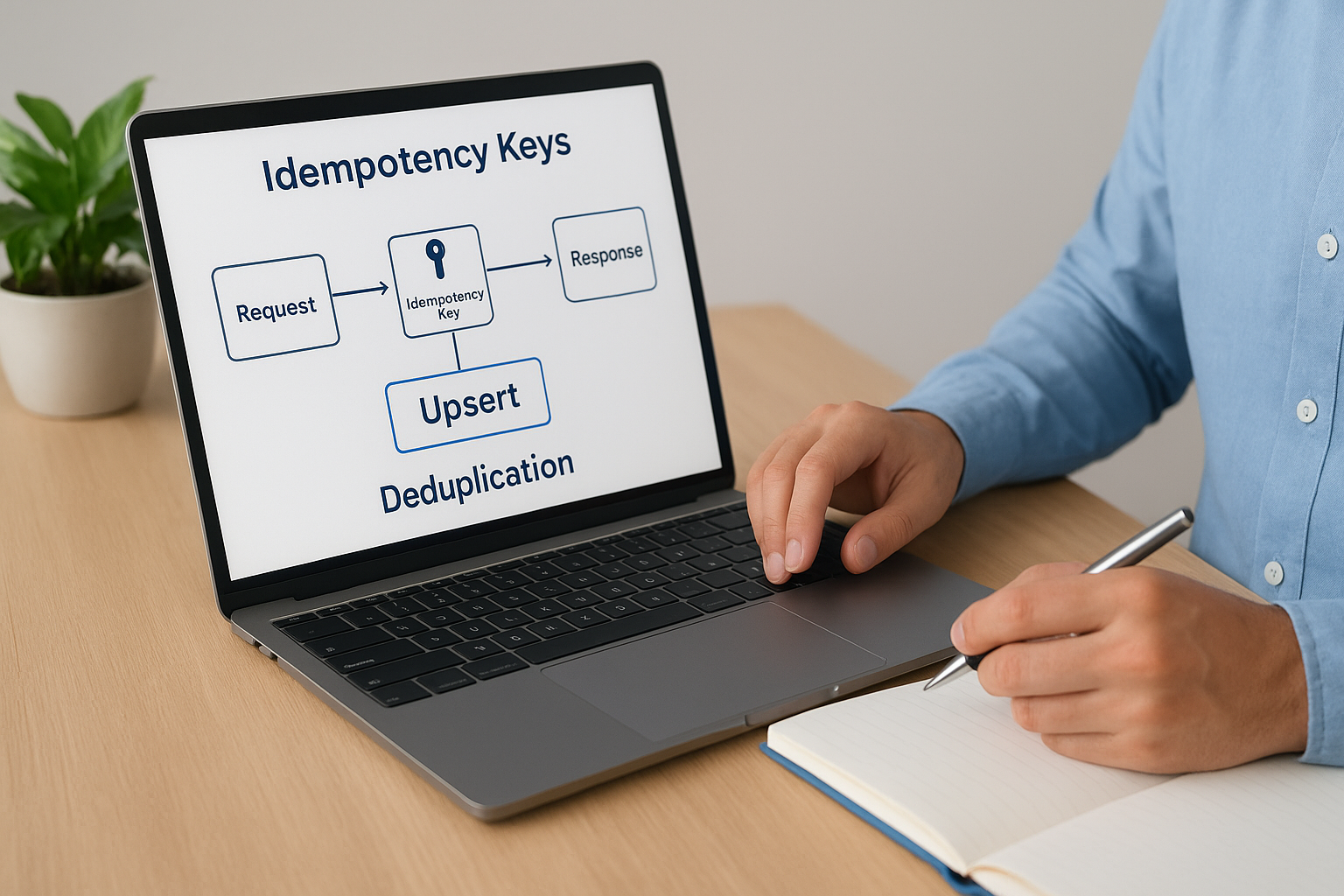
Idempotency keys are unique identifiers you generate on the sending side and attach to each API request. When the receiving system sees the same key twice, it returns the original result without processing the request again. Pair this approach with upsert operations, which create a record if it does not exist and update it if it does, to eliminate the risk of duplicate record creation at the database level. Both NetSuite and Acumatica support external ID fields that make upsert patterns straightforward to implement.
Handling timeouts, partial failures, and replay scenarios
Timeouts and partial failures are where most retry logic breaks down. Your integration should log every request attempt with its idempotency key, timestamp, and response status before retrying. This gives you a complete replay record if a transaction needs to be investigated. Define a retry ceiling for each integration, a maximum number of attempts before the system flags the failure for human review, so errors surface quickly rather than looping silently in the background.
6. Respect rate limits and control throughput end to end
Rate limits exist to protect APIs from being overwhelmed, but they create real friction in ERP integrations that move high volumes of transactional data. When your integration ignores rate limit constraints, you get throttled requests, failed syncs, and data that arrives late or out of order. Following api integration best practices means building throughput control into your integration design from day one, not bolting it on after the first 429 error hits production.
How rate limiting shows up in real ERP integration loads
ERP environments generate spikes. Month-end close, bulk order imports, and inventory reconciliation all create sudden surges in API call volume that can push you past vendor-imposed limits within minutes. NetSuite enforces concurrency limits on its REST API, and Acumatica applies rate controls per tenant. If your integration treats every trigger as an immediate, unbounded API call, you will hit those ceilings during exactly the moments when your finance team needs the data most.
Rate limits are not a vendor inconvenience; they are a design constraint you need to engineer around before your first high-volume sync.
Backoff, retry-after handling, and queue-based smoothing
When an API returns a 429 response, your integration needs a plan. Exponential backoff spaces out retry attempts with increasing delays so you do not hammer the endpoint and extend the throttle window. Most APIs include a Retry-After header that tells you exactly how long to wait before resubmitting. Pair backoff logic with a message queue to buffer incoming requests and release them at a controlled rate, so load spikes from your ERP get smoothed out before they ever reach the destination API.
Batching, pagination, and incremental sync strategies
Sending records one at a time is the fastest way to exhaust your API quota. Batch endpoints let you group multiple records into a single request, which cuts call volume dramatically without sacrificing completeness. Use incremental sync strategies that pull only records changed since the last successful run rather than re-fetching your entire dataset on every cycle. Pagination keeps large result sets manageable and prevents timeout failures on reads that would otherwise try to return thousands of records in one response.
7. Implement consistent error handling and user-ready messaging
When your integration fails silently, finance teams lose hours tracking down whether a record was posted, skipped, or partially processed. Following api integration best practices means building error handling that turns silent failures into clear, actionable signals your team can address without guesswork.
Using HTTP status codes and structured error responses
Standard HTTP status codes give your integration a shared language for communicating what went wrong. A 400 tells your team the request was malformed, a 401 means authentication failed, and a 503 signals the destination system is temporarily unavailable. Beyond the status code, your error response should include a structured payload with a machine-readable error code, a human-readable message, and the specific field or record that triggered the failure.
A vague error message that says “something went wrong” is not an error message; it is a delay.
Creating actionable errors for IT and finance users
IT staff and finance users need different error formats from the same failure event. Your integration layer should log the full technical detail for IT while surfacing a plain-language summary for finance: which transaction failed, what data was missing, and what step to take next.
Map every error code to a recommended action before go-live. When your team can look up any error and find a clear next step, they spend time resolving problems instead of diagnosing them, which keeps your close timeline intact.
Building fallbacks that keep operations moving
Not every error should halt your entire integration. Design fallback logic that routes failed records to a quarantine queue for manual review while allowing clean records to continue processing. This keeps your ERP running during partial failures and gives finance clear visibility into which records need attention without shutting down the whole pipeline. Review your quarantine queue on a defined schedule so exceptions do not quietly accumulate between review cycles.
8. Build observability with logs, metrics, and traceability
Blind integrations are dangerous integrations. When an API connection fails silently or degrades gradually, your finance team often discovers the problem through missing data or a reconciliation gap, not through a system alert. Applying api integration best practices means building observability into every layer of your integration stack so your team sees problems before they reach your close cycle.
What to monitor for ERP integrations that touch cash and close
Every integration that writes to your AR, AP, or general ledger needs dedicated monitoring coverage. Track the volume of records processed per run, the failure rate per endpoint, and the latency between trigger and write. When those numbers shift without a clear cause, something upstream has changed and you need to know before a mispost distorts your financial reporting.
Monitoring that only tells you a sync failed is not enough; you need to know which records failed, why, and what they were worth.
Correlation IDs and end-to-end transaction tracing
A correlation ID is a unique identifier you attach to a transaction at the moment it enters your integration pipeline and carry through every system it touches. When something goes wrong, your team can search that single ID across all your logs and rebuild the exact path the transaction took, which cuts investigation time from hours to minutes. Both your middleware layer and your ERP should log this ID at every handoff.

Assign correlation IDs at the originating system, not midway through the pipeline. If you generate the ID after the first hop, you lose visibility into the earliest part of the transaction’s journey, which is often where failures originate.
Alerting that detects issues before finance feels them
Threshold-based alerts on error rates and processing latency give your team a warning window before a data gap reaches a report or a payment run. Set alerts at multiple severity levels so routine noise does not bury the signals that actually matter. Routing critical integration alerts directly to your finance operations contact ensures the right person acts immediately when a high-value workflow stalls.
9. Plan for API versioning and vendor change management
Vendor APIs change, and when they do without warning, integrations that were running smoothly can break overnight. Applying api integration best practices means treating versioning and vendor change management as ongoing operational responsibilities, not one-time setup decisions. If you wait for a breaking change to expose a gap in your process, your finance team pays the price.
Version pinning, deprecations, and breaking-change risk
Always pin your integrations to a specific API version rather than defaulting to the latest release automatically. Most ERP-adjacent platforms, including payment processors and logistics providers, follow semantic versioning or date-based versioning that lets you stay on a stable release while the vendor iterates. Breaking changes, such as renamed fields, removed endpoints, or altered authentication flows, can silently corrupt data if your integration pulls in a new version before your team has validated compatibility.
Pinning to a version is not technical debt; it is the boundary that keeps a vendor update from becoming your emergency.
How to monitor release notes and schema drift
Set up a process to review vendor release notes on a regular cadence, at minimum monthly and before any major deployment. Many platforms publish deprecation timelines that give you six to twelve months before a version is retired. Schema drift is the quieter risk: when a vendor adds or reorders fields without a formal version bump, your field mappings can produce unexpected results without triggering an explicit error.
A practical upgrade and rollback playbook
Before upgrading any integration to a new API version, run the updated connection against your sandbox environment with production-representative data to confirm every field mapping and transformation behaves as expected. Document the current working version explicitly so your team can roll back within a defined window if the upgrade causes failures. Assign a named owner for each vendor relationship so release note monitoring and upgrade testing stay on someone’s radar rather than falling through the cracks between sprints.
10. Test integrations like production with sandboxes and automation
Testing an integration only in theory means your first real failure happens in production, where it affects live financial data and actual operations. Applying api integration best practices means building a testing strategy that covers unit behavior, data contracts, and full end-to-end flows before any code touches your production ERP environment.
Unit, contract, and end-to-end tests that catch real failures
Unit tests validate that individual mapping functions and transformation rules produce the right output for a given input. They run fast and catch logic errors early, before they propagate into downstream systems. Contract tests verify that the structure of the data your integration sends matches what the receiving API expects, so a schema change at either end surfaces in your test suite rather than in a failed sync.
End-to-end tests exercise the full transaction path, from trigger to write, across every system involved. These tests catch integration failures that unit and contract tests miss because they only emerge when all the components interact under realistic conditions.
Using realistic data sets without exposing sensitive data
Testing with sanitized production data gives you coverage that synthetic data sets cannot match. Anonymize or mask sensitive fields like customer names, payment details, and vendor IDs before loading records into your sandbox, so your tests reflect real-world complexity without creating a compliance risk.
A test suite built on oversimplified data will pass confidently right up until production exposes what it never covered.
Both NetSuite and Acumatica provide sandbox environments designed for this purpose. Use them with data volumes that reflect your busiest period, not your average day, so your tests validate performance under real load.
Release gates and ongoing scheduled tests after go-live
Treat passing your full test suite as a hard release gate, not a recommendation. No integration moves to production until every test passes against a production-representative data set. After go-live, schedule your end-to-end tests to run automatically on a recurring basis so silent regressions from vendor updates or configuration changes surface before your finance team encounters them.
Next steps
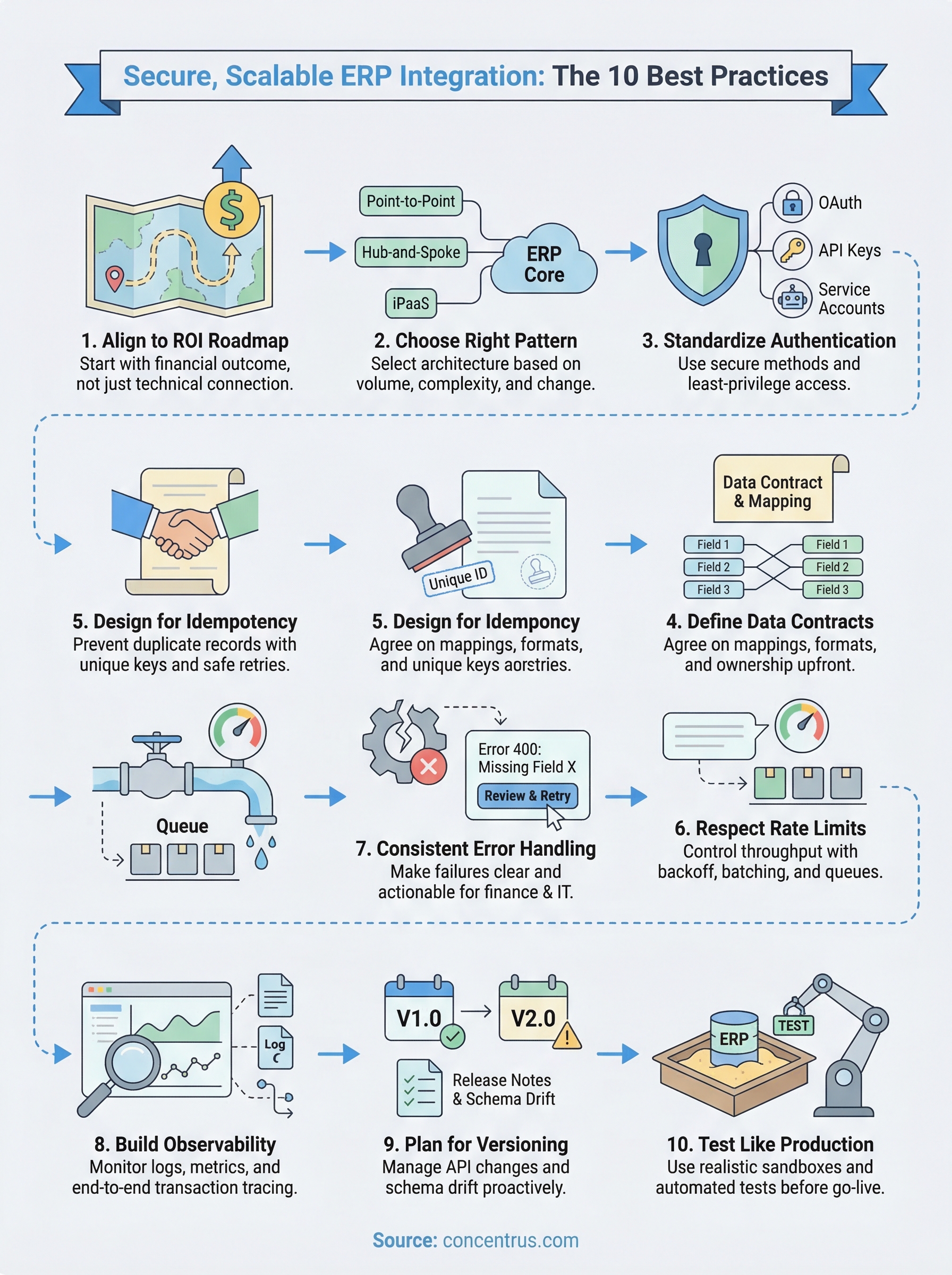
These 10 api integration best practices give you a framework for building connections that are secure, scalable, and directly tied to measurable financial outcomes. Each practice compounds the others: strong authentication protects data that clean contracts define, idempotent writes protect data that observability surfaces, and version management protects everything you built through testing. Treating your integrations as strategic financial assets rather than technical utilities changes how your whole team prioritizes, maintains, and governs them.
If your current ERP integrations are generating data inconsistencies, breaking during high-volume periods, or simply failing to deliver the ROI your implementation promised, that is a solvable problem. Concentrus works with midsized companies to implement and rescue NetSuite and Acumatica ERP systems, with every integration decision tied directly to your financial KPIs through our ROI Roadmap™ methodology. Reach out to the team at Concentrus to start a conversation about getting your ERP integrations to perform the way they should.