

A botched data migration can turn your ERP investment into a six-figure headache. Corrupted records, missing transactions, compliance gaps, these aren’t hypotheticals. They happen when data migration best practices get overlooked in the rush to go live.
For CFOs at midsized companies, the stakes are clear: your financial data is the foundation of every report, forecast, and decision your organization makes. Moving it from legacy systems to NetSuite or Acumatica without a rigorous plan puts accuracy, compliance, and operational continuity at risk.
At Concentrus, we’ve led hundreds of ERP implementations and rescued projects where data migration went sideways. That experience taught us exactly where migrations fail and what separates smooth transitions from costly recoveries. This guide shares that framework so you can protect your ROI from day one.
You’ll find a step-by-step approach covering planning, execution, and validation, everything you need to move your data with minimal downtime and maximum confidence.
What CFOs should lock down before migration
Your migration planning starts before any data moves. Too many CFOs approve a migration timeline without defining what success looks like or who owns critical decisions when problems surface. That lack of clarity turns technical hiccups into business disruptions because your team scrambles to figure out authority and priorities mid-crisis.
Effective data migration best practices begin with financial and operational guardrails you establish upfront. You need measurable outcomes, clear ownership, and documented fallback options locked in before your technical team touches a single record. These three foundations prevent scope creep, finger-pointing, and surprise costs that derail ROI.
Define your ROI metrics and success criteria
Start by documenting exactly what financial outcomes this migration must deliver. Vague goals like “better reporting” won’t hold anyone accountable when you’re three months post-launch and still reconciling discrepancies. Instead, specify quantifiable targets tied to your ERP investment case.
Your success criteria should include hard metrics like days to close reduced from 15 to 7, real-time inventory accuracy above 98%, or customer invoice processing cut by 40%. Add compliance requirements such as audit trail completeness and regulatory reporting deadlines your new system must support without manual intervention.
Lock in ROI milestones before migration starts so you can measure whether the move actually improved your operations or just relocated your problems.
Document these targets in a one-page migration charter that your executive team and implementation partner both sign. Include acceptance criteria for go-live approval, such as zero critical data errors in customer master records and all open AR/AP balances reconciled within 0.5% of legacy totals.
Establish accountability and decision rights
Assign a single executive owner for migration decisions who can resolve conflicts without endless committee meetings. This person typically reports to you and has authority to approve scope changes, data cutoffs, and go/no-go calls on launch day. Ambiguity here creates delays when your team needs immediate direction.

Create a RACI matrix that maps every major migration task to specific individuals:
| Activity | Responsible | Accountable | Consulted | Informed |
|---|---|---|---|---|
| Data validation rules | IT Manager | CFO | Controller | VP Operations |
| Cutover scheduling | Project Manager | CFO | All Dept Heads | Executive Team |
| Rollback decision | CFO | CEO | IT Manager | Board |
| Post-migration reconciliation | Controller | CFO | External Auditor | IT Manager |
Clarify escalation paths for technical vs. financial issues so your implementation partner knows who to contact when a data mapping conflict affects revenue recognition. Your IT lead shouldn’t be making judgment calls on how to handle partially migrated invoices that impact your quarter-end close.
Build a rollback and contingency plan
Define the conditions that would trigger a rollback to your legacy system before you start cutover. Specify measurable thresholds like more than 50 critical errors in financial data, inability to process payroll on schedule, or compliance reporting failures that put you at regulatory risk.
Document the technical steps and timeline required to revert to your old system, including how long you’ll maintain parallel access to legacy data. Your team needs to know whether rolling back takes four hours or four days and what business processes stay offline during recovery.
Build financial buffers into your plan by reserving 15-20% of your migration budget for contingencies like extended parallel operations, additional data cleansing cycles, or emergency consulting support. Budget overruns happen when you assume everything will go perfectly and don’t account for the reality that first cutover attempts often surface hidden issues.
Secure executive approval for controlled downtime windows and communicate those dates to customers, vendors, and internal stakeholders at least 30 days ahead. Your operations team needs clarity on when normal business pauses and what manual workarounds they’ll use if the migration extends beyond your planned window.
Step 1. Audit, scope, and clean the data
Your first migration step determines everything that follows. You can’t map data accurately, test effectively, or validate results if you don’t know what you’re starting with and where quality gaps hide in your legacy systems. Most failed migrations trace back to assumptions made during this phase, teams moved forward without documenting source data issues and paid the price when corrupted records surfaced post-launch.
This audit phase separates successful data migration best practices from wishful thinking. You need to catalog every data source, identify critical vs. non-critical records, and clean what you can before migration tools touch anything. Fixing data problems in your new system costs 10 times more than addressing them upfront.
Inventory what you have and what you need
Start by creating a complete data inventory across all systems that feed your financial operations. List every database, spreadsheet, and application that contains customer records, vendor details, product catalogs, pricing tables, or transaction history. Include shadow IT systems your departments built outside formal IT channels.
For each data source, document record counts, update frequency, and business criticality:
| Data Type | Source System | Record Count | Last Updated | Business Impact |
|---|---|---|---|---|
| Customer master | Legacy ERP | 12,400 | Real-time | Critical – revenue |
| Vendor master | Legacy ERP | 3,200 | Weekly batch | Critical – AP |
| Product catalog | PLM system | 8,500 | Daily | High – orders |
| Pricing rules | Excel files | 450 SKUs | Monthly | High – margins |
| Historical invoices | Archive DB | 145,000 | Static | Medium – audit |
Classify records as must migrate, migrate if time permits, or archive only. Your auditor needs seven years of transaction history accessible, but that doesn’t mean you move every detail into your new operational system. Determine what stays in cold storage vs. active databases to avoid cluttering NetSuite or Acumatica with unnecessary data volume.
Clean and standardize before you move
Identify duplicate records, missing required fields, and format inconsistencies that will break validation rules in your target system. Run deduplication scripts against customer and vendor files to merge records with slight name variations or address differences that represent the same entity.
Fix critical data quality issues in your source systems first rather than trying to clean everything during migration. Address problems like missing tax IDs on vendor records, invalid email formats in customer files, or product codes that don’t match your new naming convention. This approach lets you validate fixes against real business processes before cutover pressure hits.
Clean data at the source so your migration tools move accurate records the first time instead of garbage that requires expensive post-launch remediation.
Document transformation rules and exceptions
Create a data transformation specification that maps every source field to its destination and defines how you’ll handle edge cases. Specify exactly how you’ll convert legacy date formats, split combined address fields, or map old product categories to your new taxonomy.
Document known exceptions that require manual intervention or custom logic. Flag scenarios like partial shipments spanning your cutover date, open POs with receiving history in both systems, or customers with special pricing agreements that don’t fit standard migration patterns. Your implementation team needs these documented before they start building ETL scripts, not when they discover the exceptions mid-testing.
Step 2. Pick a migration strategy and cutover plan
Your migration approach determines how much business risk you’ll accept and how long your teams operate in a transitional state. You can’t pick a strategy by copying what worked for another company because your data complexity, system dependencies, and operational constraints differ fundamentally. This decision requires balancing speed against safety while accounting for your specific financial close calendar and transaction volumes.
Effective data migration best practices demand explicit choices about whether you move everything at once or stage the transition across business units. Both approaches carry distinct risks and resource requirements that directly impact your ability to maintain operations during cutover. Your planning needs to account for the reality that your business doesn’t stop generating transactions just because you’re changing systems.
Evaluate big bang vs. phased migration
Big bang migration means cutting over all modules and data in a single weekend or planned downtime window. You shut down your legacy system Friday night, migrate everything, and open Monday morning running entirely on your new ERP. This approach works when you have clean data, limited integrations, and confidence in your testing results because there’s no fallback once you commit.

Phased migration lets you move one business unit, region, or module at a time while keeping other operations on legacy systems. You might migrate your US division first, validate results for 30 days, then tackle international entities. This reduces risk by limiting blast radius but creates operational complexity because your teams work across two active systems simultaneously for extended periods.
Choose big bang when your data is clean and business can tolerate concentrated risk. Choose phased when you need proof points before committing fully or operate distinct business units.
Schedule your cutover window strategically
Pick a cutover date that avoids your busiest operational periods and provides maximum buffer before critical financial deadlines. Never schedule migration during month-end close, peak shipping seasons, or within 45 days of fiscal year-end when audit preparation demands clean data and stable systems.
Align your timeline with natural business cycles that offer lower transaction volumes:
- Retail: Post-holiday January or mid-September
- Manufacturing: Holiday shutdown weeks or summer slowdowns
- Professional services: Between quarterly billing cycles
- Distribution: Mid-month windows between major order cycles
Build in 72-96 hours of validation time after technical cutover completes before you declare success and decommission legacy access. Your finance team needs to run parallel closes, reconcile balances, and verify reporting works correctly under real-world load before you commit irreversibly.
Define parallel operations and validation periods
Document exactly how long you’ll maintain dual system access and what business processes run where during transition. Specify whether new orders go into the new system immediately or if you’ll finish in-flight transactions in legacy then migrate completed records as a second wave.
Create decision trees for edge cases that span cutover, like purchase orders issued in the old system that receive shipments in the new one. Your warehouse staff needs clear instructions on which system to update for inventory receipts, and your AP team must know how to match invoices that reference cross-system transaction numbers.
Step 3. Map data and design controls that stick
Your data mapping defines how every field transforms from legacy format to your new ERP structure and what validation rules prevent bad data from corrupting your financial records. This step requires finance expertise, not just technical skills, because your controller needs to verify that mapped data maintains integrity for revenue recognition, cost allocation, and regulatory reporting. Poor mapping creates downstream problems that surface weeks after launch when reconciliations fail or audit trails break.
Solid data migration best practices demand explicit field-level documentation and automated validation checks that catch errors before they reach production. You need mapping specifications that your technical team can execute and validation rules that your finance team can audit. This combination ensures data quality persists beyond initial migration when daily operations start creating new records.
Create detailed field mapping specifications
Build a comprehensive mapping table that documents every source field, its destination, transformation logic, and validation requirements. Include data type conversions, field concatenations, and lookup table references your ETL process must handle. Your specification should be clear enough that any competent developer could build the migration scripts without guessing intent.
Structure your mapping documentation like this:
| Source Field | Source System | Target Field | Target System | Transformation Logic | Validation Rule |
|---|---|---|---|---|---|
| CUST_ID | Legacy DB | Customer.ExternalID | NetSuite | Direct copy | Must be unique, non-null |
| INV_AMT | Legacy DB | Invoice.Total | NetSuite | Convert to decimal(10,2) | Must equal sum of line items |
| SHIP_ADDR1 + SHIP_ADDR2 | Legacy DB | Customer.ShippingAddress | NetSuite | Concatenate with comma | Max 255 chars after merge |
| PROD_CAT | Legacy DB | Item.Category | NetSuite | Lookup via category_map table | Must match existing category ID |
Document exception handling rules for fields that don’t map cleanly, such as how you’ll handle legacy product codes that don’t exist in your new taxonomy or customer payment terms that exceed your new system’s standard options.
Implement validation rules that catch errors early
Define automated validation checks that run during migration and continue enforcing data quality after go-live. Your rules should verify financial integrity constraints like balanced debits and credits, required tax information on invoices, and proper cost center assignments on expense transactions.
Build validation rules that prevent bad data from entering your new system rather than trying to clean it up after migration completes.
Layer your validation checks across three enforcement points:
- Pre-migration validation: Run checks against source data before extraction to identify problems while you can still fix them in legacy systems
- In-flight validation: Apply transformation rules during ETL to catch mapping errors before data loads into target databases
- Post-load validation: Execute reconciliation queries after migration to verify totals match and relationships remain intact
Specify tolerance thresholds for each validation, such as AR balance variance under $500 acceptable but anything higher requires investigation. Create exception reports that flag records failing validation with enough detail that your finance team can research root causes without re-running entire migration batches.
Document mapping decisions for audit trails
Maintain a change log that records every mapping decision, the business justification, and who approved it. Your external auditors will ask why certain data transformed the way it did, and you need documentation that proves deliberate choices rather than arbitrary technical decisions.
Store mapping specifications and validation rules in version-controlled repositories so you can track changes as your understanding of data quality issues evolves during testing cycles. This documentation becomes your operational playbook for handling ongoing data integration after migration when you add new customers, products, or business units to your ERP.
Step 4. Test, reconcile, and practice rollback
Your testing phase validates whether your migration actually works under real-world conditions before you risk production data. Single-table tests in development environments don’t reveal the problems that surface when you migrate 300,000 customer records with full transaction histories and dependent data spread across 15 integrated systems. You need full-scale rehearsals that expose hidden dependencies, performance bottlenecks, and data integrity gaps your team can fix before go-live pressure hits.
Rigorous data migration best practices require documented test cycles that prove your migration delivers accurate results and your rollback procedures work when you need them. Your testing needs to validate financial accuracy, system performance, and operational readiness across every business function that touches your ERP. Skip this step and you’re essentially performing live surgery on your financial systems without a practice run.
Run full migration rehearsals with production data volumes
Execute at least two complete migration runs using anonymized production data that matches your actual record counts and complexity. Your first rehearsal surfaces obvious problems like missing lookup tables or incorrect field mappings. The second run validates that fixes work correctly and measures how long each migration phase takes under realistic load.
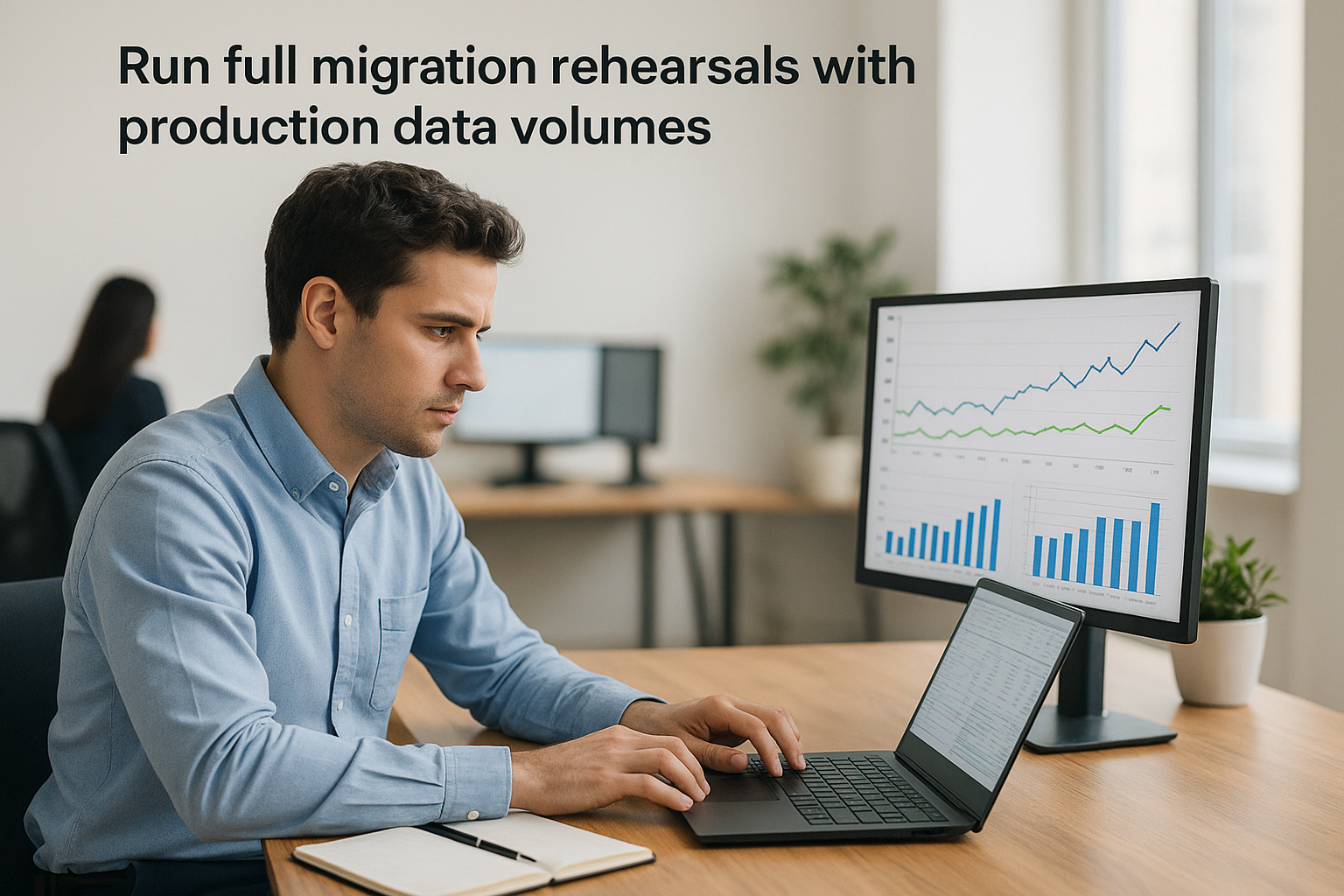
Test with real transaction volumes that mirror your busiest periods, not sanitized sample data sets that hide performance problems. Migrate 50,000 customer records if that’s your production scale, include all open orders and invoices, and verify that system response times remain acceptable when users query migrated data.
Document the exact duration of each migration step so you can build accurate cutover schedules:
| Migration Phase | Test Run 1 | Test Run 2 | Production Estimate |
|---|---|---|---|
| Customer master | 45 min | 38 min | 40 min + 10% buffer |
| Open orders | 2.5 hrs | 2.1 hrs | 2.5 hrs + 15% buffer |
| Transaction history | 6 hrs | 5.5 hrs | 6 hrs + 20% buffer |
| Vendor records | 30 min | 28 min | 30 min + 10% buffer |
Build reconciliation checklists that prove accuracy
Create detailed reconciliation procedures that your finance team executes after each test migration to verify data accuracy. Your checklists should compare total record counts, sum financial balances, and validate critical relationships like customer invoices matching AR aging reports down to the penny.
Test your reconciliation procedures during rehearsals so your team knows exactly what to check and how long validation takes when cutover clock is ticking.
Specify tolerance thresholds and escalation criteria for discrepancies found during reconciliation. Define what constitutes an acceptable variance (perhaps under $100 for a $50M AR balance) versus errors that stop cutover until resolved. Your controller needs clear authority to halt production migration if reconciliation reveals data integrity problems that put financial reporting at risk.
Practice rollback procedures under time pressure
Execute actual rollback simulations after test migrations to verify your team can restore legacy systems within documented timeframes. Don’t just review rollback documentation, actually restore database backups, reactivate integrations, and confirm that business operations resume using pre-migration systems.
Time how long rollback takes and identify dependencies that slow recovery, such as waiting for backup restores or rebuilding integration connections. Your operations team needs confidence that rolling back takes four hours, not four days, if production cutover uncovers critical problems your testing missed.
Step 5. Execute cutover and stabilize operations
Your cutover execution converts months of planning into live production operations where mistakes affect real transactions and actual customers. This phase demands disciplined execution of your documented procedures while maintaining flexibility to handle unexpected issues that testing didn’t reveal. Your migration team needs clear authority to make rapid decisions when problems surface because hesitation during cutover turns minor issues into major business disruptions.
Strong data migration best practices separate cutover execution from stabilization activities because each phase requires different skills and priorities. Cutover focuses on technical accuracy and speed while stabilization emphasizes operational readiness and user support. You need both to succeed.
Execute your final cutover checklist
Start cutover by confirming all prerequisite conditions meet your documented go criteria. Verify that legacy system backups completed successfully, all stakeholders received final communication about system downtime, and your technical team has verified access to production environments. Never begin cutover if any critical prerequisite remains incomplete.
Run through your technical execution checklist in strict sequence:
| Task | Owner | Duration | Validation Check |
|---|---|---|---|
| Lock legacy system | IT Manager | 15 min | Confirm no new transactions possible |
| Extract final data snapshot | DBA | 30 min | Verify row counts match expected totals |
| Execute migration scripts | Implementation Lead | 4-6 hrs | Monitor error logs in real-time |
| Load data to production | DBA | 2-3 hrs | Check load completion status |
| Run validation queries | Controller | 1 hr | Compare balances to source system |
| Enable integrations | IT Manager | 30 min | Test each connection with sample data |
Maintain a shared status document that your entire team updates in real-time so executives can track progress without interrupting technical execution. Log every decision, error, and workaround because you’ll need this audit trail if problems surface post-launch.
Document every cutover decision and technical issue in real-time so your team can reference exact details when troubleshooting post-migration problems.
Monitor critical business functions for 72 hours
Deploy your finance team to execute critical business processes immediately after technical cutover completes. Process sample customer orders, receive inventory against open purchase orders, and run payroll calculations to verify that core operations function correctly under production load.
Watch for performance degradation as transaction volumes increase and users execute complex queries your testing didn’t anticipate. Monitor database response times, integration queue depths, and user-reported errors to identify bottlenecks before they impact customer-facing operations.
Stabilize operations and transition to support
Schedule daily standups with all department heads for the first week to surface operational issues quickly. Your implementation partner should maintain extended support coverage during stabilization, responding to problems within one hour rather than standard ticket queue timeframes.
Document workarounds for non-critical issues that users can apply while your team develops permanent fixes. Prioritize problems that block financial close, prevent customer orders, or create compliance risks over cosmetic interface complaints that don’t affect business outcomes.
Release your legacy system access after 30 days of stable operations when reconciliations consistently balance and users stop requesting old system reports. Keep legacy databases in read-only archive mode for at least one full fiscal year to support audits and historical analysis needs.
What to do next
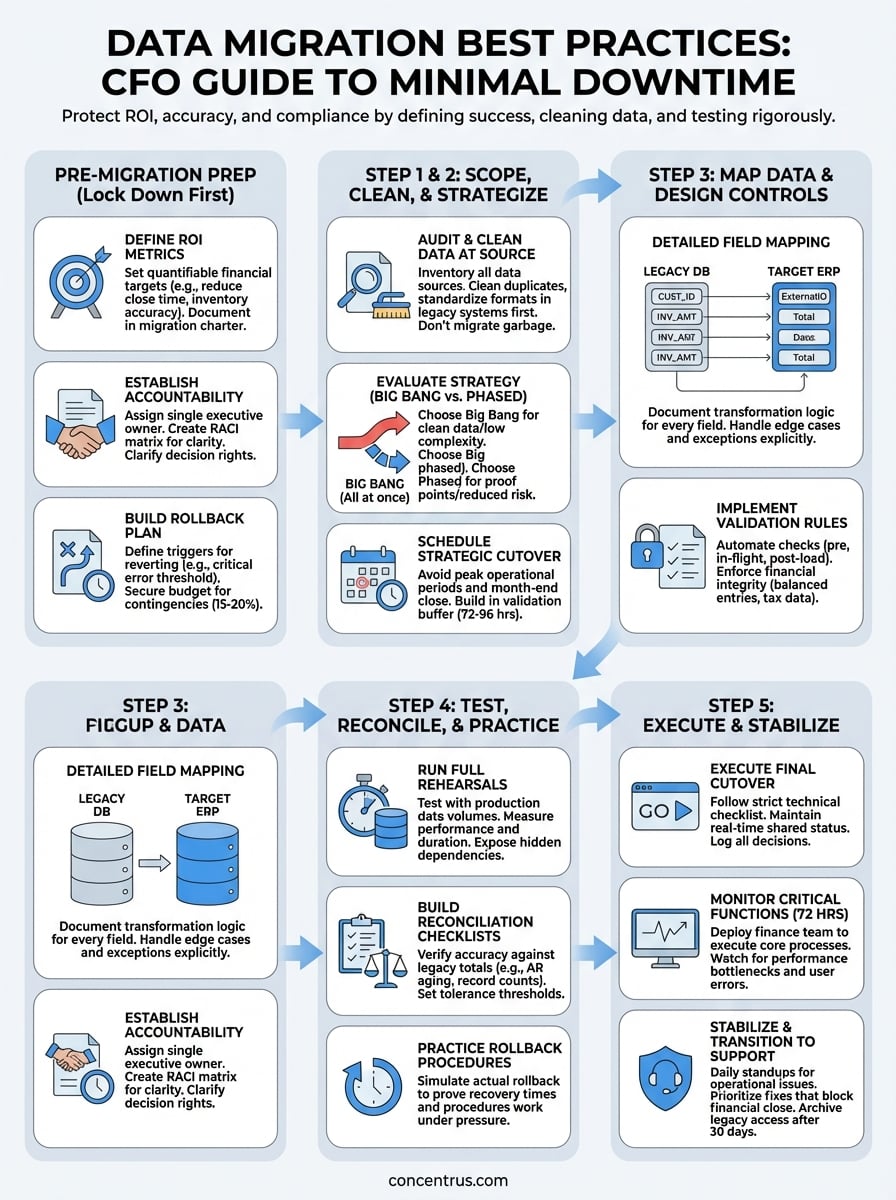
Your migration success depends on executing these data migration best practices with discipline while maintaining flexibility to handle real-world complications. Start by scheduling a planning session with your executive team to document ROI metrics and decision rights before your technical team begins detailed work. Lock in those financial targets and accountability structures within the next 30 days.
Build your detailed migration plan over the following 60-90 days, focusing on data audits, mapping specifications, and test cycles that prove your approach works before cutover pressure hits. Allocate budget for contingencies and secure your board’s approval for controlled downtime windows that align with business cycles.
Your ERP investment delivers returns when data migration executes flawlessly from day one. Concentrus specializes in NetSuite and Acumatica implementations where guaranteed ROI starts with migration frameworks that protect financial accuracy while minimizing business disruption. Connect with our team to review your specific migration challenges and build a roadmap that delivers measurable outcomes.