

Accounts payable is one of the most time-consuming functions in finance, and for midsized companies running NetSuite or Acumatica, manual AP workflows create bottlenecks that ripple across the entire operation. That’s where Ramp AP automation enters the conversation, a platform designed to eliminate manual invoice processing, streamline approvals, and give finance teams real-time visibility into spend.
But does Ramp actually deliver on those promises, and more importantly, does it fit your ERP ecosystem? At Concentrus, we help CFOs and finance leaders build ERP environments that drive measurable ROI, so we evaluate tools like Ramp through a practical lens: how well they integrate, what they actually automate, and whether they move the needle on financial performance.
This article breaks down Ramp’s AP automation features, pricing structure, and real pros and cons so you can make an informed decision. Whether you’re exploring AP automation for the first time or comparing Ramp against alternatives, you’ll walk away with a clear picture of what Ramp offers, and where it falls short.
Why AP automation matters for midsized finance teams
For midsized companies, accounts payable sits at the intersection of cash flow, vendor relationships, and operational efficiency. Most finance teams know the process is painful, but few have quantified exactly how much manual AP workflows cost in time, errors, and missed opportunities. Before evaluating any specific tool like Ramp AP automation, it helps to understand why this problem is worth solving at all.
The real cost of manual AP processes
Manual AP processing isn’t just slow. It creates compounding problems that show up across your financial statements and your team’s capacity. When your staff is entering invoice data by hand, chasing down approvers over email, and reconciling payments at month-end, every step carries risk of error and delay. A miskeyed invoice total or a missed approval can hold up a vendor payment, trigger late fees, and distort your cash flow reporting.

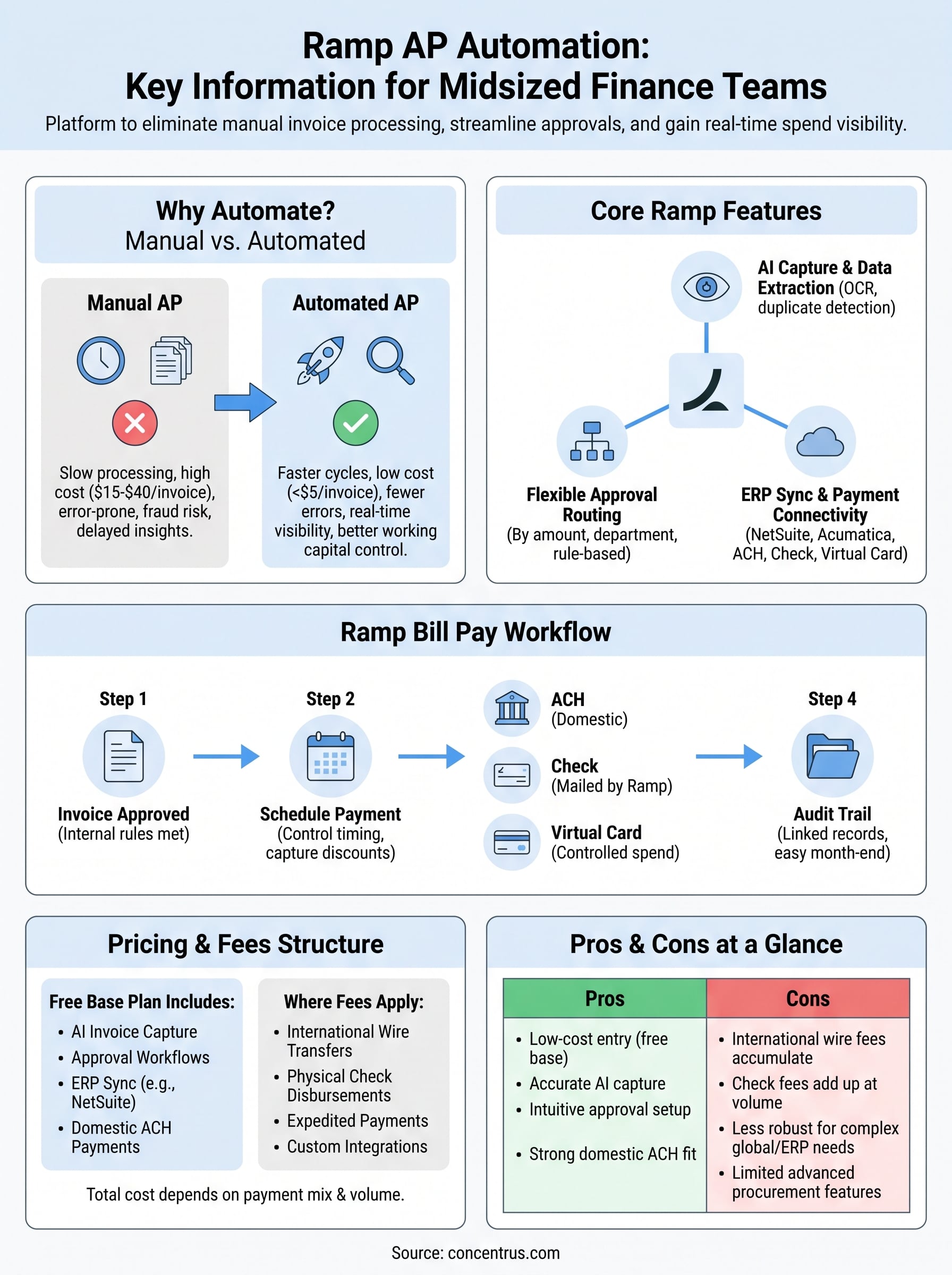
The average cost to process a single invoice manually runs between $15 and $40, compared to under $5 with automation in place, a gap that adds up fast at any meaningful invoice volume.
The volume compounds the damage. A midsized company processing 500 invoices per month at an average manual cost of $25 per invoice spends over $150,000 annually on AP processing alone. That’s before accounting for the cost of errors, duplicate payments, or the staff hours spent on vendor inquiries. Cutting those costs sharply redirects your team’s time toward work that actually moves financial performance forward.
Here’s where manual AP typically breaks down:
- Invoice capture: Data entry errors and missing documents slow approval queues
- Approval routing: Approvals stuck in email threads create bottlenecks and delays
- Payment execution: Manual check runs and wire transfers increase fraud exposure
- Reconciliation: Mismatches between PO, invoice, and payment require manual research
- Audit readiness: Scattered documentation makes audits time-consuming and stressful
How AP automation changes the finance team’s capacity
When you automate AP, you don’t just speed up the same process. You fundamentally restructure how your finance team spends its time. Instead of chasing down approvals or correcting data entry mistakes, your team focuses on vendor strategy, cash flow optimization, and financial analysis. For CFOs at midsized companies, that shift in capacity is one of the most tangible benefits of investing in automation.
Better AP processes also give you tighter control over working capital. When you can see every outstanding payable in real time, you can time payments strategically, take advantage of early payment discounts, and avoid the cash flow surprises that come from batched, end-of-week payment runs. That level of visibility directly supports better financial planning and more accurate forecasting.
Growth makes the case even stronger. As your company scales, manual AP doesn’t scale with it. Adding headcount to handle invoice volume is expensive and inefficient. Automation lets your existing team handle significantly higher invoice volumes without proportional increases in cost or error rates, which is exactly the kind of operational leverage that supports profitable growth.
What Ramp AP automation includes
Ramp AP automation is built around a core set of features that cover the full accounts payable cycle, from the moment an invoice arrives to the point a payment clears. Rather than offering a standalone invoicing tool, Ramp packages AP automation inside its broader spend management platform, which means your team gets invoice processing, approval workflows, and payment execution within a single interface. That matters because disconnected point solutions tend to recreate the same coordination problems you were trying to solve.
Invoice capture and AI-powered data extraction
The platform uses AI-driven optical character recognition to extract data from invoices automatically. Your team can forward invoices via email, upload them directly, or connect vendor portals, and Ramp pulls relevant fields like vendor name, amount, due date, and line items without manual entry. The system also flags duplicate invoices before they route for approval, which catches a common and costly error before it reaches payment.
Automated duplicate detection alone can recover thousands of dollars annually for companies processing high invoice volumes.
Approval routing and policy enforcement
Once an invoice is captured, Ramp routes it through approval chains you configure based on amount thresholds, departments, or vendor categories. Approvers receive notifications and can act from email or mobile without logging into a separate system. Because the rules are baked into the platform, policy enforcement happens automatically rather than relying on people to remember spending limits or escalation requirements.
Here’s what you can configure within Ramp’s approval framework:
- Multi-level approval chains by spend threshold
- Department or cost center-based routing
- Automatic escalation for overdue approvals
- Role-based access to limit who can approve what
ERP sync and payment connectivity
Ramp connects to NetSuite and other major accounting systems, syncing invoice data, payment records, and GL coding without manual exports. Your team sets the mapping once, and Ramp pushes clean, matched data to your ERP after each payment cycle. Payment options include ACH, check, and virtual card, giving you flexibility to match payment method to vendor preference while maintaining a complete audit trail inside both Ramp and your ERP simultaneously.
How Ramp Bill Pay handles the AP workflow
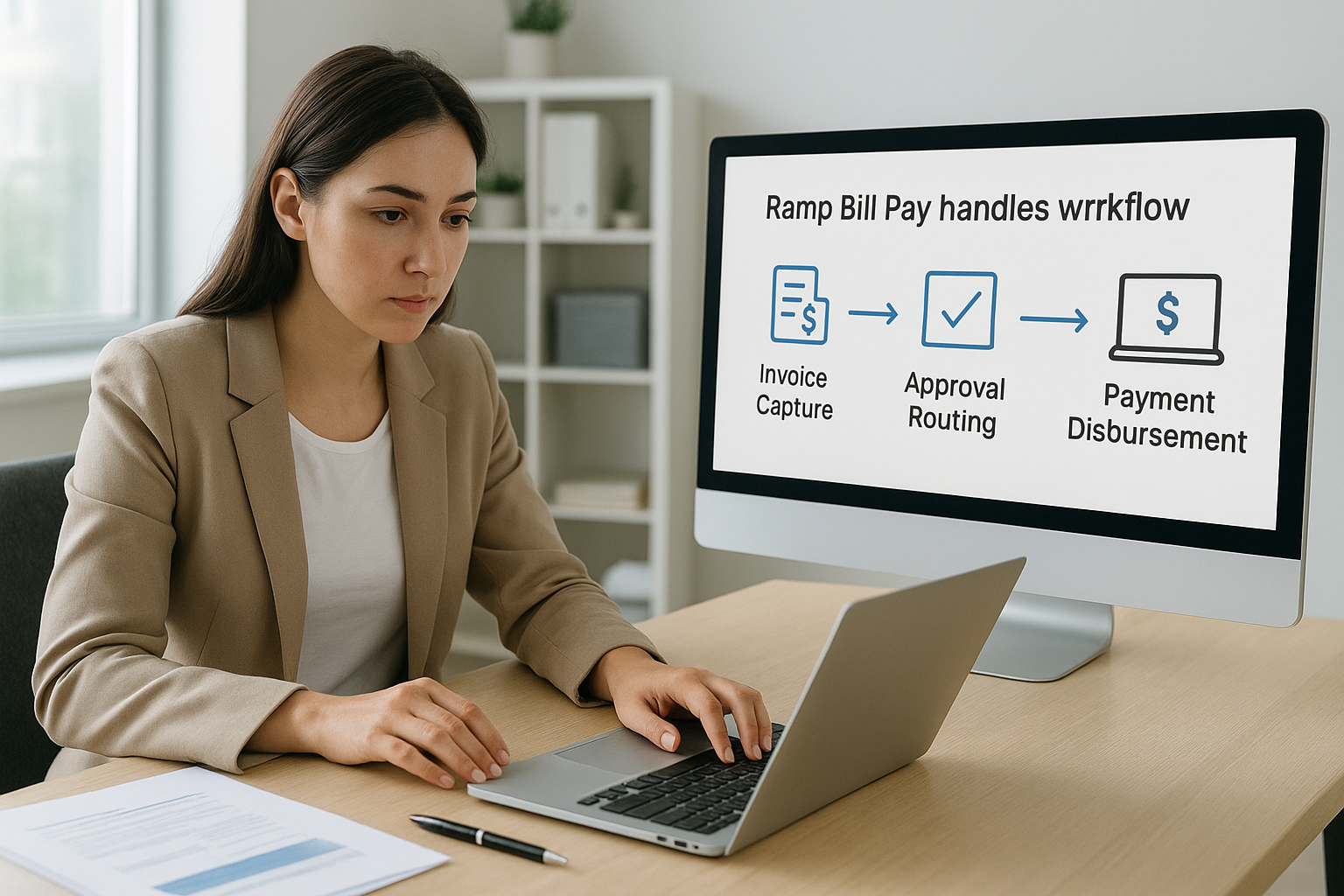
Ramp Bill Pay is the specific module within Ramp that handles end-to-end payment execution after an invoice clears the approval workflow. It connects invoice capture, approval routing, and payment disbursement into a single controlled process, which means your finance team doesn’t need to switch between systems to move a bill from received to paid.
From invoice approval to payment scheduling
Once an invoice gets approved inside Ramp AP automation, Bill Pay moves it into a payment queue where your team can schedule disbursements manually or set them to process automatically based on due dates. This gives you direct control over payment timing, so you can align outgoing cash with your actual cash position rather than processing payments in batches on a fixed schedule.
Controlling payment timing at the invoice level lets you preserve working capital during tight periods without damaging vendor relationships.
Early payment discount opportunities also become easier to act on when you have this level of visibility. Your team can identify vendors offering 2/10 net 30 terms and capture those discounts before the window closes, which adds up to real savings at meaningful invoice volumes.
Payment methods and how they work
Ramp Bill Pay supports ACH transfers, check payments, and virtual cards, and your team selects the method that fits each vendor relationship. ACH is standard for most domestic vendors and settles within one to two business days. Virtual cards work well for vendors who accept card payments and give you automatic spend controls on a per-transaction basis.
Here’s how each payment method works within Ramp Bill Pay:
| Method | Settlement Time | Best Use Case |
|---|---|---|
| ACH | 1-2 business days | Regular domestic vendors |
| Check | 3-5 business days | Vendors without banking details on file |
| Virtual card | Same-day authorization | Card-accepting vendors, high-control spend |
Check payments are handled by Ramp directly. Your team approves the payment, and Ramp mails the physical check to the vendor, removing the administrative burden of check runs from your staff entirely.
Audit trail and record keeping
Every payment processed through Ramp Bill Pay generates a complete audit trail that links the original invoice, approval history, and payment confirmation in one record. Your accounting team can pull documentation for any transaction without digging through email threads or shared drives. This tight record structure makes month-end close and audit preparation significantly faster than manual AP processes allow.
Pricing, fees, and what drives total cost
Ramp’s base platform is free, which covers corporate cards, expense management, and access to core AP automation features including invoice capture and approval workflows. That pricing model makes ramp ap automation accessible to midsized companies without a large upfront software commitment, but free doesn’t mean zero cost once you factor in transaction fees and add-on services.
The free tier gives you real functionality, but your total cost depends heavily on payment volume and the specific features your team actually uses.
What the free plan covers
The free tier includes AI-powered invoice capture, approval routing, and ERP sync for NetSuite and other major accounting systems. Your team can process domestic ACH payments and manage approval chains without paying a per-seat or per-invoice fee. For companies processing moderate invoice volumes entirely in domestic currency, the free tier covers most core AP workflows without a material cost gap.
Where transaction fees apply
Costs appear once you move outside the standard domestic ACH payment path. International wire transfers carry a fee per transaction, typically around $15 per wire depending on the destination and currency. Check disbursements, where Ramp mails the physical check on your behalf, also carry a small per-check fee that varies based on volume. Virtual card payments are generally fee-free on Ramp’s side, though your vendor may have card acceptance costs that affect the relationship.
Here’s where fees typically apply within Ramp’s payment infrastructure:
- International wires: Fee per transaction, varies by destination
- Check disbursements: Small per-check fee for physical mailing
- Expedited ACH: Premium processing fees for same-day settlement
- Custom integrations: Professional services costs for non-standard ERP configurations
What actually drives your total cost
For most midsized finance teams, payment method mix and international exposure determine whether Ramp’s total cost remains low or grows meaningfully. A company paying most vendors via domestic ACH will spend close to nothing on transaction fees. A company with significant international supplier relationships or high check volumes will see costs accumulate faster. Beyond transaction fees, factor in the staff time required to configure approval rules and maintain ERP mapping, especially if your NetSuite environment involves custom workflows or complex GL structures that require outside implementation support.
Pros, cons, and when to consider other tools
Ramp AP automation delivers real value in specific situations, but it isn’t the right fit for every midsized finance team. Understanding where it performs well and where it hits limits will help you decide whether to move forward with Ramp or evaluate other platforms before committing.
Where Ramp performs well
Ramp’s free base tier is a genuine advantage for companies that want capable AP automation without a large software budget. The AI invoice capture is accurate enough to handle most standard invoice formats, and the approval workflow configuration is intuitive enough that your team can set it up without a long implementation cycle. For domestic-focused businesses paying vendors primarily through ACH, the cost structure stays minimal.
Ramp works best when your AP volume is high, your vendor base is domestic, and your ERP integration needs are straightforward.
Here’s where Ramp consistently delivers:
- Clean invoice capture on standard vendor invoice formats
- Flexible approval routing that enforces spend policy automatically
- Reliable NetSuite and accounting system sync for GL coding
- Low total cost for domestic ACH-heavy payment environments
Where Ramp falls short
International payment workflows are a weak point for Ramp. If a meaningful portion of your vendor base is outside the US, per-wire fees accumulate quickly, and the platform’s international payment coverage is narrower than dedicated AP tools like Tipalti or Bill.com. Complex ERP environments with custom workflows, heavy project accounting structures, or multi-subsidiary configurations can also create friction during setup that requires outside technical help.
Additional limitations worth noting:
- Per-transaction fees on international wires raise total cost for global supplier bases
- Check disbursement fees add up at high check volumes
- Customer support responsiveness varies, which matters when a payment issue needs immediate resolution
- Advanced procurement features like three-way PO matching are limited compared to enterprise-grade AP platforms
When another tool makes more sense
If your company processes a high volume of international vendor payments, you should evaluate platforms built specifically for global AP workflows. Similarly, if your NetSuite implementation involves significant customization, working with a partner who understands both the ERP configuration and the AP tool integration will save you time and reduce the risk of a poorly connected system. Your AP automation decision should be driven by your actual payment mix, your ERP complexity, and the level of support your team needs during and after setup.
Next steps
Ramp AP automation gives midsized finance teams a capable, low-cost starting point for eliminating manual invoice processing and tightening payment workflows. If your vendor base is primarily domestic, your ERP integration is straightforward, and your team needs a fast path to automated approvals and real-time spend visibility, Ramp deserves serious consideration. The free tier removes the typical barrier to entry, and the platform’s core features cover most standard AP workflows without a complex implementation.
Your decision should go deeper than the software itself, though. AP automation delivers its full value only when it connects cleanly to your ERP and aligns with your broader financial processes. If you’re running NetSuite or Acumatica and want to ensure your AP setup actually moves the needle on cash flow, close cycles, and profitability, the right ERP configuration matters as much as the tool you choose. Talk to an ERP and ROI expert at Concentrus to build an AP process that drives measurable results.