

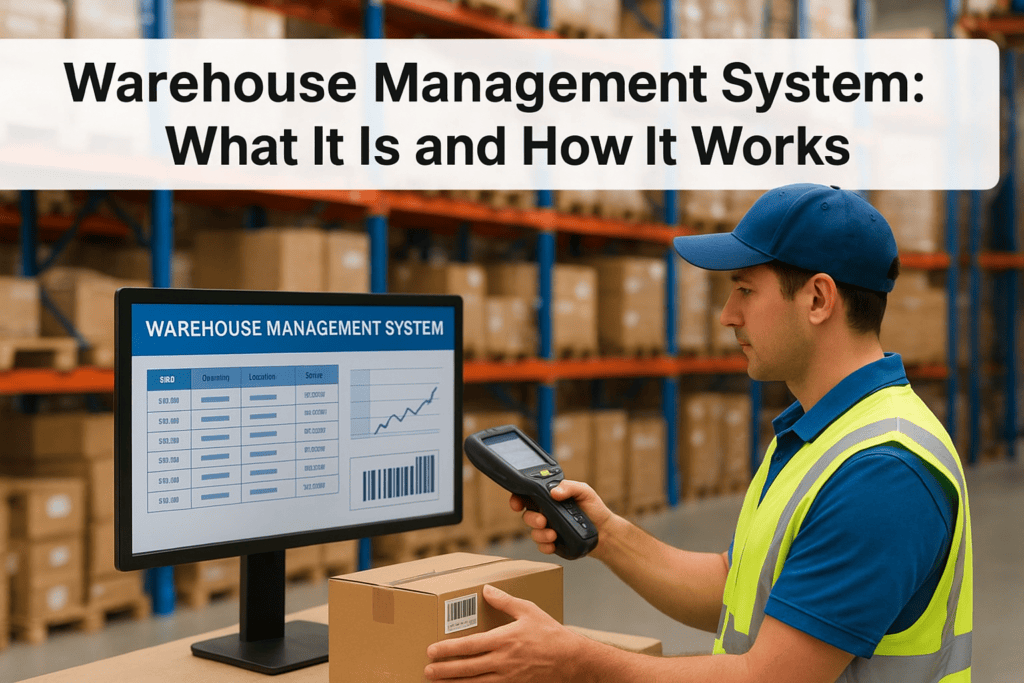
A warehouse management system (WMS) is the execution engine for your warehouse, not a glorified spreadsheet. It directs receiving, putaway, picking, packing, and shipping in real time, feeds accurate data into your ERP, and turns warehouse operations from an opaque cost center into a measurable driver of inventory accuracy, labor productivity, and margin.
In this post...
Tags
If your warehouse team is still tracking inventory on spreadsheets or fighting with a system that can’t talk to your ERP, you already know the cost: missed shipments, inaccurate counts, and finance chasing numbers that never quite match. A warehouse management system (WMS) is the software layer built to fix exactly that problem, and understanding it is the first step toward deciding if your operation actually needs one.
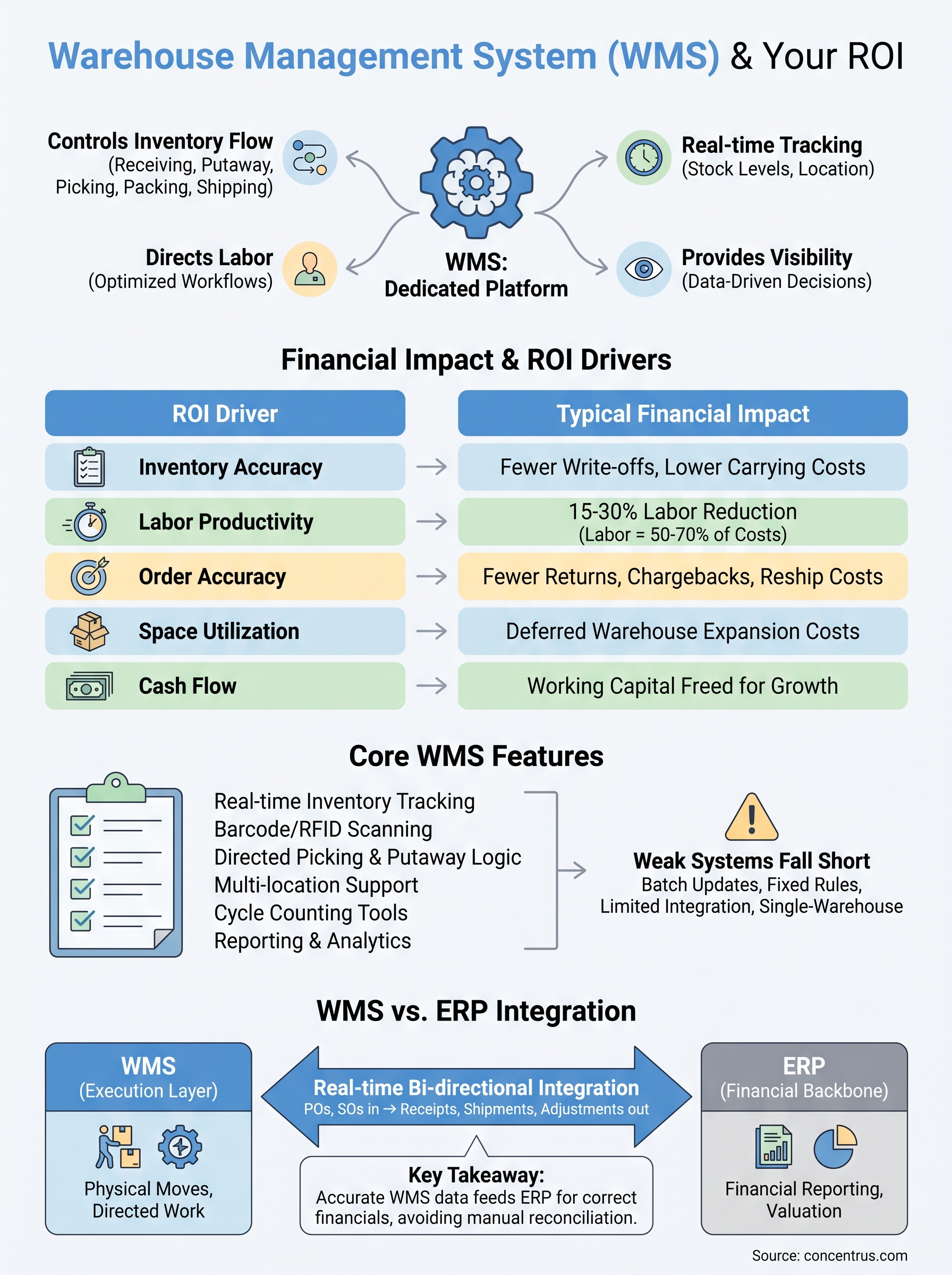
In plain terms, a WMS is a dedicated platform that controls how inventory moves through your warehouse, from receiving to putaway, picking, packing, and shipping. It tracks stock levels in real time, directs labor, and gives you visibility into every SKU at every stage, replacing guesswork with data you can act on.
This article breaks down what a WMS actually does day to day, the core functions that separate a real system from a glorified spreadsheet, and how it fits alongside your ERP rather than competing with it. If you’re a finance leader evaluating warehouse technology, you’ll come away knowing exactly what to look for and why it matters to your bottom line.
Why a warehouse management system matters for your ROI
CFOs don’t lose sleep over pick paths or dock scheduling. You lose sleep over margin erosion, write-offs, and labor costs that keep climbing without a clear explanation. A warehouse management system matters to your ROI because it attacks all three at once, turning warehouse operations from a cost center you can’t quite explain into a measurable, controllable part of the business.
The hidden cost of manual tracking
Manual and spreadsheet-based inventory tracking looks cheap until you count what it actually costs you. Every miscount triggers a cascade: a customer order can’t ship on time, a rush replenishment order gets placed at a premium, and your team spends hours reconciling numbers that should have matched in the first place. Overstock ties up working capital you could deploy elsewhere, while stockouts cost you sales and, eventually, customers. None of this shows up as a single line item on your P&L, which is exactly why it’s so easy to underestimate and so hard to fix without better data.
A warehouse management system turns inventory accuracy from a hope into a measurable, repeatable outcome.
Where the ROI actually shows up
A well-implemented WMS drives ROI through a handful of concrete levers, not vague promises of “efficiency.” The table below breaks down where finance leaders typically see the impact first.
These aren’t hypothetical categories. Labor costs typically run 50-70% of total warehouse operating expense, so even modest productivity gains compound fast across a full year.
Why finance leaders should care beyond the warehouse floor
Tracking gets sloppy the moment inventory data lives in a system that doesn’t talk to your general ledger. Every discrepancy between physical stock and what your ERP shows forces someone, usually in finance, to investigate, adjust, and explain the variance to auditors or the board. A WMS that’s properly connected to your ERP eliminates that gap by feeding accurate, timestamped inventory data straight into your financial reporting, which means your cost of goods sold and inventory valuation reflect reality instead of last month’s cycle count.
Understanding this connection is also why so many ERP rescue projects trace back to warehouse operations that were never properly scoped in the first place. Companies buy an ERP expecting it to solve inventory visibility problems, only to discover the ERP’s native inventory module can’t handle the complexity of a real distribution or manufacturing floor. That gap is exactly where a dedicated WMS earns its keep, and it’s a big part of why the National Institute of Standards and Technology has documented supply chain visibility as a direct driver of operational resilience and cost control (see NIST’s supply chain risk management guidance at nist.gov). Get the WMS-ERP relationship right from the start, and you avoid rebuilding it later under pressure.
How a warehouse management system works day to day
Walk onto a warehouse floor running a real WMS and you’ll notice something immediately: nobody is guessing. Every worker has a handheld scanner or a screen telling them exactly what to do next, and every action they take updates the system in real time. That’s the core mechanic of a warehouse management system: it directs physical work and captures data simultaneously, so the record of what happened matches what actually happened.

The inventory flow from dock to dock
A shipment arrives, and the WMS already knows what’s expected because it pulled the purchase order from your ERP. Here’s the typical sequence it manages:
Receiving: Scan incoming goods against the PO, flagging discrepancies before they become inventory problems.
Putaway: Direct workers to specific bin locations based on velocity, size, or storage rules, not whatever shelf happens to be open.
Inventory management: Track quantity, location, and status (available, allocated, damaged) for every SKU continuously.
Picking: Generate optimized pick paths so workers aren’t crisscrossing the warehouse for a single order.
Packing and shipping: Confirm the right items and quantities go into the right box, then generate labels and shipping documents automatically.
A WMS doesn’t just record what happened in your warehouse, it tells your team what to do next and confirms they did it right.
The data layer that ties it together
Behind every scan, every bin assignment, and every packed order sits a database updating in real time. This is what separates a WMS from a paper checklist or a static spreadsheet. When a picker scans an item, the system immediately decrements available inventory, updates the order status, and, if properly integrated, pushes that change toward your ERP for financial reporting. There’s no batch upload at the end of the day, no reconciliation gap between
Key features that separate a strong WMS from a weak one
Not every system marketed as a warehouse management system actually functions like one. Some are little more than inventory spreadsheets with a nicer interface, while others are stripped-down modules bolted onto an ERP that was never designed for complex warehouse logic. Knowing the difference before you buy saves you from a rescue project down the road.
Core capabilities you should never skip
Before evaluating vendors, check whether the platform actually delivers these functions, not just claims to:
Real-time inventory tracking: Stock counts update the instant a scan happens, not on a nightly batch job.
Barcode or RFID scanning: Manual data entry defeats the purpose of a WMS and reintroduces the errors you’re trying to eliminate.
Directed picking and putaway logic: The system tells workers where to go and what to grab, based on rules you control.
Multi-location and multi-warehouse support: If you operate more than one facility, the WMS needs to manage them as one connected network, not separate silos.
Reporting and analytics: You need visibility into throughput, accuracy rates, and labor productivity without exporting data to a third tool.
A weak WMS tracks inventory after the fact. A strong one directs the work that creates accurate inventory in the first place.
Where weaker systems fall short
The gap between a strong and weak WMS usually shows up under pressure, during peak season, a rapid SKU expansion, or a new sales channel. Weaker systems handle simple, static operations fine but break down when complexity increases. Watch for these warning signs during evaluation:
Weak WMS Signal
Strong WMS Behavior
Inventory updates in batches
Updates in real time, every transaction
Fixed putaway rules only
Dynamic slotting based on velocity and demand
Limited or no API integration
Native, bidirectional ERP integration
Single-warehouse design
Scales across multiple facilities and channels
Basic reporting only
Configurable dashboards tied to KPIs
Integration capability deserves special attention here, because a WMS that can’t sync cleanly with your ERP just recreates the reconciliation headaches you’re trying to eliminate, only with better barcode scanners.
WMS vs. ERP: how the two systems work together
Questions about whether a warehouse management system replaces your ERP come up constantly, and the answer is no. Your ERP runs the financial and operational backbone of the business, general ledger, accounts payable, purchasing, and financial reporting. A WMS handles the physical execution layer inside the four walls of your warehouse. Neither one does the other’s job well, and trying to force one platform to cover both usually ends in a rescue project.
What each system is actually built to do
Getting this distinction wrong is the single biggest reason companies end up disappointed with either system. The table below lays out where each one owns the work.
Function
ERP
WMS
Financial reporting
Owns it
Feeds data into it
Purchase orders
Creates and tracks
Receives against it
Inventory valuation
Records financial value
Tracks physical location and status
Pick, pack, ship logic
Not built for this
Owns it
Directed labor
No
Owns it
General ledger updates
Owns it
Never touches it directly
An ERP tells you what your inventory is worth. A WMS tells you exactly where it is and what to do with it next.
Where integration actually happens
Value only shows up when these two systems talk to each other continuously, not through a nightly file transfer that leaves finance staring at stale numbers all day. Real integration means the ERP pushes purchase orders and sales orders to the WMS automatically, and the WMS pushes receipts, shipments, and inventory adjustments back to the ERP the moment they happen. This is exactly the kind of connection Concentrus builds through its ROI Roadmap™ methodology, tying warehouse execution directly to the financial outcomes your ERP is supposed to report.
X-ray your current setup and you’ll usually find the failure point sits right here, at the integration layer, not inside either system individually. Bidirectional, real-time syncing between ERP and WMS is what turns two separate tools into one accurate picture of your business. Skip that integration work, or treat it as an afterthought during implementation, and you’ll end up right back where you started: two systems, two versions of the truth, and finance stuck reconciling the difference by hand.
What this means for your next ERP decision
A warehouse management system isn’t a nice-to-have bolted onto your ERP, it’s the operational engine that determines whether your inventory data, your labor costs, and your financial reporting actually match reality. Get the WMS-ERP relationship wrong, and you’ll spend years reconciling numbers by hand while margin erosion hides in plain sight. Get it right, and warehouse operations shift from a cost center you can’t explain into a measurable driver of ROI.
Before you sign another software contract, ask whether the platform on the table actually integrates in real time with your financial system, or whether you’re setting up the next rescue project. That question matters more than any feature list a vendor hands you.
If you’re evaluating a new ERP, rescuing a failed one, or trying to figure out where your WMS gap actually lives, talk to Concentrus about building the integration that ties your warehouse to your bottom line.
When your ERP and WMS don’t sync, every report becomes a guess and every reconciliation a fire drill. Integrating WMS with ERP creates one real-time source of truth for inventory, orders, and fulfillment—protecting margins, tightening cash flow visibility, and letting finance and operations scale without drowning in manual workarounds.
Warehouse management directly impacts cash flow, margins, and scalability. Poor processes create hidden costs through inventory errors, labor inefficiencies, and delayed fulfillment. With defined workflows, the right WMS, and ERP integration, companies gain real-time visibility, stronger inventory accuracy, faster order processing, and measurable financial returns across the business.
If you're a CFO evaluating warehouse management technology, Manhattan WMS has probably landed on your shortlist. Manhattan Associates built its reputation on warehouse execution, and their platform powers some of the largest distribution operations in the world. But reputation alone doesn't answer the question that matters most: will this investment actually pay off for your business?
That's the question we help midsized companies answer every day at Concentrus. As NetSuite and Acumatica ERP implementation and rescue specialists, we've sat across the table from finance leaders who chose warehouse management tools without fully understanding how those tools fit, or don't fit, within their broader ERP ecosystem. The result is often disconnected systems, duplicated data, and ROI that never materializes. Whether Manhattan WMS is the right call or a costly detour depends entirely on your operational reality and how it aligns with your financial goals.
This guide breaks down what Manhattan WMS actually does, where it excels, where it falls short, and how to evaluate it against alternatives that may integrate more tightly with your existing ERP investment. We'll cover features, costs, competitor comparisons, and the ROI considerations that should drive your decision, so you can move forward with clarity instead of assumptions.
Why Manhattan WMS matters to CFOs in 2026
Supply chain disruption has not gone away. Tariff pressures, labor shortages, and rising customer expectations have pushed warehouse efficiency from an operational footnote to a board-level conversation. For CFOs at midsized companies, the question is no longer whether to invest in warehouse technology, it's whether a platform like Manhattan WMS justifies the cost and complexity it brings with it.
The supply chain pressure driving WMS adoption
Warehouse management systems have moved up the priority list because margins are thinner and order accuracy is now a competitive differentiator. Customers, whether they're retail buyers or B2B distributors, expect faster fulfillment with fewer errors. When your warehouse runs on spreadsheets, whiteboards, or a legacy ERP module, you absorb the cost of that gap through chargebacks, expedited shipping, and returns.
The warehouses that consistently outperform in 2026 are not the ones with the most square footage, they're the ones with the tightest connection between inventory data and financial reporting.
Manhattan Associates built their platform specifically for high-volume, high-complexity distribution. Retailers, third-party logistics providers, and large manufacturers have relied on it for decades because it handles multi-node fulfillment, labor management, and slotting optimization at a scale that most warehouse tools cannot match.
What Manhattan WMS actually costs at midsized scale
This is where many finance leaders get caught off guard. Manhattan WMS is an enterprise-tier platform, and its pricing reflects that. Implementation costs typically start in the high six figures and can climb well past seven figures depending on the complexity of your distribution network, the number of warehouse locations, and the level of customization required.
Annual licensing and support adds another significant line item to your budget. For a midsized company running two or three warehouse locations, this raises an immediate question: are you buying more platform than your operation actually needs? Manhattan is engineered for the Fortune 500 distribution center, not the 200,000-square-foot facility that ships 1,500 orders per day.
Why ERP integration is the real financial risk
Even if Manhattan WMS fits your warehouse complexity, the ROI picture shifts dramatically based on how well it connects to your ERP system. A WMS that runs as an island produces real-time inventory data that your finance team cannot act on. Purchase orders, landed costs, and demand signals stay siloed, which means your financial close takes longer and your inventory valuations stay unreliable.
For companies running NetSuite or Acumatica, this integration gap is a known cost driver. Middleware connectors and custom API builds require ongoing maintenance, and every system update on either side creates a regression risk. Before you commit to any WMS investment, your team needs to map exactly how warehouse transactions will flow into your financial statements without manual reconciliation.
How Manhattan WMS works in day-to-day operations
Manhattan WMS manages warehouse activity from the moment inventory arrives at your dock to the moment it ships out the door. The platform assigns receiving tasks, putaway locations, pick paths, and packing instructions to workers in real time based on order priority, inventory position, and labor availability. Every transaction gets logged, which gives warehouse managers a live view of what's happening on the floor without walking it.
What the system controls at the task level
Workers interact with Manhattan WMS through handheld scanners, mobile devices, or voice-directed equipment, depending on your facility setup. The system calculates the most efficient pick path for each order and adjusts dynamically when priorities change. If a high-priority shipment comes in mid-shift, the system re-sequences tasks automatically rather than waiting for a supervisor to intervene.
The real value of a well-configured WMS is not in the technology itself, it is in how quickly your team can execute without making decisions that should be handled by the system.
Labor management is one of the areas where Manhattan's platform separates itself from lighter WMS tools. It tracks engineered labor standards, measures individual worker productivity against those standards, and flags deviations before they compound into fulfillment delays or overtime costs.
How warehouse data reaches your financial team
This is the step that most implementation plans underestimate. Manhattan WMS generates transaction-level data, including inventory adjustments, cost-per-pick metrics, and shrinkage events, that your ERP system needs to produce accurate financial statements. When that data transfer runs on a scheduled batch sync, your finance team is always working with numbers that are hours behind reality, which creates problems during month-end close.
Real-time API connections between your WMS and ERP solve this, but they require deliberate planning and ongoing maintenance, not an afterthought integration bolted on after go-live.
How to tell if Manhattan WMS fits your business
Not every warehouse operation needs enterprise-grade WMS software, and buying the wrong tier of platform is just as costly as running no WMS at all. Before you commit budget to a full Manhattan WMS evaluation, run your operation through a set of honest fitness questions. The answers will tell you quickly whether you're looking at the right tool or spending evaluation time on a platform built for a scale you haven't reached yet.
Signs Manhattan WMS fits your operation
Manhattan WMS delivers its strongest ROI in high-volume, high-complexity environments where the cost of inefficiency is large enough to offset significant implementation and licensing expenses. If your warehouse ships tens of thousands of orders per day, manages multiple fulfillment nodes, or operates under strict retailer compliance requirements, the platform's labor management and slotting optimization features can generate measurable savings.
The fit question is not whether Manhattan WMS is capable, it clearly is. The question is whether your operational complexity justifies the investment relative to alternatives that integrate more cleanly with your ERP.
You also benefit most from Manhattan's feature depth if your workforce is large enough to see a return on engineered labor standards tracking. A facility with 20 pickers will not recoup that investment the same way a facility with 200 will.
Signs you need a different approach
If your company runs one or two warehouse locations and processes under 5,000 orders per day, a native WMS module inside NetSuite or a mid-market alternative will likely cover your needs at a fraction of the cost and integration risk. The implementation timeline alone for Manhattan can consume 12 to 18 months, and a midsized operation often cannot absorb that disruption without significant impact to customer service and cash flow.
Consider whether your ERP partner can extend your current platform before adding a standalone WMS to your technology stack.
How to plan ERP and automation integrations
Your ERP is the financial backbone of your operation, and any WMS you add sits downstream from it. Before you get deep into a Manhattan WMS evaluation, you need a clear picture of how warehouse transactions will flow into your general ledger, inventory valuation, and purchasing workflows. Integration planning is not a technical checkbox, it is a financial risk management exercise that directly determines whether your WMS investment produces the ROI you are targeting.
Map your data flows before you select a vendor
Inventory adjustments, receiving confirmations, and shipment confirmations all need to reach your ERP in a timeframe that supports accurate financial reporting. Start by documenting every transaction type your warehouse generates and identifying which ones trigger a financial event in your system of record. This exercise gives your ERP partner and your WMS vendor a shared integration map to work from before contracts are signed.
The integration architecture you build between your WMS and ERP will either compress your financial close or extend it, so design this correctly before you commit budget.
Skipping this step is the most common reason ERP and WMS projects miss their ROI targets. When data gaps appear after go-live, the cost to repair them escalates quickly because both systems are already in production and your team is already dependent on the outputs those systems generate.
Understand automation dependencies in your fulfillment stack
Modern warehouse operations rely on conveyor controls, dimensioners, and robotic picking systems that generate their own data streams. Each of those systems needs to connect to your WMS, and your WMS needs to pass that data upstream to your ERP without delays that distort your inventory position or force manual reconciliation at month-end.
If you run NetSuite or Acumatica, native connectors or certified middleware partners will reduce your integration maintenance burden compared to custom API builds that break during platform updates. Ask every vendor you evaluate to walk you through their specific integration architecture with your ERP before advancing them past the shortlist stage.
How to build an ROI case and avoid cost traps
Building an ROI case for any WMS starts with total cost of ownership, not just the licensing number a vendor puts in front of you. Manhattan WMS carries significant implementation, integration, and ongoing support costs that midsized finance leaders frequently underestimate when they first model the investment. Before you approve a budget, you need to account for every dollar the project will consume across its full lifecycle, including the productivity loss your team absorbs during a 12 to 18 month go-live cycle.
Calculate the true total cost of ownership
Software licensing and implementation fees are only the starting point for your cost model. Add middleware maintenance, training time, custom development for ERP integration, and the internal labor your finance and operations teams will dedicate to the project. For midsized companies evaluating Manhattan WMS, that full number often looks very different from the initial vendor quote.
If your cost model only includes what the vendor charges, you are missing half the picture before the project even starts.
Your cost model should also include a risk buffer for scope creep and integration rework, which are the two most common drivers of budget overruns in WMS projects. Build a realistic range, not a single number, and stress-test it against a scenario where go-live is delayed by six months.
Tie WMS metrics to financial outcomes
Every operational metric your WMS tracks needs a direct line to a financial KPI your CFO dashboard already measures. Pick-accuracy rates matter because they reduce chargebacks and returns. Labor productivity metrics matter because they compress overtime costs and improve margin. If you cannot draw that line clearly, the metric is noise.
Build your ROI model around three to five financial outcomes you can measure before and after implementation, such as inventory carrying costs, order fulfillment cycle time, and cost per shipment. That framework gives your board a credible payback timeline and gives your team a performance target to work toward from day one.
Next steps for a confident decision
Evaluating Manhattan WMS against your actual operational complexity and ERP environment is the work that separates a sound investment from an expensive mistake. You now have a framework to assess fit, model total cost of ownership, and tie warehouse metrics directly to financial outcomes your board cares about. Use that framework before you sign anything.
Your next move is to pressure-test your current ERP setup against the integration requirements any WMS will demand. If you run NetSuite or Acumatica and you're not certain your system is configured to support that kind of data flow, that gap needs to close first. A poorly integrated WMS will cost you more than no WMS at all, and the time to find that out is before go-live, not after.
Talk to a Concentrus ERP specialist to map your warehouse integration needs against your financial goals before you commit budget.
We Are Experts at Generating ROI for our Clients Through Custom Integration of NetSuite and Acumatica ERP Software