


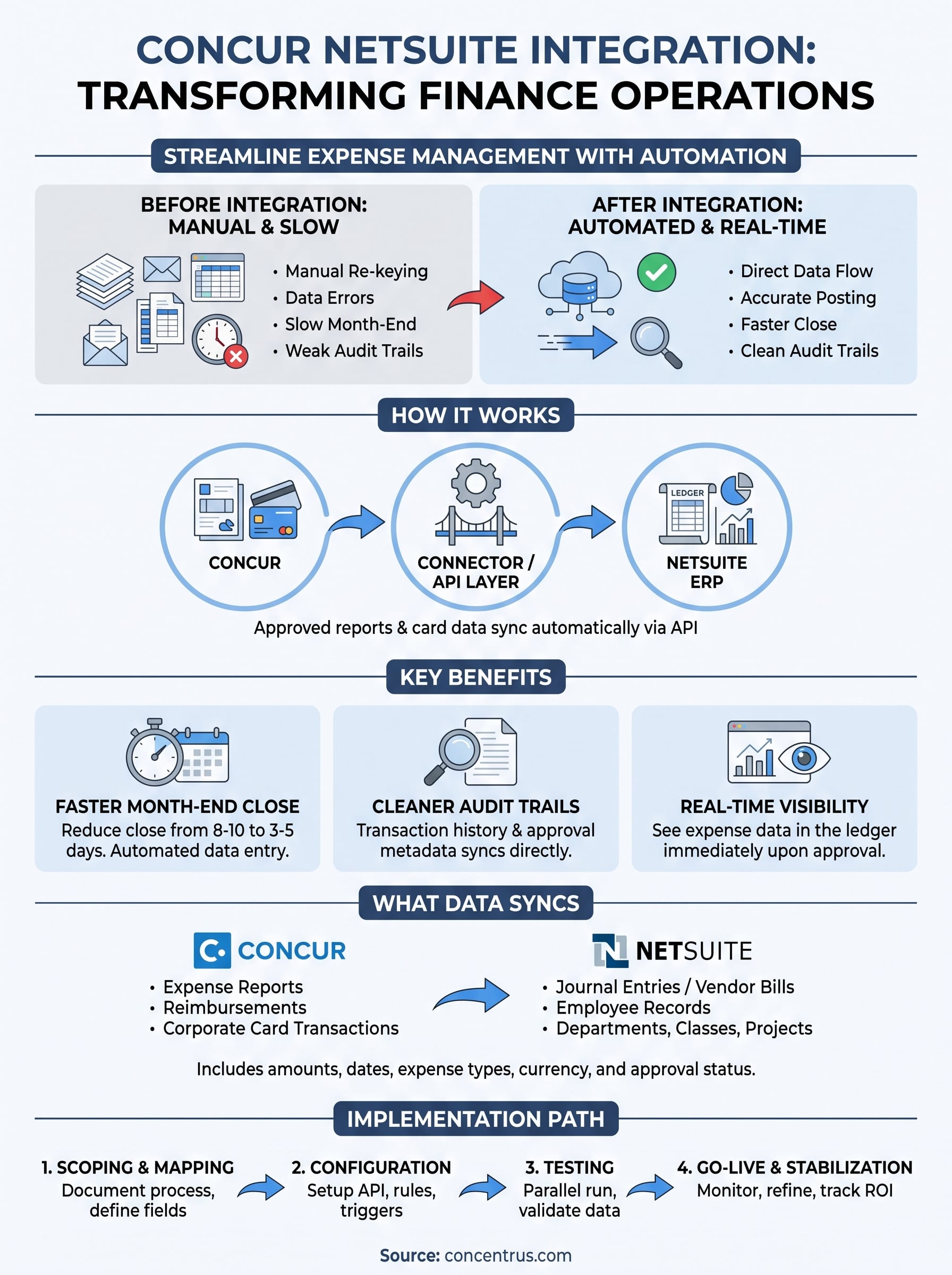
If your finance team still exports Concur reports and re-keys them into NetSuite every month end, you already know how much time and accuracy that costs you. A concur netsuite integration connects your expense management platform directly to your ERP, so approved expense reports, employee reimbursements, and corporate card transactions flow into your general ledger without manual entry.
This article explains exactly what a netsuite concur integration does, how the connection actually works behind the scenes, and which setup options fit different midsized companies, from native connectors to third-party middleware. You’ll see how transactions map to accounts, departments, and classes, and what triggers the sync between systems.
We’ll also cover the real financial payoff: faster month end closes, fewer reconciliation errors, and cleaner audit trails. For CFOs evaluating a concur integration with netsuite, that payoff matters more than the technical plumbing, and we’ll show you how to judge whether the integration is actually delivering measurable ROI once it’s live, not just running in the background.
Why Concur NetSuite integration matters for finance teams
For midsized finance teams, expense management is usually the last process to get automated, and it shows up every single month at close. Someone exports a Concur report, someone else re-keys totals into NetSuite, and a third person checks the numbers against corporate card statements. A concur netsuite integration removes that entire chain by letting approved expense data post directly to the general ledger. That’s not a nice-to-have for companies running lean finance teams. It’s the difference between closing books in three days and a month-end close that drags on for ten.
The hidden cost of manual expense processing
Manual re-entry doesn’t just waste hours, it introduces risk at every handoff. A transposed account code, a missed expense report, or a currency conversion error can sit undetected until an auditor or a board member asks why margins look off. Common friction points we see in midsized companies before they integrate include:
- Duplicate entries when the same expense report gets keyed into NetSuite twice by different team members
- Mismatched departments or classes because the person entering data doesn’t know the original approval routing
- Delayed reimbursements when card transactions sit in a spreadsheet queue instead of syncing automatically
- Inconsistent coding across subsidiaries, which turns consolidated reporting into a cleanup project
Each of these is fixable with better spreadsheets and tighter policy, sure, but that just adds more manual review on top of manual entry. It doesn’t scale.
Where integration pays off fastest
Every finance leader we talk to cares about the same three things: speed, accuracy, and visibility. Real-time synchronization between Concur and NetSuite gives you all three at once, because approved expenses land in the ledger the moment they’re approved, not weeks later during a batch upload.
When expense data flows automatically, your close speed becomes a function of your approval workflow, not your data entry team.
That shift matters most during audit season. Clean audit trails replace the folder of email approvals and spreadsheet exports that auditors used to request line by line. Every transaction carries its original approval, coding, and timestamp straight from Concur into NetSuite.
The ROI angle CFOs actually track
Speed and accuracy are the visible wins, but the number that convinces a CFO to prioritize this project is usually cost per transaction. Here’s a rough comparison based on what midsized companies typically see before and after integrating:
| Metric | Manual process | Integrated process |
|---|---|---|
| Avg. time to process one expense report | 15-20 minutes | Under 2 minutes |
| Month-end close duration | 8-10 business days | 3-5 business days |
| Reconciliation errors per cycle | 5-10 | 0-2 |
| Staff hours spent on expense entry monthly | 20-30 hours | 3-5 hours |
Those hours add up to real payroll savings, and they’re exactly the kind of ERP return on investment CFOs should actually measure, which is why we build them into our ROI Roadmap™ methodology when we scope an ERP project. If an integration can’t show its impact on close time or error rate within a quarter, it’s not delivering what it should.
Why this becomes a finance leadership issue, not just IT
Too often, a concur integration with netsuite gets treated as a technical checkbox handed to an IT contractor. That’s a mistake. The integration touches account mapping, approval hierarchies, and subsidiary structures, all decisions that belong to finance leadership, not a developer working from a ticket. When CFOs own the setup decisions upfront, the integration actually reflects how the business runs, and the ROI shows up where it’s supposed to: in the close, the audit, and the balance sheet.
How the Concur NetSuite integration works
Underneath the dashboards and approval emails, a concur netsuite integration runs on a fairly simple loop: Concur finishes processing an expense report, a connector picks up that change, translates it into NetSuite’s data structure, and posts the result as a journal entry or vendor bill. The mechanics differ depending on which tool handles the connection, but the underlying sequence stays the same across every setup we’ve built for midsized companies.

The connection layer
Most integrations run on API-based communication rather than file transfers. Concur exposes REST APIs that expose expense reports, cash advances, and card transaction data, and NetSuite’s SuiteTalk or REST API accepts that data as structured records. Whatever middleware sits between them, whether it’s a native connector or a third-party iPaaS tool, authenticates once using OAuth tokens, following the same API integration best practices any secure ERP connection relies on, and then polls or listens for changes on a schedule you control, often every 15 to 60 minutes.
The integration isn’t magic, it’s a translation layer that turns Concur’s approval status into a NetSuite transaction the moment that status changes, which is where the difference between real-time and batch integration shows up in your numbers.
What triggers the sync
The sync doesn’t fire the second an employee submits an expense report. It fires when the report clears final approval in Concur, because that’s the point where the data becomes financially reliable. A typical trigger sequence looks like this:
- Employee submits expense report with receipts attached
- Manager and, if required, finance approve the report in Concur
- Connector detects the status change from “pending” to “approved”
- Data is pulled, validated against mapping rules, and formatted for NetSuite
- Record posts to NetSuite as a journal entry or vendor bill, tagged with the original approval metadata
If a report gets rejected or sent back for correction, it simply never reaches step 3, which keeps unapproved spend out of your ledger entirely.
Mapping logic behind the scenes
Every connector relies on a mapping table that tells it how a Concur field corresponds to a NetSuite field. A simplified version looks something like this:
Concur Field          ->  NetSuite Field
Expense Type          ->  GL Account
Cost Center            ->  Department
Project Code           ->  Class or Project
Employee ID            ->  Vendor/Employee Record
Report Total           ->  Journal Entry Amount
That mapping is where most implementation time actually goes, because every subsidiary, department structure, and chart of accounts is different. Get the mapping wrong and the sync still runs, it just posts numbers to the wrong place, which is worse than a manual error because nobody’s double-checking it. That’s why we treat mapping design as a finance decision during setup, not a technical afterthought left to whichever consultant configured the last field.
What data syncs between Concur and NetSuite
A concur netsuite integration doesn’t just move dollar amounts. It carries a full record of who spent what, why, and under whose approval, which is what makes the sync useful for both accounting and audit purposes. Knowing exactly which fields cross over helps you scope the mapping project correctly and set expectations with department heads before go-live.
Expense report and reimbursement data
Business expense reports form the backbone of the sync. Each approved report carries line-item detail: expense type, amount, currency, date, and the employee submitting it. That detail posts to NetSuite as either a journal entry or an employee reimbursement transaction, depending on how you’ve configured the connector. Attached receipts and comments typically stay in Concur as supporting documentation, linked by reference number rather than duplicated into NetSuite’s file cabinet.
Corporate card and vendor transactions
Card feeds add a second data stream. Corporate card transactions flow from the card issuer into Concur first, get coded and approved there, then sync into NetSuite as vendor bills or credit card transactions tied to the correct GL account, the same path NetSuite AP automation tools use for supplier invoices. This is where automated financial data synchronization earns its keep, because card statements used to be the slowest part of reconciliation. Once the feed is live, a $4,000 travel charge shows up in NetSuite the same day it clears approval, not three weeks later during statement matching.
Dimensional and organizational data
Beyond the transaction amount, most integrations carry the dimensional data that makes reporting useful. Here’s what typically maps across:
| Concur Data Element | NetSuite Destination |
|---|---|
| Expense report total | Journal entry / vendor bill amount |
| Cost center or department | Department field |
| Project or client code | Class or Project field |
| Employee record | Employee or Vendor record |
| Approval metadata | Transaction memo / custom field |
| Currency and exchange rate | Multi-currency transaction fields |
If the data doesn’t carry its department, class, and approval history into NetSuite, the sync only solved half the problem.
What generally doesn’t sync
Not everything in Concur needs a home in NetSuite. Receipt images, policy violation flags, and internal approval comments usually stay in Concur, since NetSuite has no use for them beyond the audit trail already carried in the transaction memo. Subsidiary-level tax details sometimes need custom mapping if you’re running multi-entity NetSuite, particularly for companies with international travel spend and VAT reclaim requirements, which is where an Avalara NetSuite integration usually enters the picture. Skipping that step is a common reason integrations look complete in testing but produce incomplete tax reporting once real transactions start flowing at volume.
Native connector vs iPaaS integration tools
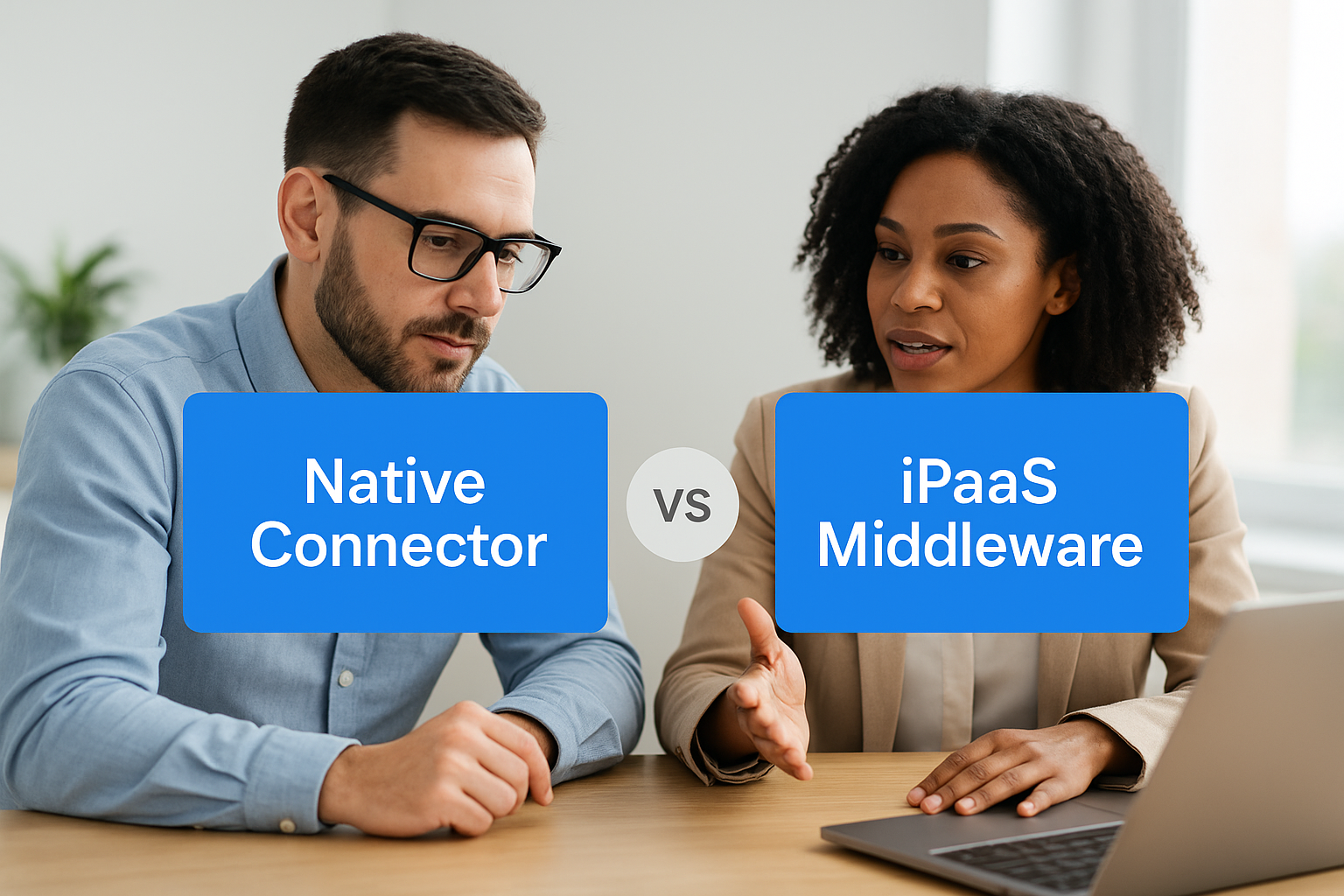
Once you decide to connect Concur and NetSuite, you’re choosing between two fundamentally different architectures: a native connector built specifically for this pairing, or an iPaaS middleware platform that treats Concur and NetSuite as two endpoints among many. Both get expense data into your ledger, but they differ in setup time, flexibility, and long-term maintenance cost, and picking the wrong one for your company’s complexity is one of the most common mistakes we see midsized finance teams make.
What a native connector gives you
A native connector, whether built by Concur, NetSuite, or a certified third party, ships with pre-built field mappings for the most common scenarios: standard chart of accounts, single subsidiary, straightforward department and class structures. Setup is faster because someone else already solved the basic translation problem. The tradeoff shows up the moment your business doesn’t fit the standard mold. Multi-subsidiary consolidations, custom approval hierarchies, or non-standard GL structures often require workarounds that push you outside what the connector was designed to handle.
What iPaaS middleware adds
Platforms like Celigo or Boomi sit between Concur and NetSuite as a configurable middleware layer, and these ERP integration platform tools give you control over every field mapping, transformation rule, and trigger condition. This matters most for companies running multiple subsidiaries, custom pricing structures, or industry-specific coding rules that a native connector can’t accommodate without custom development. The Concentrus Partner Network™ includes vetted middleware options and NetSuite integration partners for midsize CFOs exactly for this reason, since a rigid connector on a complex organization creates more manual cleanup than it eliminates.
Choose the tool that matches your chart of accounts complexity, not the one with the shortest setup time.
Comparing the two approaches
| Factor | Native connector | iPaaS middleware |
|---|---|---|
| Setup speed | Faster, days to a few weeks | Slower, several weeks |
| Best fit | Single subsidiary, standard coding | Multi-entity, custom mapping needs |
| Ongoing flexibility | Limited to vendor’s config options | Fully customizable field logic |
| Maintenance | Vendor-managed updates | Requires internal or partner oversight |
| Cost structure | Lower upfront, less scalable | Higher upfront, scales with complexity |
Making the call for your organization
Size and structure decide this more than preference. Companies running a single subsidiary with a clean, simple chart of accounts rarely need the overhead of a full middleware platform, a native connector handles that volume fine. Firms managing multiple entities, intercompany transactions, or industry-specific compliance rules, common in manufacturing and distribution, usually outgrow native connectors within a year and end up rebuilding the integration on iPaaS anyway. Skipping that rebuild by scoping correctly the first time is exactly the kind of decision our ROI Roadmap™ methodology forces into the open before implementation starts, rather than after the first failed reconciliation.
How to set up and implement the integration
Setting up a concur netsuite integration isn’t a weekend project, even with a native connector. The work splits into distinct phases, each owned by a different mix of finance, IT, and whichever partner or vendor handles the build. Skipping a phase to save time is the single most common reason integrations need rework six months after go-live.
Scoping and mapping design
Before anyone touches configuration screens, finance leadership needs to document the chart of accounts structure in NetSuite, subsidiary setup, and approval hierarchy that the integration has to respect. This is where you decide how expense types map to GL accounts, how cost centers translate to departments or classes, and whether multi-currency transactions need special handling. Rushing this step to hit a launch date is exactly how mismatched department codes end up buried in your ledger for a full quarter before anyone notices.
A rushed mapping session costs you more cleanup hours than the time you saved skipping it.
Configuration and connector setup
Once mapping is documented, the technical build starts. Typical steps look like this:
- Establish API authentication between Concur and NetSuite using OAuth credentials
- Configure field mappings based on the documented structure from the scoping phase
- Set sync frequency and define trigger conditions (usually final approval status)
- Build any custom fields NetSuite needs to receive approval metadata or project codes
- Configure error handling and notification rules for failed or rejected syncs
Each step depends on the one before it, so a native connector setup might move through this list in under two weeks, while an iPaaS build with custom transformation rules can take four to six.
Testing before go-live
Testing deserves more time than most project plans give it. Work from an integration testing checklist and run a full cycle of test expense reports through every scenario your business actually generates: multi-currency reports, split-department charges, rejected and resubmitted reports, and card transactions above your approval threshold. Parallel testing against a manual close cycle for one full month catches mismatches that a quick sandbox test misses, particularly around rounding differences and currency conversion timing.
Go-live and stabilization
Go-live doesn’t mean the project is finished. Plan for a stabilization period of at least one full close cycle where someone reviews every synced transaction against its Concur source before it posts permanently. That review catches mapping gaps early, while they’re still a five-minute fix instead of a restated financial statement. This is also the point where you should start tracking the metrics that justified the project in the first place, close duration, error rate, staff hours, against the baseline you measured before implementation. If those numbers aren’t visibly moving within one quarter, something in the setup needs revisiting, and that’s a conversation worth having with whoever built your ROI Roadmap™ before the second close cycle repeats the same problem.
Common challenges and best practices to know
Even a well-scoped concur netsuite integration runs into predictable friction points once real transaction volume hits the system. Most of these problems trace back to decisions made during mapping or testing that seemed fine in a sandbox but break down under actual employee behavior. Knowing what typically goes wrong lets you catch it in week one instead of during your next audit.

Mapping errors that surface after go-live
Sandbox testing rarely covers every expense type your employees actually submit. Miscoded expense types are the most common issue we see, usually when a new cost center or project code gets added in Concur after the initial mapping was locked down. The connector still posts the transaction, it just lands in the wrong GL account, and nobody notices until a department head asks why their budget looks off. Build a monthly review into your close checklist for the first two quarters, specifically checking new expense types and cost centers against your mapping table.
Approval workflow mismatches
Often, the trigger logic assumes every report follows a clean linear approval path, the way approval workflows in NetSuite are usually first configured, but real organizations have exceptions: delegated approvers, split approvals across departments, or emergency spend that skips a step. When the connector doesn’t recognize an approval status change, the report simply stalls instead of syncing, and it sits invisible until someone manually checks Concur against NetSuite.
An integration that silently stalls is worse than one that fails loudly, because nobody goes looking for a problem they don’t know exists.
Currency and multi-subsidiary complications
Furthermore, companies running international travel spend or multiple subsidiaries hit currency conversion timing issues that a single-entity test never reveals. A report submitted in euros but approved a week later can post at a different exchange rate than what Concur originally calculated, creating small reconciliation gaps that compound across hundreds of transactions. Multi-subsidiary setups add another layer, since intercompany expenses need consistent coding across entities, which is why it helps to know how NetSuite OneWorld manages transactions between subsidiaries before your consolidated reporting turns into a cleanup project all over again.
Best practices that prevent rework
Getting ahead of these issues comes down to a short list of ERP integration habits that midsized finance teams consistently get right:
- Lock mapping changes behind finance sign-off, so new cost centers or expense types never go live without an updated mapping entry
- Review the first 90 days of synced transactions weekly, not monthly, while volume and edge cases are still surfacing
- Document exception handling for delegated approvals and emergency spend before go-live, not after the first stalled report
- Reconcile currency-converted transactions monthly for any subsidiary with meaningful international spend
- Assign one owner for the integration, ideally in finance, who fields every mapping question instead of routing it through IT
Skipping any one of these rarely causes a visible failure right away. It shows up three months later as a reconciliation gap nobody can explain, and by then it costs far more to trace than it would have to prevent.
What this means for your finance team
A concur netsuite integration isn’t a technical upgrade you hand off and forget. It’s a finance decision that changes how fast you close, how clean your audit trail looks, and how many hours your team spends on work that shouldn’t require a human at all. The mechanics matter, native connector versus iPaaS, mapping tables, trigger logic, but they only matter because they determine whether the ROI you promised actually shows up in your numbers three months after go-live.
Get the mapping right, own the setup decisions instead of delegating them to IT, and track your close time and error rate against a real baseline. That’s what separates an integration that quietly pays for itself from one that just moves the same manual problems somewhere less visible.
If you want that ROI tied to measurable outcomes from day one, talk to Concentrus about ERP integration services and scoping your integration the right way.