

Your ERP system holds critical financial data, but if it can’t communicate with your CRM, warehouse management, or e-commerce platforms, you’re leaving money on the table. For CFOs at midsized companies, mastering ERP integration best practices isn’t optional, it’s the difference between a technology investment that pays dividends and one that drains resources. The reality? Most integration failures stem from planning gaps, not technical limitations.
You need more than generic advice. You need a framework that connects integration decisions directly to financial outcomes, faster closes, accurate forecasting, and real-time visibility across your operations. Whether you’re implementing NetSuite or Acumatica, or rescuing an underperforming system, the integration layer determines whether your ERP becomes a strategic asset or an expensive headache. Data integrity, security protocols, and scalable architecture all demand attention before a single API call gets made.
This guide delivers the actionable checklist you’re looking for. At Concentrus, we’ve built our ROI Roadmap™ methodology around one principle: every ERP decision, including how you integrate it, must tie directly to measurable financial wins. Below, you’ll find the strategic frameworks, technical considerations, and vendor evaluation criteria that CFOs need to execute integrations that actually move the needle. No fluff, no theory, just the practical guidance your finance team can implement starting today.
Why ERP integrations fail and what CFOs can control
Most ERP integration projects collapse under predictable pressure points, and the financial impact lands squarely on your desk. You’ve seen the pattern: timelines stretch from weeks to months, costs balloon beyond initial estimates, and your team still can’t pull real-time inventory data into financial reports. The truth is, technical complexity rarely causes these failures. Instead, poor planning, misaligned stakeholders, and weak governance turn straightforward integrations into expensive disasters that delay ROI for quarters or even years.
Common failure points that drain ROI
Your integration project faces three primary threats, all of which you can anticipate and prevent. First, unclear requirements create chaos when your IT team, warehouse manager, and sales director each expect different data flows from the same integration. You end up building three separate solutions when one properly scoped integration would suffice. Second, data quality issues surface the moment you attempt to sync systems. Your CRM contains duplicate customer records, your inventory management platform uses different SKU formats, and your ERP can’t reconcile the inconsistencies. Integration exposes these problems instantly, and cleaning up bad data mid-project adds weeks of unplanned work that burns through your budget.

Third, vendor coordination failures sink projects faster than any technical obstacle. When your ERP implementation partner, CRM vendor, and middleware specialist don’t communicate effectively, you inherit the integration risk. Each vendor points fingers when APIs don’t behave as documented, data mapping breaks, or security protocols conflict. Without clear contracts that define responsibilities, you’re left managing disputes while your finance team manually exports and imports files to keep operations running.
Integration failures aren’t technical problems. They’re governance and planning failures that CFOs must address before the first line of code gets written.
Scope creep represents the fourth killer. Your original plan connects NetSuite to Salesforce for basic customer and order data, but mid-project requests expand the integration to include product catalogs, service tickets, and marketing automation workflows. Each addition introduces new mapping requirements, testing scenarios, and potential failure points. Before you know it, a straightforward two-system integration becomes a sprawling web of dependencies that no one fully understands or can maintain cost-effectively.
The CFO’s sphere of control in integration planning
You control the factors that determine integration success, starting with crystal-clear ROI targets that force disciplined decision-making. Before approving any integration project, define the specific financial outcome you expect: reduced order-to-cash cycle time, lower inventory carrying costs, or elimination of manual reconciliation work. These targets become your filter for scope decisions throughout the project. If a requested feature doesn’t directly contribute to your defined ROI, you defer it to a future phase.
Financial oversight extends beyond the initial budget. You need phase-gated approvals that tie funding releases to demonstrated progress and successful testing. This approach prevents vendors from collecting payment while deliverables remain incomplete or non-functional. At each gate, you verify that the integration meets your data accuracy standards, performs within acceptable response times, and aligns with your security requirements. Your approval process becomes the quality control mechanism that protects your investment.
Stakeholder alignment falls within your domain because integration decisions have cross-functional financial consequences. When operations wants real-time inventory updates but IT warns about system performance impacts, you make the call based on which option delivers better financial outcomes. You bring department heads together to agree on data governance rules, approval workflows, and change management protocols before the integration goes live. This upfront alignment prevents the political battles that derail projects when teams discover the integration doesn’t support their preferred workflows.
Your most powerful control mechanism? Insisting that erp integration best practices include measurable milestones with financial metrics attached to each one. You track not just project completion percentages but actual business value delivered. Did the first integration phase reduce manual data entry hours as projected? Are you seeing the expected improvement in forecast accuracy? Treating integration as a financial investment rather than an IT project fundamentally changes how your team plans, executes, and measures success.
What to integrate and in what order
You can’t integrate everything at once, and attempting to do so guarantees project failure. Your integration roadmap needs prioritization logic tied directly to financial impact, not the loudest voice in the room. The sequence matters because each integration either enables or blocks subsequent connections, and poor sequencing forces expensive rework when dependencies surface late in the project. Your goal is to build integration layers that deliver measurable ROI quickly while establishing the foundation for future expansions.
Start with systems that touch cash flow directly
Your first integrations should accelerate how money moves through your business. Connect your payment processor to your ERP before anything else because this integration eliminates manual payment matching, reduces Days Sales Outstanding (DSO), and gives you real-time visibility into cash position. When customer payments automatically sync to NetSuite or Acumatica, your team stops spending hours reconciling bank statements and can focus on collections for truly overdue accounts.
Following payment integration, connect your billing and invoicing systems if they live outside your ERP. Many midsized companies use specialized subscription management, usage-based billing, or project billing tools that generate invoices. These integrations ensure invoice data flows correctly into your general ledger, preventing the revenue recognition disasters that occur when invoices exist in one system but revenue appears in another. You eliminate the manual export-import cycle that delays month-end close and introduces data entry errors.
Integration sequence determines whether you see ROI in weeks or wait months for meaningful financial improvements.
Banking integrations round out your cash-focused foundation. When your bank feeds connect directly to your ERP, you automate cash application, speed up reconciliation, and maintain accurate cash flow forecasting. This integration becomes particularly valuable if you operate multiple bank accounts or entities, where manual reconciliation consumes significant finance team capacity that could deliver higher-value analysis instead.
Sequence operational integrations by dependency logic
After securing cash flow integrations, layer in operational systems based on data flow direction. Your CRM should integrate before your warehouse management system (WMS) because customer and order data originates in the CRM and flows downstream to fulfillment operations. When sales reps create opportunities in Salesforce, those records need to sync to NetSuite before you can generate sales orders that trigger warehouse picking instructions.
Inventory and fulfillment systems follow next in your sequence. Connect your WMS to your ERP to automate inventory updates, eliminate stock discrepancies, and enable real-time visibility into fulfillment status. This integration supports accurate inventory valuation and prevents the overselling that damages customer relationships. Following WMS integration, add shipping carriers, e-commerce platforms, and then procurement tools in that order. Each integration builds on the previous layer, creating a complete order-to-cash flow that reflects true erp integration best practices centered on financial outcomes rather than technical convenience.
Choose an integration approach that fits your stack
Your integration architecture determines long-term maintenance costs, scalability potential, and how quickly you can add new connections. The wrong choice locks you into expensive custom code that breaks with every system update, while the right approach gives you flexibility to adapt as your business grows. You need to evaluate three primary integration patterns, each with distinct financial trade-offs, before committing to an architecture that will shape your technology stack for years.
Point-to-point versus middleware versus iPaaS
Point-to-point integrations connect two systems directly through native connectors or custom API code. This approach works when you need exactly one or two integrations and your IT team has capacity to maintain the connections. You avoid middleware licensing costs, but each additional integration multiplies your maintenance burden exponentially. When NetSuite releases an API update, you test and potentially rewrite every point-to-point connection you’ve built. Five systems create ten potential connections, and complexity explodes faster than your team can manage.

Middleware platforms like Dell Boomi or MuleSoft sit between your systems as a central integration hub. Your ERP connects once to the middleware, then the platform manages connections to your CRM, WMS, and other applications. This architecture reduces maintenance because you update connections in one place rather than touching individual integrations. The trade-off? Higher upfront licensing costs and learning curve, but these expenses pay back quickly when you scale beyond three or four integrated systems.
Your integration approach determines whether adding the fifth system takes two weeks or six months and whether routine updates break your existing connections.
Integration Platform as a Service (iPaaS) solutions deliver cloud-based middleware with pre-built connectors and low-code configuration tools. Platforms like Celigo specifically target NetSuite integrations with templates that reduce implementation time from months to weeks. You gain speed and reduce dependency on specialized developers, making iPaaS attractive when your IT resources focus on core business applications rather than integration maintenance. The ongoing subscription costs remain predictable, and vendor-managed updates protect you from breaking changes when connected systems evolve.
Match approach to technical resources and scale
Your current team capacity dictates which integration approach makes financial sense. If your IT staff already manages multiple custom integrations and has deep API expertise, point-to-point connections might cost less initially than licensing middleware. However, factor in the hidden costs: developer hours spent troubleshooting failed syncs, delayed projects while your team fixes broken connections after system updates, and the risk that only one person understands how critical integrations work.
Companies planning to add three or more integrations within 18 months should choose middleware or iPaaS from the start. Retrofitting a middleware layer after building point-to-point connections wastes the investment in custom code and delays the ROI improvements you expect from integration. Following erp integration best practices means choosing an architecture that supports your three-year roadmap, not just your immediate needs, because switching integration approaches mid-stream forces expensive rework that could have funded additional business capabilities instead.
Build a data foundation before you connect systems
Your integration will fail if the data inside your systems is inconsistent, incomplete, or structured differently across platforms. Before you connect your ERP to any external application, you need clean, standardized data that follows consistent formatting rules. Skipping this step creates cascading failures: customer records won’t match between systems, inventory quantities sync incorrectly, and your finance team spends hours manually correcting errors that automated integrations should eliminate. The cost of fixing bad data after integration goes live exceeds the investment required to clean your data foundation before the first API call executes.
Clean and standardize data formats across systems
Your data cleansing project starts with identifying format inconsistencies that prevent accurate matching between systems. Customer names appear differently across platforms: “ABC Corporation” in your ERP, “ABC Corp” in your CRM, and “ABC Corp.” in your e-commerce system. Phone numbers use various formats (555-1234, (555) 123-4567, +1-555-123-4567), making automated matching impossible. Product SKUs follow different naming conventions, and addresses lack standardization that shipping carriers require.
Deduplicate records before integration to avoid compounding errors. When your CRM contains three versions of the same customer and you sync all three to NetSuite, you create invoicing confusion and reporting inaccuracies that damage both operations and customer relationships. Run deduplication tools within each source system first, establish a single source of truth for each data type, and document the canonical format that all integrated systems must follow.
Data quality problems multiply exponentially during integration. Fix them once at the source rather than chasing errors across multiple connected systems forever.
Implementing erp integration best practices requires you to define field mapping rules before development starts, not after your integration partner has built custom code. Document which CRM field maps to which ERP field, how you’ll handle blank values, and what happens when data formats conflict. Your mapping specification becomes the blueprint that prevents the miscommunication causing most integration delays.
Establish master data governance rules
Someone must own each data type and maintain authority over its structure and content. Designate clear data owners for customers, products, vendors, and chart of accounts so integration decisions don’t get made by committee or default to inconsistent practices. Your customer master owner decides whether new customer records originate in the CRM or ERP, defines required fields, and approves exceptions to standard naming conventions.
Create approval workflows for data changes that affect integrated systems. When operations wants to restructure your product hierarchy or finance needs to consolidate account codes, these changes impact every connected application. Your governance process ensures stakeholders review integration implications before changes go live, preventing the surprise breakages that occur when one system updates its data structure without coordinating across the integration layer.
Design for security, compliance, and auditability
Your integration architecture exposes financial data to more systems and users than ever before, creating security vulnerabilities that threaten both your balance sheet and regulatory standing. When customer credit card details flow from your e-commerce platform to NetSuite, or when employee salary data syncs between your HRIS and Acumatica, every connection point becomes a potential breach target. You need integration security that protects data in transit, controls access based on roles, and creates audit trails that satisfy both internal controls and external compliance requirements. Treating security as an afterthought during integration planning guarantees expensive remediation work when auditors or regulators discover gaps.
Build security into every integration layer
Your first security control happens before data moves: encryption protocols for data in transit and at rest. Every API call between your ERP and connected systems must use TLS 1.2 or higher, and sensitive fields like Social Security numbers or bank account details require field-level encryption even when stored in your integration middleware. Don’t accept vendor claims that their “secure network” provides adequate protection. Verify encryption standards in your contracts and test them during implementation, because unencrypted data transfers create liability exposure that no insurance policy fully covers.
Role-based access controls determine who can view or modify integration configurations and the data they process. Your integration platform needs granular permission settings that separate integration developers from data viewers and prevent unauthorized changes to production workflows. When a developer leaves your company, their access to integration tools and API credentials must be revoked immediately, not when someone remembers to update permissions weeks later. Implement automated access reviews quarterly to catch orphaned accounts that remain active long after employees depart.
Integration security isn’t optional infrastructure. It’s the control layer that determines whether your ERP investment creates value or becomes a regulatory disaster.
Map compliance requirements to integration controls
[Your industry dictates specific compliance obligations](https://concentrus.com/why-erp-industry-fit-is-key-to-successful-implementations/) that directly affect how you design integrations. Financial services firms must follow SOX requirements for segregation of duties and change management, meaning your integration platform needs approval workflows for configuration changes and logs that track who modified what integration logic. Healthcare organizations face HIPAA constraints requiring strict controls over patient data access and encrypted transmissions for any integration touching protected health information. Manufacturing exporters need to consider ITAR restrictions on technical data that might flow through international cloud services hosting your integration middleware.
Audit trail requirements extend beyond simple activity logs. Following erp integration best practices means capturing complete data lineage that shows exactly how a value in your ERP arrived from source systems, including any transformations, mappings, or business rules applied during integration. When auditors question a revenue figure or inventory valuation, you need to trace it back through your integrations to the originating transaction in your CRM or WMS. Your integration platform must timestamp every data sync, log every API call with request and response details, and retain these records for the periods your compliance frameworks require, typically seven years for financial data under most regulatory schemes.
Run the integration project in phases with tight scope
Your integration project needs clear boundaries and measurable milestones that prevent the scope expansion destroying timelines and budgets. Breaking your integration roadmap into discrete phases lets you deliver value incrementally, test each connection thoroughly before adding complexity, and adjust priorities based on actual results rather than assumptions. Most importantly, phased delivery gives you control points where you can stop, evaluate ROI, and decide whether to proceed with subsequent integrations or pivot based on what your team learned during earlier phases.
Define minimum viable integration for each phase
Start every phase by identifying the smallest set of features that delivers measurable financial improvement. Your first phase might sync only customer records and open orders from Salesforce to NetSuite, deliberately excluding historical data, opportunity records, and custom fields that stakeholders requested. This minimal scope lets you prove the integration works, train your team on the new data flows, and generate ROI before investing in enhancement features that may prove unnecessary once users experience the core integration.
Document exactly what each phase includes and, more importantly, what it excludes. Phase one connects customers and orders with five critical fields mapped between systems. Phase two adds product catalog syncing with pricing rules. Phase three introduces order status updates flowing back to the CRM. Each phase specification lists specific fields, data volumes, and success criteria that determine when you’re ready to move forward. This documentation becomes your defense against mid-phase scope additions that threaten delivery dates.
Phased delivery protects your integration investment by proving value incrementally rather than betting everything on a complex launch that might fail spectacularly.
Lock scope and enforce change control
Once you approve a phase scope, freeze it until that phase completes successfully. New requests go into a backlog for evaluation during the next phase planning cycle, not into active development that derails your current work. Implementing strict change control following erp integration best practices means your integration partner can’t add features without written approval and timeline adjustments, protecting you from the “just one more field” requests that cascade into weeks of additional work.
Your change control process requires business justification and impact analysis for any scope modification. When a department head requests adding another data object to the current integration phase, they must explain the financial benefit and accept the timeline delay their request causes. This friction discourages casual scope expansion while allowing truly critical additions that justify the investment. Phase gates between integrations give you natural points to reassess priorities, incorporate feedback from live integrations, and reallocate resources based on which connections delivered the best ROI during previous phases.
Test, validate, and go live without breaking close
Your integration testing strategy determines whether go-live happens smoothly or forces emergency rollbacks during month-end close. You can’t afford to discover data mapping errors, performance bottlenecks, or sync failures after your finance team depends on integrated data for financial reporting. Testing must validate both technical functionality and business process accuracy before you flip the switch on production integrations. The goal isn’t perfect code, it’s proving your integration delivers accurate financial data that matches source systems and supports the reporting deadlines your close calendar demands.
Run testing in parallel before cutover
Your testing environment needs production-equivalent data volumes and transaction patterns to reveal the performance issues that only surface under real-world load. Testing with 100 customer records won’t expose the timeout errors you’ll face when syncing 50,000 active customers and their transaction history. Load your test environment with actual data extracts from production systems, then run integration syncs during the same time windows you’ll use after go-live to verify your ERP can handle the processing demands.

Parallel testing means running your new integration alongside existing processes without switching off manual workflows yet. When orders flow from your CRM to NetSuite through the new integration, your team continues processing a subset of orders manually as a control group. You compare integrated order data against manually entered orders to catch mapping errors, missing fields, or logic failures that automated testing scripts might miss. This dual-processing period typically runs for two to four weeks, giving you confidence before you retire manual processes.
Parallel testing protects your close process by proving integration accuracy with real transactions before your team depends on automated data flows for financial reporting.
Build validation checkpoints into go-live
Your go-live plan needs specific validation tests that confirm data accuracy at each integration point before you declare success. After customer data syncs from Salesforce to your ERP, you compare record counts, validate that key fields match between systems, and verify that account hierarchies maintained their parent-child relationships. Following erp integration best practices means documenting pass/fail criteria for each validation test before go-live starts, so your team knows exactly what constitutes successful integration rather than debating data quality issues mid-implementation.
Schedule your go-live date strategically around your close calendar. Never launch new integrations during the final week of a fiscal quarter when your finance team needs stable systems and reliable data for reporting deadlines. Target go-live dates in the first or second week of a period, giving you three weeks to identify and fix issues before close activities begin. Your cutover plan includes rollback procedures that restore manual processes if validation tests fail, protecting your ability to close on schedule even if the integration needs remediation work.
Create reconciliation reports that compare pre-integration and post-integration financial data. Your team verifies that customer balances, inventory values, and revenue figures match between the old manual process and new integrated workflows. These reconciliation checks catch the subtle data transformation errors that break financial reporting accuracy even when integrations appear technically functional.
Monitor performance and protect ROI over time
Your integration investment doesn’t end at go-live. The connections you’ve built require ongoing monitoring and maintenance to deliver sustained ROI, because integrations that work perfectly today can degrade silently over time. API changes from vendors, increased transaction volumes, and evolving business processes all threaten the performance and accuracy of your integrated systems. Without active oversight and regular optimization, you’ll watch hard-won efficiency gains evaporate as data sync delays grow, error rates climb, and your finance team returns to manual workarounds that your integration was supposed to eliminate.
Track integration health metrics continuously
You need real-time dashboards that surface integration failures, performance bottlenecks, and data quality issues before they impact financial reporting. Your monitoring tools should track sync completion rates, API response times, failed transaction counts, and data volume trends across all integrated systems. When your overnight customer sync suddenly takes three hours instead of 30 minutes, you want alerts that notify your IT team immediately rather than discovering the delay when your sales team complains about missing customer data during morning meetings.
Error monitoring extends beyond technical failures to catch business logic problems that produce technically successful but financially incorrect results. Your monitoring setup flags when order totals don’t match between your e-commerce platform and NetSuite, when inventory quantities drift beyond acceptable variance thresholds, or when customer payment applications create unexplained balance discrepancies. Following erp integration best practices means building validation rules directly into your monitoring system so you catch data quality degradation during nightly syncs rather than during month-end close when correction time evaporates.
Integration monitoring isn’t IT’s job alone. Your finance team needs visibility into data accuracy metrics that directly affect reporting reliability and close timelines.
Schedule regular ROI reviews against baseline
Your integration ROI doesn’t stay static. Conduct quarterly reviews that compare current performance against the baseline metrics you established before integration began. Are you still saving the manual data entry hours you projected? Has your Days Sales Outstanding improved as expected from automated payment matching? These reviews identify whether your integrations continue delivering financial value or whether process changes and increased transaction volumes have eroded the efficiency gains you achieved initially.
Use these reviews to justify ongoing optimization investments that protect your ROI trajectory. When you discover that API rate limits now constrain your batch processing or that new product categories require updated mapping rules, you allocate resources to address these issues before they compound into larger problems. Your quarterly review cadence catches degradation early while fixes remain manageable, preventing the expensive remediation projects required when ignored integration problems accumulate over years. Track not just technical metrics but financial outcomes, because maintaining integration health ultimately means preserving the improved cash flow, reduced close times, and enhanced forecasting accuracy that justified your integration investment from the start.
Next steps to lock in clean, measurable ROI
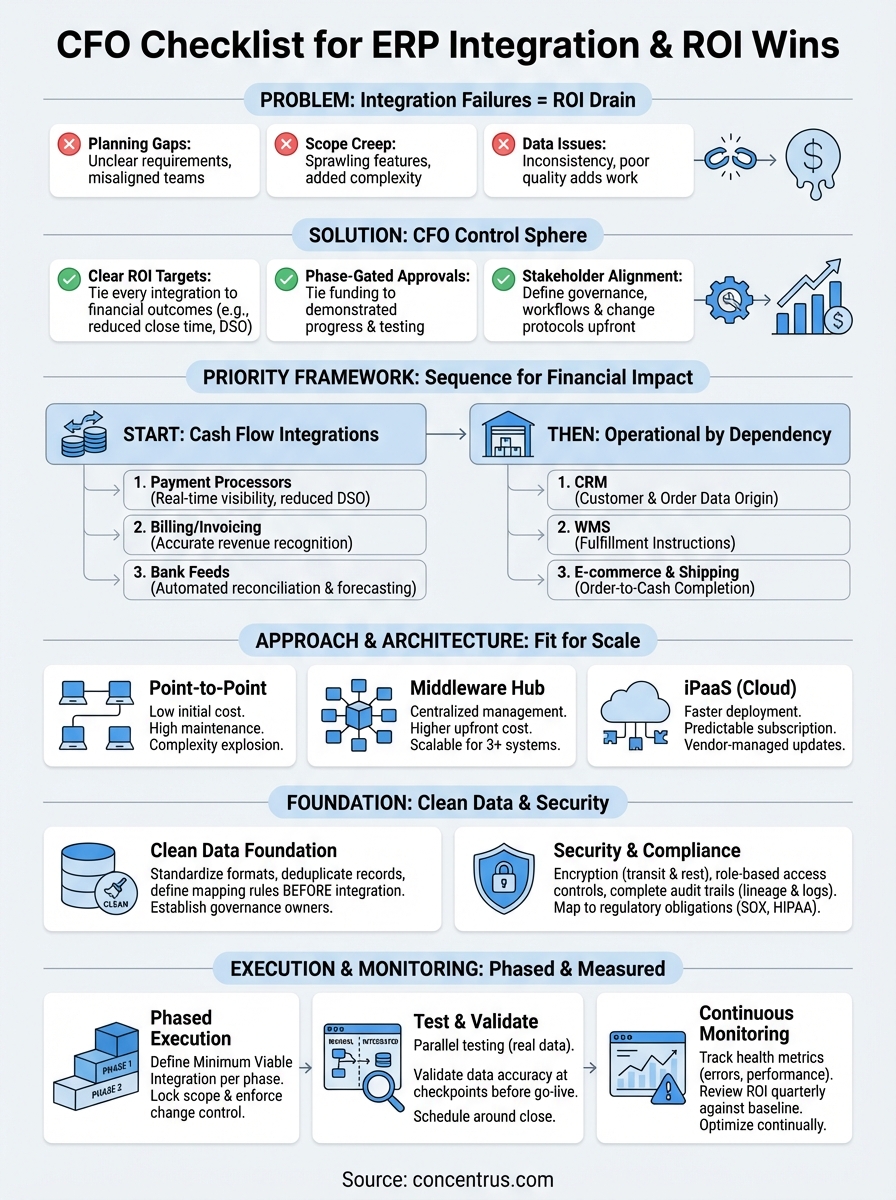
You now have the framework to execute integrations that actually deliver financial returns rather than just technical connections. The erp integration best practices outlined above protect you from the planning gaps, scope creep, and data quality disasters that sink most projects. Your integration roadmap should prioritize cash flow systems first, build on a clean data foundation, and advance through disciplined phases with tight scope control at every gate. Security and compliance can’t be retrofitted later, and your monitoring strategy determines whether ROI persists or degrades silently over time.
The difference between integration success and failure often comes down to having partners who understand both the technology and your financial goals. At Concentrus, we’ve built our reputation on connecting ERP investments directly to measurable business outcomes through our ROI Roadmap™ methodology. Ready to ensure your integration project delivers the efficiency gains, cost reductions, and reporting improvements your business needs? Connect with our ERP + ROI experts to build an integration strategy that protects your investment and accelerates your financial goals from day one.