

If your team still exports Magento orders to a spreadsheet and re-keys them into your accounting system, you already know the cost. Duplicate data entry, delayed invoicing, and inventory counts that never quite match reality. ERP integration magento projects exist to fix exactly this, connecting your storefront to the financial and operational backbone that runs the rest of the business.
At its core, magento erp system integration means your ERP, whether that’s NetSuite, Acumatica, or another platform, talks directly to your Magento or Adobe Commerce store. Orders, inventory, customer records, and pricing sync automatically in both directions, so finance sees real-time revenue and operations sees real-time stock, without anyone touching an export button.
This article breaks down what magento erp integration actually involves: the common integration methods and middleware options, the specific business benefits for finance and operations teams, and what to look for in a service provider or magento erp integration module before you commit budget and timeline to the project.
Why Magento ERP integration matters for finance leaders
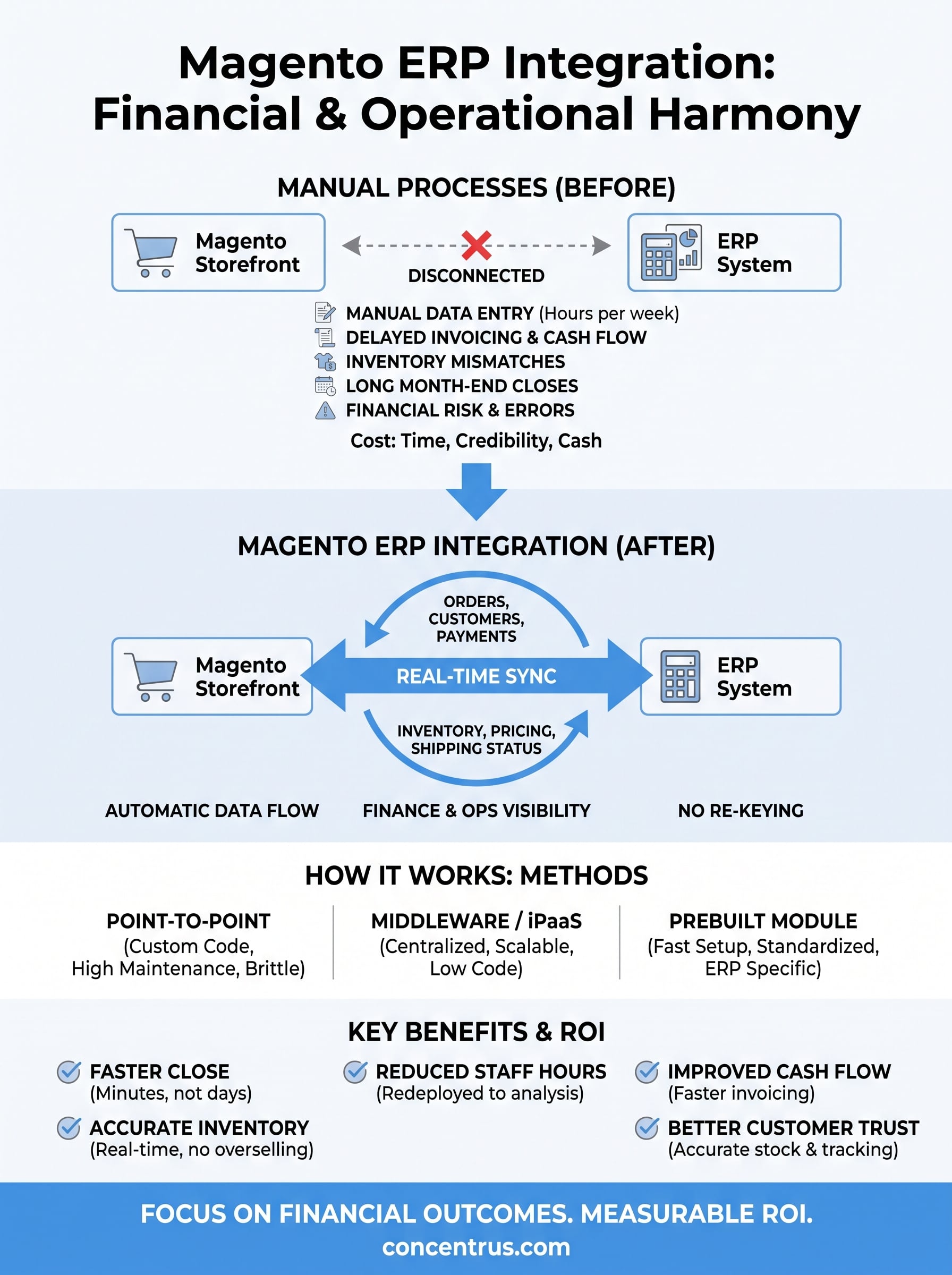
For a CFO at a midsized company, disconnected systems are not just an IT annoyance. They’re a financial risk. When erp integration with magento doesn’t exist, someone on your team is manually reconciling order data, inventory counts, and revenue figures across two systems that were never designed to talk to each other. That manual work introduces errors, and errors in financial reporting cost you time during close, credibility with your board, and sometimes actual cash when refunds or overstock go unnoticed for weeks.
The hidden cost of running Magento and your ERP separately
Most finance leaders don’t realize how much of their team’s time goes into bridging gaps between Magento and the accounting system until they actually measure it. Manual data entry between an ecommerce platform and an ERP typically eats several hours per week per person, and that number climbs fast as order volume grows. Worse, the errors introduced by rekeying data don’t show up immediately. They surface during month-end close, in a mismatched bank reconciliation, or in an inventory count that’s off by hundreds of units.

- Orders sit in Magento for hours before someone manually enters them into the ERP, delaying invoicing and cash collection.
- Inventory levels drift out of sync, leading to overselling, backorders, or unnecessary safety stock.
- Customer and pricing data diverges between platforms, creating confusion at the point of sale and in AR.
- Finance teams spend close cycles reconciling numbers that should have matched automatically.
When your storefront and your ERP don’t talk to each other, your finance team becomes the integration layer, and that’s an expensive place to put your best people.
What real-time visibility actually buys you
Once magento integration with erp is in place, the story changes. Orders placed on your storefront flow into the ERP within minutes, not days. Revenue recognition happens against real transaction data instead of a batch upload someone ran the night before. Inventory counts reflect what’s actually on the shelf, which means your sales team stops promising product you don’t have and your warehouse stops guessing.
This matters most at close. Faster, cleaner data flow between Magento and your ERP means fewer adjusting entries, fewer surprises, and a close that takes days instead of weeks. Finance leaders who’ve lived through both versions of this process consistently tell us the difference isn’t incremental, it’s structural. You stop firefighting data problems and start using that time for actual analysis.
Where the ROI shows up on your financials
The business case for magento erp integration module projects isn’t abstract. It shows up in specific, measurable line items that a CFO can track quarter over quarter.
| Financial impact area | Before integration | After integration |
|---|---|---|
| Order-to-invoice time | Hours to days, manual entry | Minutes, automated |
| Inventory accuracy | Frequent mismatches, manual counts | Real-time, system-of-record accuracy |
| Month-end close | Extended by reconciliation work | Shortened, fewer adjusting entries |
| Staff hours on data entry | Multiple hours weekly per person | Near zero, redeployed to analysis |
| Overselling and backorders | Common, damages customer trust | Rare, stock levels are accurate |
That table isn’t hypothetical. It reflects the pattern we see across manufacturing, wholesale, and ecommerce clients who move from manual Magento-to-ERP workarounds to a proper integration. Every one of those rows ties back to something a finance leader already cares about: cash flow timing, margin accuracy, and staff capacity.
Ultimately, the reason this matters to a CFO more than an IT director is accountability. Concentrus builds every ERP project, including Magento integrations, around our ROI Roadmap™ methodology precisely because integration projects tend to get evaluated on technical success instead of financial outcome. Technical success means the data flows. Financial success means faster closes, lower carrying costs, and fewer write-offs. You should expect both, and you should expect someone to measure it.
How Magento ERP integration works
Underneath the marketing language, magento erp integration comes down to one of three architectural approaches: point-to-point connections, middleware platforms, or prebuilt connectors. Each one moves the same basic data, orders, inventory, customers, pricing, but they differ in how much custom code you maintain, how fast you can stand up the connection, and how well the system holds up as your order volume grows. Getting this choice right matters more than most teams expect, because ripping out a bad integration architecture two years in is far more expensive than choosing correctly on day one.
The three common integration methods
Point-to-point integration means a developer writes custom code that calls Magento’s API directly and pushes data into your ERP’s API. It works, but it’s brittle. Every time Magento or your ERP pushes an update, someone has to test and often patch that custom code. Middleware, sometimes called an iPaaS or integration platform, sits between the two systems and manages the data mapping, error handling, and retry logic without custom code for every single data field. A magento erp integration module is a prebuilt connector, often built by the ERP vendor or a partner, that ships with pre-mapped fields for common objects like orders, items, and customers, cutting implementation time significantly compared to a from-scratch build.

| Approach | Setup speed | Maintenance burden | Best fit |
|—|—|—|
| Point-to-point custom code | Slow | High, breaks with API changes | Highly unique workflows |
| Middleware/iPaaS | Moderate | Low, centralized error handling | Growing order volume, multiple systems |
| Prebuilt connector/module | Fast | Low to moderate | Standard NetSuite or Acumatica setups |
The integration method you choose determines whether your team spends the next three years maintaining code or running the business.
How data actually moves once it’s connected
Regardless of method, the mechanics follow a similar pattern. An event in Magento, a new order, a stock adjustment, a customer sign-up, triggers a call to the integration layer, which translates that data into the format your ERP expects and posts it through the ERP’s API. Good implementations run this in near real time, typically within minutes, rather than on a nightly batch schedule that leaves your finance team looking at stale numbers all day.
Going the other direction, your ERP pushes updates back to Magento: inventory levels after a warehouse receipt, price changes from a contract update, order status once fulfillment happens. This two-way sync is what separates real erp magento integration from a one-way data dump. Without it, you’ve automated half a problem and left the other half for someone to fix by hand.
What data flows between Magento and your ERP
Ask any finance leader what they actually want from magento integration with erp and the answer is rarely “more automation.” It’s specific: which numbers move, how often, and what happens if one of them is wrong. A working connection typically syncs five categories of data, each with its own frequency and its own consequences when it breaks.
| Data object | Direction | Typical sync frequency | Why it matters to finance |
|---|---|---|---|
| Orders (header, lines, tax, shipping) | Magento to ERP | Real time or near real time | Drives invoicing, revenue recognition, AR |
| Inventory levels | ERP to Magento | Real time to hourly | Prevents overselling and backorders |
| Customer records | Both directions | Daily or on change | Keeps credit terms, tax status consistent |
| Pricing and promotions | ERP to Magento | On change | Avoids storefront and contract price gaps |
| Shipment and tracking status | ERP to Magento | Real time | Powers customer notifications, closes orders |
| Payments and refunds | Both directions | Real time to daily | Reconciles cash, prevents duplicate credits |
Orders carry more detail than most teams expect
Orders look simple from the storefront side, but a complete magento erp integration module has to carry line items, applicable tax jurisdictions, shipping method, discount codes, and payment status, not just a total dollar figure. Miss any one of those fields and your ERP either rejects the order or posts it with numbers your accounting team has to fix by hand later. Getting the order schema right on day one avoids a slow trickle of reconciliation work that nobody notices until close.
If your integration only moves the order total and not the underlying detail, you haven’t automated your books, you’ve just automated the guessing.
Inventory and pricing have to move both ways
Inventory is where two-way sync earns its keep. Your ERP, as the system of record for stock across warehouses, pushes quantity updates to Magento so the storefront never sells product that isn’t there. Pricing works the same way in reverse importance: contract pricing, volume discounts, and cost changes originate in the ERP and need to reach Magento automatically, or your sales team ends up honoring a price that finance never approved.
Customer and fulfillment data close the loop
Finally, customer records and fulfillment status tie the whole thing together. New customer accounts, credit limits, and tax exemption status typically originate in the ERP and sync to Magento, while fulfillment and tracking updates flow back the other direction so buyers see accurate delivery timelines. Skip this layer and you’ve solved the accounting problem but left customer service manually checking two systems every time a shopper asks where their order is.
Integrating Magento with NetSuite and Acumatica
NetSuite and Acumatica handle Magento connections differently, and knowing those differences before you scope a project saves you from picking a method that fights your platform instead of working with it. Both support magento erp integration, but the tooling, the native connectors, and the typical implementation timeline vary enough that a generic “connect your ERP to ecommerce” plan usually needs adjusting once you know which system you’re running.
NetSuite’s approach to Magento connections
NetSuite is API-first by design, with SuiteTalk and RESTlets giving developers a documented path to push and pull orders, inventory, and customer data. Most magento erp integration module options for NetSuite come from the NetSuite SuiteApp marketplace or from integration partners who’ve already built and tested the field mappings, which shortens the build considerably compared to writing custom SuiteScript against Magento’s API from scratch. NetSuite’s strength here is depth: multi-subsidiary support, multi-currency handling, and granular tax logic all sync cleanly if the connector is built to handle them, which matters if your midsized company sells across multiple entities or countries through the same storefront.

Choosing the wrong connector for your NetSuite setup doesn’t just cost you rework, it costs you the multi-entity accuracy you’re paying for NetSuite to deliver in the first place.
Acumatica’s approach and where it differs
Acumatica takes a similarly open approach through its REST and SOAP APIs, but the ecosystem of prebuilt Magento connectors is smaller than NetSuite’s, so erp integration with magento projects on Acumatica lean more often toward middleware platforms that can be configured rather than fully prebuilt modules. That’s not a disadvantage, Acumatica’s flexible data model actually makes custom field mapping through middleware relatively straightforward, but it does mean you should budget slightly more configuration time upfront rather than expecting a plug-and-play connector to cover every workflow out of the box.
| Factor | NetSuite | Acumatica |
|---|---|---|
| Native API | SuiteTalk, RESTlets | REST, SOAP |
| Prebuilt connector availability | Broad, mature marketplace | Growing, fewer options |
| Typical integration method | Module or middleware | Middleware, some modules |
| Best fit | Multi-entity, multi-currency operations | Flexible, mid-complexity workflows |
Why platform choice changes your integration plan
Ultimately, the platform you run should shape the integration approach, not the other way around. A magento erp integration plan built for NetSuite’s SuiteApp ecosystem won’t transfer cleanly to Acumatica’s middleware-heavy world, and vice versa. This is exactly where a lot of midsized companies lose months: they hire a generalist integrator who treats Magento-to-ERP as a single, universal problem, then discover halfway through that the connector they picked doesn’t handle their tax jurisdictions or subsidiary structure. Concentrus works across both NetSuite and Acumatica implementations specifically because the right integration architecture depends on which ERP is actually running your financials.
Choosing the right integration approach and avoiding pitfalls
Picking an integration method is only half the decision. The other half is protecting the project from the mistakes that quietly derail most magento erp integration efforts, usually well before anyone notices the ROI isn’t showing up. Finance leaders who’ve been through a failed integration almost always point to the same handful of root causes, and every one of them is avoidable if you know to look for it during scoping.
Questions to ask before you sign a statement of work
Before committing budget, walk through these questions with whoever is proposing the magento erp system integration:
- Does the proposed method (module, middleware, or custom code) match our order volume and complexity, or are we over-building for where we are today?
- Who owns error handling when an order fails to sync, and how quickly will we know?
- What happens to the integration when Magento or our ERP pushes a version update?
- Can we see a reference client running this same connector combination in production?
- How is success measured, technical uptime or financial outcomes like close time and inventory accuracy?
An integration that nobody is accountable for on a dollars-and-cents basis will eventually get blamed on the software instead of the plan.
The pitfalls that sink otherwise good projects
The most common failure mode is scope creep disguised as thoroughness. A team sets out to sync orders and inventory, then someone adds promotions, then loyalty points, then a custom approval workflow, and six months later nothing has shipped. Keep the first phase of any magento erp integration module rollout narrow: orders, inventory, and core customer data, then expand once that foundation is stable and proven.
A second pitfall is treating the integration as a one-time build instead of a maintained system. APIs change, tax rules change, new product lines get added. Without someone assigned to monitor sync failures and update field mappings, the connection degrades quietly until finance discovers a quarter’s worth of unreconciled orders. Middleware platforms help here because they centralize error logs in one place instead of scattering failure points across custom code nobody remembers writing.
Third, and most costly for a CFO, is skipping the financial success criteria entirely. Technical teams measure whether data moved. Nobody circles back to check whether close time actually shortened or inventory accuracy actually improved. That’s precisely the gap Concentrus built the ROI Roadmap™ methodology to close, tying every integration milestone to a financial KPI a CFO can track, not just a technical checkbox an IT team can mark done.
Rescuing a stalled or underperforming integration is a real, common project, not a rare edge case. If you’re already living with a connector that doesn’t sync correctly or a middleware setup nobody fully understands anymore, that’s a rescue scope, not a rebuild from zero, and it’s usually faster to fix than teams expect.
The bottom line on ERP integration
Magento ERP integration isn’t a technical checkbox, it’s a financial decision that determines how fast you close, how accurately you count inventory, and how much of your team’s time gets wasted on manual reconciliation. Whether you choose a prebuilt module, middleware, or custom code, the method matters less than whether someone ties the project to measurable outcomes finance actually cares about. Getting this right the first time saves you the far more expensive path of rescuing a failed connector two years from now.
Concentrus builds every erp integration magento project, new or rescue, around financial accountability, not just data flow. If your storefront and your ERP still don’t talk to each other, or if a past integration never delivered what it promised, talk to Concentrus about a plan that ties the work to real ROI from day one.