


If you’re running Magento on the front end and NetSuite on the back end, you already know the pain of manual order entry, mismatched inventory counts, and finance teams reconciling data by hand at month end. A solid netsuite magento integration closes that gap so orders, customers, and inventory move automatically between systems instead of living in spreadsheets somebody has to update at 6 PM.
The real question isn’t whether you need integration, it’s which option actually fits your order volume, customization needs, and budget. Some businesses need a full-featured iPaaS connector with prebuilt workflows, others get by with a lighter middleware tool or a custom API build. The right choice depends on how complex your fulfillment and pricing rules are, and how much your team wants to manage post-launch.
This article walks through eight proven ways to connect Magento and NetSuite, from established platforms like Celigo and Boomi to custom-built solutions. For each one, you’ll see how it handles order and inventory syncing, what it costs to implement and maintain, and who it’s actually built for, so you can pick the option that gets your ERP data flowing without another failed integration project on your hands.
1. How NetSuite and Magento integration works
At its core, magento netsuite integration connects two systems that were never designed to talk to each other natively. Magento handles the storefront experience: product pages, checkout, promotions, customer accounts. NetSuite runs your financials, inventory, order management, and reporting. Without a connection between them, someone on your team is exporting CSVs from one system and uploading them to the other, or worse, typing order details in by hand while customers wait for shipping confirmations.

Integration works by establishing a data pipeline between the two platforms, usually through APIs. Magento exposes a REST API that lets external systems read and write data like orders, customers, and product catalogs. NetSuite offers SuiteTalk (its SOAP and REST web services) and RESTlets for the same purpose. A connector, whether it’s a prebuilt tool or custom code, sits between these two APIs, translating data formats and triggering syncs on a schedule or in real time.
The integration itself is just plumbing. What matters is whether the data arrives accurate, on time, and in a format your finance team can actually use.
What data typically syncs
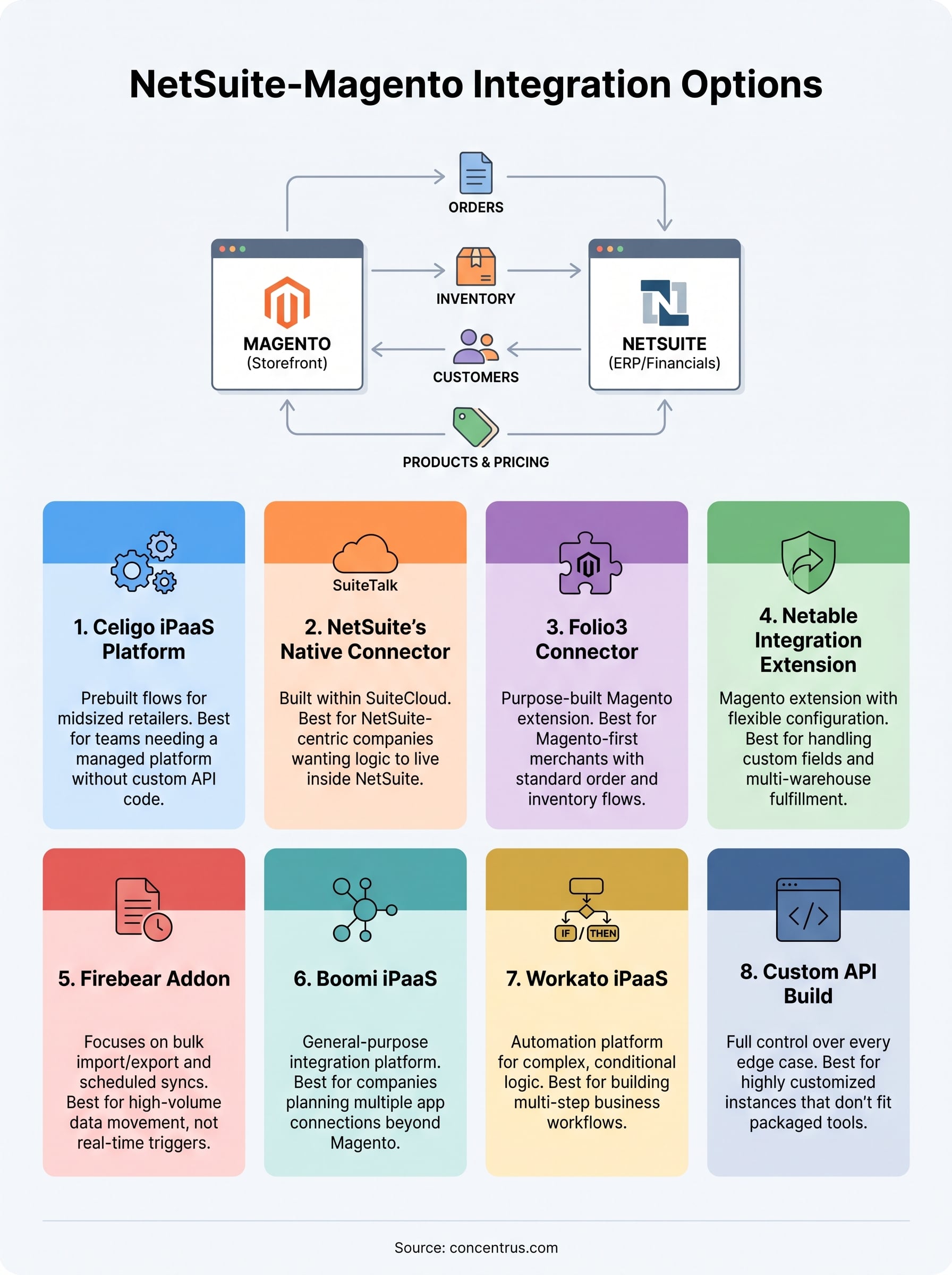
Most netsuite integration with magento setups handle four core data flows, though the exact scope depends on your business model and which connector you choose:
- Orders: New Magento orders push into NetSuite as sales orders, triggering fulfillment and invoicing workflows.
- Inventory: Stock levels update bidirectionally so Magento doesn’t sell items NetSuite shows as out of stock.
- Customers: Customer records sync so finance has accurate contact and billing details without duplicate entry.
- Products and pricing: Catalog items, SKUs, and price changes flow from NetSuite (often the system of record) down to Magento.
Real-time versus batch syncing
How often data moves matters as much as what moves. Real-time integrations use webhooks or event-driven triggers so an order placed on Magento at 2:14 PM shows up in NetSuite seconds later. Batch integrations run on a schedule, maybe every 15 minutes or once an hour, which works fine for lower-volume sellers but creates lag for businesses processing hundreds of orders a day. If you’re managing tight inventory margins or drop-shipping, that lag can mean overselling items you don’t actually have.
Where integrations typically break down
Syncing sounds simple until you hit the edge cases. Tax calculations differ between platforms. Multi-currency orders need mapping rules. Partial shipments, refunds, and order edits all require logic that a basic connector might not handle out of the box. This is exactly where a lot of DIY integration projects stall, not because the initial connection failed, but because nobody planned for what happens when a customer cancels half an order after it’s already synced to NetSuite.
The options below range from fully managed platforms that handle these edge cases for you to custom builds where your developers own every rule. None of them are automatically the
2. Celigo integration platform
Celigo built its reputation on prebuilt “flows” that map Magento data to NetSuite fields without custom code, which is why it shows up first on most shortlists for magento integration with netsuite. The platform runs on integrator.io, a low-code environment where you configure business rules through a visual interface rather than writing scripts from scratch.

How it works
Celigo’s Magento-NetSuite connector uses prebuilt integration templates that map standard fields like orders, customers, and inventory out of the box. You still need to configure the flows for your specific business rules, tax logic, and fulfillment processes, but you’re starting from a working template instead of a blank API connection. The platform monitors both systems and syncs data in near real time, with error handling and retry logic built into the flow engine so a failed sync doesn’t just disappear into a log file nobody checks.
A prebuilt connector still needs your business rules configured correctly, or you’re just automating the wrong process faster.
Best for
Midsized retailers and wholesalers running moderate to high order volumes who want a managed platform without building custom API code. Celigo suits teams that have some technical resources in-house, usually an ops or IT person, but not a full development team dedicated to integration maintenance.
Key features
- Prebuilt Magento-to-NetSuite templates for orders, inventory, customers, and product data
- Visual flow builder for adjusting field mappings without writing code
- Built-in error handling, retry logic, and sync monitoring dashboards
- Support for multi-currency and multi-subsidiary NetSuite setups
- Ability to add other systems (Shopify, Salesforce, shipping carriers) to the same integration later
Pricing
Celigo prices based on the number of flows and transaction volume rather than a flat license fee, and most midsized implementations land in the low five figures annually once you factor in setup. That puts it above the cost of a basic connector but below what most custom API builds run over the same time horizon, especially once you count ongoing maintenance. Get exact numbers directly from Celigo’s sales team, since pricing shifts based on how many systems you’re connecting and your order volume.
3. NetSuite’s native Magento connector
NetSuite’s own SuiteCommerce ecosystem doesn’t include a dedicated Magento connector out of the box, but NetSuite offers a supported integration path through SuiteCloud and its Connector for third-party platforms, which partners and NetSuite’s own professional services team configure for Magento specifically. This option matters most to companies that already run NetSuite as their core ERP and want to keep the integration inside NetSuite’s own tooling rather than adding a separate platform to manage.
How it works
The native approach relies on NetSuite’s SuiteTalk web services and SuiteScript to build the connection points that pull Magento order, customer, and inventory data into NetSuite records. Because it’s built on NetSuite’s own platform, updates to NetSuite fields, custom scripts, or workflows integrate directly without needing a translation layer maintained by an outside vendor. Data mapping happens through SuiteScript customizations rather than a visual flow builder, so you’re working closer to the code than you would with Celigo.
Staying inside NetSuite’s native tools means fewer moving parts, but it also means your team owns the scripting instead of leaning on a vendor’s prebuilt logic.
Best for
Companies with an in-house NetSuite administrator or a NetSuite-certified partner already on retainer, and businesses that want integration logic to live inside NetSuite rather than a third-party platform. This fits organizations running relatively standard Magento setups without heavy customization on the storefront side, since the native connector doesn’t offer much flexibility for unusual order flows.
Key features
- Built entirely on NetSuite’s own SuiteCloud platform, so no external system holds your integration logic
- Direct access to SuiteScript for custom business rules and validation
- Native compatibility with NetSuite’s multi-subsidiary and multi-currency features
- Support through NetSuite’s own partner network for setup and troubleshooting
Pricing
NetSuite doesn’t publish a flat rate for this connector because pricing depends on the SuiteCloud modules you need and the implementation partner doing the configuration work. Budget for both the NetSuite module licensing and the professional services hours to build and test the SuiteScript customizations, which typically runs comparable to or slightly higher than a platform like Celigo once you include ongoing script maintenance. Check current NetSuite pricing details directly with NetSuite or your implementation partner, since costs vary by edition and module count.
4. Folio3 NetSuite Magento connector
Folio3 built its connector specifically for Magento merchants who need a purpose-built bridge to NetSuite without adopting a broader iPaaS platform. Unlike Celigo or Boomi, which connect Magento to NetSuite as one use case among many, Folio3’s product exists solely for this magento-netsuite integration pairing, which shows in how deeply it handles Magento-specific quirks like bundled products, configurable SKUs, and multi-store setups.
How it works
The connector installs as a Magento extension that communicates with NetSuite through SuiteTalk APIs, syncing data on a schedule you configure rather than through a separate middleware layer. Orders, customers, inventory, and shipment status move between systems automatically, with the extension handling field mapping through a settings panel inside Magento’s own admin dashboard. Because it lives inside Magento rather than as a standalone platform, your team manages the integration from a place they already know instead of learning a new interface.
Running the connector as a Magento extension means less platform-switching for your team, but it also ties the integration’s future to how well Folio3 keeps pace with Magento core updates.
Best for
Magento-first businesses that want an integration built specifically for the platforms in play, not a general-purpose tool retrofitted for Magento. Folio3 suits mid-market merchants running standard order and inventory flows who’d rather manage everything from the Magento admin than log into a separate integration dashboard. It’s a weaker fit for companies running multiple sales channels beyond Magento, since the connector wasn’t built for that breadth.
Key features
- Native Magento extension install, managed from the Magento admin panel
- Two-way sync for orders, inventory, customers, and shipment tracking
- Support for bundled products, configurable SKUs, and multi-store Magento setups
- Scheduled and on-demand sync options
- Dedicated support team familiar with both platforms’ quirks
Pricing
Folio3 prices its connector as a licensing fee plus implementation cost, typically running lower upfront than a full iPaaS subscription like Celigo or Boomi. Ongoing costs usually come from support contracts and any customization your specific catalog structure requires, since standard Magento setups need less configuration than heavily customized storefronts. Request a quote directly from Folio3, as pricing depends on your Magento edition, order volume, and how many custom fields you need mapped.
5. Netable NetSuite integration extension
Netable takes a similar approach to Folio3 in that it’s a dedicated Magento extension rather than a general-purpose iPaaS, but it distinguishes itself by leaning heavily into configuration flexibility for merchants who need more than a standard order-and-inventory sync. Businesses researching netsuite magento integration options often land on Netable after outgrowing a basic connector that couldn’t handle custom pricing tiers or multi-warehouse fulfillment.
How it works
Netable’s extension installs directly into Magento and connects to NetSuite through SuiteTalk web services, syncing orders, customers, inventory, and product data on a schedule you set inside the extension’s own configuration panel. Where it differs from simpler connectors is in its handling of custom NetSuite fields and saved searches, letting you pull data points beyond the standard order and item records without custom scripting. Support tickets and sync logs live inside the same admin panel, so your team troubleshoots failed syncs without jumping between platforms.
A connector that surfaces custom NetSuite fields without scripting saves your admin team hours every time the business adds a new pricing rule.
Best for
Midsized Magento merchants running multi-warehouse fulfillment or custom pricing structures that a standard connector template doesn’t map cleanly. Netable fits companies with an internal admin who’s comfortable configuring extension settings but doesn’t want to write SuiteScript or manage a separate iPaaS subscription. It’s a reasonable middle ground between a basic extension and a full platform like Celigo, though companies running multiple non-Magento sales channels will likely need something broader.
Key features
- Magento admin-based configuration, no separate integration dashboard
- Support for custom NetSuite fields and saved searches without scripting
- Multi-warehouse inventory sync
- Scheduled and manual sync triggers
- Order status and shipment tracking sync back to Magento
Pricing
Netable prices through a licensing model similar to Folio3, with a base fee plus additional cost for custom field mapping or multi-warehouse configuration. Most midsized implementations run lower than an iPaaS subscription over a comparable timeframe, though you’ll want to budget for support renewals since the extension needs updates whenever Magento or NetSuite pushes platform changes. Contact Netable directly for a quote, as the exact cost depends on your warehouse count and how many custom fields need mapping.
6. Firebear NetSuite Magento 2 integration addon
Firebear started as an import/export tool for Magento 2 before expanding into dedicated NetSuite sync capability, and that history shows in how the addon handles bulk data operations. Merchants who need scheduled imports and exports alongside their netsuite magento integration often land here because Firebear’s core strength was never just live syncing, it was moving large data sets reliably on a schedule.
How it works
The Firebear addon plugs into Magento 2 as an extension and connects to NetSuite through its API, letting you configure import and export profiles that run on cron schedules or trigger manually from the Magento admin. You map fields through a visual profile builder rather than writing code, and the addon supports multiple file formats and data sources beyond just NetSuite, which matters if you’re also pulling supplier feeds or exporting to other systems. Orders, inventory, and product data sync based on the profiles you set up, with logs tracking what ran and what failed.
A tool built for bulk import and export handles scheduled catalog and inventory syncs well, but it’s not built for the split-second order triggers a high-volume storefront needs.
Best for
Magento 2 merchants who already value Firebear’s import/export capabilities and want to extend that same tool to handle NetSuite syncing rather than adding a separate platform. This fits businesses with moderate order volume where near-real-time isn’t critical, and where the team managing the integration is comfortable working inside Magento’s admin and cron job scheduling instead of a dedicated middleware dashboard.
Key features
- Visual profile builder for mapping Magento and NetSuite fields
- Scheduled and manual sync triggers through Magento’s cron system
- Support for multiple data formats beyond just NetSuite connections
- Bulk import and export tools for catalog, inventory, and order data
- Detailed sync logs accessible from the Magento admin panel
Pricing
Firebear sells the addon as a one-time or annual license fee, which tends to run lower than an iPaaS subscription like Celigo since you’re paying for a Magento extension rather than a hosted platform. Support and updates typically require a renewal fee after the first year, and any custom field mapping beyond the standard profiles adds to implementation cost. Reach out to Firebear directly for current pricing, since licensing tiers depend on your Magento edition and how many NetSuite data points you need synced.
7. Boomi iPaaS
Boomi takes a different approach than the Magento-specific extensions covered so far. It’s a general-purpose integration platform as a service (iPaaS) that happens to have a mature Magento-NetSuite connector among hundreds of other prebuilt integrations. Companies researching netsuite integration with magento often add Boomi to the shortlist when they already run other Boomi-connected systems, or when they know Magento and NetSuite are just the first two apps in a longer integration roadmap.

How it works
Boomi runs on a cloud-based integration engine called AtomSphere, where you build integration processes using a visual, drag-and-drop canvas rather than writing code from scratch. For Magento-NetSuite specifically, Boomi provides connector components that handle the API authentication and data structure on both ends, so your team focuses on mapping fields and building the business logic around orders, inventory, and customer records. Boomi Atoms, small runtime engines you deploy locally or in the cloud, execute the actual sync jobs and give you a place to monitor throughput and errors.
A platform built for dozens of app connections gives you room to grow the integration well past Magento and NetSuite without starting over.
Best for
Midsized to larger companies planning to connect more than just Magento and NetSuite, think ERP, CRM, EDI, and shipping systems all tied together over time. Boomi suits organizations with a dedicated IT or integration team, since the platform’s flexibility comes with a steeper learning curve than a single-purpose Magento extension.
Key features
- Prebuilt Magento and NetSuite connectors with configurable field mapping
- Visual process builder for designing multi-step integration logic
- Boomi Atom architecture for local or cloud-based execution
- Real-time monitoring dashboards with alerting on failed syncs
- Ability to add unlimited additional systems to the same integration hub
Pricing
Boomi prices on a subscription basis tied to the number of connections and data volume, and most midsized NetSuite-Magento deployments start in the mid five figures annually once implementation is included. That cost reflects the platform’s broader scope compared to a Magento-specific extension, so it makes more financial sense when you’re planning multiple integrations rather than just this one pairing. Get a quote directly from Boomi’s sales team, since pricing tiers shift based on connector count and monthly transaction volume.
8. Workato iPaaS
Workato positions itself as an automation platform first and an integration tool second, which shows in how it handles Magento and NetSuite workflows. Rather than just moving data between the two systems, Workato’s automation engine lets you build multi-step business logic, like triggering a credit hold in NetSuite when a Magento order exceeds a customer’s approved limit, without writing custom code. Teams evaluating magento integration with netsuite often add Workato to the shortlist when they want automation beyond basic syncing, not just a pipe connecting two databases.

How it works
Workato calls its building blocks “recipes,” which are trigger-and-action sequences you assemble through a visual editor. A Magento order creation event can trigger a recipe that checks inventory in NetSuite, applies pricing rules, creates the sales order, and sends a confirmation, all in one automated sequence. The platform uses prebuilt connectors for both systems, handling API authentication and field structures so your team focuses on the business logic rather than the plumbing.
Automation platforms like Workato earn their cost when you need conditional logic, not just a straight data copy from one system to the other.
Best for
Companies that need conditional business logic layered into their sync, not just a straightforward order-and-inventory feed. Workato fits organizations with an ops or RevOps team comfortable building recipes themselves, and businesses planning to automate processes across HR, sales, and finance tools beyond just Magento and NetSuite.
Key features
- Recipe-based visual builder for multi-step automation logic
- Prebuilt connectors for Magento, NetSuite, and hundreds of other apps
- Conditional triggers and approval workflows built into sync processes
- Real-time error alerting and recipe version history
- Low-code environment suited to business users, not just developers
Pricing
Workato prices on a subscription model based on the number of active recipes and task volume, and most midsized Magento-NetSuite deployments land in a similar range to Boomi once you factor in implementation. The cost makes more sense when you’re automating logic beyond simple data transfer, since you’re paying for the automation engine as much as the connection itself. Request current pricing directly from Workato’s sales team, as tiers shift based on recipe complexity and monthly transaction counts.
9. Custom API integration
Custom API integration means your developers build the connection between Magento and NetSuite from scratch, using each platform’s own web services rather than a prebuilt connector or extension. Companies choose this route when their magento-netsuite integration needs don’t fit any packaged product, usually because of unusual fulfillment logic, a heavily modified Magento storefront, or a NetSuite instance with dozens of custom fields no template was built to handle.
How it works
Developers connect to Magento’s REST API and NetSuite’s SuiteTalk or RESTlet endpoints directly, writing the authentication, field mapping, error handling, and retry logic themselves instead of relying on a vendor’s existing framework. Your team decides exactly how orders, inventory, and customer records move between systems, down to the specific business rules for tax calculation, partial shipments, and refunds that off-the-shelf connectors often handle with generic defaults.
Custom code gives you full control over every edge case, but every edge case then becomes your team’s problem to maintain, not a vendor’s.
Expect a build timeline of several weeks to a few months depending on scope, plus ongoing developer time whenever Magento or NetSuite pushes an API change.
Best for
Companies with in-house development resources or a trusted implementation partner, and businesses whose order flows, pricing structures, or NetSuite customizations don’t map cleanly to any packaged connector. This option suits organizations that already tried a template-based tool and hit its limits, not first-time integrators looking for the fastest path live.
Key features
- Full control over data mapping, sync frequency, and business logic
- No licensing fees tied to a third-party platform
- Ability to handle highly customized Magento or NetSuite instances
- Direct ownership of error handling and retry logic
- No vendor dependency for feature requests or roadmap changes
Pricing
Costs run entirely on developer time rather than a subscription or license fee, and most custom builds land in the mid five figures to low six figures depending on scope and how many edge cases you’re coding for. Ongoing maintenance adds recurring cost every time either platform updates its API, which makes this the most expensive option long-term unless your business has genuinely unique requirements that justify it.
10. How to choose the right integration option
Matching the right connector to your business comes down to three variables: order volume, customization needs, and internal technical resources. A company processing 50 orders a day with a standard catalog doesn’t need Boomi’s multi-app architecture, and a business with heavily customized NetSuite fields and dozens of SKU variants will outgrow a basic Magento extension fast. Before you commit budget to any netsuite magento integration, map out which of these variables actually describes your operation, because the wrong fit shows up six months later as a support ticket queue nobody wants to own.
Budget matters too, but not in isolation. A cheaper license fee on a Magento extension can cost more over three years than a Celigo or Boomi subscription once you factor in the developer hours needed to extend a rigid tool past its original scope. Think about total cost of ownership, not just the number on the initial quote.
The cheapest option on paper often becomes the most expensive once you count the hours your team spends working around its limits.
Match the tool to your growth plan
If Magento and NetSuite are the only two systems you’ll ever connect, a dedicated connector like Folio3 or Netable keeps things simple. If you’re already planning to add a CRM, EDI, or shipping platform within the next year or two, an iPaaS like Boomi or Workato saves you from rebuilding the integration layer later.
| Priority | Best-fit option |
|---|---|
| Lowest upfront cost | Firebear or Folio3 |
| Complex conditional logic | Workato |
| Multiple future integrations | Boomi or Celigo |
| Highly customized NetSuite instance | Custom API |
| Standard order flow, moderate volume | Celigo or Netable |
Run this table against your own order volume and roadmap before you sign a contract, and ask each vendor for a reference client running a similar setup to yours.
11. Best practices for a lasting integration
Getting a netsuite magento integration live is only half the job. The connectors covered above all fail the same way over time: nobody tests the edge cases before go-live, and the first partial refund or split shipment breaks the sync silently for weeks before finance notices the numbers don’t add up. Build a test plan that covers the scenarios your standard order flow doesn’t hit every day, not just the happy path where a single item ships in full.
- Test partial shipments, refunds, and order edits before launch, not after
- Confirm tax and multi-currency logic matches your finance team’s expectations
- Run a full month-end close against synced data before trusting it live
- Set up alerts for failed syncs instead of relying on someone checking logs manually
- Assign one owner internally who understands the mapping logic, even with a managed vendor
Having a real owner matters more than the tool itself. Integrations drift when nobody’s watching the connection, and vendors move on to the next client the day after implementation wraps.
An integration nobody owns internally starts breaking the day the vendor stops paying attention to it.
Just as important, don’t treat launch day as the finish line. Magento pushes core updates, NetSuite rolls out release changes twice a year, and either one can quietly break a field mapping that worked fine last quarter. Schedule a recurring check, quarterly at minimum, where someone reviews sync logs, confirms inventory counts still match between systems, and tests a sample order end to end. Companies that skip this step are the ones calling for ERP rescue services eighteen months later, wondering why their once-working integration started dropping orders.
Keep documentation current too. Whoever configured your magento integration with netsuite should leave behind a record of field mappings, custom business rules, and known limitations, so the next person troubleshooting a failed sync isn’t starting from zero. Even the best-built integration turns into a liability if the only person who understood it left the company last spring.
Making the right integration choice
There’s no single best answer to netsuite magento integration, only the option that matches your order volume, your NetSuite customizations, and how much your team wants to own after go-live. A Magento-first extension like Folio3 or Netable works fine if you’ll never connect anything beyond these two systems. An iPaaS like Boomi or Workato earns its cost once you’re planning a broader integration roadmap. Custom code makes sense only when your business genuinely doesn’t fit a packaged tool, not because a developer on staff wants a project.
Whatever you pick, the connector matters less than the plan behind it. Test the edge cases, assign an internal owner, and revisit the sync quarterly instead of assuming it’ll keep working forever.
If you’d rather have someone who’s rescued failed NetSuite projects walk through your specific setup before you commit, talk to Concentrus about building an integration tied to measurable ROI from day one.