

NetSuite ERP ROI: How CFOs Should Actually Measure ValueWhy Industry Fit Matters More Than Features in NetSuite ERP ImplementationsEvery unplanned system change carries risk, downtime, broken integrations, lost data, and frustrated teams scrambling to fix what shouldn’t have broken in the first place. ServiceNow Change Management exists to eliminate that chaos by giving organizations a structured, auditable process for evaluating, approving, and implementing changes across their IT environment. For midsized companies running complex systems like ERPs, CRMs, and interconnected platforms, getting change management right is non-negotiable.
At Concentrus, we see the consequences of poorly managed change every day. When companies implement or rescue ERP systems like NetSuite and Acumatica, the surrounding IT infrastructure needs to keep pace. A single uncoordinated update can derail financial reporting, disrupt supply chain workflows, or compromise the ROI that leadership expects from their technology investments. That’s why understanding how tools like ServiceNow govern IT changes matters, especially for CFOs and finance leaders who need confidence that system modifications won’t undermine operational stability.
This article breaks down how ServiceNow’s Change Management module works, from its core process workflows and change types to the features that make it effective at scale. You’ll also find practical best practices for implementation, so your team can reduce failed changes, maintain compliance, and protect the systems your business depends on.
Why ServiceNow change management matters
Organizations that skip formal change management processes often discover the real cost only after something breaks. A developer pushes a configuration update, a network team patches a server, and suddenly the financial reporting system throws errors on the day the CFO needs accurate numbers. Uncontrolled change is one of the leading causes of IT outages, and in environments where ERP systems, payment processors, and cloud platforms all interconnect, the ripple effect from a single uncoordinated update can be severe and expensive.
The cost of uncontrolled change
Research consistently shows that a large percentage of IT outages trace back to changes that were not properly reviewed or tested before deployment. When your team lacks a shared process for logging, evaluating, and approving modifications, the same mistakes get repeated across quarters. Teams work in silos, duplicate efforts, and spend more time diagnosing incidents than delivering improvements. The financial impact compounds quickly: failed deployments lead to unplanned downtime, emergency rollbacks consume staff hours, and customer-facing disruptions damage revenue in ways that are difficult to recover from.
The true cost of a failed change isn’t just the time to fix it. It’s the downstream effect on every system, team, and process that depended on what you broke.
ServiceNow change management addresses this directly by creating a structured record for every proposed change. Each request goes through a defined workflow, gets assigned a risk score, and requires the right approvals before anything touches a production environment. Your team stops operating blind and starts making decisions with full visibility into what is changing, why it is changing, and what the potential impact is across your environment.
How it connects to business outcomes
Change management in ServiceNow is not simply an IT housekeeping exercise. For CFOs and finance leaders at midsized companies, the stability of underlying IT systems directly affects whether the business hits its operational and financial targets. If your ERP goes down during a period close, or your integration platform breaks during a high-volume shipping week, the cost is both measurable and immediate. Leadership feels it, customers notice it, and the confidence that finance teams need to operate effectively takes a hit.
A well-implemented change management process reduces the frequency of these incidents by requiring teams to think through risk before acting, not after. It also builds an auditable history of every modification made to your environment, which matters when regulators, auditors, or executives ask what changed and when. For companies running on platforms like NetSuite or Acumatica, that governance layer directly supports the accountability that CFOs require when they are responsible for the ROI those systems are supposed to deliver.
Beyond risk reduction, structured change processes improve team velocity over time. When your staff knows the workflow, trusts the tooling, and can move standard changes through without unnecessary delays, they stop treating change management as a bureaucratic barrier and start treating it as a practical advantage. Fewer incidents means fewer all-hands emergency responses. Faster recovery when incidents do happen means less downtime per event. The cumulative effect is a more stable technology environment that supports business growth rather than creating drag against it. That is the real argument for investing in ServiceNow change management: it pays for itself through the failures it prevents.
Core terms and components in ServiceNow change
Before you configure workflows or start logging requests, you need to understand the building blocks that ServiceNow change management relies on. Each component plays a specific role in the process, and knowing what each one does prevents confusion when your team starts working inside the platform.
Change requests and change models
A change request (CR) is the core record in ServiceNow change management. It documents what is being changed, who is requesting it, the systems involved, the risk level, and the steps required to execute and verify the work. Every modification to your environment, whether a patch, a configuration update, or a major infrastructure shift, should originate from a change request. Change models sit above individual requests and act as templates. When your team handles a recurring change, a model pre-populates the workflow, tasks, and approval steps so you are not rebuilding the process from scratch every time.
A well-designed change model can cut the time to submit a standard request in half, which removes the friction that causes teams to skip the process entirely.
Risk scores and impact fields
Risk and impact fields on a change request help the platform calculate how much scrutiny a change needs before it moves forward. ServiceNow uses inputs like the affected configuration items (CIs), the time of deployment, and historical data from previous changes to generate a risk score. A higher score means more review steps and tighter approval requirements. These fields are not optional details; they drive which workflow the request follows and who gets notified.
Configuration items and the CMDB
The Configuration Management Database (CMDB) is the backbone that makes ServiceNow change management accurate rather than just administrative. Every server, application, integration, or device in your environment lives in the CMDB as a configuration item (CI). When a change request references a CI, the platform can surface related dependencies, identify potential conflicts, and flag other in-flight changes that touch the same asset. Without a clean, current CMDB, your risk scoring loses precision and your collision detection becomes unreliable.
Assignment groups and task ownership
Assignment groups determine which team reviews, approves, or executes each step in the change workflow. Linking the right group to the right task keeps work from stalling in the wrong queue. Individual task records within a change request break the overall work into discrete steps, each with its own owner and completion status, so progress is visible and accountability is clear throughout execution.
Change types and when to use each
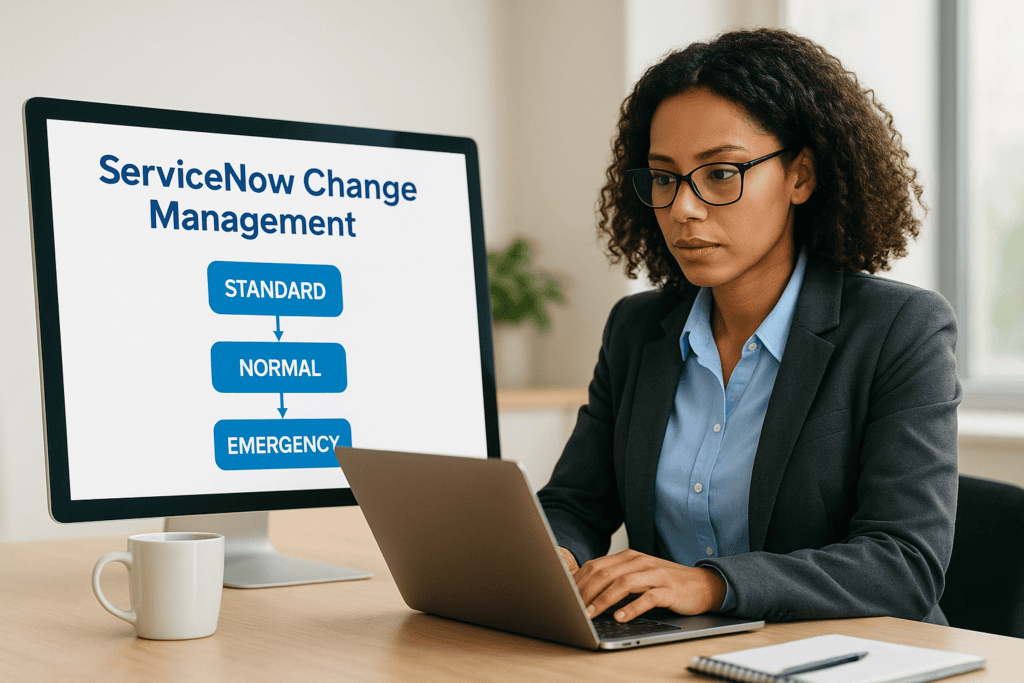
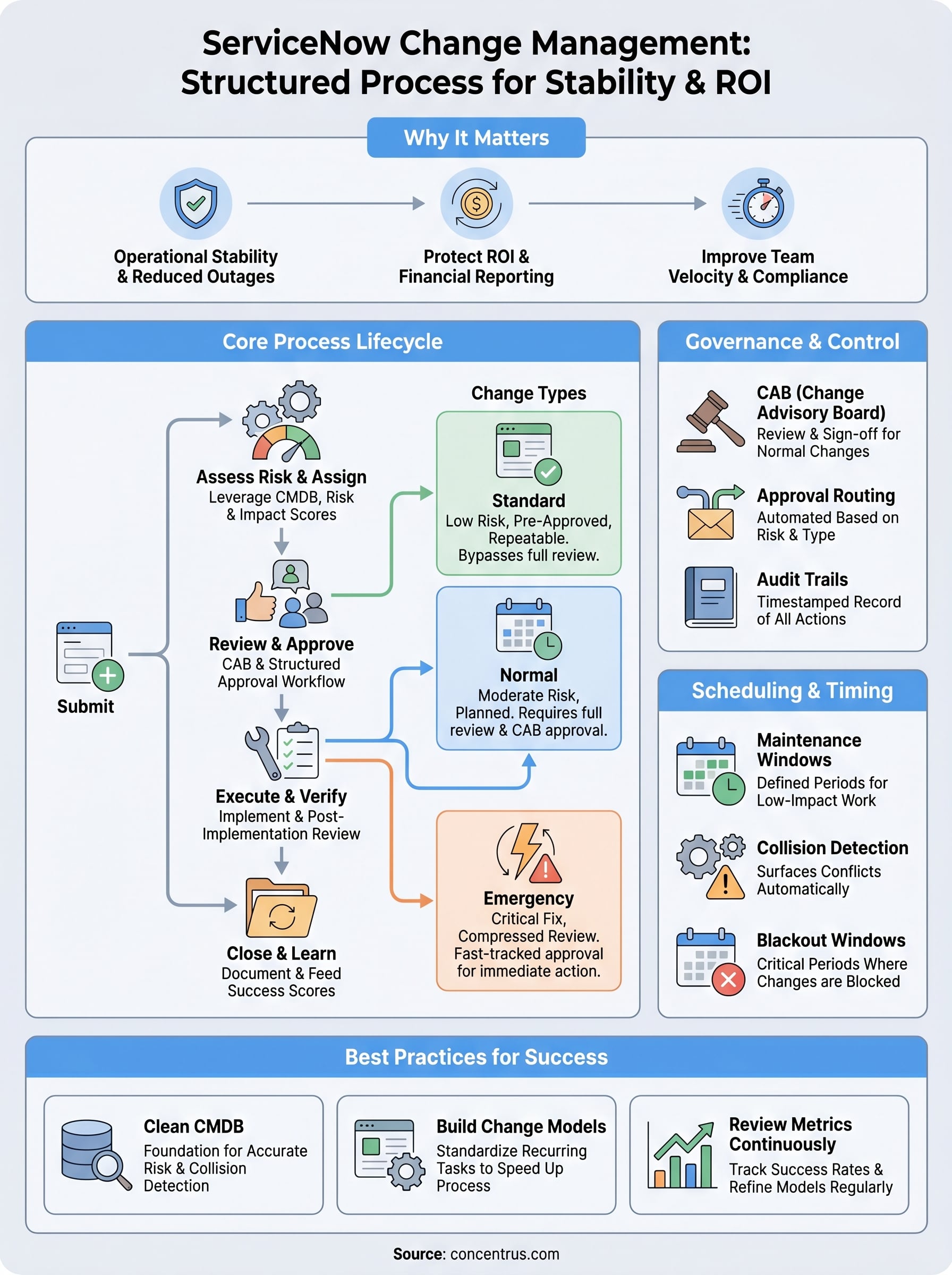
ServiceNow change management organizes every request into one of three distinct change types: standard, normal, and emergency. Each type carries a different level of risk, follows a different approval path, and is suited to a specific set of circumstances. Knowing which type applies to a given situation keeps your process moving at the right speed without cutting corners on oversight.

Standard changes
Standard changes are pre-approved, low-risk modifications that your team performs repeatedly with consistent, well-documented steps. Adding a user account, applying a routine security patch, or updating a DNS record all qualify as standard changes in most environments. Because the risk and process are already understood and approved at the model level, individual requests of this type move through without requiring a full review cycle.
Use standard changes only when the procedure is genuinely repeatable and the risk profile has been validated. Treating a novel task as standard to skip approvals introduces the exact risk change management is designed to prevent.
You set up standard changes by building a change model that pre-populates the workflow, tasks, and risk fields. Once the model is approved, your team submits requests against it and executes without waiting for additional sign-off. This keeps routine work fast while keeping it visible and auditable.
Normal changes
Normal changes cover the majority of planned modifications that carry moderate to significant risk. Infrastructure upgrades, application deployments, integration reconfigurations, and ERP environment updates all typically fall into this category. Unlike standard changes, normal changes require a full review and approval workflow, including risk scoring, impact assessment, and sign-off from the appropriate stakeholders before work begins.
Your team should plan normal changes far enough in advance to allow the review process to complete without pressure. Rushing approvals on a normal change defeats the purpose of the governance controls your organization put in place.
Emergency changes
Emergency changes exist for situations where a fix must happen immediately to restore service or prevent a critical failure. The approval process for emergency changes is compressed, not eliminated. Most organizations designate a small group, often part of the Change Advisory Board, with authority to approve emergency requests outside of standard meeting cycles.
Document emergency changes thoroughly after execution. Skipping post-change records creates gaps in your audit trail and makes it harder to learn from incidents when they recur.
The ServiceNow change process step by step
ServiceNow change management moves every request through a consistent sequence of steps that keeps risk visible and accountability clear from the moment someone identifies a need for change to the moment the work is closed and verified. Understanding each phase helps your team move efficiently without skipping the controls that protect your environment.

Submit and categorize the request
The process starts when a requester creates a change request record and fills in the core details: what is changing, which systems are affected, the planned start and end times, and the business justification. At this stage, the requester also selects the change type, whether standard, normal, or emergency, which determines the workflow the request will follow. If a matching change model exists, ServiceNow pre-populates many of these fields automatically, reducing manual effort and keeping submissions consistent.
Assess risk and assign ownership
Once the request is submitted, the platform calculates a risk score based on the configuration items involved, deployment timing, and any historical data tied to similar changes. Your team uses this score, along with the impact fields, to determine how much review the change needs before it progresses. At the same time, the request gets routed to the appropriate assignment group so the right people own each downstream task. A change touching your ERP environment, for example, should route to the team with direct knowledge of that platform, not a generic IT queue.
Accurate CI data in your CMDB is what makes risk scoring meaningful at this stage. Without it, the scores are estimates at best and misleading at worst.
Review, approve, and schedule
Normal changes move into a structured review phase where stakeholders evaluate the risk score, the implementation plan, and the rollback procedure before granting approval. Standard changes bypass this step since approval already exists at the model level. Once approved, the change gets scheduled against your maintenance windows and checked for conflicts with other in-flight work.
Execute, verify, and close
Your team carries out the work according to the documented implementation steps in the request. After execution, they complete a post-implementation review, confirm that the change achieved its intended outcome, and close the record with notes on what was done and whether any issues arose. That closure record becomes part of your audit history and feeds data back into future risk assessments.
Risk, impact, and change success scoring
ServiceNow change management uses a combination of risk scoring, impact assessment, and change success scoring to give your team an objective basis for deciding how much oversight a change needs. These mechanisms work together to surface the changes that carry the most potential for disruption so that your reviewers spend their attention where it counts, not on every routine request that crosses their queue.
How risk scoring works
Risk scoring in ServiceNow pulls from several inputs to generate a numerical value that reflects how dangerous a proposed change is to your environment. Configuration items referenced in the request, deployment timing, historical failure rates for similar changes, and the breadth of systems affected all feed into the calculation. The platform weights these factors and produces a score that automatically determines which approval path the request follows.
A risk score is only as accurate as the data behind it. Keeping your CMDB current and your change models well-calibrated is what separates a meaningful score from a number that misleads reviewers.
Your team can also supplement automated scoring with manual risk fields where requesters document their own assessment of the change. Combining both gives reviewers a fuller picture than either source alone provides.
Impact assessment
Impact assessment answers a different question than risk scoring. Where risk looks at the likelihood of something going wrong, impact measures how many users, systems, or business processes would be affected if it did. A change to a core financial integration, for instance, might carry a moderate procedural risk but a very high impact if it fails during a reporting period.
ServiceNow surfaces related configuration item dependencies through the CMDB to help your team quantify impact at the time of submission, not after the fact. Filling in impact fields accurately at the outset shapes the approval routing and gives the Change Advisory Board the context it needs to make fast, informed decisions.
Change success scoring
Change success scoring evaluates outcomes after a change closes and feeds that data back into future risk calculations. When your team marks a change as successful, failed, or partially completed, ServiceNow tracks that history against the specific change models, CIs, and teams involved. Over time, this record identifies which types of changes succeed consistently and which carry patterns of failure that your process needs to address.
Reviewing success scoring data on a quarterly basis helps you refine your models, flag underperforming teams, and build a continuous improvement loop directly into your governance process.
Approvals, CAB, and governance controls
Approval workflows and governance controls are what separate a disciplined change process from a system where decisions happen informally and accountability disappears. In servicenow change management, the platform enforces approval routing automatically based on the change type and risk score, so the right people review the right requests every time without relying on someone to remember who needs to sign off.
The role of the Change Advisory Board
The Change Advisory Board (CAB) is the group responsible for reviewing normal changes before they move to execution. Your CAB typically includes representatives from IT operations, application management, security, and any business units with a stake in production stability. The group meets on a defined schedule, reviews pending requests, asks questions about implementation and rollback plans, and grants or withholds approval based on what they find.
Treat CAB meetings as structured decisions, not status updates. If your team is spending most of the meeting describing changes rather than evaluating risk, the submission quality needs improvement before the meeting, not during it.
Keeping your CAB focused requires that change requesters submit complete records with documented implementation steps, rollback procedures, and accurate risk and impact fields before the meeting agenda is set. Incomplete submissions waste review time and push approvals into the next cycle.
Approval routing and escalation paths
ServiceNow routes approval tasks to the correct individuals or groups automatically once a change request enters the review phase. You configure this routing at the workflow level, mapping approval steps to assignment groups, managers, or specific named approvers depending on the risk tier and systems involved. Higher-risk changes trigger additional approval layers, while standard changes skip the routing entirely since approval already exists at the model level.
Build escalation paths into your configuration from the start. If an approver does not respond within your defined window, the platform should automatically notify a backup approver or escalate to a manager rather than letting the request stall silently.
Governance controls and audit trails
Every action taken on a change request in ServiceNow generates a timestamped activity record that captures who did what and when. This audit trail supports regulatory compliance, internal reviews, and post-incident investigations without requiring manual documentation from your team. Finance leaders who need clear accountability for every system modification can pull this history on demand rather than piecing it together from emails and calendar entries.
Scheduling, collisions, and blackout windows
ServiceNow change management gives your team more than just an approval workflow. It also gives you tools to control when changes happen and to prevent two risky modifications from landing on the same system at the same time. Getting scheduling right reduces the window of exposure during every deployment and protects the stability of systems your business depends on.

Change scheduling and maintenance windows
When your team schedules a change, it links the planned start and end times to a maintenance window that your organization defines in advance. Maintenance windows identify the periods when your environment is most tolerant of disruption, typically off-peak hours, weekends, or planned outages. Scheduling changes inside these windows keeps production risk low and gives your team a predictable rhythm for planning and executing work.
Sticking to defined windows also simplifies audit reviews. When a reviewer or auditor asks why a change ran at 2 a.m. on a Sunday, a documented maintenance window policy gives you a clear, defensible answer rather than a vague explanation about timing preferences.
Collision detection
A collision occurs when two or more changes are scheduled to affect the same configuration item or shared dependency during overlapping time windows. ServiceNow surfaces these conflicts automatically by checking each new request against the CMDB and the existing change schedule before the request moves to approval. Your team sees the conflict early, when it is still easy to adjust timing, rather than discovering the problem after both changes are already in flight.
Undetected collisions are one of the most common causes of preventable outages. Reliable collision detection depends entirely on your CMDB containing accurate, current CI data.
Blackout windows
Blackout windows mark specific periods when no changes are permitted in your environment. Common examples include financial period closes, peak sales seasons, and critical infrastructure freezes. You configure these directly in ServiceNow, and the platform blocks any change request from scheduling into a protected window unless your team explicitly overrides the restriction with appropriate authorization.
Defining blackout windows in advance and communicating them across your IT and business teams prevents the friction that comes from a developer submitting a change request three days before a quarter close and wondering why it cannot move forward. Everyone knows the rules before the deadline arrives.
Best practices for setup and ongoing improvement
ServiceNow change management delivers the most value when your configuration reflects how your organization actually works, not how someone assumed it would work during initial setup. Before you go live, spend time mapping your real approval chains, documenting your existing change categories, and identifying which recurring tasks are strong candidates for standard change models. Starting with a realistic baseline prevents the rework that comes from discovering your configuration does not match operational reality after the platform is already in use.
Start with a clean CMDB
Your CMDB quality determines the accuracy of everything that depends on it: risk scoring, collision detection, and impact assessment all rely on current, complete configuration item records. Before configuring change workflows, run a CMDB audit to identify stale records, missing relationships, and CIs that have never been linked to their downstream dependencies. Fix those gaps first.
An accurate CMDB is not a one-time project. Assign ongoing ownership to a specific team so your CI data stays reliable as your environment evolves.
Establish a CI ownership model where each configuration item has a named team responsible for keeping its record accurate. When ownership is clear, updates happen consistently instead of falling through the cracks during busy periods.
Build change models for repeatable work
Every change your team executes more than a few times per quarter is a candidate for a standardized change model. Identify those recurring tasks early, document the exact steps, pre-populate the risk and impact fields, and get the model approved through your normal governance process. Once the model exists, your team submits future requests against it instead of building a new record from scratch each time.
Revisit your existing change models at least twice per year to confirm that the documented steps still match how your team actually executes the work. Models that drift out of sync with current procedures create false confidence and undermine the audit trail your leadership depends on.
Review metrics and refine continuously
Pull change success rate, failed change count, and mean time to implement from your ServiceNow reports on a defined schedule, monthly at minimum. These metrics tell you which models are performing well and which categories consistently produce incidents or rollbacks that need process attention.
Use that data to drive structured retrospectives with your change management team. When patterns point to specific configuration items, teams, or change types causing repeated failures, treat the finding as a process problem to solve rather than an isolated incident to close.
Next steps
ServiceNow change management gives your organization a repeatable, auditable process for controlling every modification to your IT environment before it causes an incident. When you combine clean CMDB data, well-built change models, and consistent governance, the platform stops being an administrative requirement and starts being a practical tool that protects the systems your business depends on.
The steps are clear: build your change models around real workflows, keep your CMDB accurate, use risk and impact scoring to route approvals to the right people, and review your metrics regularly to catch patterns before they become recurring failures.
For midsized companies running ERP systems like NetSuite or Acumatica, IT stability and financial outcomes are directly connected. If your current ERP implementation is underperforming or your change process is creating more risk than it prevents, Concentrus can help. Talk to our ERP and ROI experts to find out where your biggest opportunities for improvement are.