

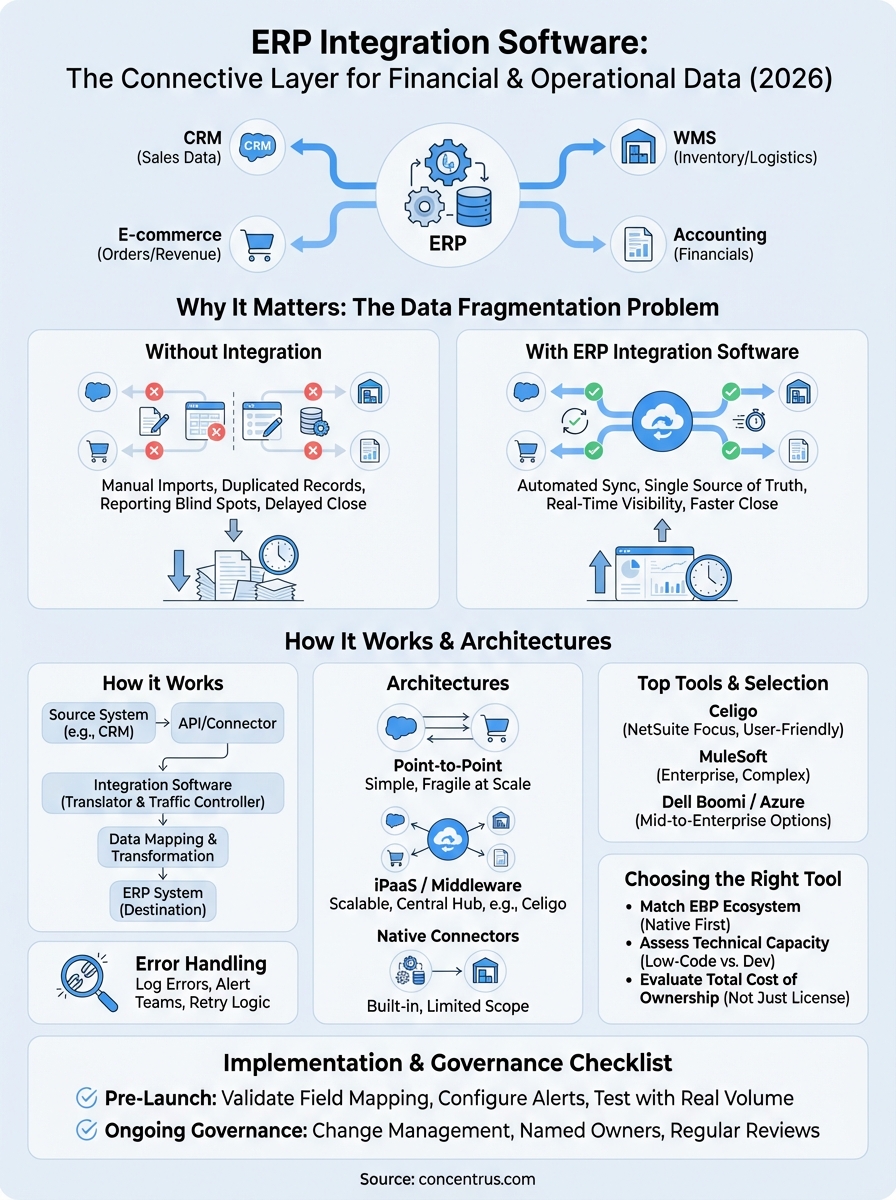
Your ERP system holds critical financial and operational data, but it doesn’t operate in a vacuum. Between your CRM, e-commerce platform, warehouse management tools, and accounting software, there are dozens of systems that need to talk to each other. ERP integration software is the connective layer that makes that happen, syncing data across applications so your teams aren’t stuck with manual imports, duplicated records, or reporting blind spots.
The problem? Not all integration tools are built the same. Some are native to specific ERP platforms like NetSuite or Acumatica. Others are middleware solutions designed to bridge gaps across your entire tech stack. Choosing the wrong one, or implementing the right one poorly, can create more complexity than it eliminates. For CFOs and finance leaders at midsized companies, that’s a direct threat to the ROI your ERP investment was supposed to deliver.
At Concentrus, we build and rescue ERP implementations on NetSuite and Acumatica, and integration architecture is one of the most common areas where projects go sideways. Through our Concentrus Partner Network™, we work with best-in-class integration platforms like Celigo to extend ERP capabilities and ensure every connected system drives measurable financial outcomes, not just data flow.
This guide breaks down what ERP integration software actually does, how the major tools compare, and what to look for when selecting one for your business. Whether you’re planning a new ERP rollout or untangling a troubled implementation, this is the context you need before making a decision.
Why ERP integration software matters in 2026
The average midsized company now runs between 40 and 100 different software applications across its departments. That number has grown steadily over the past decade, and so has the gap between what those systems can do independently and what they deliver when they share data in real time. ERP integration software has moved from a secondary concern to a foundational requirement for any finance leader who wants clean, actionable numbers without building a manual reconciliation process around them.
The data fragmentation problem has gotten worse
Finance teams at midsized companies are dealing with more data sources than ever before. Your sales team runs a CRM. Your warehouse uses a dedicated WMS. Your storefront lives on Shopify or a custom platform. Your logistics partner has its own portal. Each of these systems captures data that belongs in your ERP, but without an integration layer, that data arrives late, arrives wrong, or doesn’t arrive at all.

When data doesn’t flow automatically, your team fills the gap manually, and manual processes are where accuracy and speed both go to die.
The downstream effects hit your financial reporting directly. Month-end close timelines stretch because your team is chasing numbers across systems. Inventory valuations drift because the warehouse hasn’t synced with the ERP. Revenue recognition lags because order status updates are batched rather than real time. These aren’t technology problems in isolation; they’re financial performance problems that trace back to a broken integration strategy.
Cloud adoption has multiplied every company’s connection points
The shift to cloud-based software has accelerated the integration challenge. A decade ago, most midsized companies ran on a handful of on-premise tools that IT managed directly. Today, SaaS applications get added department by department, often without central oversight, and each new tool creates a new connection point your ERP needs to account for.
Platforms like NetSuite and Acumatica are built with APIs that make integration technically possible, but API availability doesn’t mean integration is automatic. You still need middleware, configuration, field mapping, error handling, and ongoing monitoring. The complexity compounds with every new system you add, and without a structured integration strategy, you end up with a fragile network of point-to-point connections that break under pressure.
Finance leaders carry more of the integration risk than they realize
When an integration breaks, your financial data is the first place it surfaces. A failed sync between your e-commerce platform and ERP means revenue posts to the wrong period. A lag between your 3PL and your inventory module means your cost of goods figures are wrong at close. Your team may not catch these errors until month-end, and by then the fix is time-consuming and the reporting damage is already done.
CFOs and controllers often treat integration as an IT issue, but the risk lives squarely in the finance function. Every integration decision, which tool connects to which system, how often data syncs, and what happens when a sync fails, has a direct line to the accuracy of your financials. That’s why selecting and governing your integration architecture is a finance leadership responsibility, not just a technical one.
What’s changed specifically in 2026
AI-driven automation tools, real-time analytics platforms, and expanded partner ecosystems have all pushed integration demands higher in the last 12 to 18 months. Your board and executive team expect real-time visibility into cash flow, inventory, and revenue performance, not reports that are two days stale because a sync failed overnight. The bar for what counts as acceptable data latency has dropped, and the cost of integration gaps is now visible in executive dashboards rather than buried in a spreadsheet someone builds at month-end.
Understanding what’s at stake in 2026 helps you ask sharper questions before you approve a new integration build or sign a contract with a vendor. The sections ahead give you the framework to evaluate your options with the same rigor you’d apply to any significant investment in your tech stack.
How ERP integration software works
At its core, ERP integration software acts as a translator and traffic controller between your ERP and every other system in your tech stack. When a sales order closes in your CRM, the integration layer picks up that event, transforms the data into a format your ERP recognizes, and pushes it into the right module, whether that’s order management, accounts receivable, or inventory. The whole sequence can happen in seconds or on a scheduled interval, depending on how you configure it.
The role of APIs and connectors
Modern ERP platforms like NetSuite and Acumatica expose REST APIs that allow external systems to send and receive data in structured formats. Integration software uses these APIs to establish a two-way channel between your ERP and connected applications. Most platforms also offer pre-built connectors for common tools like Salesforce, Shopify, or third-party logistics providers, which cuts down setup time significantly compared to building a custom API integration from scratch.
The pre-built connector library your integration platform offers is often the fastest way to assess whether it will actually work for your specific stack before you commit.
Data mapping and transformation
Raw data pulled from one system rarely matches the structure your ERP expects. A customer record in your CRM might use a different field format, naming convention, or currency code than what your ERP requires. Data mapping is the process of defining how each field in the source system corresponds to a field in the destination, and data transformation handles the conversion logic in between. Integration platforms provide visual mapping tools that let you configure these rules without writing custom code, though complex scenarios often require scripted logic to handle exceptions accurately.

The quality of your mapping directly affects the quality of your financial data. Poorly mapped fields lead to posting errors, misclassified transactions, and inaccurate reporting, which is exactly the kind of problem that shows up at month-end and takes hours to trace back to its source.
Error handling and monitoring
Integrations fail. A source system goes offline, a field format changes after a software update, or a record hits a validation rule it can’t pass. Robust ERP integration software includes built-in error logging and alert systems that notify your team when a sync fails rather than silently dropping records. You should be able to see exactly which transactions didn’t process, why they failed, and reprocess them once the issue is resolved without duplicating data. Without that visibility, broken syncs become financial discrepancies that are far more expensive to fix than they were to prevent.
ERP integration methods and architectures
Not every integration is built the same way, and the architectural choice you make upfront shapes how maintainable, scalable, and reliable your connected systems will be over time. Before you evaluate any specific ERP integration software, you need to understand the three primary architectural patterns and what each one costs you in flexibility and long-term maintenance.
Point-to-point integration
Point-to-point integration connects two systems directly, typically through a custom API build or a simple webhook. It works well for a single, stable connection, such as pushing confirmed orders from one platform into your ERP, and it’s often the fastest option to stand up. The problem surfaces when your stack grows. Each new connection requires a separate build, and when a source system updates its API, every direct connection it touches needs to be updated individually.
Point-to-point integrations are technically functional, but they become an unmaintainable web of dependencies the moment your environment scales beyond a handful of systems.
Finance leaders frequently inherit this architecture from earlier IT decisions and only recognize the fragility when a sync breaks at month-end and no one can quickly identify which connection failed or why.
Middleware and iPaaS platforms
Integration Platform as a Service (iPaaS) sits between your ERP and all other systems, acting as a central hub that manages data flow, transformation logic, and error handling in one place. Platforms in this category give you a visual interface to build and monitor integration flows without writing custom code for every connection. When a source system changes, you update the configuration in one place rather than hunting through a dozen direct connections.
For midsized companies running NetSuite or Acumatica, iPaaS solutions are typically the right architectural fit. They offer pre-built connector libraries for common business tools, reusable transformation templates, and centralized logging that makes it much easier to identify and resolve failures before they affect your financial close.
Native ERP connectors and SuiteApps
Both NetSuite and Acumatica offer native connector ecosystems. NetSuite’s SuiteApp marketplace and Acumatica’s partner extensions give you pre-certified integrations that are built specifically for each platform’s data model and field structure. These connectors reduce setup time and carry a lower risk of mapping errors compared to custom builds.
The trade-off is scope limitation. Native connectors work well for the applications in the supported library, but they may not cover every tool in your stack. In those cases, combining a native connector for high-volume, business-critical connections with an iPaaS layer for the rest gives you the best balance of reliability and coverage.
Must-have features and requirements
When you evaluate ERP integration software, the feature list matters less than whether those features solve the specific failure points that affect your financial operations. Most platforms offer a long list of capabilities, but a small set of requirements will determine whether the tool actually protects your data accuracy and supports your close cycle rather than just moving records between systems.
Pre-built connectors for your core stack
Your integration platform needs to support the specific tools your business already runs, not just a generic list of popular applications. Check that the platform offers certified, maintained connectors for your ERP, CRM, e-commerce platform, and any third-party logistics or warehouse tools before you evaluate anything else. A pre-built connector reduces your mapping configuration time and lowers the risk of field-level errors that corrupt financial records.
When a connector is pre-built and actively maintained by the vendor, it gets updated when the source system changes its API rather than breaking silently. That distinction separates a sync failure you catch in a monitoring dashboard from one you catch at month-end when the numbers don’t reconcile.
Error handling, alerting, and retry logic
Every integration will fail at some point. The question is whether your platform surfaces that failure immediately or lets it go undetected. Look for platforms that log every failed transaction with a specific error code, send alerts to designated team members when a sync breaks, and allow you to reprocess failed records after the issue is resolved.
Without retry logic and detailed error logs, a single failed sync can create a gap in your financial data that takes hours to identify and fix manually.
Silent failures are the most dangerous because your team continues operating on the assumption that data is flowing correctly until a discrepancy appears in your reports. Alerting and retry logic are not optional features; they are the baseline for any integration tool you trust with your financial data.
Granular access controls and audit logging
Finance data flowing through your integration layer carries the same sensitivity as data sitting directly in your ERP. Your integration platform should support role-based access controls that limit who can modify integration flows, view credentials, or trigger manual syncs. Audit logging tracks every change made to a flow configuration, which matters when you need to trace a data error back to a specific configuration change.
Compliance requirements in industries like manufacturing, healthcare, or financial services add another layer of necessity here. An integration platform that cannot demonstrate clear access governance is a liability in a compliance review, regardless of how well it performs technically.
Top ERP integration software tools for 2026
The ERP integration software market includes a wide range of platforms, from lightweight connectors designed for a single use case to enterprise-grade iPaaS solutions built for complex, multi-system environments. The tools below represent the options most relevant to midsized companies running NetSuite or Acumatica, based on connector depth, financial data handling, and the operational overhead required to maintain them.
Celigo
Celigo is an iPaaS platform built specifically for business application integration, and it’s one of the strongest options for companies running NetSuite. Its pre-built integration templates for NetSuite cover order-to-cash, procure-to-pay, and inventory sync workflows, which means you’re not starting from a blank canvas when you connect your CRM or e-commerce platform. The interface is built for operations and finance teams, not just developers, so your team can monitor sync status, review error logs, and trigger reruns without needing IT involvement for every issue.

Celigo’s SmartConnectors are designed to handle field-level mapping changes automatically when a connected application updates its schema, which significantly reduces the maintenance burden your team carries after go-live.
Concentrus partners with Celigo through the Concentrus Partner Network™ because its architecture aligns with how we build integration layers for NetSuite and Acumatica clients. For midsized companies that want a platform with financial workflow depth and a strong support ecosystem, it consistently performs well in production environments.
MuleSoft
MuleSoft, owned by Salesforce, is a robust enterprise integration platform with broad connector coverage and strong API management capabilities. It handles high-volume, complex integration scenarios well and is particularly effective when your environment includes a mix of cloud and on-premise systems. The trade-off is implementation complexity. MuleSoft typically requires dedicated technical resources to configure and maintain, which makes it a better fit for companies with internal integration engineering capacity or a strong implementation partner.
Dell Boomi and Microsoft Azure Integration Services
Dell Boomi and Microsoft Azure Integration Services both serve the mid-to-enterprise segment with different strengths. Boomi offers a low-code environment with a large connector library and strong monitoring tools, making it accessible for teams without deep development resources. Azure Integration Services fits well when your environment is already anchored in the Microsoft ecosystem, particularly if you run Dynamics or rely heavily on Azure infrastructure. Both platforms handle error logging and retry logic reliably, which matters for any team that needs clean financial data flowing into their ERP without manual intervention.
How to choose the right tool for your ERP
Choosing ERP integration software is not a feature comparison exercise. The right decision depends on three factors: what your ERP platform natively supports, how much technical capacity your team has to configure and maintain the integration layer, and what the real cost looks like over a two-to-three-year window. Getting any one of these wrong leads to a tool that works in a demo but creates operational debt the moment it hits production.
Start with your ERP platform’s native ecosystem
NetSuite and Acumatica both have partner ecosystems that include pre-certified integration tools built specifically for their data models. Before evaluating any general-purpose iPaaS platform, check whether your ERP vendor’s marketplace offers a connector for the systems you need to link. Native or certified connectors reduce setup time and lower the risk of field-mapping errors because the vendor has already done the work of aligning the integration logic with your ERP’s internal structure.
If your required connections live outside the certified library, a platform like Celigo or Boomi gives you the coverage you need. But starting with your ERP’s native ecosystem first helps you avoid paying for an iPaaS layer where a simpler, supported connector would do the job more reliably.
Match the tool to your team’s technical capacity
The most technically capable platform is worthless if your team can’t configure, monitor, and maintain it without calling in a developer every time something breaks.
Low-code iPaaS platforms are the right fit for most midsized finance teams because they let operations and finance staff manage sync monitoring and reprocessing without engineering support. If your organization has dedicated integration engineers, a platform with deeper API management capabilities gives you more flexibility. If it doesn’t, prioritize a tool with a clean monitoring interface and strong vendor support over one with raw technical power your team can’t practically use.
Evaluate total cost of ownership, not just licensing
The licensing fee is rarely the largest cost associated with an integration platform. Configuration time, ongoing maintenance, connector update cycles, and the internal staff hours required to manage errors all add up. When you compare tools, build out a rough cost model that includes implementation effort, annual maintenance overhead, and the cost of any consulting support you’ll need to keep the integration layer running as your stack evolves.
A tool that costs more upfront but requires less ongoing maintenance often delivers better financial outcomes over three years than a cheaper option that generates steady technical debt.
Implementation checklist and governance
Selecting the right ERP integration software is only half the work. How you deploy it, document it, and govern it over time determines whether your integration layer stays reliable or becomes a source of financial data risk. Before you go live with any new integration build, run through a structured checklist that covers not just technical configuration but the operational and governance controls your finance team depends on.
Pre-launch configuration checklist
Before activating any integration in your production environment, your team should verify every element of the build against a defined standard. Skipping steps here creates problems that compound over time, and they almost always surface during a month-end close when you have the least capacity to fix them.
- Field mapping reviewed and validated against actual ERP records, not sample data
- Error alerting configured with designated recipients for each integration flow
- Retry logic enabled with defined thresholds for failed transaction reprocessing
- Access controls set so only authorized users can modify flow configurations
- End-to-end test completed in a sandbox environment using real transaction volumes
- Rollback plan documented in case a production sync fails on go-live day
Running your integration test against realistic transaction volumes, not just a handful of sample records, is the most reliable way to catch edge cases before they affect your live financials.
Ongoing governance and change management
Integration governance does not end at go-live. Every time a connected application updates its API, changes a field structure, or introduces a new data object, your integration layer needs to absorb that change without breaking. Assign a named owner for each integration flow, whether that is an internal operations lead or a managed services partner, and establish a review cadence that includes a check of error logs, sync performance, and any upcoming software updates from connected vendors.
Change management is the other side of governance. When your team adds a new system to the stack, modifies a workflow in your ERP, or updates how a field is used, that change should trigger a formal review of every integration that touches the affected data. Without that process, configuration drift accumulates quietly, and the first sign of a problem is often a discrepancy in your financial statements rather than an alert in your monitoring dashboard. Treating integration governance as a recurring finance responsibility, not a one-time IT task, is what separates teams that close accurately from teams that spend their close cycle chasing data errors.
Next steps
Selecting and implementing ERP integration software is a decision with a direct line to your financial accuracy, close cycle performance, and the overall ROI your ERP delivers. The tools and frameworks in this guide give you a starting point, but the right architecture for your business depends on your specific ERP platform, your existing tech stack, and the governance capacity your team can realistically maintain. Getting that alignment right from the start prevents the kind of integration debt that turns into a financial reporting problem six months after go-live.
If your current integration layer is underperforming, or if you are planning a new ERP implementation and want to build the connection strategy correctly from day one, working with a partner who ties integration decisions to measurable financial outcomes makes a significant difference. The team at Concentrus specializes in exactly that, combining deep NetSuite and Acumatica expertise with a proven methodology that puts ROI at the center of every implementation decision.