

When something breaks in NetSuite at 4:45 on a Friday, you do not want to wait on a support ticket. NetSuite SuiteAnswers is the platform’s built-in knowledge base, and most finance teams either do not know it exists or only stumble into it by accident during a crisis. That is a missed opportunity, because a huge share of the errors, workflow questions, and configuration puzzles you run into have already been documented and solved inside it.
This article gives you a straight answer to what SuiteAnswers actually is, what kind of content lives inside it, and how to get to it directly from your account instead of hunting through menus. You will see how self-service troubleshooting fits alongside your admin team and your support contract, not as a replacement for either.
We put this together from the perspective of people who fix NetSuite implementations for a living. Below, we walk through accessing SuiteAnswers, searching it effectively, and knowing when a question is too complex for an article and needs a real ERP partner instead.
Why SuiteAnswers matters for finance-led NetSuite teams
Finance leaders do not think about NetSuite the way IT does. You care about the month-end close, the accuracy of your revenue recognition schedules, and whether your controller can trust the numbers on the dashboard by Tuesday morning. When a saved search breaks or a workflow stops firing, you are not just annoyed, you are potentially delaying a board report. SuiteAnswers exists precisely for these moments, giving you a documented answer before you have to escalate anything to your NetSuite administrator or open a support case.
The real cost of waiting on a support ticket
A standard NetSuite support case can take hours to get an initial response, sometimes longer depending on your service tier and the severity you assign. That delay is fine for a cosmetic bug. It is not fine when your AP approval routing stalls during a payment run or your consolidated financial statements throw an unexpected variance. SuiteAnswers compresses that timeline to minutes because the documentation is searchable right now, inside your account, without a ticket queue in between.
The fastest fix in NetSuite is the one you never had to file a ticket for.
Consider how the resolution paths typically compare for a routine, well-documented issue:
| Path | Typical time to resolution | Best suited for |
|---|---|---|
| SuiteAnswers search | Minutes | Known errors, standard configuration questions, how-to steps |
| Internal admin review | Hours to a day | Custom scripts, permission conflicts, workflow logic |
| NetSuite support case | Hours to several days | Bugs, account-specific defects, escalations |
| ERP consulting partner | Same day to a few days | Strategic redesign, rescue scenarios, ROI-linked changes |
Finance teams touch NetSuite differently than IT
Controllers and finance directors interact with NetSuite through reports, reconciliations, and period-close checklists, not through the SuiteScript editor. That difference matters because SuiteAnswers content is written to match how a business user actually works. You will find articles on closing a fiscal period, correcting a misapplied payment, or adjusting a revenue arrangement, phrased in the same language you use when you talk to your team, not in developer shorthand. This makes it one of the few NetSuite resources a non-technical finance leader can use independently and get a correct answer from on the first try.
What good self-service actually saves you
Every hour your team spends stuck on a solvable NetSuite question is an hour not spent closing books, forecasting cash, or reviewing margin by product line. Multiply that across a finance department of five or six people and a habit of checking SuiteAnswers first, rather than pinging the admin or opening a ticket, adds up to real capacity over a fiscal year. Self-service troubleshooting also reduces the number of low-value tickets your admin has to triage, freeing that person for the configuration work that actually moves your ERP forward.
Getting comfortable with SuiteAnswers is also a small but real piece of ERP governance. When your finance team can resolve the routine questions on their own, your internal NetSuite administrator and any outside partner you work with can focus on the changes that touch your financial KPIs directly, like faster closes or cleaner margin reporting, instead of answering the same how-do-I-fix-this question every week. That separation of routine support from strategic work is exactly the kind of discipline that keeps an ERP investment paying off instead of quietly draining time.
How to access SuiteAnswers in NetSuite
Getting into NetSuite SuiteAnswers takes about ten seconds once you know where NetSuite hid the link. Most users never notice it because it sits in the header, not in a main menu, and NetSuite has moved its exact placement a few times over various releases. The good news is that the access points are consistent enough that once you find it, you will not lose it again.
The fastest route: inside your account
Log into your NetSuite account and look at the top right corner of the screen, near your user profile icon. You will typically see a question mark icon or a Help link. Clicking it opens a panel that includes a direct link into SuiteAnswers, along with contextual help tied to whatever record or page you are currently viewing. That contextual piece is worth pausing on: if you are sitting on a broken saved search when you click Help, NetSuite often surfaces SuiteAnswers articles related to saved searches specifically, which saves you a search step entirely.
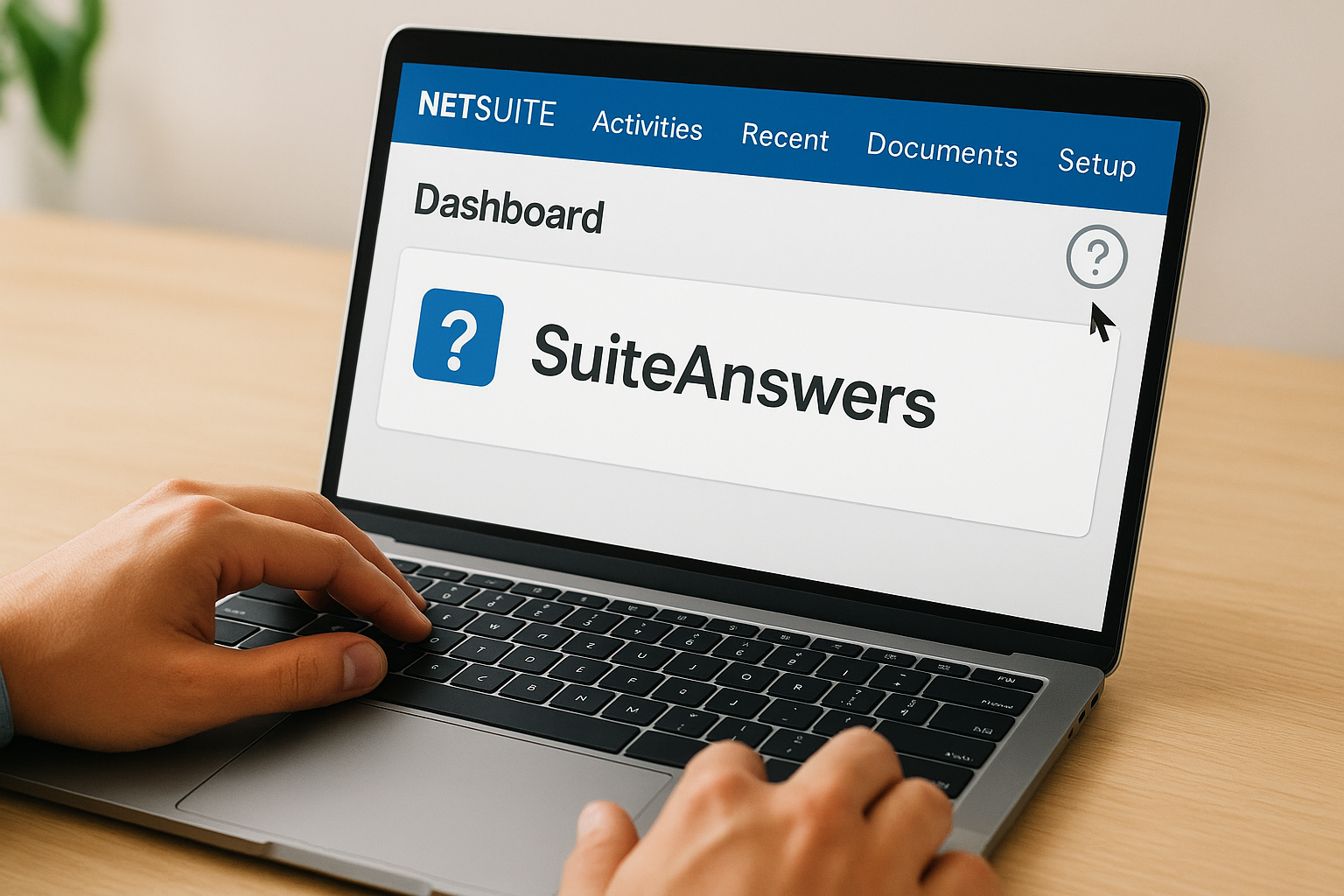
If you can log into NetSuite, you already have everything you need to reach SuiteAnswers.
Access without logging in
You do not always need to be inside your account to search SuiteAnswers. NetSuite maintains a public-facing entry point for certain content, which is useful when you are troubleshooting from your phone before you have even opened NetSuite for the day, or when you want to check something before renewing a contract or evaluating a new module.
Here is a quick rundown of the ways to get there:
- From inside NetSuite: Click the Help icon (usually a question mark) in the top navigation bar, then select the SuiteAnswers link from the panel that appears.
- Via direct search: Use the search bar inside the Help panel to jump straight to SuiteAnswers results without browsing categories first.
- From a support case: Case forms in NetSuite often link out to related SuiteAnswers articles before you are allowed to submit the case, which is NetSuite’s own way of nudging you toward self-service first.
- Bookmark it: Once you land on a SuiteAnswers results page, bookmark it. Some content requires an active session, so a saved bookmark from a logged-out browser will not always work, but it is still faster than digging through menus each time.
A quick note on permissions
Access to SuiteAnswers itself is not typically restricted by NetSuite role permissions, so a controller, an AP clerk, and your NetSuite administrator can all reach the same articles. What differs is whether specific fixes described in an article require permissions the logged-in user does not have, which is a separate issue from access to the knowledge base itself.
How to search SuiteAnswers effectively
Typing a vague question into SuiteAnswers gets you a wall of loosely related articles. Getting a useful answer fast depends on how you phrase the search, not just whether you search at all. Think about error codes and exact field names the way you would think about a part number at an auto parts counter: the more specific you are, the faster the right result surfaces.
Search by error code first
If NetSuite throws an error, copy the exact error code or message text and paste it directly into the search bar before you touch anything else. NetSuite error messages are often unique strings tied to a specific record type or script failure, so pasting the literal text usually beats typing a paraphrased description of what happened. Exact error text narrows results dramatically compared to a general description like “saved search not working.”
Paste the error, don’t describe it, and SuiteAnswers gets you to the fix faster.
Use NetSuite’s own terminology, not your team’s shorthand
Your team might call something a “credit memo fix” or a “close checklist,” but NetSuite’s documentation uses its own naming conventions for records, transactions, and features. Searching with NetSuite terminology, like the exact transaction type or the specific module name, matches how articles are tagged internally and returns more relevant results than searching with internal shorthand that only your department uses.
Filter and refine instead of re-searching from scratch
Most SuiteAnswers search results let you filter by category, such as accounting, order management, or administration, once your initial search returns too many hits. Use those filters before typing a whole new query. A few habits that consistently narrow results:
- Add the module name (Accounting, SuiteBilling, Order Management) alongside your error term.
- Include the record type (invoice, journal entry, vendor bill) when the issue is transaction-specific.
- Search for the exact button or field label as it appears on the NetSuite screen, not your own description of it.
- Try both the singular and plural form of a term if your first search returns nothing.
Know when the search is telling you something
If a well-phrased, specific search turns up nothing relevant after two or three attempts, that is a signal worth noticing. It usually means the issue is either account-specific, tied to a customization, or genuinely undocumented, and no amount of rephrasing will fix that. That is the point where continuing to search costs you more time than it saves.
The content types you’ll find inside SuiteAnswers
SuiteAnswers is not just a pile of troubleshooting articles. It holds several distinct content types, and knowing which one you need before you search saves you a round of wasted clicks. NetSuite documentation inside SuiteAnswers ranges from short how-to steps to full release notes, and each type answers a different kind of question.
Step-by-step how-to articles
Most of what finance users pull up day to day are how-to articles: short, numbered instructions for completing a specific task, like reversing a journal entry or adjusting a revenue recognition schedule. These articles assume you know your business process already and just need the exact clicks inside NetSuite to execute it. Step-by-step guidance like this is the fastest content type to act on because it rarely requires interpretation.
Error and known-issue explanations
When NetSuite throws a specific error code, SuiteAnswers often has a dedicated article explaining what triggers it and what to check first. Some of these double as known-issue notices, meaning NetSuite has acknowledged a bug and is telling you the workaround while a permanent fix is in development. That distinction matters: a known issue means the fault is not yours, and no amount of reconfiguring on your end will resolve it faster than NetSuite’s own patch cycle.
A known-issue article saves you from debugging something that was never broken on your end.
Release notes and feature documentation
Every NetSuite release brings changes, and SuiteAnswers archives the release notes alongside deeper feature documentation explaining how a new capability works. Reviewing these before a release lands helps you anticipate whether a workflow change will affect your close process or your reporting.
A quick breakdown of what you’ll typically find:
| Content type | What it answers | Typical length |
|---|---|---|
| How-to articles | “How do I complete this task?” | Short, a few steps |
| Error/known-issue articles | “Why did this happen, and is it my fault?” | Short to medium |
| Release notes | “What changed in this version?” | Medium to long |
| Feature guides | “How does this module work overall?” | Long, reference-style |
FAQs and best-practice guidance
Rounding things out, SuiteAnswers includes FAQ-style content and best-practice recommendations for common setup decisions, like how to structure a chart of accounts or configure approval thresholds. Getting familiar with which category you’re actually searching in narrows your results before you even type a query.
SuiteAnswers vs. the NetSuite Help Center
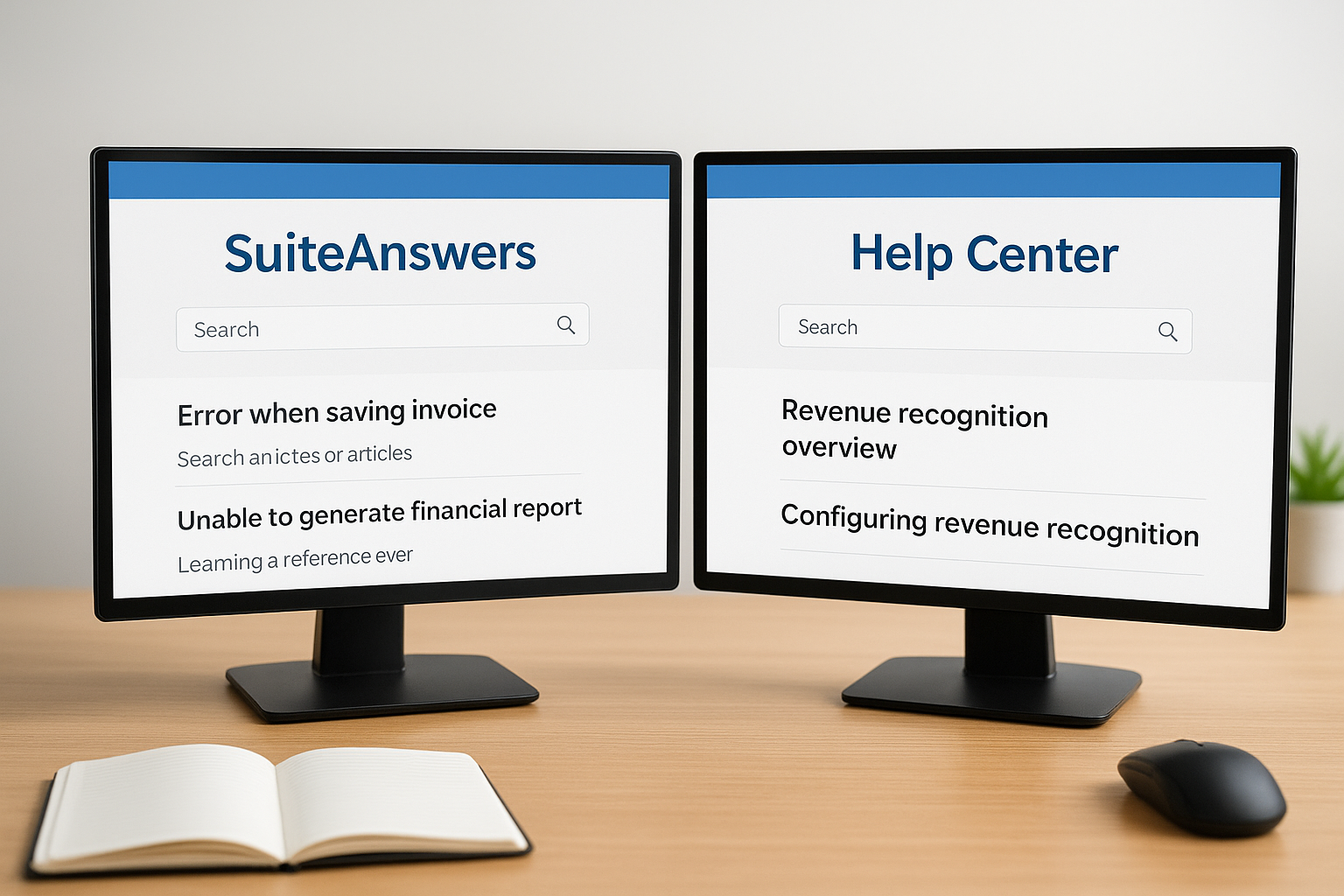
Users often use “SuiteAnswers” and “NetSuite Help Center” interchangeably, but they are not the same thing, and mixing them up costs you time when you are trying to find a specific answer fast. NetSuite Help Center is the broader documentation hub built into your account, covering setup guides, field-level definitions, and the full reference material for every module you have provisioned. SuiteAnswers, by contrast, is the searchable knowledge base layered on top of that documentation, purpose-built for troubleshooting and quick answers rather than comprehensive reference reading.
What each one is actually built for
Think of the Help Center as the manual and SuiteAnswers as the FAQ desk sitting next to it. If you need to understand how revenue recognition rules work across your entire account, the Help Center walks you through the full concept with examples and configuration paths. If you just need to know why a specific revenue arrangement threw an error this morning, SuiteAnswers content gets you there faster because it is indexed around symptoms and error codes, not concepts.
Use the Help Center to learn a feature, and SuiteAnswers to fix a problem with it.
A side-by-side look
| Resource | Best for | Content style | Typical use case |
|---|---|---|---|
| SuiteAnswers | Troubleshooting, quick fixes | Short articles, error-specific | “Why is this error appearing?” |
| Help Center | Learning a feature end to end | Long-form reference guides | “How does revenue recognition work?” |
Why finance leaders should care about the distinction
Searching the wrong resource wastes real time. If your controller opens the Help Center hunting for a fix to a specific error message, they will likely wade through pages of conceptual explanation before finding anything actionable. Flip it around, and someone trying to learn a whole new module through SuiteAnswers alone will end up with fragmented, symptom-level articles instead of the structured walkthrough the Help Center actually provides. Knowing which resource matches your question, a quick fix versus a real learning need, is a small habit that saves your finance team meaningful hours over a year. Both resources sit inside the same NetSuite ecosystem and often link to each other, so once you know the difference, moving between them becomes second nature rather than a guessing game.
When to escalate from SuiteAnswers to a support case
Knowing when to stop searching and start a ticket saves you more time than any search trick covered above. SuiteAnswers is built for known, documented problems. A support case exists for everything else, including bugs specific to your account, data corruption, and anything that touches your live financial data in a way you cannot safely reverse on your own. Treating every issue as a search problem, even after three or four failed attempts, is where finance teams waste hours they could have saved by escalating an hour earlier.
Signs a support case is the right move
A few patterns show up consistently when an issue has outgrown self-service:
- You’ve searched with specific error text and NetSuite terminology, and nothing relevant comes back after two or three tries.
- The problem affects live transactions, like postings that already hit the general ledger, where a wrong fix could compound the damage.
- Multiple users report the same symptom at the same time, suggesting an account-wide issue rather than a one-off mistake.
- The SuiteAnswers article you found describes a known issue with no workaround listed, meaning you’re waiting on NetSuite’s own patch cycle.
- The fix requires backend access, script changes, or account configuration beyond what a business user should touch directly.
If the fix touches your ledger and you’re not sure it’s reversible, stop searching and open a case.
What to have ready before you open a case
Support tickets move faster when you hand NetSuite a complete picture instead of a vague description. Before you submit, gather the exact error text, a screenshot of the transaction or record involved, the steps that reproduce the problem, and a note on which SuiteAnswers articles you already tried and why they didn’t resolve it. That last detail matters more than people expect: it tells the support rep you’ve already ruled out the documented fixes, which usually moves your case past the first tier of generic troubleshooting questions.
When even a support case isn’t enough
Some problems are not NetSuite defects at all. They’re the result of a configuration decision made during your original implementation, and no support ticket will fix a structural design flaw. If you keep hitting the same category of issue every quarter, that’s a sign your account needs a rescue-level review, not another ticket.
Where SuiteAnswers fits in your broader support strategy
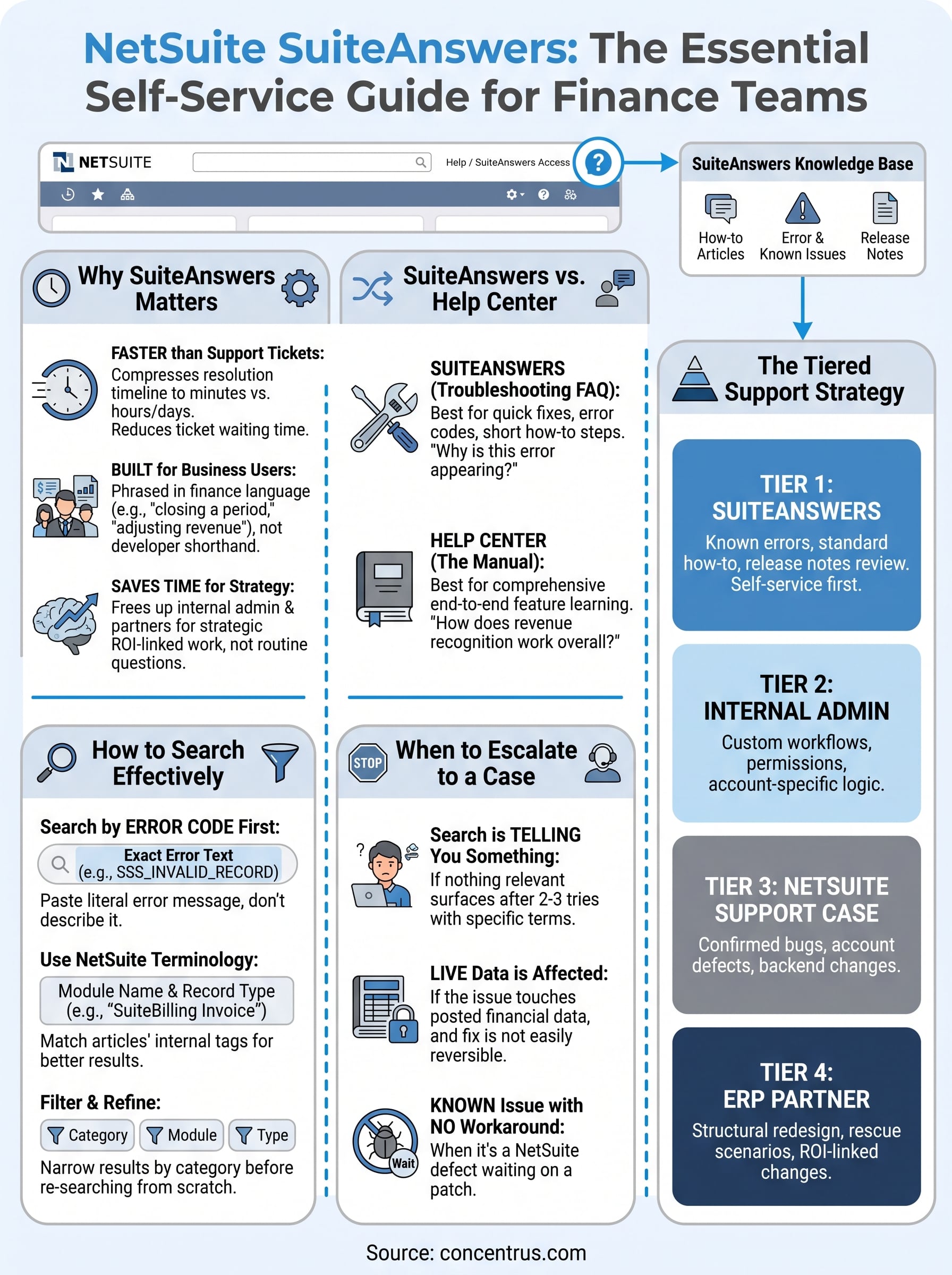
SuiteAnswers works best as one layer in a stack, not a standalone solution. Treat it as the first stop for routine questions, with your internal NetSuite administrator as the second layer and your outside ERP partner as the third. Support strategy built this way keeps every tier doing the work it’s actually good at, instead of your admin fielding basic how-to questions or your partner getting pulled into a ticket that a five-minute search would have solved.
A tiered model that actually holds up
Most finance teams that run NetSuite well end up with some version of this structure, whether they planned it deliberately or backed into it after a few painful weeks:

- Tier 1, SuiteAnswers: Known errors, standard how-to questions, release note review before an upgrade lands.
- Tier 2, internal admin: Custom workflows, permission conflicts, saved search logic, anything touching your account’s specific configuration.
- Tier 3, NetSuite support case: Confirmed bugs, account-specific defects, anything NetSuite itself needs to acknowledge or patch.
- Tier 4, ERP consulting partner: Structural redesign, rescue scenarios, and anything tied directly to a financial KPI you’re trying to move, like close speed or margin visibility.
A support strategy without tiers turns every question into an emergency, and every emergency into a ticket.
Why the order matters more than the tools
Skipping tiers is where teams lose the most time. Jumping straight to a support case for something SuiteAnswers already documents adds a wait for an answer you could have had in minutes. Jumping straight to a consulting partner for a routine fix wastes budget that should be reserved for work tied to real ROI. Getting the order right is less about which tool is smartest and more about matching the size of the problem to the right resource on the first try.
Building the habit across your team
Rolling this out doesn’t require a policy document. It requires your controller, your AP lead, and your admin agreeing on one simple rule: search before you escalate, and escalate before you guess. Once that habit sticks, your internal team spends less time bouncing between resources and more time on the financial work SuiteAnswers was never meant to touch in the first place.
Common SuiteAnswers access issues and how to fix them
Even a tool this simple breaks in predictable ways. Most access issues trace back to a handful of causes: an expired session, a browser blocking a pop-up, or a user looking in the wrong spot in the interface entirely. None of these require your NetSuite administrator to get involved, and knowing the fix ahead of time saves you the ten minutes you’d otherwise spend digging through settings.
The Help icon doesn’t show a SuiteAnswers link
Sometimes the Help panel opens but the SuiteAnswers link is missing or grayed out. This usually happens after a NetSuite release, when the panel layout shifts slightly and cached browser data hasn’t caught up. Refreshing the page after clearing your browser cache resolves it in almost every case. If it persists across multiple refreshes, log out of NetSuite completely and log back in rather than just reloading the tab.

Most SuiteAnswers access problems are browser problems, not NetSuite problems.
Search results look stale or incomplete
A search that returns the same handful of old articles, even after NetSuite has published newer content on the same topic, is almost always a caching issue on your end. Try the search in an incognito or private window first. If fresh results appear there, your regular browser session is the culprit, not SuiteAnswers itself.
Logged-in users seeing a login prompt anyway
Occasionally a user clicks into SuiteAnswers and gets asked to log in again, even though they’re already inside their NetSuite session. This typically happens when a pop-up blocker intercepts the SuiteAnswers window, since it sometimes opens in a separate tab or frame. Whitelisting NetSuite’s domain in your browser settings fixes this permanently.
A quick checklist for the most common symptoms:
- Missing Help link: Clear cache, refresh, or fully log out and back in.
- Stale results: Test in a private browser window to rule out local caching.
- Unexpected login prompt: Check your pop-up blocker settings for the NetSuite domain.
- Blank or broken article page: Try a different browser; some older browser versions render SuiteAnswers pages incorrectly.
- No access at all from a shared workstation: Confirm the workstation’s NetSuite session hasn’t timed out separately from your login.
None of these fixes require a support case. Working through this checklist first keeps a five-minute annoyance from turning into an unnecessary ticket.
Getting more ROI from your NetSuite support resources
Every hour your team spends stuck on a NetSuite question is an hour that never shows up on a productivity report, but it still costs you real money. ROI tracking on your ERP investment should account for support efficiency the same way it accounts for close speed or reporting accuracy, because both drain the same budget line. Treating SuiteAnswers, your admin’s time, and your support contract as one connected resource, rather than three separate line items, is what actually moves the needle on the return you’re getting from NetSuite.
Measure what self-service is actually saving you
Most finance teams never track how many issues get resolved through SuiteAnswers versus escalated to a ticket or a partner call. Start tracking it for one quarter and you’ll have a real baseline. A few numbers worth watching:
- Tickets opened per month before and after your team adopts a search-first habit.
- Average time to resolution for issues resolved through SuiteAnswers versus those escalated to a support case.
- Admin hours spent on routine questions that a documented article could have answered directly.
You can’t improve what you never measured, and support efficiency is no exception.
Build SuiteAnswers into onboarding, not just crisis response
New hires on your finance team rarely get shown SuiteAnswers unless someone happens to mention it. Fix that by adding a five-minute walkthrough to your onboarding checklist: show them the Help icon, run one sample search together, and point out the difference between SuiteAnswers and the Help Center covered earlier in this article. That small investment pays off the first time a new AP clerk hits an error instead of pinging your controller.
Know where self-service stops paying off
SuiteAnswers earns its keep on routine, documented problems. It has no opinion on whether your chart of accounts is structured to support the reporting your CFO actually needs, or whether your approval workflows are costing you days at close every month. That’s strategic work, and it belongs with a partner who ties every recommendation to a measurable financial outcome, not just a fixed feature list. Concentrus builds that accountability into every NetSuite engagement through the ROI Roadmap™ methodology, so the support layer you rely on daily and the strategic work that actually grows your return stay connected instead of operating as two disconnected efforts.
Turning self-service into ERP confidence
NetSuite SuiteAnswers gives your finance team a real first line of defense against the errors and workflow questions that would otherwise sit in a support queue. You now know how to reach it, search it with the right terms, and recognize the difference between a documented fix and a problem that needs an admin or a support case. That knowledge alone puts you ahead of most teams that only discover SuiteAnswers by accident.
Getting this right matters beyond convenience. Support efficiency is part of your ERP’s total return, right alongside close speed and reporting accuracy. But self-service only takes you so far. When the issue is structural, when your workflows or chart of accounts are quietly costing you at every close, no article will fix that.
That’s where a partner tied to measurable outcomes earns its place. Talk to Concentrus about turning your NetSuite investment into a system built for ROI, not just uptime.