

Inventory carrying costs, stockouts, and fulfillment delays eat directly into your margins. For midsized companies balancing growth with operational complexity, manual tracking or disconnected systems can’t keep pace. NetSuite inventory management brings purchasing, warehousing, and fulfillment together in one real-time platform, giving you control over what’s often one of your largest working capital investments.
This article covers how NetSuite’s inventory management system works, its core features, and the specific capabilities that help finance leaders gain visibility into stock levels, reduce carrying costs, and improve cash flow predictability. You’ll learn what the software actually does, not just what the marketing says.
At Concentrus, we implement NetSuite for midsized companies with a focus on measurable ROI, not just technical configuration. Whether you’re evaluating NetSuite for the first time or trying to get more value from an existing setup, this guide provides the foundational knowledge to ask better questions and make informed decisions about your ERP investment.
Why NetSuite inventory management matters to finance
Inventory sits on your balance sheet as an asset, but in reality, it’s cash that hasn’t converted yet. For CFOs at midsized companies, inventory often represents 20 to 40 percent of total assets, making it one of the largest working capital drains. Poor visibility into stock levels, slow-moving items, and inaccurate valuations create a ripple effect that touches cash flow, margin erosion, and financial reporting accuracy. NetSuite inventory management gives you the real-time data and controls needed to turn inventory from a liability into a strategic advantage.
Working capital and cash flow predictability
Every dollar tied up in excess inventory is a dollar you can’t deploy elsewhere. When you carry too much stock, you increase warehousing costs, risk obsolescence, and limit your ability to invest in growth. Conversely, insufficient stock leads to stockouts that kill revenue and damage customer relationships. NetSuite provides visibility into inventory turns, days on hand, and reorder points across multiple locations, letting you optimize working capital without guessing. You can see which SKUs are moving, which are stagnant, and where cash is sitting idle on the shelf.
Real-time inventory tracking helps you balance the trade-off between capital efficiency and service levels with data instead of gut feel.
Better inventory planning directly improves cash conversion cycles. When you know exactly what you have, what’s on order, and what’s committed to customers, you can adjust purchasing to match actual demand rather than overstocking based on forecasts. This means fewer write-downs, less obsolescence, and more predictable cash outflows for procurement.
Cost structure and margin protection
Inventory carrying costs include warehousing, insurance, handling, and the opportunity cost of tied-up capital. For many companies, these costs add up to 15 to 25 percent annually of average inventory value. NetSuite’s built-in costing methods (FIFO, LIFO, average, standard) ensure that every item is valued correctly, and you can track landed costs that include freight, duties, and handling. Accurate costing means you know your true margins on every sale, not just estimated margins based on outdated purchase prices.
Stockouts have their own financial impact. When you run out of a high-margin product, you lose the sale or incur expedited freight costs to rush replacement stock. NetSuite’s demand planning and replenishment tools help you avoid both scenarios by setting safety stock levels, reorder points, and preferred vendors at the item level. You protect margins by keeping the right products in stock without overcommitting capital to slow movers.
Financial reporting accuracy and compliance
Inventory valuation directly affects your cost of goods sold and gross profit on the income statement, as well as current assets on the balance sheet. Inaccurate inventory records lead to misstated financials, compliance issues, and difficulty defending your numbers during audits. NetSuite automatically updates inventory values based on transactions, applies the correct costing method, and provides audit trails for every movement. You can reconcile physical counts to system records, investigate variances, and close your books with confidence that inventory is stated correctly.
Integration between inventory and financial modules means that every receipt, transfer, and fulfillment updates your GL in real time. You don’t wait until month-end to discover discrepancies. Instead, you see the financial impact of inventory decisions as they happen, giving you the ability to course-correct before small issues become material problems.
How NetSuite inventory management works end to end
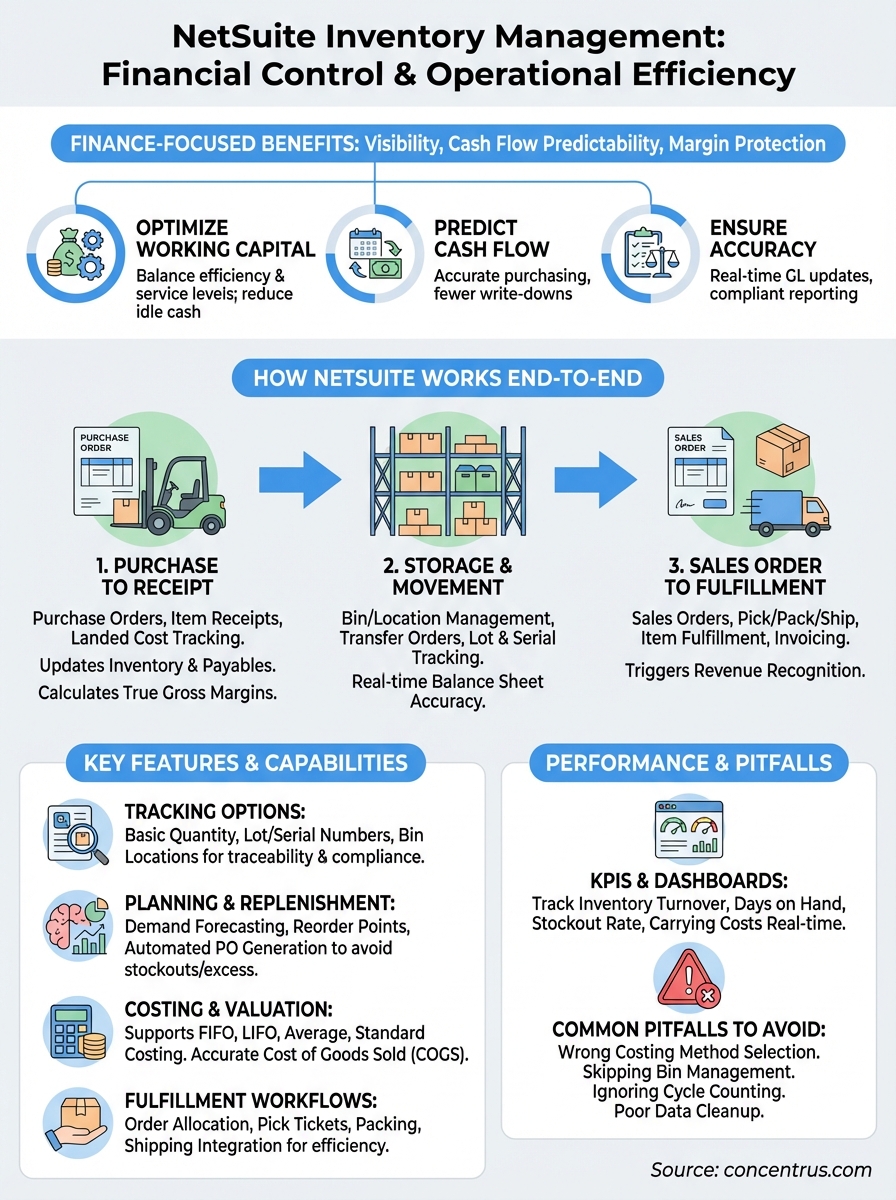
NetSuite inventory management connects every step from purchasing through fulfillment in a single system, eliminating the data gaps that create write-offs and stockouts. The platform tracks items in real time as they move through your supply chain, updating financial records automatically at each transaction. Understanding this end-to-end flow helps you see where bottlenecks occur and where better controls protect cash.
Purchase to receipt
The cycle starts when you create a purchase order based on reorder points, demand forecasts, or manual requisitions. NetSuite tracks expected delivery dates and alerts you when suppliers miss commitments. When goods arrive, you record an item receipt that updates inventory quantities and creates a payable in your accounting system. If the shipment includes freight or duties, you can add these as landed costs that become part of the item’s total value. This direct link between procurement and inventory means you always know what you paid and what you’re carrying on the books.
Landed cost tracking ensures you calculate true gross margins instead of guessing based on invoice-only pricing.
Storage and movement
Once received, items sit in specific bins or locations within your warehouses until you need them. NetSuite supports multiple storage strategies, from basic location tracking to advanced bin management with pick paths and zone assignments. When you move inventory between warehouses, the system records transfer orders that adjust quantities and values at both locations simultaneously. This keeps your balance sheet accurate across all sites without manual reconciliation. You can also set up lot or serial number tracking for items that require traceability for compliance or warranty management.
Sales order to fulfillment
When a customer places an order, NetSuite creates a sales order that reserves inventory and starts the fulfillment process. The system checks available stock across locations and can automatically allocate from the warehouse closest to the customer. Your warehouse team receives a pick ticket showing exactly which bins to pull from, reducing picking errors and speeding shipments. After you ship, you create an item fulfillment that reduces inventory quantities, updates cost of goods sold, and triggers invoicing. The entire transaction flow from order entry to revenue recognition happens within netsuite inventory management, giving you complete visibility into how inventory movements affect financial performance.
Inventory records and tracking options in NetSuite
NetSuite inventory management builds on a flexible item record structure that lets you define exactly how much detail you need for each product. You can track items at a basic level with just quantity and location, or you can drill down to specific lot numbers, serial numbers, and bin locations for compliance or operational precision. The tracking method you choose affects how much control you have over traceability, fulfillment accuracy, and the granularity of your financial reporting. Most midsized companies start with simpler tracking and add layers as they scale or face regulatory requirements.
Item record fundamentals
Every product in your system starts as an item record that defines its type (inventory, assembly, kit, non-inventory), cost method, preferred vendor, and reorder parameters. You control whether the item is tracked by quantity only or requires additional identifiers like lot or serial numbers. The item record also holds purchasing and sales data, including default prices, lead times, and units of measure. When you set up an item correctly at the start, downstream processes like purchasing, receiving, and fulfillment automatically follow the rules you defined. This prevents situations where your warehouse team tracks serial numbers on paper while your ERP only knows total quantities.
Lot and serial tracking
Lot tracking groups items received or manufactured together under a single identifier, making it easier to trace batches for quality issues or expiration management. You assign lot numbers at receipt and then track which lots are sold to which customers. Serial tracking takes this further by assigning a unique identifier to each individual unit, which is critical for electronics, medical devices, or any product with warranty obligations. NetSuite lets you define whether an item requires lot or serial tracking, and the system enforces this rule at every transaction. You can’t ship a serialized item without recording the specific serial number, protecting you from compliance gaps.
Serial and lot tracking provides the audit trail regulators expect without adding manual paperwork that slows operations.
Bin and location management
Basic inventory systems tell you how many units you have, but not where they physically sit. NetSuite’s bin management assigns specific warehouse locations to every item, down to aisle, rack, and shelf positions if needed. This speeds picking by showing your team exactly where to find products and reduces mis-picks that cost time and money. You can set up pick paths that guide pickers through the warehouse efficiently, or use zone picking where different team members handle different areas. Multi-location inventory extends this across warehouses, distribution centers, and retail stores, updating quantities in real time as you transfer stock between sites.
Planning and replenishment in NetSuite
NetSuite inventory management gives you tools to predict what you’ll need before you run out, avoiding both excess stock and emergency orders. The platform combines demand forecasting, safety stock calculations, and automated reorder triggers to keep inventory levels aligned with actual sales patterns. Strong planning reduces carrying costs while protecting against stockouts that kill revenue. You set the parameters once at the item level, and the system monitors conditions continuously to flag when action is needed.

Demand planning and forecasting
NetSuite analyzes your historical sales data to project future demand, adjusting for seasonality and growth trends. You can create demand plans at different levels of detail, from high-level product families down to individual SKUs across multiple locations. The system shows you expected demand month by month, letting you compare forecasts to current inventory and plan purchases ahead instead of reacting to shortages. When actual sales deviate from forecasts, you can adjust future projections or investigate why demand shifted unexpectedly.
Demand planning becomes particularly valuable when you have long lead times from suppliers. If it takes 90 days to receive imported goods, you need visibility into what customers will likely order three months from now. NetSuite’s demand plans give you that forward view, reducing the guesswork that leads to write-offs when you over-order or lost sales when you under-order.
Reorder points and safety stock
Reorder points tell the system when to trigger replenishment based on current inventory levels and expected usage. You define the minimum quantity at which NetSuite generates a purchase requisition or alerts your procurement team. Safety stock adds a buffer above the reorder point to protect against unexpected demand spikes or supplier delays. Both settings are item-specific, so you can apply tighter controls to high-velocity products while holding less safety stock on slow movers.
Proper reorder points balance working capital efficiency against service level requirements using data instead of instinct.
The system continuously compares on-hand quantities to reorder points across all locations. When inventory falls below the threshold, NetSuite flags the item for replenishment. You can review suggested orders in bulk, adjust quantities based on current conditions, and convert them to purchase orders with a few clicks. This automation prevents the manual monitoring that misses replenishment needs until it’s too late.
Purchase order generation and automation
NetSuite can automatically generate purchase requisitions when items hit reorder points, grouping suggestions by preferred vendor and delivery date. You review these requisitions, adjust quantities if business conditions changed, and convert them to purchase orders that go directly to suppliers. The system tracks PO status from acknowledgment through receipt, alerting you when deliveries are late so you can follow up before stockouts occur. Automation here doesn’t remove your judgment; it removes the repetitive monitoring that causes buyers to miss critical replenishment needs.
Fulfillment workflows and warehouse execution
NetSuite inventory management connects order processing directly to warehouse operations, eliminating the manual handoffs that create shipping delays and picking errors. When a sales order enters the system, NetSuite automatically checks inventory availability, allocates stock from the optimal location, and generates pick tickets that guide your warehouse team through fulfillment. This integration between front-office sales and back-office operations gives you control over the last mile before products reach customers, where mistakes cost both money and reputation.
Order allocation and picking strategies
The system evaluates multiple factors when allocating inventory to orders, including warehouse proximity to the customer, available quantities at each location, and item-specific allocation rules you define. You can prioritize fulfillment from specific warehouses to balance inventory levels or reduce shipping costs. NetSuite supports different picking methods depending on your warehouse setup: single-order picking where one person fulfills an entire order, batch picking where multiple orders are picked simultaneously, or zone picking where different team members handle different warehouse areas. Pick tickets show the exact bin locations for each item, reducing the time spent searching and preventing mis-picks that require costly corrections.
Integrated picking workflows reduce order-to-ship time by eliminating the manual coordination between sales and warehouse teams.
Wave management lets you group orders into picking waves based on shipping deadlines, carrier schedules, or order characteristics. You release waves to the warehouse floor when you’re ready to begin fulfillment, maintaining control over workflow timing instead of overwhelming your team with unorganized pick lists. This batching improves labor efficiency while ensuring high-priority orders ship first.
Packing and shipping integration
After picking, your warehouse team creates item fulfillments that record exactly what shipped to each customer. NetSuite updates inventory quantities, triggers invoicing, and can integrate with shipping carriers to generate labels and tracking numbers without leaving the system. You capture package weights, dimensions, and shipping methods that feed into freight cost analysis and customer service. The fulfillment record creates the audit trail connecting the physical shipment to financial transactions, ensuring your revenue recognition matches actual goods delivered.
Returns and adjustments
Customer returns flow back through return merchandise authorizations (RMAs) that credit the customer and return inventory to available stock or quarantine locations for inspection. NetSuite tracks return reasons, helping you identify quality issues or fulfillment errors that need corrective action. Physical inventory adjustments handle discrepancies found during cycle counts or year-end inventories, with approval workflows that prevent unauthorized changes. Both processes update your general ledger automatically, maintaining the accuracy between physical stock and financial records that auditors expect.
Costing, valuation, and financial reporting impact
NetSuite inventory management determines how your cost of goods sold flows through your income statement and how inventory appears on your balance sheet. The costing method you select affects gross margin calculations, tax liability, and the accuracy of your financial statements. For CFOs, this isn’t just an accounting detail; it’s a decision that directly impacts reported profitability and working capital metrics. NetSuite supports multiple costing methods and automatically applies your chosen approach to every transaction, maintaining consistency that auditors expect while giving you the flexibility to adjust when business conditions change.
FIFO, LIFO, and average costing methods
First-In-First-Out (FIFO) assumes you sell the oldest inventory first, which means your cost of goods sold reflects older purchase prices while your balance sheet shows recent acquisition costs. This method typically results in higher reported profits during inflationary periods because you’re matching older, lower costs against current selling prices. Last-In-First-Out (LIFO) does the opposite, assuming you sell the most recently purchased items first. This approach lowers taxable income during inflation by matching higher recent costs against revenue, though it’s not permitted under IFRS for companies reporting internationally.
Average costing calculates a weighted average of all purchase costs for each item, updating this average with every new receipt. You avoid the volatility of FIFO or LIFO when purchase prices fluctuate, creating more stable cost of goods sold from month to month. NetSuite recalculates averages automatically as you receive inventory, so your current average cost always reflects your actual purchasing history without manual intervention.
Landed cost allocation
Purchase price alone doesn’t capture your true cost basis. NetSuite lets you add freight charges, customs duties, insurance, and handling fees to the landed cost of received items. These additional costs get allocated across the items in each shipment based on weight, quantity, or value, ensuring that your inventory valuation includes every dollar you spent to get products on the shelf. Without landed cost tracking, you understate inventory values and overstate margins because you’re missing significant expenses that belong in cost of goods sold.
Accurate landed costs mean you know your real margins on every sale instead of discovering hidden expenses at year-end.
Revaluation and period-end processing
NetSuite performs inventory valuation continuously as transactions occur, but you can also run manual revaluations when you need to adjust standard costs or correct discrepancies. Period-end close processes verify that all receipts, fulfillments, and adjustments posted correctly to your general ledger, with variance reports highlighting any items where book quantities don’t match expected values. You can investigate these variances before finalizing your close, protecting the accuracy of your financial statements. The system maintains complete audit trails showing every transaction that affected each item’s cost and quantity, giving you the documentation needed to defend your numbers during internal reviews or external audits.
KPIs and dashboards for inventory performance
NetSuite inventory management provides real-time metrics that show you exactly where working capital sits and how efficiently you’re converting stock to cash. For finance leaders, these dashboards translate operational activity into financial performance indicators that drive decisions about purchasing, pricing, and warehouse efficiency. You can track everything from inventory turnover to carrying costs without building custom reports, giving you the visibility needed to spot problems before they affect your balance sheet.
Core inventory KPIs to track
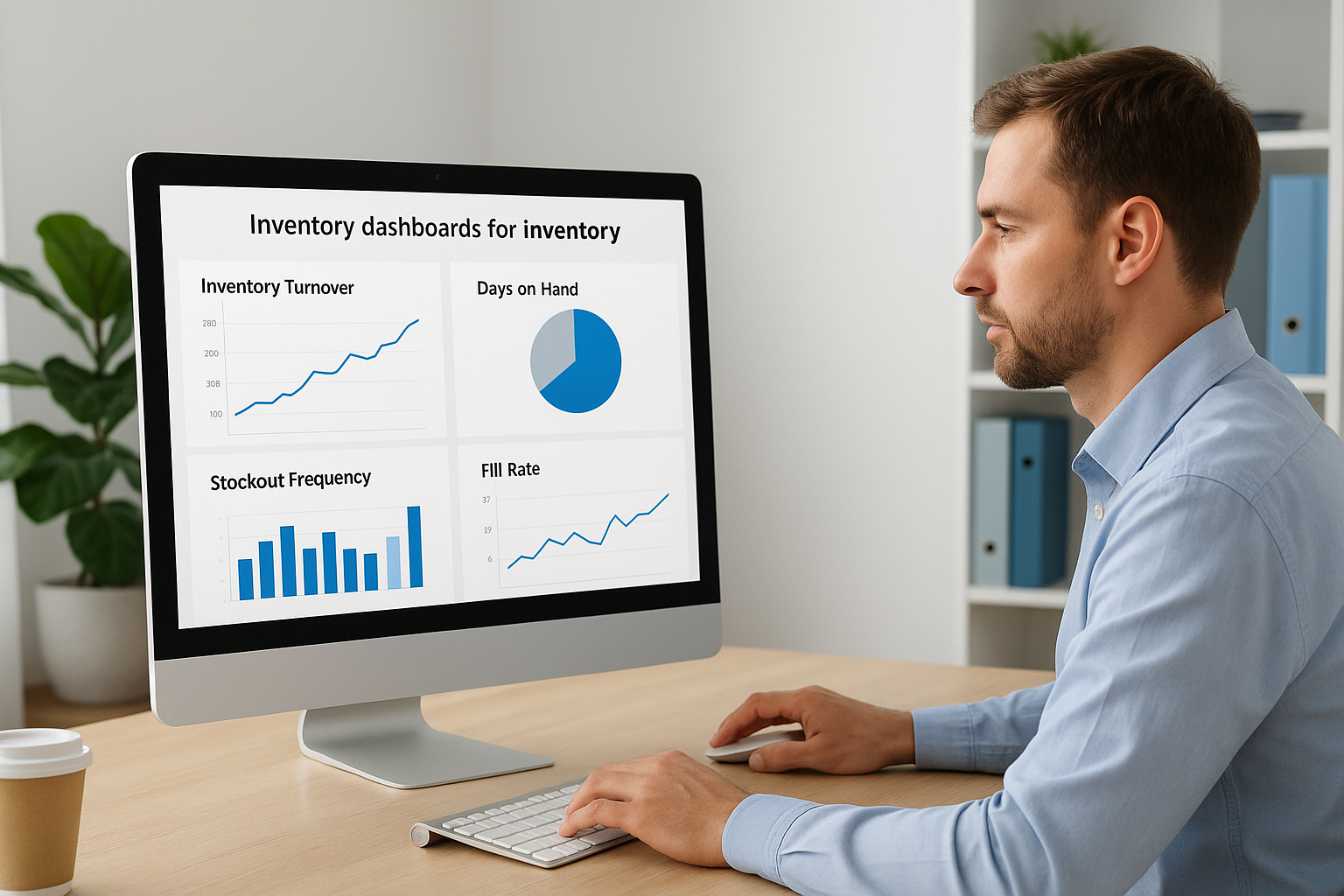
Inventory turnover measures how many times you sell and replace stock within a period, calculated as cost of goods sold divided by average inventory value. Higher turnover means you’re converting inventory to cash faster, reducing carrying costs and freeing working capital. NetSuite calculates turnover automatically at both company and item levels, letting you identify slow movers that drain cash. Days on hand inverts this metric to show how long current stock will last at your current sales rate, helping you spot overstock situations before they become write-offs.
Tracking turnover by item category reveals which product lines tie up disproportionate capital relative to their revenue contribution.
Stockout frequency and fill rate measure service levels, showing how often you fail to fulfill orders from available inventory. Each stockout costs you the lost sale plus expedited freight to rush replacement stock, making this a critical profitability metric. Carrying cost percentage applies your warehousing, handling, insurance, and opportunity costs to average inventory value, typically ranging from 15 to 25 percent annually. You need this number to evaluate whether holding additional safety stock costs more than the stockouts it prevents.
Dashboard configuration and real-time visibility
NetSuite dashboards display your chosen KPIs on a single screen that updates continuously as transactions occur. You configure widgets that show current metrics, trends over time, and comparisons to prior periods or targets. Your team sees the same data simultaneously, eliminating the version control issues that happen when everyone pulls different reports. Drill-down capabilities let you click any metric to see the underlying transactions that created it, moving from high-level summaries to transaction detail without switching systems.
Using metrics to drive purchasing and pricing decisions
KPI tracking becomes valuable when it changes behavior. You review inventory turnover weekly to identify items below your target rate, then adjust reorder points or safety stock to reduce overstock. High carrying costs on specific SKUs might justify raising prices or running promotions to clear slow-moving inventory. Fill rate trends by warehouse help you decide where to position inventory to minimize both stockouts and transfer costs. These metrics give you objective data to challenge assumptions about which products deserve shelf space and capital allocation.
Common pitfalls and how to avoid them
Most NetSuite inventory management failures don’t come from software limitations. They come from poor setup decisions and process shortcuts that create data integrity problems months later. You can’t fix inventory accuracy issues by adding more customizations or buying another module. Instead, you need to address the root causes that make your system unreliable in the first place. Understanding these common mistakes lets you avoid expensive fixes after go-live when correcting problems affects live operations and financial reporting.
Choosing the wrong costing method for your business
Companies often select a costing method based on what their previous system used instead of evaluating which approach best serves their current business model. If you carry imported goods with fluctuating freight costs, average costing might hide margin erosion that FIFO would expose. Manufacturing companies sometimes pick standard costing without having the discipline to regularly update standards, leading to massive variances that distort profitability reports. You need to evaluate costing methods against your actual operations, not just accounting preferences.
Select your costing approach based on how you need to manage margins and working capital, not just what your auditor accepts.
Tax implications matter too. LIFO can reduce taxable income during inflation but creates balance sheet distortions and isn’t allowed internationally. Review the financial impact of different methods using historical data before you make the choice permanent. Switching costing methods after implementation requires revaluing all inventory and often forces you to close a fiscal period early, creating audit headaches you don’t need.
Skipping bin management or using it incorrectly
Many companies avoid bin management because they think it adds unnecessary complexity. Then their warehouse team wastes hours searching for products because NetSuite only tells them which building has stock, not which aisle or shelf. You don’t need to bin-track every item, but high-velocity SKUs and products stored in multiple locations justify the setup effort. Missing items, wrong picks, and excessive fulfillment time all cost more than the work to maintain accurate bin assignments.
Incorrect bin setup creates its own problems. If you define bins too granularly, your team spends more time recording locations than picking orders. Too broad, and you lose the efficiency gains bin management provides. Start with zone-level tracking for most items and add detail only where picking speed or compliance require it.
Ignoring cycle counting until discrepancies force action
Waiting for year-end physical inventory to correct your records guarantees you’ll operate with inaccurate data for months. Cycle counting spreads verification work across the year, catching problems while they’re still small enough to investigate and fix. You count high-value or fast-moving items more frequently and slow movers less often, focusing effort where financial impact is greatest. NetSuite can automate cycle count schedules, but you need the operational discipline to actually perform counts and research variances instead of just adjusting quantities to match reality.
How to implement or fix NetSuite inventory management
Whether you’re launching NetSuite for the first time or rescuing a struggling implementation, success depends on getting foundational setup correct before you process transactions. Most inventory failures trace back to rushed implementations that skipped critical configuration steps or inadequate process design that doesn’t match how your business actually operates. You need a methodical approach that validates each component before moving forward, not a race to go-live that leaves you fixing problems under pressure. Strong implementations tie every technical decision back to specific financial and operational outcomes you need to achieve.
Start with process documentation and data cleanup
You can’t configure NetSuite inventory management effectively until you document your current processes and identify what needs to change. Map out how items move from purchasing through fulfillment, noting where manual handoffs occur and where data gets lost between systems. This documentation reveals which NetSuite features you actually need versus which ones sound useful but don’t address real problems. Your implementation team uses these process maps to configure workflows that match operations instead of forcing your warehouse to adapt to generic best practices.
Data migration requires more than just importing item records from your old system. You need to clean master data by eliminating duplicate SKUs, correcting unit of measure inconsistencies, and verifying which items are still active. Bad data imported into NetSuite creates ongoing problems that affect costing accuracy and inventory valuation. Establish data governance rules that define who can create items, what information is mandatory, and how you’ll maintain data quality after go-live. Without these controls, your clean implementation deteriorates within months.
Configure costing methods and tracking options deliberately
Choose your costing method based on how you manage margins and working capital requirements, not just what your previous system used. Test different approaches with historical transaction data to see how FIFO, LIFO, or average costing would have affected reported profitability and tax liability. Implement lot or serial tracking only where compliance or warranty management require it, avoiding the operational overhead of tracking identifiers you never use. Bin management setup should start at the zone level for most items, adding granular bin assignments only for high-velocity SKUs where picking speed justifies the maintenance effort.
Configuration decisions made before go-live determine whether inventory becomes a strategic asset or an ongoing data integrity problem.
Test fulfillment workflows with real scenarios
Run complete order-to-cash cycles in your test environment using actual customer orders and current inventory levels. Verify that allocation rules select the correct warehouse, pick tickets show accurate bin locations, and fulfillments update financials as expected. Test edge cases like partial shipments, customer returns, and inventory transfers between locations to confirm the system handles exceptions properly. Your warehouse team should participate in testing to identify workflow issues before you process live orders. Document any gaps between how NetSuite works and what your operations require, then decide whether to adjust processes or configure the system differently.
What to do next
NetSuite inventory management connects purchasing, warehousing, and fulfillment into a single real-time system that directly affects your working capital and margins. You’ve seen how the platform tracks items from receipt through shipment, applies costing methods that impact profitability, and provides KPIs that reveal where cash sits idle. Strong implementations start with clear process documentation, deliberate configuration choices, and testing that validates workflows before you process live transactions.
Your next step depends on where you stand. If you’re evaluating NetSuite for the first time, use this knowledge to ask vendors specific questions about costing methods, tracking capabilities, and financial reporting integration. For companies already running NetSuite but struggling with accuracy or efficiency, identify which foundational elements need correction before adding more complexity.
At Concentrus, we implement and rescue NetSuite with a focus on measurable ROI, not just technical configuration. Connect with our team to discuss how we can align your inventory management system with the financial outcomes that matter to your business.