


A NetSuite implementation process done right can transform your financial operations, faster closes, cleaner data, and real-time visibility into the numbers that matter. Done poorly, it becomes a multi-year headache that drains budgets and frustrates teams. For CFOs at midsized companies, the difference between these outcomes often comes down to methodology.
The reality is that ERP implementations fail at alarming rates, not because the software is flawed, but because the process lacks structure, accountability, and alignment with business goals. Without a clear roadmap, scope creep takes over, timelines slip, and the promised ROI never materializes. That’s a problem when you’re the one signing off on a six or seven-figure investment.
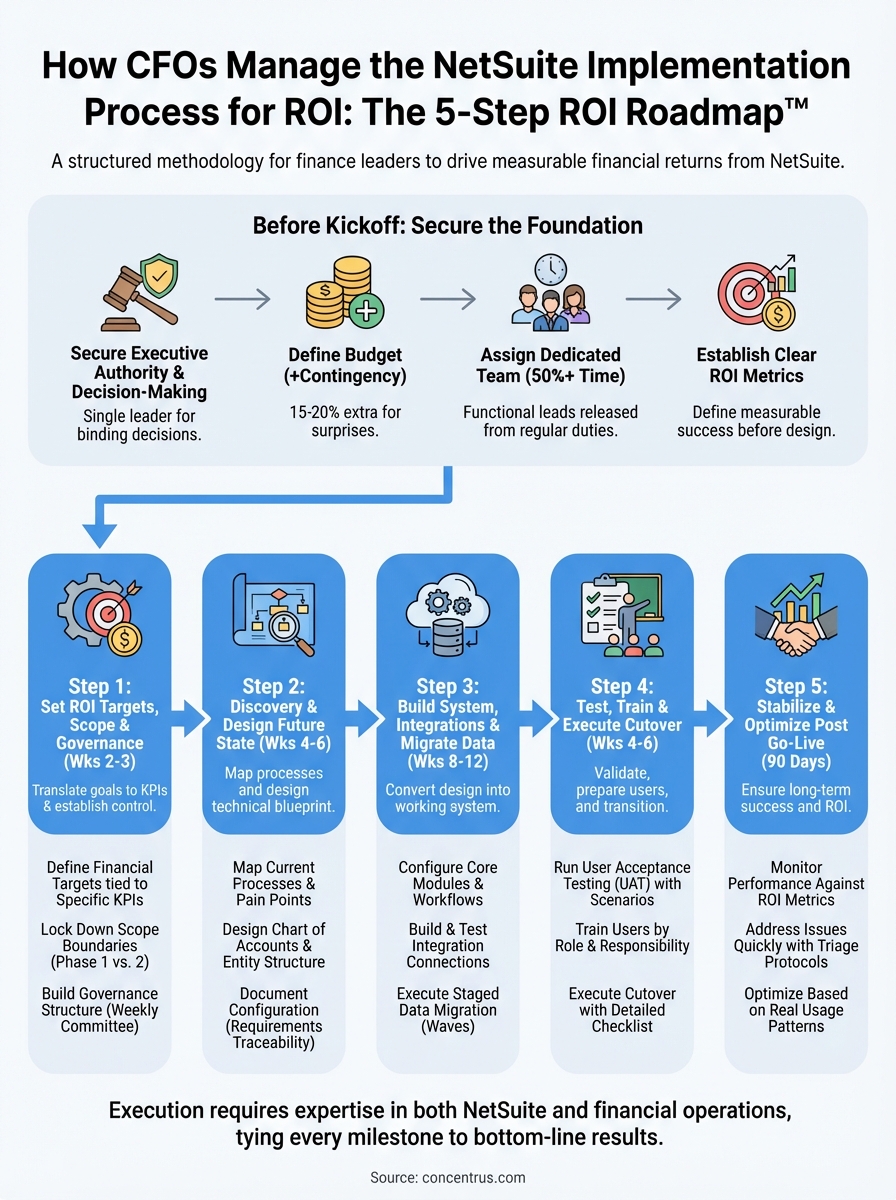
This guide breaks down the complete NetSuite implementation process into actionable phases, timelines, and best practices built for finance leaders who need results they can measure. At Concentrus, we’ve developed our ROI Roadmap™ methodology specifically to tie every implementation milestone to financial outcomes, because an ERP project without measurable returns isn’t a success. Whether you’re starting fresh or rescuing a stalled project, this framework will give you the clarity and control you need to lead your implementation with confidence.
What CFOs should lock down before kickoff
The success of your NetSuite implementation process hinges on the decisions you make before a single configuration session begins. Most implementations stumble because critical groundwork was skipped or rushed, leaving teams to make expensive course corrections mid-project. Your role before kickoff is to create the structural foundation that prevents scope creep, budget overruns, and misaligned expectations.
Secure executive sponsorship and decision-making authority
You need to identify who has the final say on design decisions and make sure that person is available when the project needs them. If you’re the executive sponsor, that’s straightforward. If not, clarify who owns this responsibility and ensure they understand the time commitment required. This person will need to break ties between departments, approve critical trade-offs, and make calls that impact how your business operates. Without clear authority, your implementation team will stall at every fork in the road.
The most successful implementations have a single executive who can make binding decisions in real time, not a committee that needs three weeks to schedule a vote.
Define your budget with contingency built in
Most CFOs budget for the software subscription and implementation partner fees, but the real costs run deeper. You need to account for internal labor hours, temporary backfills for team members pulled into the project, data cleansing work, third-party integrations, and at least 15-20% contingency for the inevitable surprises. Document these costs upfront so you’re not scrambling for budget approvals when a critical integration partner surfaces halfway through. Your finance team should know exactly what resources are committed and when they’ll be deployed.
Assign dedicated team members, not task forces
Your implementation needs full-time or near-full-time participation from key functional leads in finance, operations, and IT. These people cannot treat the project as something they do between their day jobs. Identify your core team members and get formal sign-off from their managers that they’ll be released from at least 50% of their regular duties during peak project phases. If you can’t secure that commitment, delay your kickoff until you can. Part-time participation leads to missed requirements, delayed decisions, and a system that doesn’t reflect how your business actually works.
Document your current pain points and desired outcomes
Before you meet with your implementation partner, sit down with your leadership team and build a prioritized list of what needs to change. Which reports take too long to generate? Where do manual processes create errors or delays? What financial metrics do you struggle to track today? Document these pain points with specific examples and current costs so your implementation team can design solutions that address real problems, not theoretical improvements. This exercise also becomes your baseline for measuring ROI once you go live.
Establish clear success metrics before design begins
You need to define what success looks like in measurable terms before anyone starts configuring NetSuite. Is it closing the books three days faster? Reducing manual journal entries by 70%? Cutting inventory carrying costs by 15%? Write these targets down, get leadership agreement, and make them part of your project charter. These metrics become the North Star that keeps your implementation focused on outcomes that matter to your business, not just technical features that sound impressive in a demo.
Step 1. Set ROI targets, scope, and governance
The first phase of your NetSuite implementation process establishes the financial guardrails and accountability framework that will keep your project on track. This step typically takes two to three weeks and involves translating business objectives into measurable targets, defining what’s in and out of scope, and creating a decision-making structure that prevents delays. Skip this foundation and you’ll spend the rest of the project arguing about priorities and scope changes.
Define financial targets tied to specific KPIs
You need to convert your business goals into quantifiable metrics with baseline measurements and target improvements. Work with your implementation partner to identify which NetSuite features directly impact each target, then document the current state so you have a clear before-and-after comparison. Your ROI targets should map to specific system capabilities, not vague efficiency gains.
| Financial Goal | Current Baseline | Target Improvement | NetSuite Feature |
|---|---|---|---|
| Month-end close time | 12 days | 5 days | Automated consolidation, real-time subledgers |
| Invoice processing cost | $15 per invoice | $6 per invoice | AP automation, OCR capture |
| Inventory accuracy | 78% | 95%+ | Cycle counting, barcode scanning |
| Revenue recognition errors | 8% manual adjustment rate | <1% | Advanced revenue management |
Lock down scope boundaries and exclusions
Your scope document must explicitly state what will not be included in the initial implementation, because that’s where most budget overruns originate. List every customization request, integration, or process redesign that came up during planning, then categorize them as Phase 1, Phase 2, or out of scope. Get signatures from all stakeholders that Phase 2 items won’t be revisited until after go-live.
The most successful implementations have shorter Phase 1 scopes that deliver core functionality fast, then build enhancements based on real user feedback.
Build project governance structure
Establish a weekly steering committee with decision-making authority that includes your executive sponsor, functional leads, and implementation partner project manager. Create an escalation path for blocked decisions with response time commitments of 24-48 hours maximum. Document who owns each functional area and can approve design choices without committee review.
Step 2. Run discovery and design the future state
Discovery and design typically span four to six weeks and represent the most critical phase of your NetSuite implementation process. This step transforms your business requirements into a technical blueprint that your implementation team will build from. The quality of your discovery work directly determines how well NetSuite fits your operations, so resist the temptation to rush through this phase to accelerate your timeline.
Map current processes and pain points
You need to document how your finance and operations teams actually work today, not how the procedures manual says they should work. Schedule working sessions with each functional area where team members walk through their daily tasks, month-end routines, and exception handling while you capture every step. Focus on identifying manual handoffs, duplicate data entry, and workarounds that exist because your current system can’t support the intended process.

Create a simple process map template for each major workflow:
| Process Step | Current Owner | System Used | Pain Point | Desired Future State |
|---|---|---|---|---|
| Receive customer PO | Sales admin | Email + Excel | Manual entry into 3 systems | Single entry in NetSuite |
| Credit check | AR manager | Separate credit system | Delays order approval by 2 days | Real-time check in NetSuite |
| Order approval | Controller | Email chain | No audit trail or visibility | Automated approval workflow |
Design your chart of accounts and entity structure
Your chart of accounts design determines what financial visibility and reporting flexibility you’ll have for the next decade. Work with your implementation partner to structure accounts, segments, and classes that support multi-dimensional reporting without creating unnecessary complexity. Map each current account to its NetSuite equivalent and identify where you need to split or consolidate for better insight.
The right chart of accounts structure built upfront eliminates 90% of custom reporting requests later.
Document configuration decisions in requirements traceability
Build a requirements matrix that tracks every configuration choice back to a business objective. This document becomes your single source of truth when stakeholders question why certain features were configured a specific way. Include columns for requirement description, business justification, NetSuite feature used, and which ROI metric it supports.
Step 3. Build the system, integrations, and data migration
Configuration and data migration typically consume eight to twelve weeks of your NetSuite implementation process, and this phase converts your design documents into a working system. Your implementation team will build out modules, connect third-party systems, and migrate your historical data while you validate that everything matches your approved requirements. This step requires constant validation checkpoints to catch configuration errors before they compound into major rework.
Configure core modules and workflows
Your implementation partner will start with foundational setup like chart of accounts, vendor records, and customer data, then progressively layer on more complex configurations for revenue recognition, inventory management, and consolidation. You need to schedule weekly configuration review sessions where functional leads log into the sandbox environment and validate that each module behaves as designed. Catch problems now while changes take minutes instead of days.
| Configuration Area | Validation Checkpoint | Your Action Required |
|---|---|---|
| GL and subsidiary setup | Verify account structure and intercompany eliminations | Test sample consolidation with dummy transactions |
| AP automation workflow | Confirm approval routing and coding rules | Submit test invoices through full approval cycle |
| Revenue recognition rules | Check criteria triggers and schedules | Run sample contracts through recognition engine |
| Inventory costing method | Verify FIFO/average cost calculations | Compare NetSuite results against current system |
Build and test integration connections
Your integrations team will establish API connections between NetSuite and your CRM, payment processors, EDI partners, and other critical systems. Request a data flow diagram that shows exactly what information moves between each system, in which direction, and on what schedule. Test each integration with production-volume data loads to verify that performance holds up under real-world conditions, not just the ten-record samples that always work perfectly.
The integration testing phase reveals whether your data architecture can handle actual transaction volumes without creating bottlenecks.
Execute staged data migration
Plan your data migration in three distinct waves: initial load for testing, delta load for validation, and final cutover load. Start with your chart of accounts and vendor master file, then progress to open transactions and historical balances. Build a migration validation template that tracks record counts, balances, and key totals at each stage so you can immediately spot where data got lost or duplicated during the transfer.
Step 4. Test, train, and execute cutover
Testing and training occupy the final four to six weeks before your NetSuite go-live date, and this phase determines whether your implementation succeeds or stumbles out of the gate. Your team will validate that the system performs correctly under real-world conditions, train users on new processes, and execute a controlled transition from your legacy system to NetSuite. This step in the NetSuite implementation process requires meticulous planning because you only get one chance to cut over without disrupting operations.
Run user acceptance testing with real scenarios
You need to build a UAT test plan that covers every critical business process from quote to cash and procure to pay. Assign each test scenario to the actual person who will perform that task in production, not a consultant or IT staff member. Your users should work through complete business cycles using real data volumes and edge cases that expose problems your configuration might create.
| Test Scenario | User Role | Pass Criteria | Status |
|---|---|---|---|
| Process customer order with split shipments | Order entry clerk | Creates multiple fulfillments correctly | Pending |
| Close month-end with intercompany transactions | Controller | Elimination entries post automatically | Pass |
| Run cycle count and adjust inventory | Warehouse manager | Adjustments update GL in real-time | Fail/Retest |
Train users by role and responsibility
Build separate training tracks for each user role rather than forcing everyone through identical sessions. Your AR team needs deep training on collections workflows while warehouse staff need hands-on practice with mobile scanning. Schedule training sessions two weeks before go-live so knowledge stays fresh, but not so early that people forget everything by cutover day.
The most effective training happens when users practice in the actual NetSuite environment with their own data, not generic demo accounts.
Execute cutover with a detailed checklist
Create a hour-by-hour cutover timeline that assigns specific tasks to named individuals with completion checkpoints. Plan your cutover for a weekend or slow period when transaction volumes drop, giving your team time to validate that opening balances loaded correctly before normal operations resume. Build verification steps that confirm every integration is working and all beginning balances match your legacy system before you declare success.

Step 5. Stabilize and optimize after go-live
The first 90 days after go-live represent the most critical window for securing long-term success from your NetSuite implementation process. Your team will encounter unexpected issues, users will request workflow adjustments, and you’ll discover optimization opportunities that weren’t visible during testing. This stabilization phase requires dedicated support resources and systematic performance tracking to ensure your system delivers the ROI targets you established in Step 1.
Monitor performance against your ROI metrics
You need to establish weekly measurement cadence for the financial KPIs you defined at project kickoff. Pull the same reports you used for baseline measurements and compare actual results against your target improvements. Track both hard metrics like close time and soft indicators like user adoption rates and support ticket volumes that signal whether your implementation is gaining traction or creating friction.
Build a simple tracking dashboard that updates each week:
| KPI | Baseline | Target | Week 1 | Week 4 | Week 8 | Week 12 |
|---|---|---|---|---|---|---|
| Month-end close | 12 days | 5 days | 10 days | 8 days | 6 days | 5 days |
| User logins/day | N/A | 85% | 62% | 78% | 82% | 88% |
| Support tickets/week | N/A | <20 | 47 | 28 | 18 | 12 |
Address issues quickly with triage protocols
Create a tiered support structure that categorizes problems by business impact and routes them to the right resources. Critical issues that block transactions require immediate escalation to your implementation partner, while training questions get handled by internal super users. Document every problem and its resolution in a shared knowledge base so your team builds institutional knowledge instead of solving the same issue repeatedly.
The difference between implementations that stabilize quickly and those that struggle for months comes down to how fast you identify and fix root causes instead of just treating symptoms.
Optimize based on real usage patterns
Review your transaction volumes, report usage, and workflow completion times at 30, 60, and 90 days to identify where the system underperforms expectations. Users will reveal which processes need refinement through their actual behavior, not what they said they wanted during design. Prioritize optimizations that directly impact your ROI metrics and defer nice-to-have enhancements until your core processes run smoothly.
Next steps
Your NetSuite implementation process doesn’t have to become another statistic in the 60% failure rate that plagues ERP projects. The difference between success and expensive rework comes down to methodology that ties every milestone to measurable financial outcomes instead of just technical checkboxes. You need a partner who understands that closing the books faster, improving cash visibility, and reducing operational costs are the real measures of implementation success.
The five-step framework we’ve outlined gives you the structure to maintain control, but execution requires expertise in both NetSuite configuration and financial operations. Most implementation partners focus on the software while leaving you to figure out how it impacts your P&L and balance sheet. That’s backwards.
Concentrus specializes in NetSuite implementations built around our ROI Roadmap™ methodology, which guarantees every phase of your project delivers quantifiable returns. If you’re planning a new implementation or need to rescue a struggling one, we’ll show you exactly how to connect your NetSuite investment to bottom-line results.