

NetSuite can transform how your finance team operates, or it can become an expensive disappointment that drains resources and morale. The difference comes down to execution. Following netsuite implementation best practices from day one determines whether your ERP investment delivers measurable ROI or joins the growing list of failed technology projects.
The stakes are real. Industry research consistently shows that a significant percentage of ERP implementations fail to meet their original objectives. For CFOs at midsized companies, this isn’t just a technology problem, it’s a financial and operational risk that affects everything from cash flow visibility to your ability to close the books efficiently. Without a clear strategy, even powerful software becomes a burden.
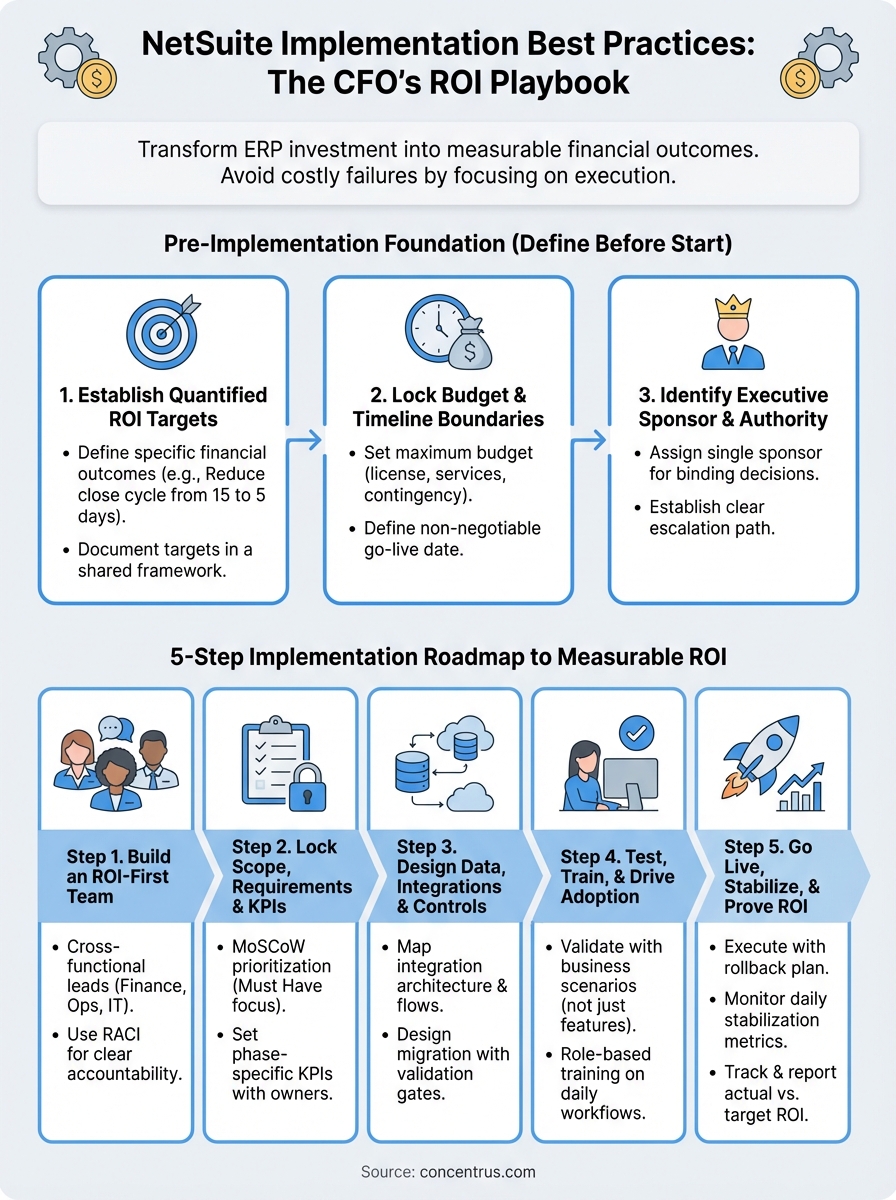
This guide walks you through the proven approaches that separate successful NetSuite rollouts from costly failures. You’ll learn how to assemble the right team, manage organizational change, structure your project methodology, and handle data migration, all with ROI accountability built into every phase. At Concentrus, we’ve refined these practices through hundreds of implementations and rescue projects using our ROI Roadmap™ methodology, and we’re sharing the playbook that ties every phase to financial outcomes.
What CFOs should define before you start
Before your team configures a single NetSuite module, you need to establish the financial and operational guardrails that will keep your implementation on track. Most failed rollouts trace back to ambiguous goals, undefined success criteria, and misaligned expectations across leadership. As the CFO, you own the responsibility of setting clear parameters that tie every project decision back to measurable business outcomes.
Your pre-implementation planning shapes everything that follows. Without documented ROI targets, budget limits, and success metrics, your implementation partner lacks the framework needed to make strategic tradeoffs. When scope creeps or priorities conflict, these foundational decisions become your decision-making anchor that prevents budget overruns and feature bloat.
Establish quantified ROI targets
You need to define the specific financial outcomes you expect NetSuite to deliver within 12 months of go-live. Vague goals like “better reporting” or “improved efficiency” don’t give your team the direction they need to configure the system properly. Instead, quantify targets like reducing month-end close from 15 days to 5, decreasing DSO by 10 days, or eliminating 80 manual journal entries per month.

Without measurable ROI targets documented upfront, you have no objective way to judge whether your implementation succeeded or failed.
Document these targets in a simple framework that your entire team can reference:
| ROI Category | Current State | Target State | Timeline | Owner |
|---|---|---|---|---|
| Close cycle time | 15 days | 5 days | Month 6 | Controller |
| Days sales outstanding | 52 days | 42 days | Month 9 | AR Manager |
| Manual journal entries | 150/month | 30/month | Month 3 | Accounting Manager |
| Inventory accuracy | 82% | 98% | Month 6 | Operations Director |
Share this document with your implementation partner during vendor selection. Partners who focus on netsuite implementation best practices will help you validate whether your targets are realistic and build project milestones around proving each outcome.
Lock your budget and timeline boundaries
Set a maximum budget and deadline before you engage with implementation partners. Your budget should include software licensing, implementation services, data migration support, training, and a 15-20% contingency for unexpected needs. When you define these limits upfront, you force honest conversations about scope tradeoffs during the planning phase rather than mid-project when changes cost more.
Create a simple budget template that breaks costs into clear categories:
- Software licensing: Annual NetSuite subscription based on user count and modules
- Implementation services: Partner consulting hours with defined phase gates
- Third-party integrations: Costs for connecting CRM, e-commerce, or other systems
- Data migration and cleanup: Resources for extracting, transforming, and loading historical data
- Training and change management: Workshops, documentation, and ongoing support
- Contingency reserve: 15-20% buffer for scope adjustments and unforeseen needs
Timeline boundaries work the same way. Define your non-negotiable go-live date based on business needs like fiscal year-end, busy season avoidance, or contract obligations. Working backward from that deadline helps your team prioritize ruthlessly and avoid scope expansion that jeopardizes the launch.
Identify your executive sponsor and decision authority
Assign a single executive sponsor who has authority to make binding decisions when your team hits inevitable tradeoffs between functionality, timeline, and cost. This sponsor should sit at the executive table and have direct access to you as CFO. Without clear decision authority, your implementation will stall every time stakeholders disagree on priorities or scope.
Define the escalation path for decisions that require your direct involvement versus those your sponsor can resolve independently. Most day-to-day configuration choices and minor scope adjustments should stay with your sponsor, while budget increases, timeline extensions, or major scope changes flow to you for final approval.
Step 1. Build an ROI-first implementation team
Your implementation team structure determines whether NetSuite delivers your targeted ROI or becomes another technology project that consumes resources without clear outcomes. You need to assemble a cross-functional group that represents every business process you plan to transform, and you need to give each member clear accountability for specific financial metrics. The team composition directly affects your ability to configure NetSuite around workflows that drive measurable results.
Start by identifying stakeholders who own the processes tied to your ROI targets. If you committed to reducing close cycle time, your controller and accounting managers must participate actively. When inventory accuracy appears in your targets, your operations and warehouse leaders need decision-making seats at the table. This outcome-based selection prevents the common mistake of staffing projects with whoever has availability rather than who has operational authority.
Select your core team by functional impact
Build your team roster by mapping each ROI target back to the functional leader who controls that metric today. Your core team should include representatives from finance, operations, sales, and IT, but only those who directly influence the outcomes you defined in your pre-implementation planning. Avoid adding stakeholders simply for political reasons or because they want involvement without clear accountability.
Structure your team using this basic framework:
| Role | Responsibility | Time Commitment |
|---|---|---|
| Executive Sponsor | Final decision authority, budget oversight | 2-4 hours/week |
| Project Lead | Day-to-day management, vendor coordination | 20-30 hours/week |
| Finance SME | Chart of accounts, close process, reporting | 10-15 hours/week |
| Operations SME | Inventory, purchasing, fulfillment workflows | 10-15 hours/week |
| IT Lead | Integrations, security, technical architecture | 10-15 hours/week |
| Change Champion | Training, adoption, communication | 5-10 hours/week |
Document the time commitment you expect from each team member and secure their manager’s agreement to prioritize this work. Following netsuite implementation best practices means treating implementation as a business transformation, not an IT project that team members squeeze in around their regular duties.
Define accountability using RACI templates
Create a RACI matrix that assigns Responsible, Accountable, Consulted, and Informed roles for every major project deliverable. This framework eliminates confusion about who makes decisions versus who provides input, and it prevents bottlenecks when approvals are needed. Your implementation partner should help you build this during kickoff, but you own the final approval.
Clear role definition using RACI prevents the delays and confusion that plague most ERP implementations and threaten your ROI timeline.
Apply RACI to key decisions like requirements validation, testing sign-off, data migration approval, and go-live authorization. Your executive sponsor should be Accountable for most strategic decisions, while functional leads are Responsible for executing their domain-specific tasks. Keep the Consulted group small to maintain decision velocity.
Step 2. Lock scope, requirements, and KPIs
Scope creep destroys more NetSuite implementations than technical failures. You need to define exactly what functionality you’re deploying in your initial rollout and establish a formal change control process for any requests that fall outside those boundaries. Your implementation partner should help you distinguish between requirements that support your ROI targets and features that stakeholders want but won’t meaningfully impact your financial outcomes.
The requirements you document now become your contract with your implementation team about what success looks like. Vague requirements like “improve inventory management” leave room for interpretation that leads to missed expectations and budget overruns. Instead, you need to specify that you want automated reorder point calculations based on 90-day rolling averages, with email alerts when stock falls below thresholds. This precision drives configuration decisions that align with your ROI roadmap.
Document requirements using MoSCoW prioritization
Apply the MoSCoW framework to categorize every requirement as Must Have, Should Have, Could Have, or Won’t Have in your initial implementation. This prioritization forces honest conversations about which features directly support your ROI targets versus nice-to-have functionality that can wait for phase two. Your Must Have list should include only capabilities that are absolutely essential for go-live success.
Work through each business process you plan to transform and classify requirements using this structure:
| Category | Definition | Phase 1 Example |
|---|---|---|
| Must Have | Critical for go-live, directly supports ROI target | Automated three-way match for AP invoices |
| Should Have | Important but can use workaround temporarily | Advanced approval workflows with delegation rules |
| Could Have | Valuable but doesn’t block operations | Custom dashboard widgets for executive reporting |
| Won’t Have | Out of scope for current phase | Multi-currency consolidation (single entity only) |
Following netsuite implementation best practices means being ruthless about keeping your Must Have list focused. Every additional requirement extends your timeline and increases risk to your ROI delivery schedule.
Set phase-specific KPIs with ownership
Define the measurable outcomes you expect at each project milestone, not just at final go-live. Your implementation should prove value incrementally through configuration, testing, and rollout phases. Assign a specific team member as owner for each KPI who will track progress and escalate when metrics fall behind target.
Phase-specific KPIs transform your implementation from a technology project into a series of measurable business improvements that build confidence with stakeholders.
Structure your KPI tracking using clear accountability:
| Phase | KPI | Target | Owner | Measurement Frequency |
|---|---|---|---|---|
| Configuration | Requirements validated | 100% sign-off | Project Lead | Weekly |
| Testing | Critical defects | Zero open P1 issues | QA Lead | Daily |
| Training | User certification | 95% completion | Change Champion | Weekly |
| Go-live | Close cycle time | 7 days (from 15) | Controller | Monthly |
Step 3. Design data, integrations, and controls
Your system architecture decisions during this phase determine whether NetSuite becomes a reliable single source of truth or creates data silos that undermine your ROI targets. You need to map how data flows between NetSuite and your existing systems, define what historical information moves into the new platform, and establish the financial controls that protect accuracy and compliance. Poor architecture choices made during design create technical debt that costs multiples to fix after go-live.
This phase requires deep collaboration between your finance team, IT lead, and implementation partner. You’re not just moving data from point A to point B. You’re redesigning how information flows through your organization and where control points exist to prevent errors, enforce approvals, and maintain audit trails. Following netsuite implementation best practices means treating this as a business process redesign, not a technical data transfer exercise.
Map your integration architecture first
Start by documenting every system that needs to exchange data with NetSuite, the frequency of those exchanges, and whether integration should be real-time or batch. Your CRM needs to push order data, your warehouse management system needs inventory updates, and your bank feeds need to reconcile payments. Each connection point represents a potential failure mode that requires error handling and monitoring.
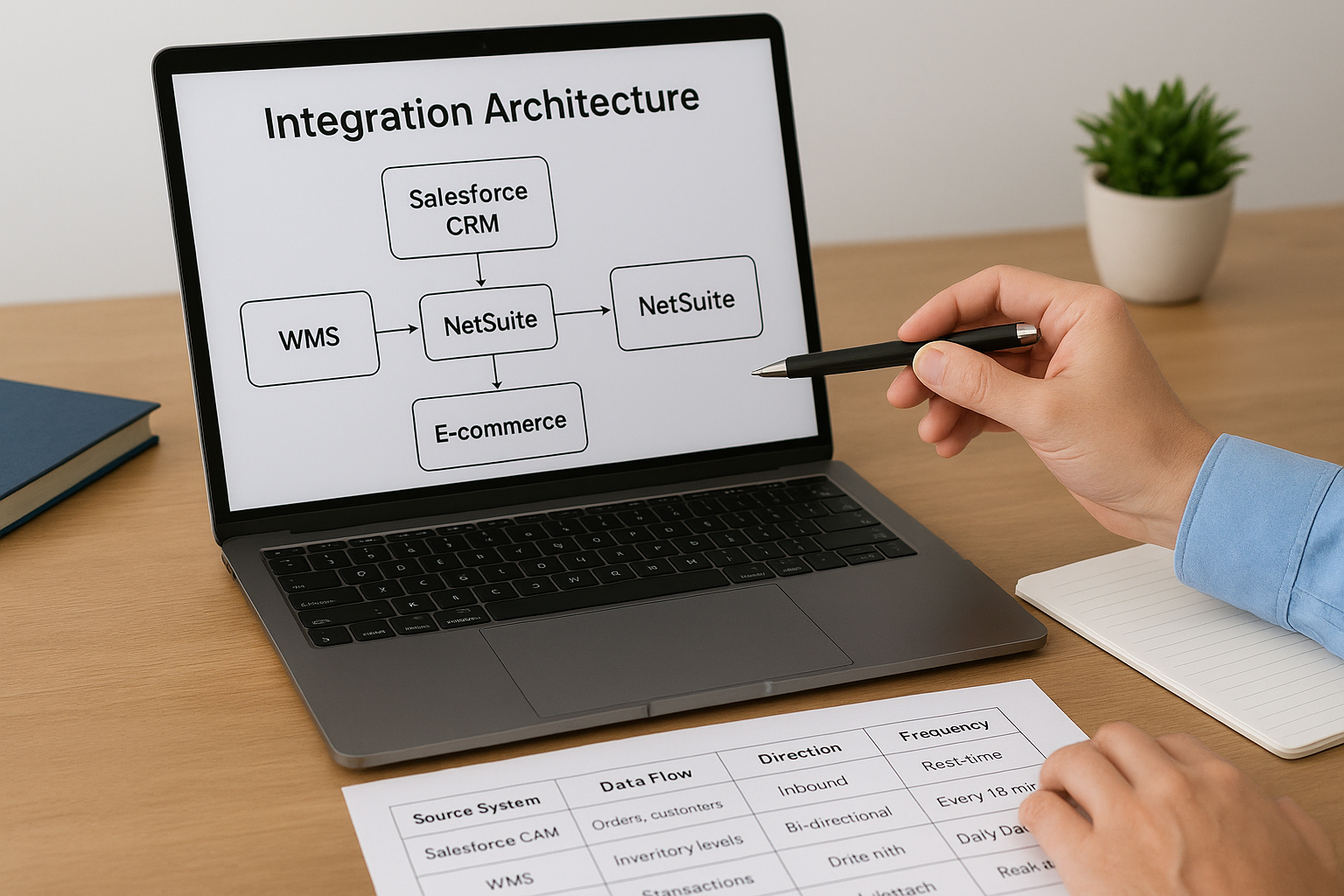
Create a visual integration map using this structure:
| Source System | Data Flow | Direction | Frequency | Critical Path |
|---|---|---|---|---|
| Salesforce CRM | Orders, customers | Inbound | Real-time | Yes |
| WMS | Inventory levels | Bi-directional | Every 15 min | Yes |
| Bank feeds | Transactions | Inbound | Daily batch | No |
| E-commerce | Orders, returns | Inbound | Real-time | Yes |
Your IT lead should validate the technical feasibility of each integration and identify any middleware or custom APIs required. Budget extra time for integrations marked as critical path, these connections directly impact your ability to operate if they fail.
Design data migration with validation gates
Define exactly what historical data you’re bringing into NetSuite and how far back your records need to go. Most companies migrate open transactions and 12-24 months of history while archiving older data in a read-only repository. More data increases migration complexity and testing burden without adding meaningful value to your day-to-day operations.
Your data migration strategy should prioritize accuracy over completeness, bringing only the information that supports active business processes and regulatory requirements.
Build validation checkpoints into your migration workflow that verify record counts, balances, and relationships match between source and target systems. Your controller should personally review reconciliation reports for critical data like customer balances, open AP/AR, and inventory valuations before signing off on migration completion.
Step 4. Test, train, and drive adoption
Your testing and training strategy determines whether your team actually uses NetSuite effectively or reverts to spreadsheets and workarounds that destroy your ROI. You need to design a structured testing protocol that validates every critical workflow and a training program that builds confidence rather than just checking a compliance box. This phase separates implementations that transform operations from those that simply replace one system with another while maintaining the same inefficient habits.
Build a testing protocol with business validation
Create test scripts that mirror your actual business processes rather than generic NetSuite functionality checks. Your finance team should test month-end close procedures using real transaction volumes, your operations team should process actual customer orders, and your AP team should run complete invoice approval workflows. User acceptance testing must prove that NetSuite supports the specific ways your company operates, not just demonstrate that features work in isolation.
Document your testing approach with clear pass/fail criteria:
| Test Scenario | Owner | Success Criteria | Priority |
|---|---|---|---|
| Complete order-to-cash cycle | Sales Ops | Order processed in under 5 min | P1 |
| Month-end close with 50 JEs | Controller | Close completed in 7 days | P1 |
| Three-way match for 100 invoices | AP Manager | 95% auto-match rate | P1 |
| Inventory cycle count adjustment | Warehouse Lead | Update reflected in under 15 min | P2 |
Your implementation partner should provide the testing framework, but your team members must execute the scenarios and validate that outputs match your business requirements. Following netsuite implementation best practices means refusing to approve go-live until your team has validated every critical workflow under realistic conditions.
Design role-based training that builds confidence
Structure your training around job functions rather than NetSuite modules. Your AR specialists need to learn how to process payments and manage collections, not attend a generic “accounts receivable overview” that covers features they’ll never use. Each training session should focus on the three to five workflows that person will perform daily, with hands-on practice using your actual company data in a sandbox environment.
Training effectiveness directly correlates with user adoption rates, which in turn determines whether you achieve your targeted ROI within your committed timeline.
Create a simple certification checklist for each role that proves competency before go-live. Your change champion should track completion rates weekly and escalate when key users fall behind schedule.
Step 5. Go live, stabilize, and prove ROI
Your go-live event marks the beginning of your ROI delivery phase, not the end of your implementation project. You need to execute a controlled cutover that minimizes business disruption, establish a stabilization period where you actively monitor for issues, and prove that NetSuite is delivering the financial outcomes you committed to leadership. This phase determines whether your implementation becomes a success story that validates future technology investments or a cautionary tale about wasted resources.
The first 30 days after go-live require intense focus from your core team and executive sponsor. Problems that seem minor during this window can compound into systemic failures that erode user confidence and threaten your ROI targets. Following netsuite implementation best practices means treating stabilization as seriously as you treated configuration and testing, with daily monitoring and rapid response protocols.
Execute your cutover with a rollback plan
Build a detailed cutover checklist that specifies the exact sequence of activities during your transition weekend, including who performs each task and the time window allocated. Your checklist should cover system shutdowns, final data migration, validation steps, and user access activation. More importantly, you need a documented rollback procedure that explains how to revert to your legacy system if critical failures occur within the first 48 hours.

Structure your cutover plan using clear task dependencies:
| Task | Owner | Duration | Start Time | Dependencies |
|---|---|---|---|---|
| Legacy system final backup | IT Lead | 2 hours | Friday 6pm | None |
| Final data extraction | Data Lead | 3 hours | Friday 8pm | Backup complete |
| Data migration to NetSuite | Implementation Partner | 6 hours | Friday 11pm | Extraction done |
| Validation and reconciliation | Controller | 4 hours | Saturday 5am | Migration complete |
| User access activation | IT Lead | 1 hour | Saturday 9am | Validation approved |
Monitor stabilization metrics daily
Create a stabilization dashboard that tracks system performance, user adoption, and early ROI indicators during your first 30 days live. Your project lead should review this dashboard every morning and escalate any red flags to your executive sponsor immediately. Focus on metrics that signal whether users are actually working in NetSuite or finding workarounds that bypass the system.
Daily monitoring during stabilization catches adoption problems while they’re still fixable, before they become ingrained habits that destroy your ROI timeline.
Track and report ROI proof points
Document the actual improvements you’re seeing against your original ROI targets and share these results with leadership monthly. Your controller should provide data showing how close cycle time, DSO, or other metrics are tracking to target, along with explanations for any gaps. This regular reporting builds confidence that your NetSuite investment is delivering value and positions you to request resources for phase two enhancements.
Build your tracking report using this format:
| ROI Target | Baseline | Current | Target | Status |
|---|---|---|---|---|
| Close cycle time | 15 days | 8 days | 5 days | On track |
| DSO | 52 days | 48 days | 42 days | Ahead |
| Manual JEs | 150/month | 65/month | 30/month | On track |
Next steps for your rollout
Your NetSuite implementation succeeds when you treat it as a financial transformation with technology as the enabler, not the goal. The netsuite implementation best practices outlined in this guide give you a framework for maintaining ROI accountability through every phase, from team assembly to post-go-live stabilization. Each step builds on the previous one to create a system that delivers measurable outcomes rather than just replacing your legacy software.
Start by documenting your ROI targets and assembling your cross-functional team this week. Lock your scope and requirements before engaging with implementation partners, using the MoSCoW framework to separate must-have functionality from nice-to-have features. Design your data architecture and testing protocols early, before configuration work begins, to avoid costly rework during later phases.
Ready to launch your implementation with ROI accountability built in from day one? Concentrus specializes in NetSuite implementations that deliver guaranteed financial outcomes using our proven ROI Roadmap™ methodology. We help CFOs at midsized companies transform their ERP investments into measurable business value that scales with your growth.