


A 1% drop in inventory accuracy can cascade into missed shipments, bloated carrying costs, and financial reports that nobody trusts. If you’re a CFO or finance leader at a midsized company, you already know that inventory discrepancies hit harder than most operational issues, because they touch revenue, margins, and cash flow all at once. Understanding how to improve inventory accuracy isn’t just a warehouse concern; it’s a financial strategy.
The problem is that most companies treat inventory accuracy as a counting exercise. They run cycle counts, hope for the best, and wonder why their ERP data still doesn’t match reality. The root cause usually lives upstream, in disconnected systems, manual processes, and ERP configurations that were never set up to track inventory with precision. That’s exactly where a properly implemented ERP system changes the game.
At Concentrus, we help midsized companies get measurable ROI from their NetSuite and Acumatica ERP investments, and inventory accuracy is one of the fastest wins we see. This article breaks down nine actionable strategies to tighten your inventory records, from process fixes to technology-driven solutions, so you can make decisions based on numbers you actually trust.
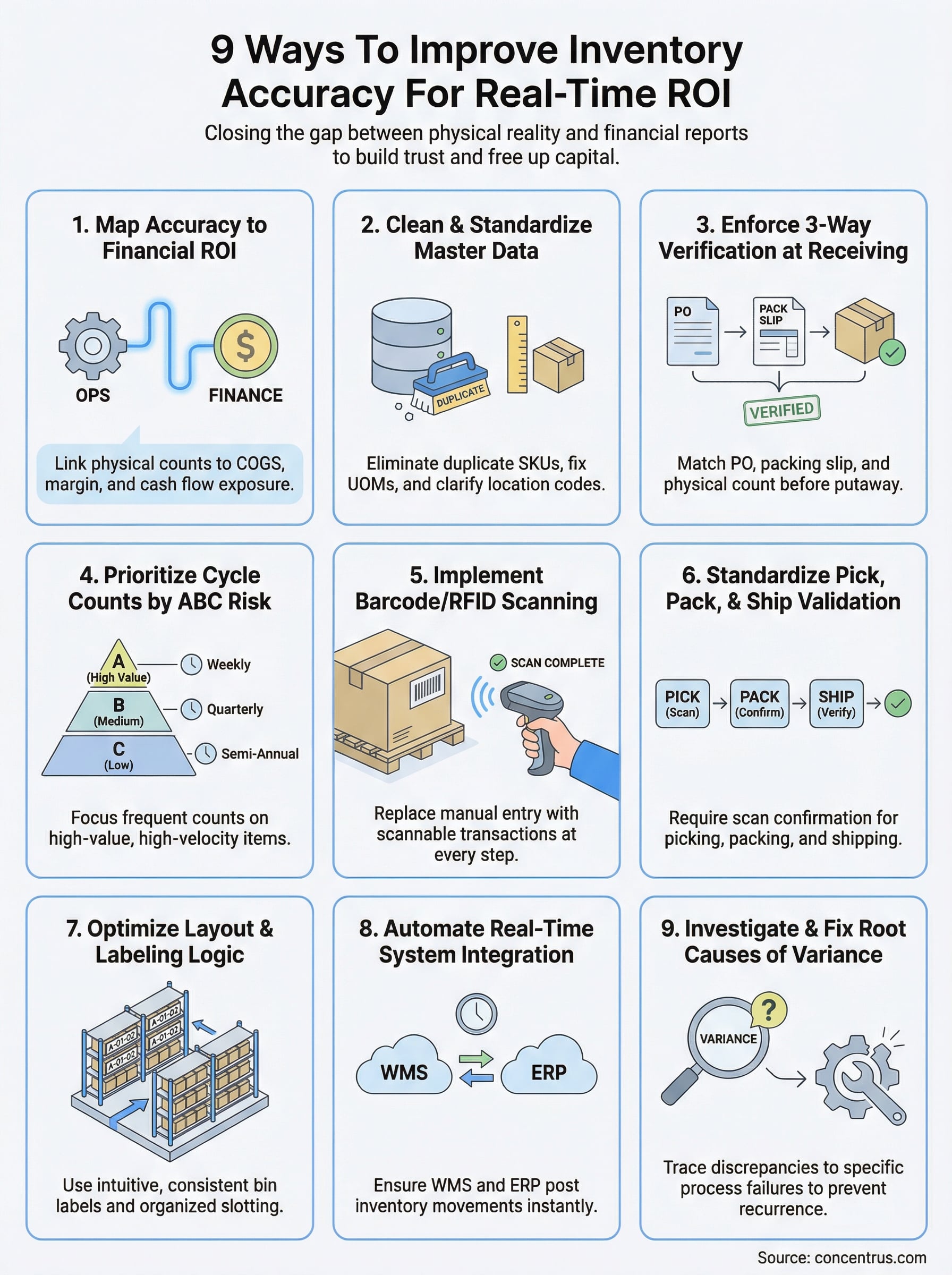
1. Map inventory accuracy to ROI in your ERP
Before you fix a process or buy new scanning equipment, you need to connect inventory accuracy to the financial outcomes that matter in your ERP. Most teams treat inventory as a warehouse metric, but your finance team absorbs the consequences every time the system numbers diverge from physical reality.
What “inventory accuracy” means in finance terms
In financial terms, inventory accuracy is the percentage of SKUs whose physical count matches your ERP system of record at a specific point in time. It tells you how much you can trust the on-hand quantities your system reports, and that trust directly affects demand planning, order fulfillment, and financial close reliability.
The formulas to use and when each one fits
Two formulas cover most situations. Use the right one based on what your team is trying to measure:
| Formula | Use When |
|---|---|
| (Items Counted Correctly / Total Items Counted) x 100 | Tracking operational accuracy by count |
| (Accurate Value on Hand / Total Recorded Value) x 100 | Reporting financial accuracy to leadership |
Value-weighted accuracy is the metric your CFO needs because it shows exposure in dollars, not just item counts.
How inventory accuracy hits COGS, margin, and cash
Inaccurate inventory distorts COGS depending on whether your system shows more or less than you physically hold. Over time, this warps gross margin reporting, creates phantom profitability, and locks working capital into stock that either does not exist or is invisible to your planning team.
Inventory inaccuracies that go uncorrected compound across financial periods, making your balance sheet less reliable with every close cycle.
How to set targets by SKU class and business risk
Not every SKU warrants the same accuracy standard. A-class items, your highest-value and highest-velocity stock, should target 99% accuracy or higher. B and C items can tolerate slightly lower thresholds. Configure these targets directly in your ERP by SKU class so your team focuses effort where the financial risk is greatest.
The minimum data and process standards to enforce
Your ERP reports what gets entered, so bad inputs produce bad outputs. Enforce real-time transaction posting for every inventory movement and require bin-level location tracking rather than warehouse-level aggregates. These two standards close the most common data gaps that make learning how to improve inventory accuracy an ongoing struggle instead of a solved problem.
2. Fix item data, locations, and units of measure
Dirty master data is the most overlooked cause of inventory discrepancies. If your ERP item records carry duplicate entries, conflicting units of measure, or vague location codes, your counts will never reconcile cleanly, regardless of how diligently your team scans.
What bad master data looks like in the real world
Bad master data shows up as the same part listed under three different item numbers, locations labeled “MISC,” and units that mix eaches with cases inconsistently. These gaps directly undermine how to improve inventory accuracy because your system cannot reconcile what it cannot clearly identify.
SKU rationalization, duplicates, and substitution rules
Audit your item master and merge duplicate SKUs before your next count cycle. Define substitution rules explicitly in your ERP so your team never improvises a workaround that creates shadow inventory the system cannot track.
Units of measure, pack sizes, and conversion controls
Mismatched units of measure create systematic variances that look like shrinkage but are really data entry problems.
Lock conversion factors between eaches, cases, and pallets at the item level. Require controlled UOM changes so no single user can alter a conversion without triggering an approval workflow.
Location, bin, and status hygiene for clean counts
Every bin needs a purpose and a naming convention your team actually follows. Flag obsolete locations and clear staging areas regularly so on-hand quantities stay tied to real, findable stock.
Governance: who can change what and how you audit it
Set role-based permissions in your ERP that restrict item master edits to a designated data owner. Run a monthly audit log review to catch unauthorized changes before they distort your next count.
3. Tighten receiving with 3-way verification
Receiving errors are where most inventory inaccuracies begin. When your team skips verification steps or logs receipts manually, discrepancies compound downstream and become nearly impossible to trace by the time your next count surfaces them.
Where inventory accuracy usually breaks first
The receiving dock is the single highest-risk point in your entire inventory process. When shipments arrive without a structured check, your ERP records what was ordered, not what actually landed on the dock.
What to verify at the dock before you put away
Run a three-way match between the purchase order, the supplier’s packing slip, and the physical count before any goods move to a bin. Confirm quantities, item numbers, and condition on every receipt, not just for high-value orders.

Skipping the physical count step on “trusted” suppliers is one of the fastest ways to accumulate chronic receiving variances.
Labeling and scanning rules for immediate system updates
Scan or label every item at the dock before putaway so your ERP records the receipt in real time. Delayed system updates create a window where stock exists physically but not digitally, which breaks picking, planning, and financial reporting at once.
Handling exceptions: shorts, damages, and substitutions
Log short shipments and damaged goods as separate transactions the moment you identify them. Never absorb substitutions without updating the item record, or your on-hand data will drift from day one.
KPIs for receiving accuracy and supplier performance
Track receiving accuracy rate and exception frequency by supplier so you can spot patterns before they become systemic. These metrics belong in your ERP dashboard, not a separate spreadsheet.
4. Run cycle counts with ABC prioritization
Cycle counts give you a continuous, manageable way to verify inventory accuracy without shutting down operations. If you want to understand how to improve inventory accuracy over time, replacing your annual wall-to-wall count with a structured cycle count program is one of the highest-leverage changes you can make.
Why cycle counts beat annual wall-to-wall counts
An annual count captures one snapshot and introduces massive operational disruption. Cycle counts spread the workload across the year, so your team catches and corrects errors while they are still small rather than absorbing a full year of drift at once.
How to choose ABC rules that match your risk and volume
Your ABC classification should reflect financial exposure, not just movement speed. Structure your count frequency around risk:
- A-items: Monthly or weekly counts
- B-items: Quarterly counts
- C-items: Semi-annual counts based on margin impact
Counting everything at the same frequency wastes resources and misses the items that actually threaten your financial close.
How to schedule counts without disrupting operations
Count A-items during slower periods in your daily workflow and assign dedicated counters separate from active pickers. Stagger location zones by day so no single area goes offline during a peak shift.
How to reconcile counts without creating new errors
Require a supervisor review before posting any count adjustment above a set dollar threshold. Log every variance with a reason code so your ERP builds a traceable correction history your finance team can audit.
What to do when an item keeps failing counts
Repeat failures signal a process problem, not a counting problem. Pull the transaction history for that SKU, identify where the variance originates, and fix the upstream process before you count again.
5. Use barcodes and add RFID where it pays off
Scanning technology closes the gap between what your team does physically and what your ERP records in real time. When you choose the right scanning approach for each area of your operation, you remove a large category of manual entry errors from the equation.
The accuracy problems scanning solves immediately
Manual keying is the fastest way to corrupt your inventory data. Barcodes eliminate transposition errors and misidentified items by forcing your team to scan the exact item in front of them before any system transaction posts.
A single mis-keyed quantity on a high-volume SKU can create a variance that takes months to trace back to its source.
Where RFID outperforms barcodes and where it fails
RFID reads multiple items simultaneously without a line-of-sight requirement, making it effective in high-volume receiving docks and bulk storage zones. It underperforms in environments with dense metal shelving or liquid products, which interfere with signal accuracy.
Label standards that prevent mis-scans and mis-picks
Use standardized label formats and font sizes across every location, item, and bin. Inconsistent labeling forces your team to guess, which is where mis-scans begin.
Required process changes for scan compliance
Scanning only improves inventory accuracy if your team scans at every transaction point. Enforce scan-at-receipt, scan-at-pick, and scan-at-ship as non-negotiable process steps, not optional habits.
How to estimate payback and total cost of ownership
Calculate payback by multiplying your current error rate by the average cost per correction, then compare that figure against your total implementation cost, including hardware, labels, and training time.
6. Standardize picking, packing, and shipping
Fulfillment errors create variances that are nearly impossible to trace after the fact. Standardizing each step from pick to ship is one of the most direct ways to learn how to improve inventory accuracy without adding headcount or disrupting throughput.
The most common fulfillment actions that create variances
Picking the wrong quantity and closing orders without scan confirmation are the two fulfillment mistakes that generate the most inventory discrepancies. Both errors post incorrect on-hand balances to your ERP the moment an order closes.
Pick methods that reduce errors in your environment
Directed picking through your WMS or ERP routes each picker to the correct bin and requires a scan confirmation before moving on. This removes location ambiguity and forces your system to reflect physical reality at every transaction point.
Pack confirmation and shipping verification controls
Require a pack confirmation scan before any carton closes so your ERP captures the actual items shipped. Shipping verification at the carrier handoff point catches quantity mismatches before they become permanent inventory variances.
Skipping pack confirmation on routine orders is where short shipment discrepancies accumulate fastest.
Returns and RMA workflows that keep stock truthful
Returns that bypass a formal RMA process get shelved without a system receipt, creating phantom inventory your team cannot pick or plan against. Enforce received-and-inspected status updates before restocking any return.
KPIs: perfect order rate, mis-picks, and short shipments
Track perfect order rate and mis-pick frequency by shift and picker so you can spot patterns early. These metrics belong in your ERP reporting dashboard, not a separate spreadsheet.
7. Improve warehouse layout, labels, and bin rules
Your physical warehouse environment directly shapes how to improve inventory accuracy at the operational level. When locations are poorly labeled and putaway rules are inconsistent, your team will misplace stock, and your ERP will reflect the wrong bin long after the item moved.
Slotting strategies that reduce misplacement and travel
Place high-velocity A-items closest to your shipping area to reduce travel time and the chance your team shortcuts the scan process under pressure. Consistent slot assignments also make count discrepancies easier to spot because pickers develop familiarity with each location.
Location naming conventions people actually follow
Build location codes that are self-explanatory, such as an Aisle-Bay-Level format, so new team members can navigate without guessing. When your naming convention is intuitive, your team scans the right location the first time instead of logging transactions from memory.
Cryptic location codes are one of the most common reasons teams bypass scanning and enter transactions manually.
Visual management: signage, zone maps, and label placement
Post zone maps at entry points and place bin labels at eye level so your team never searches for a location identifier mid-task. Clear visual cues reinforce correct behavior without adding extra steps to the workflow.
Bin discipline: putaway rules, quarantines, and staging
Define explicit putaway rules in your ERP so every receipt lands in a designated bin, not the nearest open space. Reserve quarantine and staging zones with locked statuses so damaged or pending stock never mixes with available inventory.
How to prevent “temporary locations” from becoming permanent
Temporary bins fill up fast and become invisible to your planning team when nobody clears them. Assign a weekly review task to your warehouse lead so staging areas stay clean and your on-hand data stays reliable.
8. Automate transactions and integrate systems
Manual transaction entry is the fastest way to introduce errors into your inventory records at scale. When you automate the right steps and connect your WMS, ERP, and finance systems, you remove the human error points that consistently undermine how to improve inventory accuracy across your operation.
What to automate first to remove human error
Start with high-frequency, low-complexity transactions like receipts, bin transfers, and pick confirmations. These are the steps where manual entry produces the highest volume of errors relative to the effort required to fix them.
Real-time posting between WMS, ERP, and finance
Real-time system integration ensures that every physical movement posts to your ERP the moment it happens. When your WMS and finance layer share a live data feed, your on-hand balances and COGS stay synchronized without end-of-day batch uploads creating temporary gaps in visibility.

Batch posting delays create windows where your team makes fulfillment decisions on stale data, which compounds the original error before anyone detects it.
Controls for backdating, manual adjustments, and overrides
Restrict backdating permissions to a designated finance role and require a reason code for every manual adjustment. Uncontrolled overrides erode your audit trail and make variances nearly impossible to trace back to a specific transaction.
Alerts for negative inventory, unexpected movements, and holds
Configure system alerts for negative on-hand quantities and unexpected location transfers so your team catches anomalies in real time rather than discovering them at the next count cycle.
Reporting setup for one version of the truth across teams
Build a single inventory report inside your ERP that your warehouse, operations, and finance teams all reference. Separate spreadsheets create separate versions of reality, and reconciling them costs more time than building the unified report correctly from the start.
9. Find and eliminate the root causes of variances
Counting more often helps, but it does not fix anything if you never identify why variances appear in the first place. Building a repeatable system that traces every discrepancy back to a specific process failure is the final step in learning how to improve inventory accuracy for the long term.
A simple variance triage that your team can repeat
When a count reveals a discrepancy, sort variances by dollar value and frequency before you investigate. This focuses your team’s time where the financial exposure is greatest and moves low-risk, one-time gaps to a watch list.
Use these three triage tiers to prioritize corrective action:
- High value + recurring: Investigate immediately and assign ownership
- High value + isolated: Review transaction history within 24 hours
- Low value + recurring: Schedule root cause review before next count
Root cause analysis that links errors to a process step
Trace each variance back to a specific transaction or process step using your ERP’s audit trail. Whether the error originates at receiving, putaway, or picking, linking the discrepancy to its source is the only way to stop it from recurring.
Variances you cannot trace to a transaction signal that your system lacks real-time posting at a critical process point.
Random spot checks that validate behavior, not just counts
Run unannounced spot checks between scheduled cycle counts to verify your team follows scanning and putaway procedures under normal conditions. Spot checks surface compliance gaps that structured counts rarely catch.
Documentation that makes discrepancies traceable end to end
Log every variance with a reason code and transaction reference so your audit trail stays complete. Reviewable documentation gives your finance team the evidence they need to close the books with confidence.
Preventive controls that stop repeat issues before the next count
Configure system-level controls in your ERP, such as required reason codes on adjustments and alerts for abnormal movements, so the same process failure cannot generate a new variance undetected before your next cycle count.
Next steps
Every strategy in this article connects inventory accuracy to a financial outcome your team can measure. Whether you start with master data cleanup, tighten your receiving process, or configure ERP alerts for negative stock, each fix reduces the gap between what your system shows and what actually sits on your shelf. The compounding effect across all nine areas is what separates companies that guess at their margins from those that close their books with confidence.
Learning how to improve inventory accuracy is not a one-time project. It requires consistent process enforcement, ERP configuration that matches your operations, and a finance team that treats inventory data as a strategic asset. If your current ERP implementation is not giving you that level of control, the problem is likely in how the system was set up, not in your team’s effort.
Talk to the Concentrus team to find out exactly where your ERP is leaving accuracy and ROI on the table.