

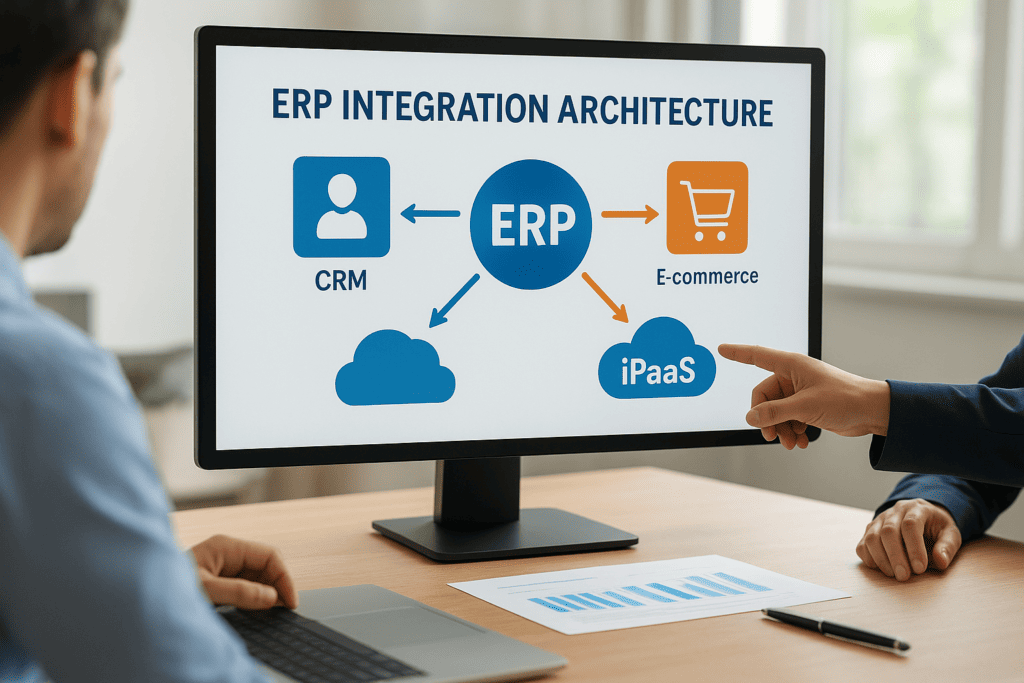
Your ERP system holds critical financial and operational data, but it doesn’t exist in a vacuum. It needs to communicate with your CRM, e-commerce platform, warehouse management system, and dozens of other applications that keep your business running. How these connections are designed and managed is what ERP integration architecture refers to, and getting it right directly impacts everything from reporting accuracy to cash flow visibility.
For CFOs and finance leaders at midsized companies, understanding integration architecture isn’t just a technical exercise. It’s a strategic decision that affects how quickly you can close the books, how reliably data flows between systems, and whether your ERP investment actually delivers measurable ROI. The wrong architecture creates data silos, manual workarounds, and costly errors. The right one gives you a single source of truth and the operational efficiency you expected when you signed off on the project.
At Concentrus, we’ve seen integration challenges derail otherwise solid NetSuite and Acumatica implementations. That’s why our ROI Roadmap™ methodology addresses integration architecture from day one, ensuring your ERP connects seamlessly with your existing tech stack while supporting future growth. This article breaks down the core integration models, patterns, and tools you need to understand, including iPaaS, ESB, and API-based approaches, so you can make informed decisions that protect your investment.
Why ERP integration architecture matters
Your ERP system only delivers value when data flows freely between all your business applications. Poor integration architecture creates manual data entry, duplicate records, and reporting delays that cascade through your entire finance operation. You might close the books three days late because your warehouse system doesn’t sync properly with your ERP, or you might approve payments based on outdated inventory data because your e-commerce platform updates twice daily instead of in real time.
The real cost of poor integration
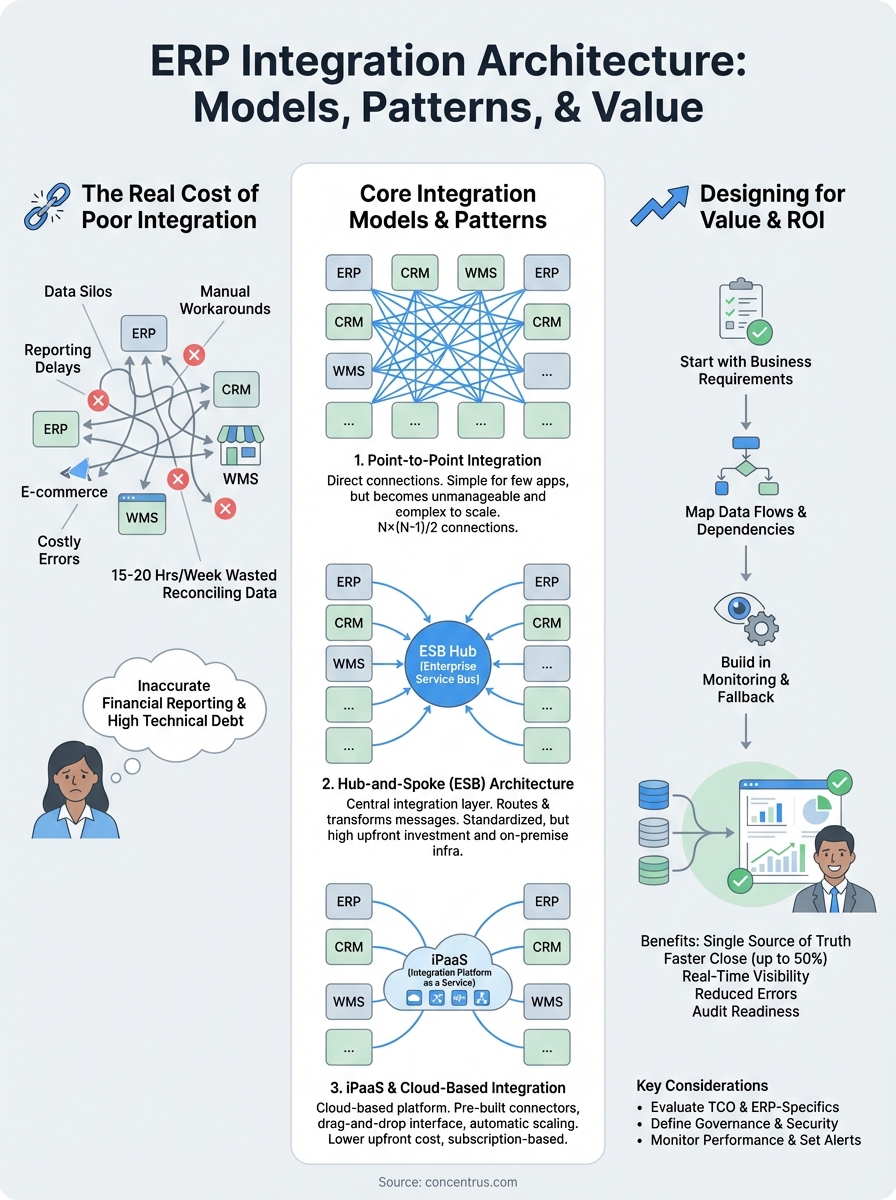
Finance teams at midsized companies waste an average of 15 to 20 hours per week reconciling data between disconnected systems. Your accountants copy information from spreadsheets, chase down discrepancies, and run manual scripts that should have been automated from the start. This isn’t just an efficiency problem; it’s a financial risk that affects everything from audit readiness to cash flow forecasting. When your order management system, payment gateway, and ERP don’t communicate seamlessly, you lose visibility into working capital and create opportunities for errors that can trigger compliance issues.
The technical debt compounds over time. What starts as a simple workaround becomes a critical dependency that no one wants to touch. Your team builds processes around broken integrations instead of fixing the underlying architecture, and before long, you’re stuck with a fragile system that costs more to maintain than it would have cost to design correctly. Integration failures also increase the total cost of ownership for your ERP by requiring custom patches, emergency support calls, and unplanned consulting fees.
“A well-designed ERP integration architecture reduces your month-end close time by up to 50% by eliminating manual data transfers and reconciliation tasks.”
How integration affects financial operations
Your ability to generate accurate financial reports depends entirely on data synchronization across systems. When your ERP receives order data from your e-commerce platform with a 24-hour delay, your revenue recognition is off, your inventory valuations are wrong, and your cash flow projections become guesswork. Real-time integration architecture ensures that every transaction updates your general ledger immediately, giving you the visibility you need to make informed decisions about spending, hiring, and growth investments.
Integration quality directly impacts your audit process. External auditors need to trace transactions from source systems through to your financial statements, and disconnected systems make this process expensive and time-consuming. Strong erp integration architecture creates clear audit trails, reduces the risk of material misstatements, and shortens the time your team spends gathering documentation during quarterly reviews.
The scalability factor
Your integration needs evolve as your company grows. The point-to-point connections that worked when you had five applications become unmanageable when you have twenty. Scalable integration architecture lets you add new systems without breaking existing connections or creating new data silos. You can expand into new markets, acquire other businesses, or switch vendors without rebuilding your entire tech stack from scratch.
Legacy integration approaches often lock you into specific platforms or require expensive custom development every time you make a change. Modern architecture patterns give you the flexibility to adapt as your business requirements shift, protecting your ERP investment and ensuring that your technology supports growth instead of constraining it.
Core models and patterns to know
Understanding the fundamental integration models helps you choose the right approach for your specific business requirements. Each pattern solves different problems, and the architecture you select affects everything from implementation costs to long-term maintenance overhead. Your choice determines how easily you can add new applications, how reliably data flows between systems, and how much technical expertise your team needs to manage the connections.
Point-to-point integration
Point-to-point connections link two systems directly without an intermediary layer. Your ERP talks directly to your CRM, which talks directly to your warehouse management system, creating separate connections for each relationship. This approach works well when you only have a handful of applications that need to communicate, and the data flows are simple and predictable.
The model falls apart as your tech stack grows. Adding a tenth application might require building nine new connections, each with its own custom logic and error handling. You end up with a tangled web of integrations that becomes nearly impossible to troubleshoot when something breaks. Point-to-point also makes it difficult to standardize data formats across systems, forcing you to handle transformations separately for each connection.
Hub-and-spoke (ESB) architecture
Enterprise Service Bus (ESB) architecture introduces a central integration layer that manages all communication between your applications. Instead of each system connecting directly to every other system, they all connect to the ESB hub, which routes messages and transforms data according to predefined rules. This centralization reduces the total number of connections and creates a single point for monitoring and governance.

“ESB architecture reduces integration complexity from N×(N-1)/2 connections to just N connections, where N is the number of systems you’re integrating.”
Traditional ESB platforms require on-premise infrastructure and specialized technical skills to maintain. You gain control and standardization, but at the cost of longer implementation times and higher upfront investment in hardware and software licenses.
iPaaS and cloud-based integration
Integration Platform as a Service (iPaaS) delivers the benefits of hub-and-spoke architecture through cloud-based tools that eliminate infrastructure management. Platforms like Celigo, Boomi, and MuleSoft provide pre-built connectors for common applications, drag-and-drop interface design, and automatic scaling as your integration needs grow. Your team can build and modify erp integration architecture without writing custom code, reducing both time-to-value and ongoing maintenance costs.
Cloud integration platforms charge subscription fees based on usage, making them more accessible for midsized companies that can’t justify the capital expense of traditional ESB infrastructure.
How to design an ERP integration architecture
Building effective erp integration architecture requires a methodical approach that starts with business requirements rather than technical preferences. Your finance team needs specific outcomes like faster period closes, real-time inventory visibility, or automated revenue recognition. These operational goals drive your architectural decisions and help you avoid over-engineering solutions that look impressive on paper but don’t solve actual business problems.
Start with business requirements
Document exactly what data needs to move between systems, how often updates must occur, and what happens when something fails. Your accounts receivable team might need order data within minutes to generate accurate invoices, while your financial reporting process can tolerate batch updates overnight. Understanding these timing requirements prevents you from building expensive real-time integrations where batch processing would suffice.
“The most successful ERP integration projects define their data synchronization requirements before evaluating technical solutions, not after.”
Map out error handling expectations for each integration. When your payment gateway fails to update your ERP, does your team need immediate alerts, or can they handle reconciliation during the next business day? These decisions affect both your architectural complexity and your ongoing operational costs.
Map data flows and dependencies
Create a visual diagram showing how information moves through your systems and where transformations occur. Your e-commerce platform captures orders in one format, your ERP expects them in another, and your warehouse management system needs different fields entirely. Identifying these transformation requirements early prevents surprises during implementation and helps you spot opportunities to standardize data formats across applications.

Dependencies between systems determine your integration sequence. You can’t update inventory levels in your ERP until your warehouse system confirms shipments, and you can’t recognize revenue until your billing system validates payment terms. Mapping these dependencies ensures your architecture processes transactions in the correct order and maintains data integrity throughout the workflow.
Build in monitoring and fallback procedures
Your integration architecture must include automated health checks that detect failures before they cascade through your financial systems. Every connection needs logging, error notifications, and clearly documented recovery procedures that your team can execute without emergency consulting calls.
Choosing tools and platforms
Your platform selection determines both implementation success and long-term maintenance costs. The right integration tool should match your technical capabilities, support your existing ERP system, and scale with your business without requiring constant upgrades. You need to evaluate platforms based on concrete criteria rather than vendor promises or feature lists that look good in demos but don’t address your specific integration requirements.
Evaluate total cost of ownership
Calculate the full financial impact of each platform option over a three-year period, not just the initial licensing fees. Your total cost includes subscription charges, implementation services, training expenses, and ongoing maintenance overhead. Some iPaaS platforms advertise low monthly fees but charge per-transaction pricing that escalates quickly as your data volumes grow, turning an affordable solution into a budget problem.
Factor in the cost of technical expertise required to maintain each platform. If your solution needs specialized developers to build and modify integrations, those consulting fees become a permanent part of your operating expenses. Cloud-based integration platforms with visual workflow designers reduce this dependency by letting your finance team make changes without writing code.
“Platforms that reduce your reliance on external consultants typically deliver better ROI than feature-rich solutions that require constant technical support.”
Consider ERP-specific requirements
NetSuite and Acumatica have different integration capabilities built into their core platforms. NetSuite offers SuiteScript and RESTlets for custom integrations, while Acumatica provides generic inquiries and web service endpoints that simplify data access. Your chosen integration platform must work seamlessly with these native capabilities rather than fighting against them or duplicating functionality that already exists.
Pre-built connectors significantly reduce implementation time and maintenance complexity. Platforms like Celigo specialize in NetSuite integrations with templates designed for common business processes, while other iPaaS solutions offer broader connector libraries that support multiple ERP systems. Choose platforms that maintain their connector libraries actively, because outdated integrations break when your ERP vendor releases updates or changes API specifications.
Governance, security, and monitoring
Your erp integration architecture requires clear policies that define who can access integration tools, modify workflows, and view sensitive financial data. Without proper governance, your integrations become security vulnerabilities and compliance risks that expose your company to data breaches, audit failures, and regulatory penalties. You need documented standards for how integrations are built, tested, and maintained, along with approval processes that prevent unauthorized changes from breaking critical financial workflows.
Define access control and ownership
Assign specific team members as integration owners responsible for maintaining each connection and responding to failures. Your finance systems analyst might own the connection between your ERP and banking platforms, while your operations manager handles warehouse management system integrations. This accountability structure ensures that someone monitors each integration’s performance and can troubleshoot issues without waiting for your IT department to investigate every alert.
Role-based access controls prevent unauthorized users from modifying integration logic or accessing sensitive data mappings. Your accounts payable clerk needs to view integration logs when reconciling payments but shouldn’t be able to change how your payment gateway connects to your ERP. Implement approval workflows for any changes to production integrations, requiring sign-off from both technical and business stakeholders before updates go live.
Secure data transmission and storage
Encrypt all data moving between systems using TLS 1.2 or higher to prevent interception during transmission. Your integration platform must also encrypt credentials, API keys, and other authentication tokens at rest, storing them in secure vaults rather than hardcoding them in integration scripts. These security measures protect your financial data from both external attacks and internal misuse.
“Integration security failures account for 43% of data breaches in midsized companies, making proper encryption and access controls critical financial safeguards.”
Monitor performance and set alerts
Configure automated monitoring that tracks integration execution times, error rates, and data volumes to detect problems before they affect your financial reporting. Your platform should send immediate notifications when integrations fail, data doesn’t sync within expected timeframes, or unusual patterns suggest security issues. Build dashboards that show integration health at a glance so your team can spot trends and address performance degradation proactively.
Next steps
Your ERP integration architecture directly affects your ability to close books faster, reduce manual work, and make confident financial decisions based on accurate data. Understanding the models, patterns, and tools available gives you the foundation to evaluate your current setup and identify gaps that create inefficiencies in your finance operations.
Start by documenting your existing integrations and measuring their performance against your business requirements. Calculate how much time your team spends on manual data transfers, reconciliation, and error correction to establish a baseline for improvement. These quantifiable metrics help you build a business case for architectural changes that deliver measurable ROI and demonstrate the value of proper integration planning to stakeholders.
If your current erp integration architecture creates data silos, delays reporting, or requires constant manual intervention, Concentrus can help you design and implement solutions that connect your NetSuite or Acumatica ERP seamlessly with your entire tech stack. Our ROI Roadmap™ methodology ensures every integration delivers financial value you can track from day one.