

Migrating data between database engines is one of the most critical, and risk-prone, steps in any ERP implementation or rescue project. Whether you’re moving from a legacy system to NetSuite or Acumatica, the underlying data migration has to be precise, or your entire investment is at risk. That’s where AWS Database Migration Service documentation becomes essential reading. It provides the technical foundation for configuring, executing, and validating database migrations across heterogeneous environments with minimal downtime.
At Concentrus, we guide midsized companies through ERP implementations and rescues built around our ROI Roadmap™ methodology. A successful migration isn’t just about flipping a switch on new software, it depends on getting the right data into the right system cleanly. AWS DMS is one of the tools that can support that process, and understanding its documentation is the first step toward using it effectively.
This guide breaks down what the AWS Database Migration Service documentation covers, how to set up DMS for your migration needs, and what to watch for during configuration. You’ll walk away with a clear picture of how DMS works, what its core components are, and how to apply this knowledge to real-world data migration scenarios tied to ERP projects.
What AWS DMS documentation covers
The AWS Database Migration Service documentation on the AWS official docs site is structured to walk you through every phase of a migration project, from initial setup to post-migration validation. It covers replication instances, endpoints, migration tasks, and monitoring tools, giving you both conceptual explanations and step-by-step procedures in one place. If you are preparing for an ERP data migration, this documentation is where you need to start.
Core components and concepts
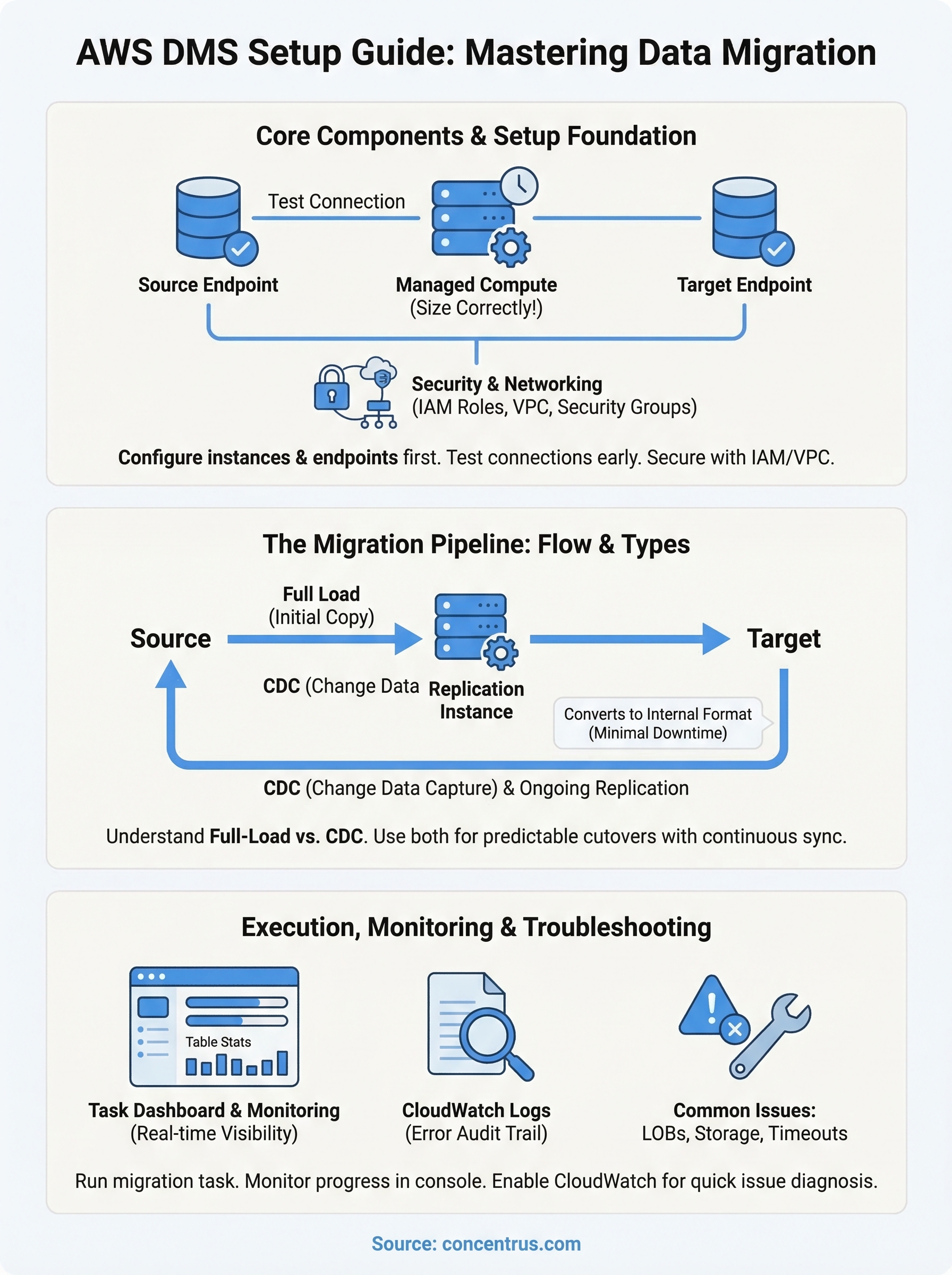
The documentation breaks AWS DMS into three fundamental building blocks you must configure before any data moves: the replication instance, the source endpoint, and the target endpoint. The replication instance is a managed server that runs your migration tasks. AWS hosts and manages it, but you control its size, network placement, and availability settings.
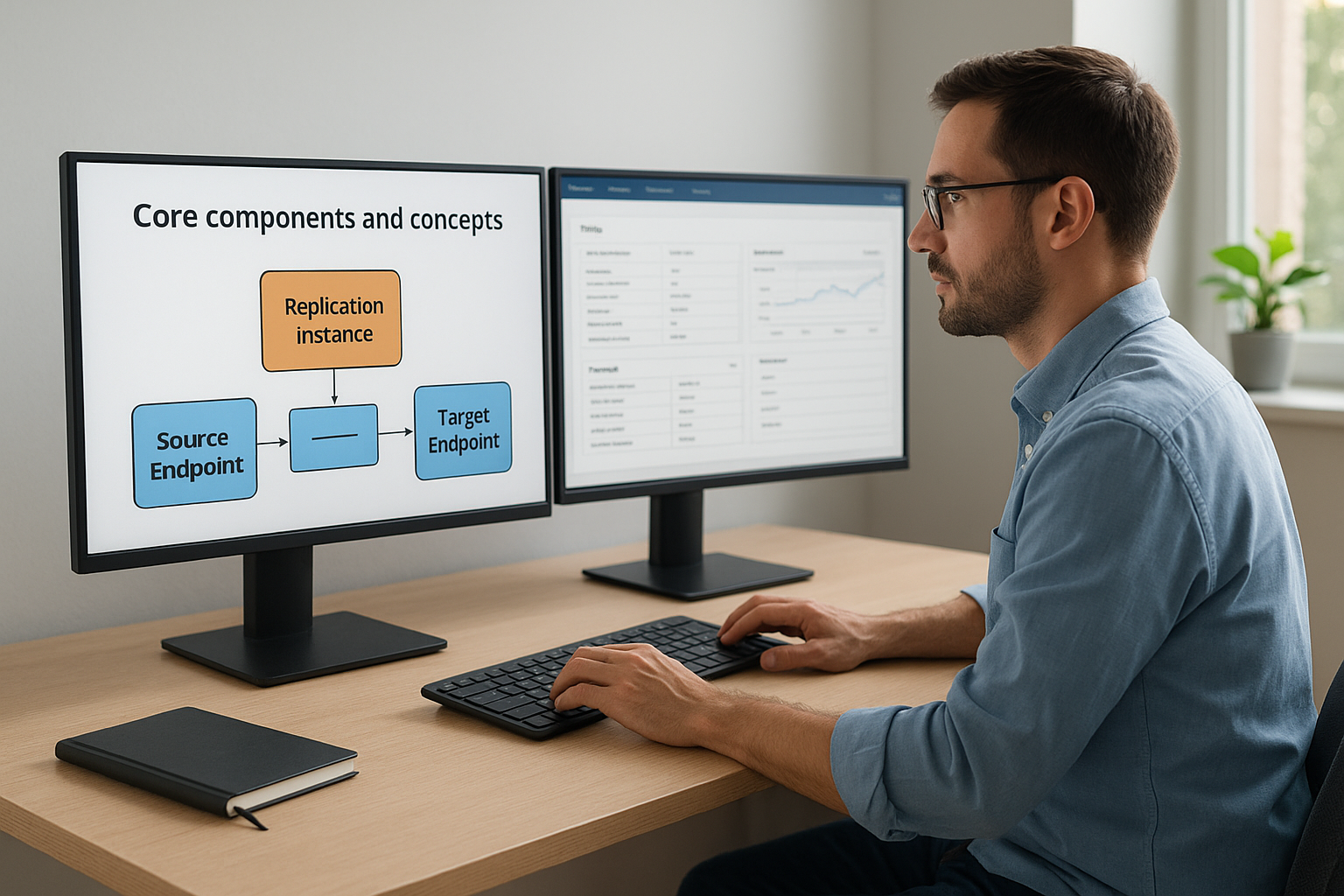
Getting the replication instance sizing right from the start prevents bottlenecks that slow large-scale migrations and inflate costs.
Each section of the documentation also explains task settings and table mappings, which control how data is selected, transformed, and written to the target database during the migration.
Supported source and target endpoints
One of the most practical parts of the documentation is its endpoint compatibility matrix. It tells you exactly which database engines work as sources and which work as targets. AWS DMS supports a wide range of options, including Oracle, SQL Server, MySQL, PostgreSQL, MongoDB, and Amazon Aurora, among others.
The documentation separates full-load migrations from ongoing replication tasks, so you can plan accordingly based on whether you need a one-time move or continuous data sync during a transition period. Knowing these distinctions upfront saves you from having to reconfigure tasks mid-project.
How AWS DMS works in a migration
AWS DMS operates in three stages: full load, change data capture (CDC), and ongoing replication. Understanding this flow is critical before you configure anything. The AWS Database Migration Service documentation outlines each stage clearly, so you know exactly where your data is at every point in the process.
The migration task pipeline
A migration task connects your source endpoint to your target endpoint through the replication instance. AWS DMS reads data from the source, converts it to a common internal format, and writes it to the target. This happens without requiring you to shut down your source system, which means your business keeps running while the migration executes.
Keeping your source system online during migration significantly reduces downtime risk for ERP cutover events.
Full load versus CDC
Full load copies all existing data from your source to the target in one pass. CDC then captures every insert, update, and delete that happens after the full load completes, keeping the target in sync until you are ready to cut over. Using both together gives you a complete migration with minimal data loss and a predictable cutover window you can plan around.
How to set up AWS DMS step by step
The aws database migration service documentation walks you through setup in a specific order, and skipping steps creates problems that are hard to diagnose later. You need to complete three core actions before any data moves: build a replication instance, configure your endpoints, and create a migration task.
Create a replication instance
Your replication instance is the compute resource that runs the migration. Inside the AWS DMS console, navigate to Replication Instances and select “Create replication instance.” Choose an instance class that matches your data volume, and place it in the same VPC as your target database to reduce latency.
Under-sizing your replication instance is the single most common cause of stalled migrations on large datasets.
Configure source and target endpoints
After the replication instance is ready, create your source endpoint and target endpoint separately. Each endpoint requires the engine type, server address, port, and valid credentials. Use the built-in Test Connection button in the console to verify both endpoints connect successfully before proceeding.
Create and run the migration task
With both endpoints tested, create a migration task and link it to your replication instance. Select full-load-and-CDC if you need continuous sync during cutover. Start the task and monitor its progress from the task dashboard.
Security, networking, and permissions
The aws database migration service documentation dedicates a full section to security because a misconfigured network or missing permission will stop your migration before it starts. You need to address three areas before running any task: IAM roles, VPC configuration, and security group rules.
Getting your IAM and VPC settings right before you create any endpoints saves you from silent failures that only surface mid-migration.
IAM roles and VPC settings
AWS DMS requires a specific IAM role called dms-vpc-role to interact with your VPC resources. The documentation on AWS Identity and Access Management explains how to create and attach the correct trust policy to this role. Without it, your replication instance will fail to launch in your target VPC.

Your replication instance and both endpoints must share the same VPC or have proper peering in place. Place your replication instance in a private subnet and restrict inbound traffic using security group rules that only allow traffic on the database ports your source and target engines use. Open the minimum ports required and nothing more.
Monitoring and troubleshooting with the docs
The aws database migration service documentation includes a dedicated monitoring section that gives you real-time visibility into your migration tasks. You can track table statistics, row counts, and task state directly from the AWS DMS console, giving you a clear picture of whether your migration is progressing as expected or falling behind schedule.
Reading task logs and error messages
When a migration stalls or fails, the task logs are your first resource. The documentation explains how to enable CloudWatch Logs for your replication instance and where to find detailed error messages tied to specific tables or rows. You access these logs through the Amazon CloudWatch console.
Enabling CloudWatch Logs before you start your migration task gives you a full audit trail that makes diagnosing failures significantly faster.
Common issues and fixes
Common issues the documentation covers include LOB column handling errors, insufficient replication instance storage, and endpoint connectivity timeouts. Each error type comes with a specific recommended fix, so you are not left guessing when something breaks mid-migration. Reviewing these sections before your migration starts lets you anticipate problems and build contingency steps into your project timeline.
Next steps
You now have a working foundation for using the aws database migration service documentation to plan and execute a database migration. Start by reviewing the supported endpoints matrix to confirm your source and target engines are compatible, then size your replication instance based on your actual data volume before you build anything in the console. Testing your endpoint connections early catches credential and network issues before they block your migration on go-live day.
From here, build your project timeline around the full-load-and-CDC sequence so your cutover window is predictable and tight. Enable CloudWatch Logs before your first task runs so you have a complete audit trail if anything breaks. Document every IAM role, security group rule, and VPC setting you configure so your team can reproduce or troubleshoot the setup quickly.
If your ERP migration needs expert oversight to protect your ROI, talk to the Concentrus team about how we align data migration work directly to measurable financial outcomes.