

Manufacturing and distribution companies running NetSuite often leave one of its most powerful modules underutilized: NetSuite MRP (Material Requirements Planning). MRP calculates what materials you need, when you need them, and how much to order, so you stop guessing and start planning based on actual demand signals and inventory data. When it’s configured correctly, it directly impacts cash flow, margin, and fulfillment speed.
But here’s the problem: MRP is only as good as its setup. Inaccurate lead times, messy BOMs, or poorly defined planning parameters turn what should be a precision tool into a source of confusion. That’s where many midsized companies get stuck, they have the technology but haven’t aligned it with their operational and financial goals to actually drive results.
At Concentrus, we implement and optimize NetSuite for midsized companies with a focus on measurable ROI at every phase. We’ve seen firsthand how a well-configured MRP module transforms procurement cycles, reduces carrying costs, and gives finance leaders the visibility they need to make confident decisions. This article breaks down NetSuite MRP’s core features, how it differs from traditional supply planning methods, the tangible benefits it delivers, and practical tips for getting your implementation right.
What NetSuite MRP does and how it works
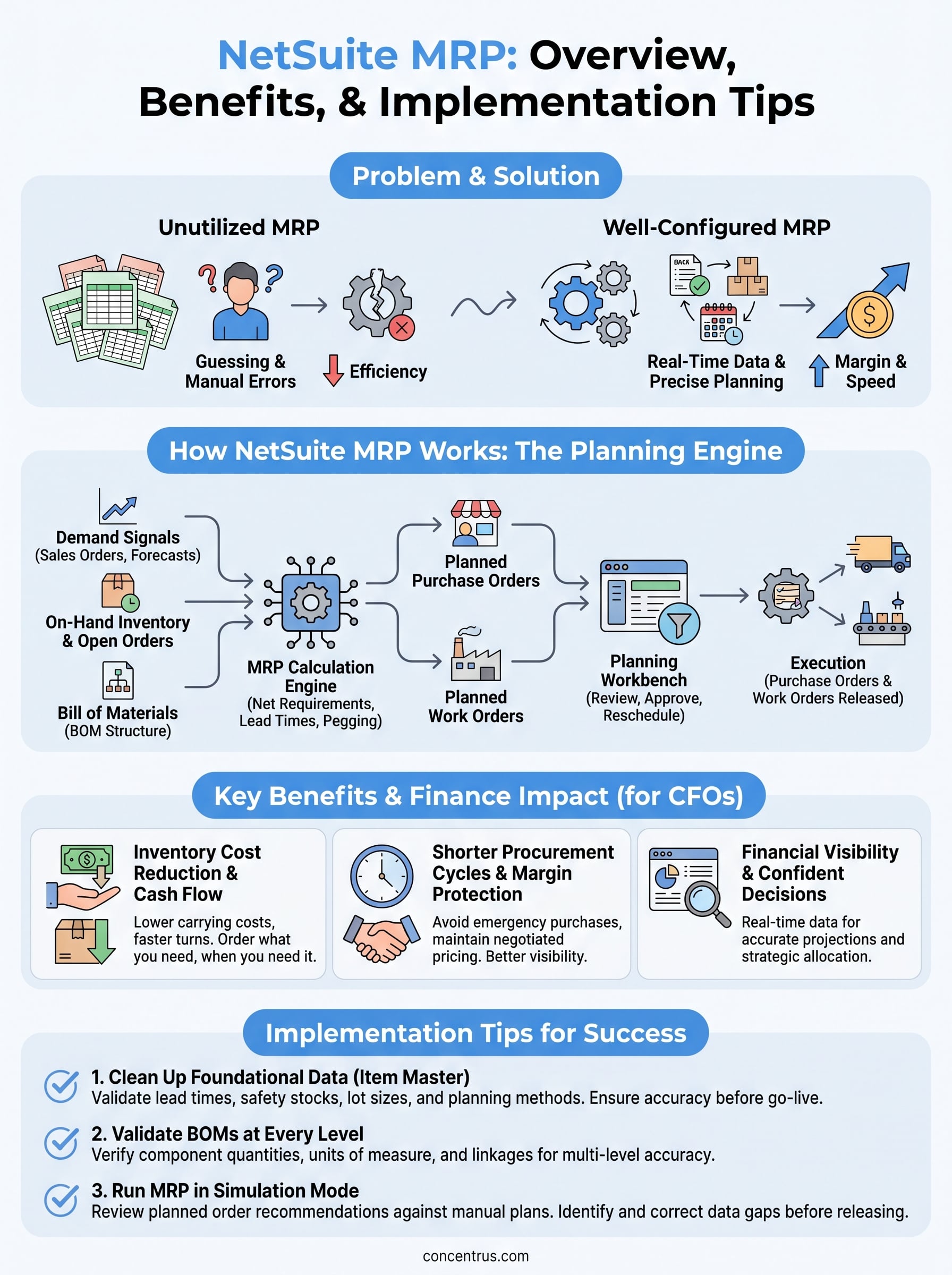
NetSuite MRP works as a planning engine that sits at the intersection of your sales orders, inventory levels, and production schedules. It pulls real-time data from across your NetSuite environment and calculates exactly what you need to buy or build, and when. Instead of relying on buyer intuition or manual spreadsheet calculations, the system generates planned purchase orders and work orders automatically based on defined rules and current demand signals.
How MRP calculates demand and supply
The calculation starts with demand signals, which can come from several sources: open sales orders, sales forecasts, or a combination of both depending on your planning settings. NetSuite MRP then compares that demand against your current on-hand inventory, open purchase orders, and in-progress work orders to determine your net requirements. If a shortfall exists, the system generates a planned order to cover it.

The accuracy of your MRP output depends entirely on the quality of data flowing into it: lead times, safety stock levels, lot sizes, and bill of materials accuracy all directly shape what the system recommends.
From there, the system works backward from the demand date using vendor and item lead times to calculate when each planned order needs to be released. This backward scheduling logic is what gives MRP its practical value: you know not just what to order, but when to trigger the order so materials arrive on time without inflating your inventory buffer unnecessarily.
The role of the Bill of Materials in MRP
For manufacturers, the Bill of Materials (BOM) is the structural foundation that makes MRP functional beyond basic restocking. When a planned work order is generated for a finished good, NetSuite MRP explodes the BOM to identify every component, sub-assembly, and raw material required to build it. Each of those components then goes through its own supply and demand check, which may generate additional planned purchase or work orders at lower BOM levels.
This multi-level explosion is where NetSuite MRP separates itself from simple inventory replenishment tools. A reorder point system restocks individual items in isolation, with no visibility into upstream or downstream dependencies. MRP looks at your entire production structure and ensures every layer of your supply chain is covered before a production run begins. For midsized manufacturers, this capability alone eliminates the costly scenario of starting production only to discover a critical sub-component is missing.
How planned orders move into execution
Once an MRP run generates planned orders, your planners review them through the Planning Workbench, which is the primary interface for evaluating and approving MRP recommendations. Planners can filter by item, location, or date range and can modify quantities or dates before releasing any order into the live system.
Releasing a planned purchase order converts it into an actual purchase order that flows to your vendor. A planned work order converts into a production work order your shop floor team can act on immediately. This controlled approval step matters: it keeps your team in the loop and prevents the system from autonomously issuing orders that don’t reflect real-world conditions, like a supplier being out of stock or a customer order being placed on hold.
Your finance and operations teams end up with a shared planning language that connects customer demand to the procurement and production actions required to fulfill it, all inside a single system. That connection is what makes properly configured NetSuite MRP a strategic asset rather than just a scheduling tool.
Key features and planning workbench basics
NetSuite MRP bundles several interconnected features that work together to give you control over your supply chain planning without requiring a separate system outside NetSuite. Understanding what each feature does, and how they connect in practice, helps you configure the module to match your actual planning cycles rather than defaulting to out-of-box settings that may not fit your business.
The Planning Workbench interface
The Planning Workbench is the central interface for reviewing and acting on MRP recommendations. After you run MRP, every planned purchase order and work order appears here, organized by item, location, and due date so your planners can evaluate them in a structured way. You can filter by item class, preferred vendor, or date range to focus on what needs attention first. Nothing releases to the live system until a planner explicitly approves it, which keeps your team in control of the final execution decisions while the system handles all the demand and supply math.
The Planning Workbench is where bad data becomes visible. If a planned order quantity looks wrong, the root cause is almost always upstream: a missing lead time, an incorrect BOM, or a safety stock level that hasn’t been reviewed in months.
From the workbench, you can release individual planned orders or batch-release an entire filtered group. You can also reschedule or cancel recommendations that no longer reflect current conditions, such as a customer order that was pushed out or a vendor confirming a delivery delay.
Supply and demand pegging
Pegging is one of the most practically useful features inside NetSuite MRP, and it often gets overlooked during initial setup. Pegging links each planned order back to the specific demand that triggered it, so you can trace a planned purchase order directly to the sales order or forecast line that created the requirement. When conditions change, that traceability lets you act fast without manually cross-referencing records across multiple screens.
Your planners use pegging to answer operational questions in real time: which open purchase orders support this specific production run, or what happens to your supply plan if a sales order shifts by two weeks. Pegging surfaces those answers inside the same interface without requiring separate reports or data exports. That speed of insight reduces your planning cycle time and helps your team respond to disruptions before they turn into fulfillment failures.
Benefits and finance impact for CFOs
For CFOs at midsized companies, NetSuite MRP delivers value that shows up directly in your financial statements, not just in your operations reports. When your planning engine is driven by actual demand signals and accurate inventory data, you stop funding inefficiencies with working capital. The result is a tighter connection between your supply chain activity and your financial performance metrics across inventory, cash flow, and gross margin.
Inventory cost reduction and cash flow improvement
Carrying excess inventory is one of the most common ways midsized manufacturers and distributors quietly erode margin. Without MRP, buyers often over-order to protect against stockouts, which ties up cash in slow-moving inventory and inflates your carrying costs over time. NetSuite MRP calculates your actual net requirements, factoring in what you already have on hand, what’s already on order, and what demand has actually been placed. That precision means you order what you need, when you need it, rather than padding quantities out of uncertainty.
When your planned order quantities are grounded in real demand rather than buyer intuition, your inventory investment shrinks and your available cash increases without any reduction in service levels.
The downstream effect on cash conversion cycles is measurable. Faster inventory turns mean cash moves through your business more efficiently, which gives you more flexibility to fund growth, manage vendor payment terms, or reduce reliance on short-term credit facilities.
Shorter procurement cycles and margin protection
When your planning runs happen on a regular cadence and your vendor lead times are accurately maintained, your procurement team spends less time in reactive mode. Emergency purchases at premium prices are one of the fastest ways to compress your gross margin, and they almost always trace back to a planning failure rather than a genuine supply chain disruption. NetSuite MRP surfaces requirements early enough that your team can source at standard terms and maintain negotiated pricing agreements with preferred vendors.
Financial visibility that supports confident decisions
CFOs need forward-looking data to make credible capital allocation decisions. When MRP is running accurately inside NetSuite, your inventory projections, purchase commitments, and production requirements are all visible in one system, updated in real time. You can walk into a board meeting or a bank conversation with a clear picture of your supply obligations and anticipated inventory positions, rather than relying on static spreadsheet snapshots that are outdated the moment they’re shared. That real-time operational visibility is what separates reactive financial management from strategic financial leadership.
NetSuite MRP vs demand planning and supply plans
These three terms often get used interchangeably, but they represent distinct planning layers that serve different purposes inside your operation. Understanding where each one starts and stops helps you configure your NetSuite environment so the right tool is doing the right job, rather than forcing one process to cover ground it wasn’t designed for.
How demand planning fits alongside MRP
Demand planning focuses on forecasting future customer demand based on historical sales data, market trends, and statistical models. It answers the question: how much of each product will customers want over the next month, quarter, or year? That forecast then feeds into your planning engine as an input. NetSuite MRP uses those demand signals, alongside confirmed sales orders, to calculate net material requirements and trigger planned orders at the right time.

The critical distinction is that demand planning generates the forward-looking projections, while MRP translates those projections into specific procurement and production actions. One produces the signal; the other acts on it. If your demand plan is inaccurate, your MRP output will reflect that inaccuracy downstream, which is why maintaining clean forecast data in NetSuite is just as important as configuring your planning parameters correctly.
Your MRP results are only as reliable as the demand signals you feed into it, whether those signals come from confirmed orders, a statistical forecast, or both.
Supply plans and where MRP takes over
A supply plan is a higher-level view of how your organization intends to source, produce, and distribute inventory across a planning horizon, typically measured in months or quarters. Supply planning is strategic: it aligns your production capacity, supplier relationships, and inventory strategy with anticipated demand at an aggregate level. It answers questions like whether you have enough supplier capacity to meet projected demand for the next six months, or whether a new product launch requires you to qualify an additional vendor.
MRP operates at a more granular, execution-focused level. Once your supply plan sets the broad parameters, MRP translates them into specific item-level planned orders with exact quantities and dates. Where supply planning tells you what resources you’ll need, MRP tells you which purchase order to release on which day to keep production running on schedule. Both layers are necessary for a functioning operation, but they serve your team at different planning horizons and with different levels of detail. Treating them as the same tool leads to gaps in your planning process that show up as stockouts, late orders, or excess inventory.
Implementation tips that prevent bad planning data
NetSuite MRP is a calculation engine, and like any calculation engine, it produces results proportional to the quality of its inputs. Before you run MRP for the first time, the most important work you can do is clean up the foundational data your planning engine will rely on. Implementation failures almost always trace back to skipped data preparation steps, not to the software itself.
If you go live with MRP on top of inaccurate item records, lead times, or BOMs, the system will generate planned orders confidently and incorrectly at the same time.
Clean up your item master before go-live
Your item master records drive every MRP calculation, and missing or outdated values will produce unreliable planned orders from day one. Walk through each item and confirm that planning methods, safety stock levels, and preferred vendors are set correctly for each record. Pay particular attention to items that have changed suppliers recently or that carry seasonal demand patterns, because those records are most likely to have stale settings that don’t reflect your current operation.
Here are the item master fields that most commonly cause MRP errors:
- Lead time: missing or underestimated lead times cause planned orders to be released too late
- Safety stock: overstated safety stock drives excess inventory; understated safety stock creates stockout risk
- Lot sizing method: fixed lot sizes that don’t match vendor minimums generate orders your procurement team will manually override every time
- Reorder point: incorrect reorder points conflict with MRP logic and produce redundant or contradictory signals
Validate your BOMs at every level
For manufacturers, BOM accuracy is the single biggest implementation risk because errors at any BOM level cascade through the entire MRP explosion. A missing component at a sub-assembly level means NetSuite will not generate a purchase order for it, and you will not discover the gap until production is already underway. Before your first MRP run, verify quantities, units of measure, and component linkages at every level of each BOM, not just the top-level finished goods records.
Assign a specific team member to own BOM validation as a dedicated pre-launch task, separate from the broader implementation checklist. Rushed BOM reviews produce exactly the kind of data gaps that destroy planner confidence in the system within the first few weeks of go-live.
Run MRP in simulation mode first
Most NetSuite implementations allow you to review planned order recommendations before releasing anything to the live system. Use that window as a diagnostic tool by running a full MRP pass and comparing the output against what your experienced buyers and planners would have ordered manually. When the recommendations diverge, investigate the root cause before you release a single order. That comparison process surfaces data gaps you can correct while there is still time to fix them without operational consequences.
Next steps
NetSuite MRP gives midsized manufacturers and distributors a planning engine that connects demand signals to procurement and production actions with precision. When your item master is accurate, your BOMs are validated, and your planning parameters reflect how you actually operate, MRP stops being a source of noise and starts being a reliable foundation for operational and financial decisions. The features covered in this article, from the Planning Workbench to supply and demand pegging, are only effective when they sit on top of clean, well-maintained data.
If your current MRP setup is producing unreliable recommendations, or if you are preparing to go live for the first time and want to avoid the most common configuration mistakes, the right implementation partner makes a measurable difference. Concentrus works with midsized companies to configure NetSuite so every module, including MRP, drives real ROI against your financial goals. Talk to a NetSuite ERP expert to get started.