

Your ERP system holds critical financial data, but it’s only as powerful as its connections to the rest of your tech stack. If you’re asking what are ERP integrations, you’re likely facing a familiar challenge: disconnected systems that create data silos, manual workarounds, and reporting headaches. For CFOs at midsized companies, these gaps translate directly into delayed closes, inaccurate forecasts, and lost productivity.
ERP integrations connect your enterprise resource planning system to other business applications, CRM, e-commerce platforms, warehouse management, payroll, and more, so data flows automatically between them. Done right, integrations eliminate duplicate data entry, reduce errors, and give finance leaders real-time visibility across operations. Done poorly, they become a constant source of frustration and technical debt.
At Concentrus, we’ve spent years implementing and rescuing NetSuite and Acumatica ERP systems for midsized companies. Integration strategy is central to every engagement because your ROI depends on it. This guide breaks down the types of ERP integrations available, the measurable benefits they deliver, and real-world examples that show how connected systems drive efficiency, accuracy, and profitability. Whether you’re planning a new implementation or trying to get more value from an existing system, understanding integrations is essential to making your ERP investment pay off.
Why ERP integrations matter for finance leaders
You can’t manage what you can’t see, and disconnected systems keep critical data trapped in silos across your organization. When your ERP doesn’t communicate with CRM, e-commerce, inventory, or payroll systems, you’re forced into manual data transfers that slow down every financial process. The result is delayed month-end closes, inaccurate forecasts, and countless hours spent reconciling discrepancies that shouldn’t exist in the first place. For CFOs at midsized companies, these inefficiencies directly impact your ability to scale, compete, and deliver reliable financial guidance to the board.
Real-time visibility replaces delayed reporting
Without integrations, your finance team waits days or weeks to get the complete picture. Sales data sits in your CRM, inventory updates live in your warehouse system, and customer payments land in a separate payment processor before someone manually exports and imports everything into the ERP. This lag prevents you from understanding current cash position, real-time margins, or inventory turns when decisions need to be made.

Integrated systems give you access to live operational data the moment transactions occur. You see order volumes, shipment status, and revenue recognition in real time rather than waiting for batch uploads at month-end. This visibility lets you identify trends early, adjust pricing strategies faster, and respond to cash flow challenges before they become crises. The difference between next-day reporting and real-time dashboards can determine whether you capture market opportunities or miss them entirely.
Manual processes create hidden costs
Your team spends hours each week copying data between systems, a task that feels routine but costs more than you realize. Manual data entry not only consumes productive time that could go toward analysis and strategic work, but it also introduces errors that ripple through financial statements. A single transposed digit in a customer invoice can delay payment, trigger collection issues, and create reconciliation headaches that take days to resolve.
The true cost extends beyond labor hours. When you factor in error correction, duplicate records, and the opportunity cost of finance professionals doing data entry instead of financial planning, the ROI case for integration becomes clear. Companies that automate data flows between systems typically reclaim 20 to 40 hours per month per finance team member, time that can be redirected toward margin analysis, cash flow optimization, and strategic initiatives that actually move the business forward.
Integrated systems eliminate the manual handoffs that slow down your financial processes and introduce costly errors at every step.
Disconnected systems prevent accurate forecasting
Forecasting accuracy depends on having complete, reliable data from across your business. When systems don’t talk to each other, you’re building projections on incomplete snapshots pulled from multiple sources at different times. Sales forecasts in your CRM don’t automatically flow into revenue projections in your ERP, and inventory data doesn’t align with purchasing plans, leaving you with assumptions that quickly become outdated.
This fragmentation affects strategic decision-making in ways that compound over time. You can’t model the impact of new product launches accurately when sales, inventory, and financial data live in separate systems. Cash flow projections miss the mark when payment timing, vendor terms, and AR aging don’t connect. Integrated systems give you the data consistency needed for scenario planning, what-if analysis, and confident financial guidance that helps your executive team make better strategic choices. When you can answer “what are ERP integrations” with specific examples of how they’ve improved your forecasting accuracy, you’ve turned technology into a competitive advantage.
What to integrate with your ERP system
Your integration priorities depend on where data flows create the most friction in your current operations. Start by identifying the systems that require manual data transfers between your finance team and other departments. These handoffs represent the highest-value integration opportunities because they directly impact financial accuracy, reporting speed, and operational efficiency.
Customer-facing systems that drive revenue
Your CRM holds the sales pipeline, customer interactions, and order history that finance needs for accurate revenue recognition and forecasting. Without integration, sales data gets manually exported from platforms like Salesforce and imported into your ERP, creating delays between when deals close and when they appear in financial reports. This lag prevents you from understanding current period revenue until well after transactions occur.
E-commerce platforms like Shopify, Magento, or BigCommerce generate hundreds or thousands of transactions daily that need to flow into your ERP for order fulfillment, inventory updates, and revenue posting. Manual entry isn’t feasible at scale, yet these transactions directly impact your financial statements. Integration ensures that online orders, payments, refunds, and returns sync automatically, giving you complete visibility into your digital revenue streams without the administrative burden.
Integration of customer-facing systems eliminates the gap between when revenue is earned and when your financial team can report on it.
Back-office and operational systems
Payment processors like Stripe, PayPal, or Authorize.net collect customer payments that must reconcile against open invoices in your ERP. When these systems don’t connect, your AR team spends hours matching payments to invoices, chasing down discrepancies, and manually updating customer accounts. Integrated payment processing applies cash automatically, reduces DSO (days sales outstanding), and gives you real-time cash position visibility.
Warehouse management systems (WMS) track inventory movements, lot numbers, and fulfillment operations that your ERP needs for accurate cost of goods sold and inventory valuation. Manufacturing execution systems (MES) capture production costs, labor hours, and material consumption that drive your product costing and margin analysis. When you’re evaluating what are ERP integrations to prioritize, these operational systems directly feed the data that determines your gross margins and profitability metrics.
Payroll systems like ADP or Paychex process labor costs that represent your largest operating expense for many businesses. Integration ensures that payroll expenses, tax withholdings, and benefit costs post to the correct general ledger accounts automatically, eliminating manual journal entries and reducing the risk of payroll misclassification that can distort departmental profitability.
Common ERP integration examples across departments
When you ask what are ERP integrations in practice, the answer varies by department because each team relies on specialized tools that need to exchange data with your financial system. Understanding these cross-functional integration patterns helps you prioritize which connections deliver the greatest impact on operational efficiency and financial accuracy. The integrations that matter most are those that eliminate repeated data entry, reduce errors, and give your finance team complete visibility into transactions as they occur across your organization.
Sales and marketing integrations
Your sales team lives in CRM platforms like Salesforce or HubSpot, where they track leads, manage opportunities, and close deals. Integration pushes won opportunities directly into your ERP as sales orders, triggering fulfillment workflows and revenue recognition without manual intervention. Customer information, contact details, and pricing terms flow automatically, ensuring that your finance team works with the same customer data that sales relies on.
Marketing automation platforms like Marketo or Pardot generate campaign costs and lead attribution data that your finance team needs for accurate marketing ROI analysis. When these systems connect to your ERP, you can track spending by campaign, measure cost per acquisition, and tie marketing investments directly to revenue outcomes. This integration gives you the cost visibility required to make informed budget decisions rather than treating marketing as a black box expense.
Integration between sales, marketing, and your ERP creates a complete revenue story from first touch to cash collection.
Operations and supply chain integrations
Warehouse management systems track inventory movements, lot traceability, and fulfillment accuracy that your ERP needs for proper cost accounting. When shipments leave your facility, integration updates inventory quantities and costs in real time, ensuring that your balance sheet reflects actual stock levels rather than outdated counts. This connection prevents the inventory discrepancies that force costly physical counts and surprise write-downs at quarter end.
Transportation management systems (TMS) handle freight costs, carrier selection, and delivery tracking that impact your landed costs and customer satisfaction. Integration ensures that shipping expenses post to the correct orders and cost centers automatically, giving you accurate total delivered cost for margin analysis. Third-party logistics (3PL) integrations sync inventory levels across multiple fulfillment locations, preventing stockouts while avoiding the excess inventory that ties up working capital.
HR and finance department integrations
Payroll systems process labor costs, benefits, and tax withholdings that represent your largest operating expense. Integration automatically posts payroll expenses to department-specific accounts, projects, or cost centers in your ERP, eliminating manual journal entries that slow down your month-end close. You gain real-time labor cost visibility that supports accurate job costing, project profitability, and departmental budgeting.
Time tracking tools like TSheets or Replicon capture billable hours, project time, and attendance data that drive both payroll accuracy and customer invoicing. When integrated with your ERP, these hours flow directly into project costing modules and generate billable invoices automatically, reducing billing delays and improving cash flow for professional services firms.
ERP integration methods and architectures
The technical approach you choose for connecting systems determines maintenance costs, scalability, and long-term flexibility of your integration strategy. Understanding what are ERP integrations from an architectural perspective helps you evaluate vendor proposals, assess internal resources, and avoid technical debt that limits your ability to adapt as your business grows. Each integration method carries distinct trade-offs in complexity, cost, and ongoing support requirements that directly impact your technology budget and IT workload.
Point-to-point integrations
Point-to-point connections establish direct links between two systems without intermediate technology layers. Your ERP communicates directly with your CRM, e-commerce platform, or warehouse system through file transfers, database queries, or custom code written specifically for that connection. This approach delivers fast initial implementation because you’re building exactly what you need without additional platform licensing costs.
The challenge emerges as you add more systems to your technology stack. Each new connection requires custom development, creating a web of interdependencies that becomes increasingly difficult to maintain. When you upgrade your ERP or replace a connected application, you must rebuild or modify every point-to-point integration that touches the changed system. For midsized companies managing five or more integrated applications, this architecture quickly becomes unsustainable.
Middleware and integration platforms
Integration Platform as a Service (iPaaS) solutions like Celigo, Boomi, or MuleSoft introduce a central hub that manages connections between your ERP and other applications. Instead of building direct links between every system pair, you connect each application to the middleware once. The platform handles data transformation, error handling, and monitoring across all your integrations from a single interface.
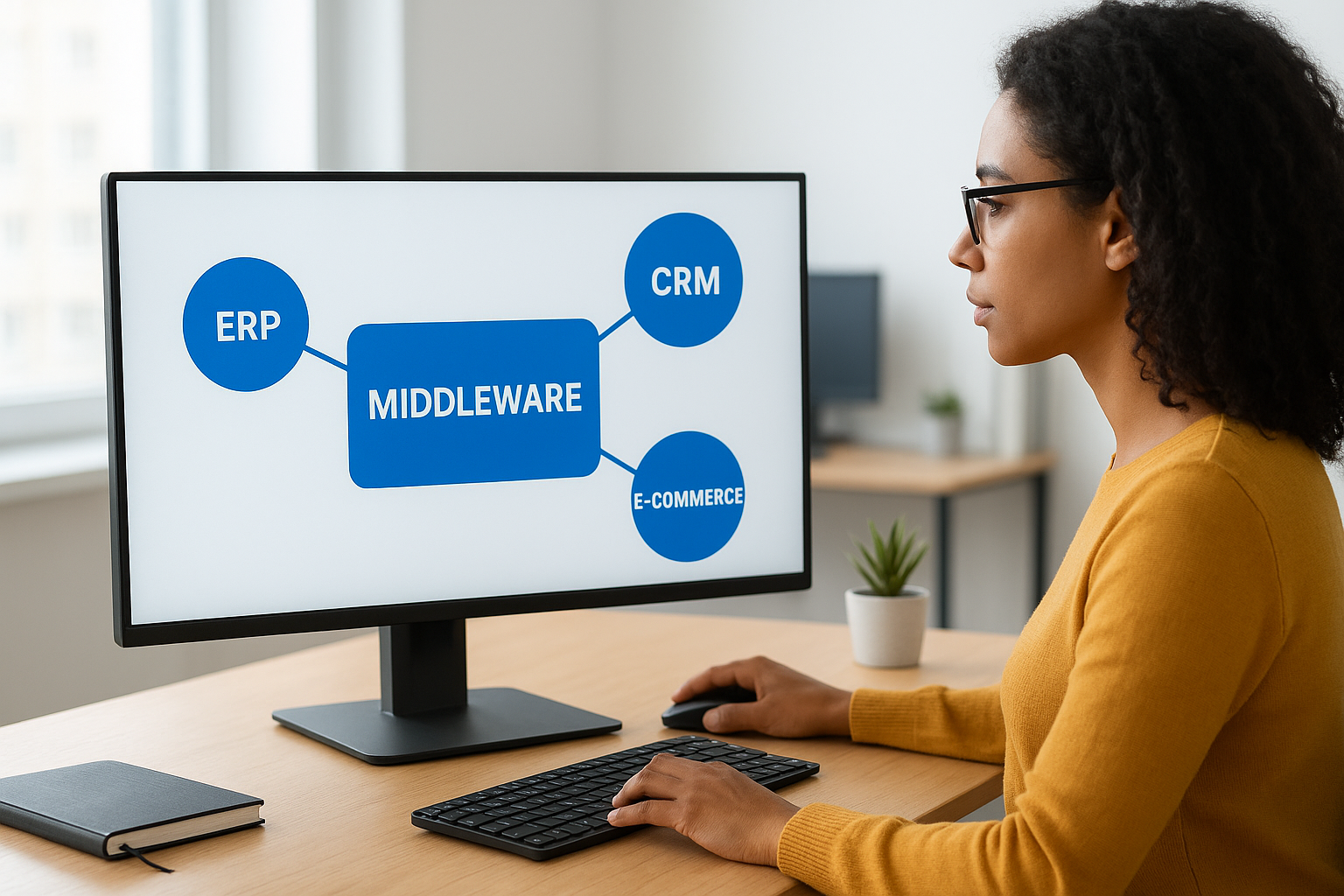
This architecture scales efficiently as you add new systems because each integration builds on reusable connectors and templates rather than starting from scratch. Your IT team gains centralized visibility into data flows, error logs, and performance metrics that make troubleshooting faster. The trade-off comes in licensing costs and the learning curve required to manage the platform effectively, but the operational efficiency typically justifies the investment once you reach three or more active integrations.
Middleware platforms transform integration from a collection of custom connections into a managed infrastructure that scales with your business.
API-based architectures
Modern cloud applications expose RESTful APIs (Application Programming Interfaces) that allow systems to exchange data using standardized web protocols. Your ERP calls an API endpoint in your CRM to retrieve customer data, or your e-commerce platform pushes order information to your ERP through its published API. This approach provides real-time data access with built-in security controls and version management.
API-based integrations require development expertise to implement but offer the greatest flexibility for custom workflows and bi-directional data exchange. You control exactly which data fields sync, how often updates occur, and what business logic applies during the transfer. Cloud ERPs like NetSuite and Acumatica provide robust API frameworks that support modern integration architectures without the limitations of older file-based methods.
Data standards and the single source of truth
Your integrations move data between systems, but they can’t fix inconsistent definitions or conflicting records that exist across your technology stack. When different departments use different customer IDs, product codes, or account structures, integration becomes a technical exercise that amplifies existing problems rather than solving them. The question of what are ERP integrations extends beyond connectivity to include data governance principles that determine which system owns each type of information and how that data maintains consistency across every connected application.
Establishing master data ownership
Every data element needs a single authoritative source that other systems reference rather than duplicate. Your ERP typically serves as the master for chart of accounts, vendor records, and financial dimensions like departments or cost centers. Your CRM owns customer contact information, sales territories, and account hierarchies. Your warehouse system maintains SKU attributes, lot numbers, and bin locations that your ERP consumes for inventory valuation but doesn’t attempt to manage independently.
Clear ownership prevents the conflicts that occur when two systems claim authority over the same data. If both your ERP and CRM allow users to update customer addresses, you create divergent records that confuse fulfillment teams and result in shipments to outdated locations. Designating your CRM as the master means address changes flow from CRM to ERP, never in reverse, giving you a consistent customer record across all systems.
Field mapping and transformation rules
Systems rarely use identical data structures, so your integrations must translate between formats while preserving meaning. Your e-commerce platform might store customer names as a single field while your ERP separates first and last names. Product categories in your warehouse system need to map to revenue account codes in your general ledger according to rules your finance team defines based on recognition policies and reporting requirements.
These transformation rules require documentation and testing because errors in field mapping create data quality issues that compound over time. A misconfigured integration might post all e-commerce sales to a single revenue account instead of breaking them out by product line, destroying your ability to analyze category profitability. Your integration platform should maintain version-controlled mapping documentation that survives system upgrades and personnel changes.
Data standards transform integration from a technical connection into a strategic asset that maintains consistency across your entire business.
Preventing duplicate records
Duplicate customer, vendor, or product records fragment your data and undermine reporting accuracy and operational efficiency. Integration logic must include matching algorithms that identify when an incoming record already exists in your ERP under a slightly different name or account number. Your CRM might use “ABC Corporation” while your ERP has “ABC Corp,” requiring fuzzy matching rules that catch variations before creating duplicates.
Regular data quality audits identify duplicates that slip through matching rules, giving you the opportunity to merge records and refine integration logic based on actual patterns. Your finance team can’t trust AR aging reports or vendor spend analysis when duplicate records split transaction history across multiple accounts that represent the same business entity.
Security, controls, and compliance for integrations
Your integrated systems create pathways for data to flow automatically across your organization, but those same pathways become security vulnerabilities if you don’t implement proper controls from the start. When you connect your ERP to external applications, you’re expanding the attack surface that malicious actors can exploit to access financial data, customer records, or intellectual property. CFOs at midsized companies must balance the operational efficiency that integrations provide against the compliance obligations and data protection requirements that come with connecting systems. The question of what are ERP integrations must include consideration of how you’ll secure those connections and maintain audit trails that satisfy internal controls and regulatory requirements.
Authentication and access controls
Every integration requires credentials that authenticate one system’s right to access another, and these credentials represent high-value targets for attackers. Service accounts used for integrations often hold elevated privileges that allow read and write access across multiple data types, making them more dangerous than individual user accounts if compromised. Your integration strategy must include credential management practices that rotate passwords regularly, use API keys with limited scope, and implement OAuth or token-based authentication rather than storing plain-text passwords in configuration files.

Role-based access controls determine which data fields an integration can read or modify within each connected system. Your e-commerce integration might need read access to inventory levels but shouldn’t have permission to modify chart of accounts or vendor payment terms in your ERP. Principle of least privilege ensures that each integration holds only the specific permissions required for its designated function, limiting the potential damage if credentials are exposed.
Data encryption and transmission security
Data moving between systems must travel through encrypted channels that prevent interception during transmission. HTTPS connections with TLS 1.2 or higher protect API calls and web service requests from man-in-the-middle attacks that could expose sensitive financial information. Your integration platform should enforce encryption standards and reject connections that attempt to use outdated or insecure protocols.
Sensitive data like customer payment information, social security numbers, or bank account details requires additional protection beyond transport encryption. Tokenization replaces actual values with meaningless substitutes in systems that don’t require the real data, while field-level encryption protects specific attributes even if someone gains unauthorized database access. These controls become particularly important when integrations touch PCI-DSS regulated payment data or HIPAA-protected health information that carry significant penalties for breaches.
Proper encryption and access controls transform integrations from potential security liabilities into protected data highways that meet your compliance obligations.
Audit trails and compliance requirements
Your integration platform must log every data transaction, including what changed, when it occurred, and which system initiated the request. These audit trails provide the evidence your internal and external auditors need to verify that financial transactions flow correctly between systems and that unauthorized changes haven’t occurred. SOX compliance requires demonstrable controls over financial data, and your integration logs become part of that control documentation during annual audits.
Error handling and exception monitoring catch failed transactions before they create financial discrepancies that require manual correction. Your integration platform should alert your IT and finance teams when data sync failures occur, giving you the opportunity to resolve issues within the same business day rather than discovering problems weeks later during reconciliation. Regular review of integration logs identifies patterns that might indicate security issues, system performance problems, or configuration drift that needs correction.
How to plan and implement ERP integrations
Your integration project succeeds or fails based on the planning decisions you make before writing a single line of code or configuring your first connector. CFOs who treat integration as a purely technical exercise discover too late that they’ve built connections that don’t support actual business processes or require constant manual intervention to function correctly. Understanding what are ERP integrations means recognizing that successful implementation starts with clear requirements gathering that involves both technical teams and the business users who depend on integrated data daily. The discipline you apply during planning determines whether your integrations become strategic assets or ongoing maintenance headaches.
Define requirements and prioritize integrations
Start by documenting which data needs to flow between systems, how often updates must occur, and what business processes depend on that data. Your accounts receivable team might need customer payments from your payment processor to sync within minutes to support same-day cash application, while nightly batch updates suffice for transferring general ledger balances to your reporting tool. These timing requirements drive technical architecture decisions and cost trade-offs between real-time APIs and scheduled batch processes.
Prioritize integrations based on financial impact and operational pain. Connections that eliminate manual data entry by your finance team or reduce month-end close time deliver immediate measurable value. Integrations that improve customer experience or enable new business models might show longer-term strategic benefits. Your roadmap should sequence implementations to build momentum with early wins while establishing the technical foundation needed for more complex integrations later.
Choose the right integration approach
Your technical architecture must align with internal IT capabilities, budget constraints, and long-term scalability needs. Point-to-point integrations cost less initially but create maintenance burdens as you add more connected systems. Integration platforms require upfront licensing investment but provide centralized management and reusable components that reduce total cost of ownership across multiple integrations.
Evaluate vendor-provided connectors that offer pre-built templates for common integration patterns before building custom code. NetSuite SuiteCloud and Acumatica’s integration framework include connectors for popular applications that handle field mapping, error handling, and authentication automatically. Custom development gives you complete control but increases ongoing support requirements when systems upgrade or business requirements change.
The right integration architecture balances initial implementation speed against long-term maintenance costs and your ability to adapt as business needs evolve.
Test thoroughly before going live
Your testing strategy must verify data accuracy, error handling, and performance under realistic transaction volumes before you cut over to production. Create test scenarios that include edge cases like duplicate records, missing required fields, and simultaneous updates from multiple systems. Your integration might work perfectly with clean test data but fail when it encounters the messy real-world data that exists in your production systems.
Run parallel processing during your initial go-live period, comparing integrated data flows against manual processes to catch discrepancies before you eliminate the safety net of human verification. This validation period gives your team confidence that integrations handle exceptions correctly and that your financial statements reflect complete accurate data from all connected systems.
How to measure ROI and maintain integrations
Your integration investment delivers value that extends far beyond the initial implementation, but you need concrete metrics to prove it. Finance leaders who can’t quantify integration benefits struggle to justify maintenance budgets or expansion to additional systems. The ROI calculation for integrations must account for both direct cost savings from eliminated manual work and strategic benefits like faster decision-making and improved cash flow that compound over time. When stakeholders ask what are ERP integrations worth to your business, your answer should include specific dollar amounts tied to measurable operational improvements rather than vague efficiency claims.
Tracking financial and operational metrics
Calculate hours saved per month by eliminating manual data entry, exports, and reconciliation tasks that integration automates. Multiply those hours by your team’s fully loaded labor cost to determine the hard dollar savings. Your accounts receivable team that previously spent 20 hours monthly applying payments manually now redirects that time toward collections and dispute resolution that actually reduces DSO and accelerates cash collection.
Measure improvements in financial close speed by comparing the number of days required to close your books before and after integration. Every day you shave off the close cycle gives your leadership team faster access to financial results for strategic decisions. Track error rates and correction costs by counting discrepancies found during reconciliation that required research and adjustment. These metrics demonstrate how integration improves data accuracy and reduces the financial risk of reporting errors to stakeholders.
Quantifiable metrics transform integration from an IT expense into a finance initiative that delivers measurable returns quarter after quarter.
Ongoing maintenance and monitoring
Your integrations require regular attention to maintain reliability as systems evolve and transaction volumes grow. Schedule monthly reviews of error logs and failed transactions to identify patterns that indicate configuration drift or capacity constraints. Address issues proactively rather than waiting for users to report problems that have already impacted business operations.
Monitor integration performance metrics like sync times, API call volumes, and data throughput to catch degradation before it affects user experience. Your e-commerce integration might process orders flawlessly at current volumes but need optimization as you scale. Budget for maintenance costs including platform licensing, IT support time, and periodic updates that keep integrations compatible with system upgrades.
Planning for system changes and upgrades
Create a change management process that evaluates integration impacts before implementing system updates or replacing connected applications. Your CRM upgrade might introduce new custom fields or modify existing objects in ways that break your existing integrations. Testing integration compatibility in a sandbox environment prevents production outages that disrupt financial operations.
Document your integration logic, field mappings, and business rules so that knowledge doesn’t reside solely with the original implementation team. This documentation enables faster troubleshooting and reduces dependency on specific individuals when issues arise or requirements change. Version control ensures you can roll back problematic changes while maintaining a history of modifications that helps diagnose unexpected behavior.
Next steps
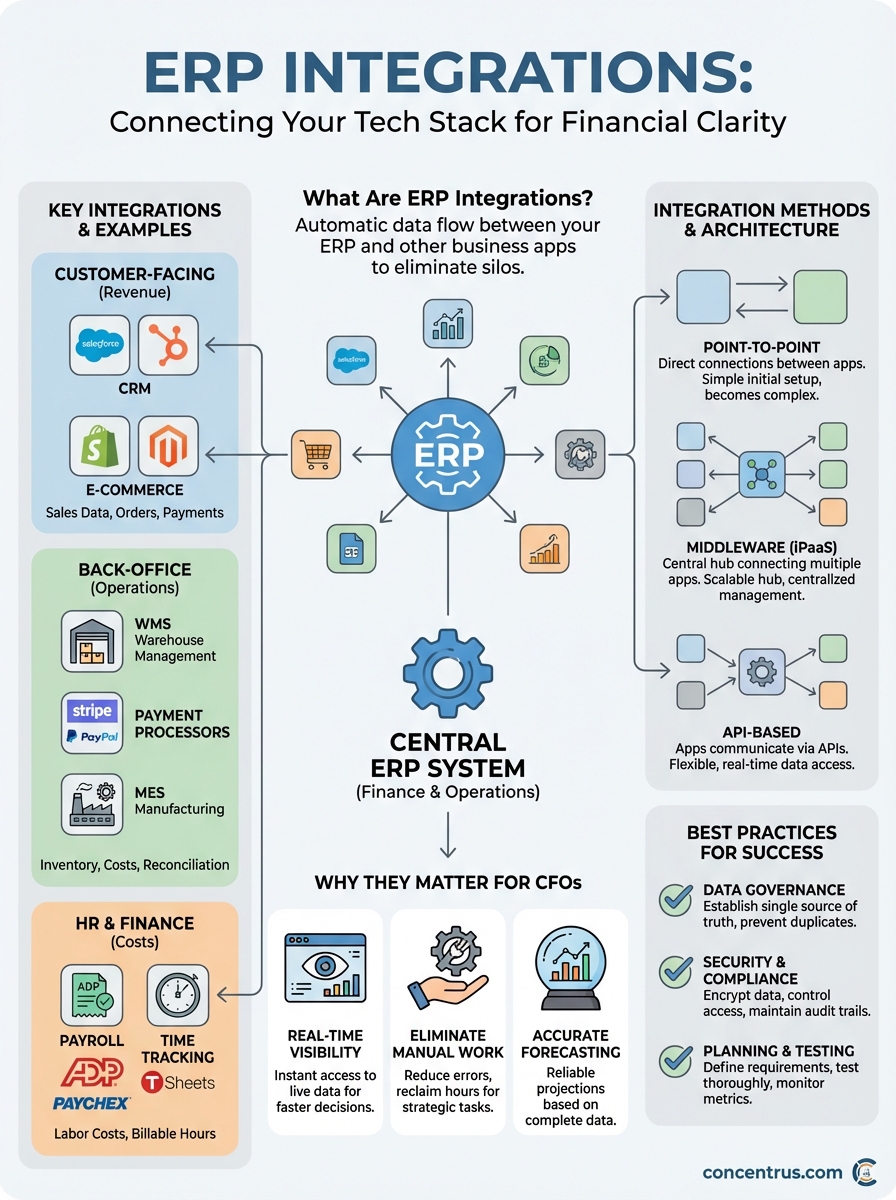
Understanding what are ERP integrations gives you the foundation to transform disconnected systems into a unified technology stack that supports financial accuracy and operational efficiency. Your success depends on strategic planning that balances technical implementation with clear business requirements, proper data governance that maintains a single source of truth, and ongoing maintenance that keeps integrations reliable as your business grows.
The difference between integrations that deliver ROI and those that become costly maintenance burdens comes down to expertise in both the technical platform and the financial processes they support. Concentrus has helped midsized companies implement and rescue NetSuite and Acumatica ERP systems with integration strategies that connect to existing applications while protecting your data and maintaining compliance. Our ROI Roadmap™ methodology ensures every integration ties directly to measurable financial outcomes like faster closes, improved cash flow, and reduced operational costs.
Learn how Concentrus can help you design and implement ERP integrations that deliver guaranteed ROI rather than technical complexity.