

Every ERP implementation, system upgrade, or cloud transition hinges on one critical process: moving your data from point A to point B without losing accuracy, context, or business continuity. So what is data migration, exactly? It’s the process of transferring data between storage systems, formats, or computing environments, and when done poorly, it can derail even the most promising technology investment. For CFOs and finance leaders at midsized companies, understanding data migration isn’t optional; it’s essential to protecting your ROI on platforms like NetSuite or Acumatica.
At Concentrus, we’ve seen firsthand how data migration can make or break an ERP project. A flawless implementation means nothing if your historical financial records, customer data, or inventory information arrives corrupted, incomplete, or in the wrong format. That’s why our ROI Roadmap™ methodology treats data migration as a strategic priority, not an afterthought. The difference between a successful go-live and a rescue engagement often comes down to how well the migration was planned and executed.
This guide breaks down the types of data migration, walks through the process step by step, and shares best practices that finance leaders can use to evaluate their own projects. Whether you’re preparing for a new ERP implementation or recovering from a troubled one, you’ll leave with a clear framework for ensuring your data moves safely, and your investment delivers measurable results.
Why data migration matters in ERP projects
Your ERP system only becomes valuable when it contains accurate, complete historical data that your team can trust. Understanding what is data migration in the context of ERP implementations means recognizing that you’re not just moving files; you’re transferring the financial memory of your organization. Every general ledger entry, every customer record, every open purchase order needs to arrive in your new system with full integrity, or your team will spend months reconciling discrepancies instead of realizing ROI.
Most CFOs underestimate the complexity until they face it directly. You might assume that migration is a technical task your IT team or vendor handles in the background. The reality? Data migration decisions directly impact your ability to close books on time, run accurate financial reports, and maintain audit trails. When historical revenue recognition data doesn’t map correctly into NetSuite or Acumatica, your first month-end close becomes a nightmare instead of a milestone.
Your financial data is the foundation of every business decision
The quality of your migrated data determines whether your new ERP delivers insight or confusion. If your chart of accounts doesn’t map cleanly, you’ll see inflated expenses in the wrong departments or revenue attributed to discontinued product lines. When customer payment histories arrive incomplete, your AR team loses visibility into aging patterns and collection priorities. These aren’t minor inconveniences; they’re operational risks that erode the confidence your finance team needs to do their jobs.
A successful ERP implementation depends on migrated data that’s accurate enough to support real-time decision-making from day one.
Your ability to forecast cash flow, manage inventory levels, and analyze profitability all rely on data that reflects actual business history. If your migration skips over the last three years of transaction detail because it seemed easier to start fresh, you’ve just eliminated your ability to perform year-over-year comparisons or identify seasonal trends. The ERP becomes a system you use instead of a strategic asset that drives better decisions.
Bad migration costs multiply fast in ERP environments
When data migration goes wrong in an ERP context, the damage spreads quickly across every department. Finance can’t reconcile accounts. Operations can’t trust inventory balances. Sales loses visibility into customer purchase history and credit limits. Each functional area discovers new problems as they try to execute their daily workflows, and your team spends weeks troubleshooting instead of capturing the efficiency gains you purchased the ERP to deliver.
The financial impact extends beyond lost productivity. You may need to pay consultants to re-migrate data, delay go-live timelines while you fix foundational issues, or run parallel systems longer than planned. In rescue engagements, we’ve seen companies burn through six-figure budgets trying to correct migration failures that could have been prevented with better upfront planning and validation.
Continuity matters more than speed during cutover
Your business doesn’t pause while you switch ERP systems. Orders still need fulfillment. Invoices still require processing. Payroll still runs on schedule. That’s why migration strategy must account for business continuity, not just technical data transfer. You need a plan that minimizes downtime, maintains transactional integrity during the cutover window, and gives your team confidence that nothing critical was lost in the transition.
Rushing through migration to meet an arbitrary go-live date creates more problems than it solves. Teams that prioritize validation and testing over speed end up with cleaner implementations, fewer post-launch firefights, and faster time to value.
Types of data migration you’ll run into
Understanding what is data migration becomes clearer when you recognize that not every migration looks the same. The type of data migration your team encounters depends on where your data currently lives and where it needs to go. Each category comes with distinct technical challenges, risk profiles, and planning requirements that directly impact your ERP implementation timeline and success rate. Most finance leaders deal with multiple migration types simultaneously, which is why your project plan needs to account for each one explicitly.
Storage and database migration
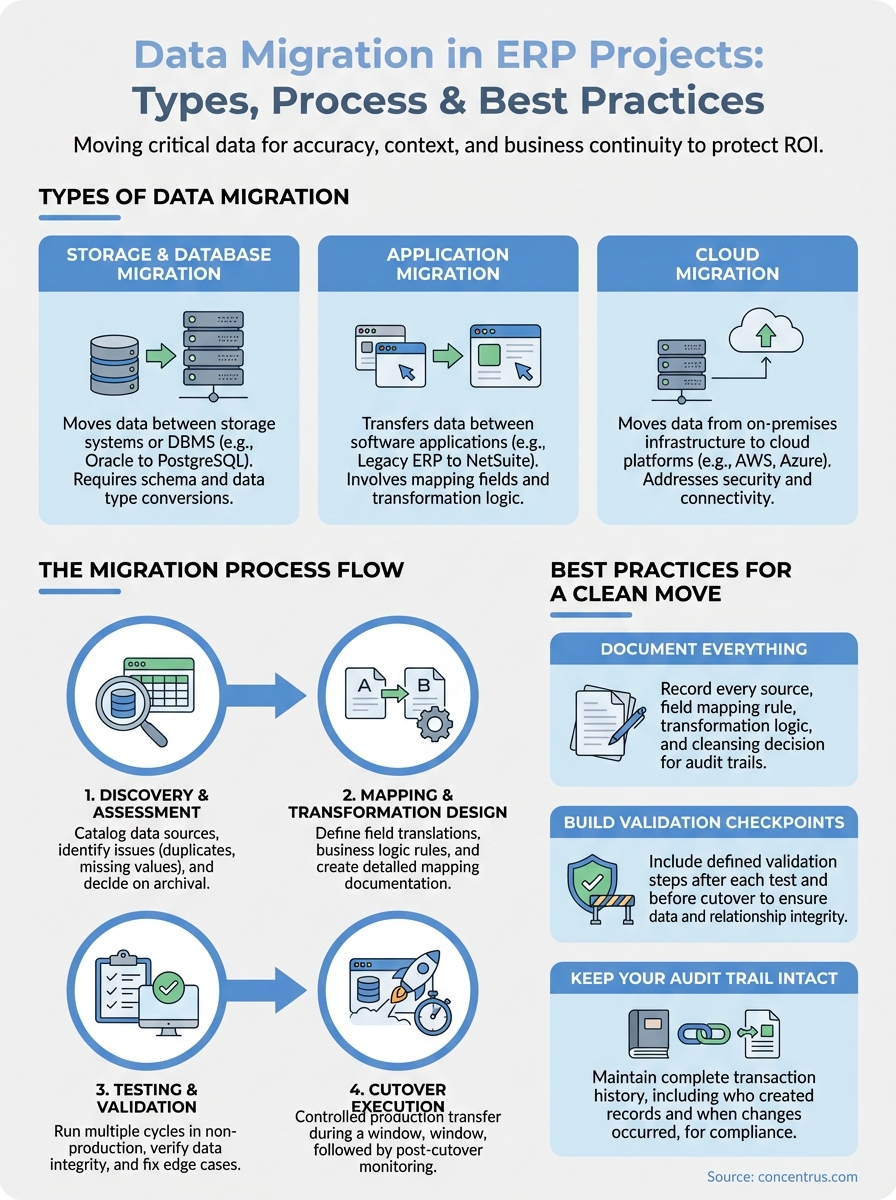
Storage migration moves your data from one physical or virtual storage system to another without changing the underlying database structure. You might upgrade from on-premises disk arrays to faster SAN infrastructure, or consolidate multiple storage environments as part of a data center modernization. Database migration goes deeper by transferring data between different database management systems, such as moving from Oracle to PostgreSQL or from SQL Server to MySQL, which often requires schema transformation and data type conversions.
ERP implementations frequently trigger database migrations because your legacy system runs on incompatible database technology compared to NetSuite or Acumatica. The challenge isn’t just copying data; it’s ensuring that relationships between tables remain intact and that your queries perform efficiently on the new platform.
Application migration
Application migration transfers data between different software applications while often transforming its structure to fit the target system’s requirements. This is the migration type most relevant to ERP projects, where you’re moving financial data, customer records, inventory balances, and transaction history from your old ERP or disparate systems into NetSuite or Acumatica. The complexity comes from mapping fields between systems that weren’t designed to work together.
Your legacy system might track customer credit limits in one module and payment terms in another, while your new ERP expects that information in a unified customer master record. Application migration requires careful data mapping, transformation rules, and validation to ensure nothing breaks when you flip the switch.
Application migration in ERP projects demands detailed field mapping and business logic translation to preserve data integrity across systems.
Cloud migration
Cloud migration moves your data from on-premises infrastructure to cloud platforms like AWS, Azure, or Google Cloud, or from one cloud provider to another. This type often overlaps with application migration when you implement a cloud-native ERP like NetSuite. Beyond the technical data transfer, you need to address security protocols, compliance requirements, and network connectivity that didn’t matter in your old environment.
How the data migration process works
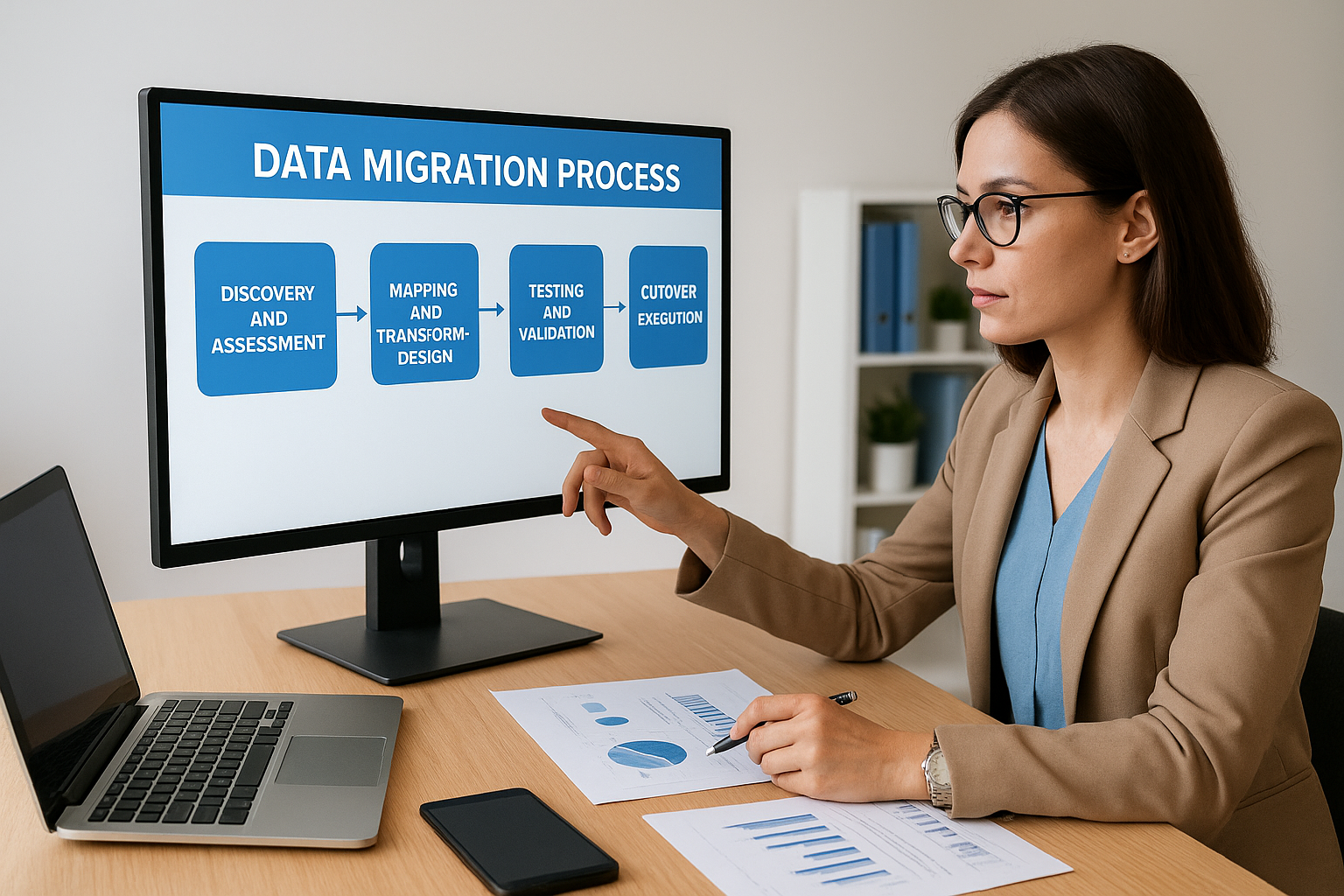
Understanding what is data migration from a procedural standpoint helps you evaluate whether your implementation team is following a disciplined approach or winging it. The process breaks into distinct phases that build on each other, and skipping steps or rushing through validation inevitably creates problems downstream. Your role as a finance leader isn’t to manage the technical details, but you need to understand the critical checkpoints where your approval and oversight protect your organization’s data integrity and business continuity.
Discovery and assessment
Your migration team starts by cataloging every data source that feeds into your business operations. This includes your current ERP, standalone accounting software, spreadsheets, CRM systems, and any other applications that contain financial, customer, or operational data. The assessment phase identifies data quality issues like duplicate records, inconsistent formatting, or missing values that need correction before migration begins.
Teams also determine which data you actually need to migrate versus what you can archive. Moving 10 years of detailed transaction history sounds thorough, but if you only need three years for regulatory compliance and operational analysis, you’re adding unnecessary complexity and cost to your project.
Mapping and transformation design
This phase defines exactly how each field in your source system translates to your target ERP. Your chart of accounts might use four-digit account numbers while NetSuite expects a hierarchical structure with segments. Customer records might store tax identification numbers in formats that don’t match your new system’s validation rules. Mapping documents become the blueprint that developers and consultants use to build transformation logic.
Detailed mapping documentation prevents data from landing in wrong fields and creates an audit trail you can reference months after go-live.
Testing and validation
You run multiple migration cycles in a non-production environment to verify that data arrives correctly. Initial test runs usually reveal gaps in your mapping logic or uncover edge cases your team didn’t anticipate. Each iteration gets you closer to a production-ready migration by identifying and fixing issues before they impact your live system.
Cutover execution
The final migration happens during a controlled cutover window when business activity stops or slows significantly. Your team runs the production migration, validates key data points, and confirms that users can access what they need. Post-cutover monitoring catches any issues quickly so you can address them before they cascade into bigger problems.
Common risks and how teams reduce them
Every data migration carries inherent risks that can derail your ERP project if your team doesn’t anticipate them. When you ask what is data migration from a risk management perspective, you’re really asking how to protect your business from the consequences of technical failures, human errors, and planning gaps. The most successful migrations aren’t the ones that avoid problems entirely; they’re the ones where teams identify vulnerabilities early and build mitigation strategies into every phase. Your ability to recognize these common pitfalls and verify that your implementation partner addresses them directly determines whether your go-live happens on schedule or turns into a rescue engagement.
Data loss during transfer
Complete data loss during migration happens more often than most vendors admit, usually because teams skip incremental backups or fail to validate that every record transferred successfully. You might discover weeks after go-live that entire customer accounts, historical transactions, or product records simply didn’t make it into your new ERP. Teams reduce this risk by running checksum validation that compares record counts and key field totals between source and target systems after each test migration and the final cutover.
Your migration plan must include row-level validation and rollback procedures to recover quickly if data goes missing during the transfer.
Implementing a staged migration approach where you move data in batches rather than all at once gives you opportunities to catch issues before they compound. You also need verified backups of your source system that remain accessible throughout the migration window, so you can recover specific records if problems surface later.
Mapping errors that corrupt records
Field mapping mistakes cause data corruption that’s harder to detect than complete loss because your records appear to transfer successfully but contain wrong values. Your customer credit limits might land in the discount percentage field, or your multi-currency transactions might lose their exchange rates. These errors happen when teams rush through mapping documentation or fail to account for edge cases and null values in their transformation logic.
Timeline slippage from underestimation
Migration timelines frequently double or triple because teams underestimate the complexity of data cleansing and the number of test cycles required to achieve production readiness. You reduce schedule risk by building in buffer time for each phase and treating your first two test migrations as discovery exercises rather than final rehearsals.
Best practices for a clean, auditable move
When finance leaders ask what is data migration success looks like, the answer always includes two elements: clean data that works correctly and complete documentation you can audit months later. Your implementation team might deliver technically functional migration while leaving you with gaps in accountability that create compliance risks or make troubleshooting impossible. The practices that separate professional migrations from hasty ones all focus on transparency, verification, and documentation that protect your organization beyond go-live. These aren’t optional extras that add cost; they’re risk controls that determine whether your ERP investment delivers sustainable value or becomes a perpetual cleanup project.
Document everything before you start
You need written documentation of every data source, field mapping rule, and transformation logic your team applies during migration. This documentation serves multiple purposes: it creates accountability for decisions, provides a reference when users question why data looks different in the new system, and gives future teams the context they need to maintain or modify your ERP. Your mapping documents should explain not just what fields connect but why you made specific choices when multiple options existed.
Complete migration documentation transforms into your audit trail and operational playbook that teams reference long after implementation ends.
Recording your data cleansing decisions matters just as much as technical mappings. When you chose to merge duplicate customer records or standardize product codes, document the business rules you followed and who approved them. This protects you during audits and prevents confusion when users notice historical data doesn’t match their old system exactly.
Build validation checkpoints into every phase
Your migration plan needs defined validation steps after each test cycle and before final cutover. These checkpoints compare record counts, verify that financial totals balance between systems, and confirm that critical business transactions maintain their integrity through the migration process. You should validate not just that data transferred but that relationships between records remain intact, so customer payments still link to correct invoices and purchase orders still connect to their receiving transactions.
Keep your audit trail intact
Regulatory compliance requires you to demonstrate complete transaction history that connects your old system to your new ERP. You need to preserve the ability to trace any financial figure back through its source documents, even after you decommission legacy systems. This means maintaining read-only access to historical data or migrating complete audit trails that include who created each record, when changes occurred, and what approvals governed transactions.
Next steps
Now that you understand what is data migration and why it matters for your ERP investment, you can evaluate whether your current implementation approach protects your data integrity and business continuity. Review your project plan against the best practices outlined here, and ask your implementation team specific questions about their validation checkpoints, mapping documentation, and rollback procedures. The difference between a successful migration and a costly rescue often comes down to how thoroughly these fundamentals get executed.
If you’re facing a troubled ERP implementation or planning a new NetSuite or Acumatica project, Concentrus specializes in migrations that deliver measurable ROI from day one. Our ROI Roadmap™ methodology treats data migration as a strategic priority, not a technical afterthought, ensuring your historical data becomes a foundation for better decisions. Connect with our ERP and ROI experts to discuss how we can help you achieve a clean, auditable migration that protects your investment.