


If your team still exports Shopify orders to a spreadsheet before anyone in accounting can see them, you already know the problem. Sales grow, order volume climbs, and suddenly your finance staff spends hours reconciling numbers that should have synced automatically. ERP integration Shopify projects exist to close that gap, connecting your storefront directly to the financial and operational system that runs the rest of the business.
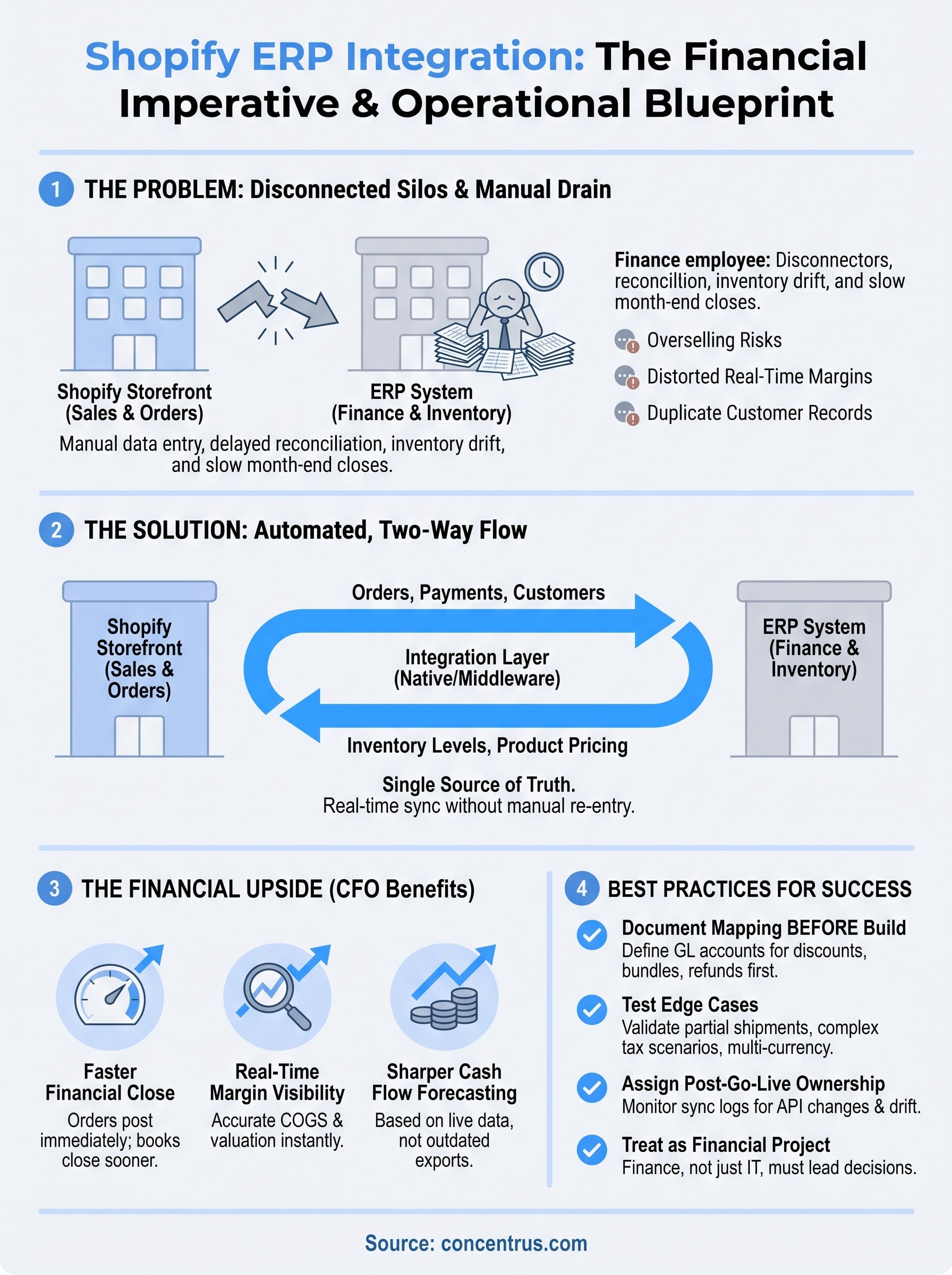
At its core, Shopify ERP integration links your e-commerce orders, inventory, and customer data with your ERP so information flows one way, in real time, without manual re-entry. Whether you run NetSuite, Acumatica, or another platform, the goal is the same: one accurate source of truth for orders, inventory, and financials, instead of two systems that drift apart.
This article walks through what shopify integration with erp actually means, how the connection works technically, and the main integration approaches companies use today, from native connectors to middleware platforms. We’ll also cover what to watch for so the integration actually protects your margins and cash flow, not just your data entry time.
Why Shopify ERP integration matters for finance leaders
For a CFO, Shopify ERP integration isn’t a technical nice-to-have. It’s a direct lever on cash flow, margin visibility, and how fast you can close the books each month. When Shopify orders sit in one system and your general ledger sits in another, every reconciliation cycle becomes a manual, error-prone chore that eats staff hours and delays the numbers you need to make decisions.
The hidden cost of manual reconciliation
Most midsized companies that skip shopify erp integration end up with someone on the finance team exporting CSVs, matching order numbers by hand, and chasing down discrepancies between what Shopify says sold and what the ERP shows in inventory. That work doesn’t scale. Add a second sales channel, a promotional spike, or a new SKU line, and the manual process breaks down completely. You end up closing the month later than you should, with numbers you don’t fully trust.
When Shopify and your ERP don’t talk to each other, your finance team spends its time reconciling data instead of analyzing it.
What breaks without integration
Here’s what typically goes wrong when Shopify and your ERP run as separate silos:

- Inventory drift: Shopify shows items in stock that were already sold through another channel, leading to overselling and refunds.
- Delayed revenue recognition: Orders sit unposted in the ERP for days, distorting your real-time margin picture.
- Duplicate customer records: Without a synced customer master, marketing and finance work from different versions of the same account.
- Manual tax and shipping errors: Rates calculated in Shopify don’t match what lands in the ERP, creating reconciliation gaps at month-end.
- Slower financial close: Every unsynced order is another line item someone has to track down manually before the books can close.
The financial upside of getting it right
Once order data, inventory counts, and customer records flow automatically between Shopify and your ERP, the benefits show up directly on the financial statements. Faster closes become possible because orders post to the ledger the moment they happen, not days later. Margin visibility improves because cost of goods sold and inventory valuation update in real time instead of on a lag. Cash flow forecasting gets sharper because you’re working from live order and inventory data rather than a snapshot from last week’s export.
Growth also stops being a threat to your reporting accuracy. A properly integrated system handles a 20% jump in order volume the same way it handles a slow week, because the sync doesn’t care about volume the way a manual process does. That scalability matters most during peak seasons, when manual reconciliation would otherwise fall furthest behind.
Why this belongs on the CFO’s agenda, not just IT’s
Too many companies treat Shopify integration as an IT ticket rather than a financial priority. That’s a mistake. The decisions involved (which orders sync in real time, how tax and shipping data map to the general ledger, how returns and refunds hit revenue) are financial decisions with operational implications, not the other way around. Concentrus builds every ERP project, including Shopify integrations, around a ROI Roadmap™ methodology that ties the technical work back to specific financial KPIs like days sales outstanding, gross margin accuracy, and close-cycle time. That framing keeps the project accountable to the finance team’s actual goals, not just a checklist of connected data fields.
The bottom line: if your ERP and Shopify aren’t synced, you’re paying for that gap somewhere, whether it’s staff hours, inventory errors, or a close cycle that runs longer than it should. Fixing that connection is one of the more direct ways a finance leader can improve operational efficiency without adding headcount.
How Shopify ERP integration works
Underneath the marketing language, Shopify ERP integration is really a set of automated data exchanges between two systems that speak different languages. Shopify uses its own REST and GraphQL APIs to expose orders, customers, products, and inventory levels. Your ERP, whether that’s NetSuite or Acumatica, has its own data model for sales orders, item records, and general ledger accounts. The integration layer’s job is to translate one system’s data into the other’s format, on a schedule that matches how fast your business needs the information.
The core data that moves back and forth
Most shopify integration erp projects sync the same handful of data types, just in different directions depending on where the data originates:
- Orders: Flow from Shopify into the ERP as sales orders, triggering fulfillment and revenue recognition.
- Inventory levels: Flow from the ERP back to Shopify so the storefront never sells what isn’t actually on hand.
- Customer records: Sync both ways to keep a single customer master instead of duplicate profiles.
- Product and pricing data: Usually flow from the ERP to Shopify, since the ERP is the system of record for cost and pricing rules.
- Payments and refunds: Post from Shopify into the ERP’s accounts receivable and revenue accounts.
The whole point of the integration is that no single order ever exists in only one system.
How the connection actually gets triggered
Most integrations run on one of two mechanisms: webhooks or scheduled polling. A webhook fires the instant something changes in Shopify, say a new order comes in, and pushes that event to the ERP within seconds. Polling checks for changes on a set interval, like every 15 minutes, which works fine for lower-volume stores but introduces lag that finance teams notice at month-end. A simplified webhook payload for a new order looks something like this:

POST /erp/sales-orders
{
 "shopify_order_id": "4102938",
 "customer_email": "buyer@example.com",
 "line_items": [...],
 "total_tax": 12.45,
 "fulfillment_status": "unfulfilled"
}
The ERP receives that payload, maps it to its own sales order structure, and posts it to the correct GL accounts automatically.
Where the mapping logic actually lives
The hardest part of any integration isn’t moving data, it’s deciding how each field maps. Does a Shopify discount code map to a specific GL account? Does a partial refund reduce revenue or create a credit memo? Those mapping rules live in either a native connector, a middleware platform like Celigo, or custom code, and they determine whether your financials are accurate the moment an order syncs or whether someone still has to clean things up after the fact.
Choosing the right integration method for your business
Once you understand what has to sync, the next question is how. There isn’t one right way to build erp integration shopify connections. The right method depends on your order volume, how many sales channels you run, and how much custom logic your finance team needs baked into the sync itself.
The three main approaches
Most midsized companies pick between three integration paths, each with real tradeoffs in cost, flexibility, and long-term maintenance:
| Method | Best for | Tradeoff |
|---|---|---|
| Native connector | Simple order flow, single Shopify store, low customization needs | Limited field mapping, fewer options for complex tax or multi-entity rules |
| Middleware/iPaaS (e.g., Celigo) | Growing companies with multiple channels or workflows that need custom logic | Higher upfront setup, but scales cleanly as complexity grows |
| Custom API integration | Highly specific business rules that no packaged tool supports | Full control, but you own the maintenance and every API version change |
Native connectors work well when your order flow is genuinely simple: one Shopify store, one warehouse, standard tax rules. Middleware platforms earn their cost the moment you add a second sales channel, a marketplace like Amazon, or shipping logic that a plug-and-play connector can’t handle. Custom-built integrations make sense only when your business rules are so specific that no existing tool covers them, and even then, most CFOs regret owning that maintenance burden long-term.
The best integration method is the one that matches your actual order complexity today, not the one with the most features on paper.
Questions to ask before you commit
Before your team signs off on an integration approach, walk through these questions with whoever owns the ERP relationship:
- How many sales channels feed into the ERP right now, and how many will in 18 months?
- Does your tax and shipping logic require field-level customization a native connector can’t support?
- Who on your team will maintain the integration after go-live, and do they have the technical bandwidth?
- What happens to the sync if Shopify or the ERP pushes an API update?
Answering these honestly usually points you toward middleware for anything beyond a single-channel storefront, since it gives you the flexibility of custom logic without the full maintenance load of custom code.
Why this decision belongs in the ROI conversation
The integration method you pick affects your total cost of ownership for years, not just at launch. Concentrus works this decision into the same ROI Roadmap™ framework used for the rest of the ERP project, weighing the upfront build cost against ongoing maintenance and the financial accuracy each option delivers. A cheaper connector that leaves your team reconciling tax discrepancies every month isn’t actually cheaper once you count the staff hours it costs.
Popular ERP systems that connect with Shopify
Not every ERP handles a Shopify connection the same way, and the platform you already run (or plan to adopt) shapes what your integration project actually looks like. For midsized companies, the conversation almost always comes back to two platforms: NetSuite and Acumatica. Both were built with e-commerce in mind, which is why they dominate the shopify integration with erp conversations we have with finance leaders.
NetSuite and Shopify
NetSuite treats Shopify as a native retail channel rather than a bolt-on system, which means orders, inventory, and customer records flow into the same SuiteCommerce data model the rest of your business already runs on. That matters for multi-entity companies, since NetSuite consolidates revenue and inventory across subsidiaries without a separate reconciliation step. Concentrus builds these connections as part of full NetSuite implementation projects, mapping Shopify’s order and refund data directly to the GL structure the finance team already trusts.
Acumatica and Shopify
Acumatica takes a more modular approach, letting you connect Shopify through its own connector or through middleware without forcing a rigid data model on the rest of your operations. That flexibility suits companies with unconventional fulfillment workflows, like split shipments across multiple warehouses or drop-ship arrangements with vendors. Our Acumatica implementation work usually pairs the Shopify connection with Acumatica’s built-in inventory and distribution modules, since that combination gives finance real-time visibility into landed cost and margin by SKU.
The right ERP for your Shopify store is the one that already matches how your business actually operates, not the one with the longest feature list.
Comparing the two at a glance
| Factor | NetSuite | Acumatica |
|---|---|---|
| Best fit | Multi-entity, multi-subsidiary companies | Distribution-heavy or field-service businesses |
| Shopify connection style | Native SuiteCommerce integration | Connector or middleware-based |
| Licensing model | Per-user, cloud-only | Consumption-based, flexible deployment |
| Strongest for | Consolidated financial reporting | Inventory and warehouse complexity |

Outside of NetSuite and Acumatica, plenty of midsized companies run Microsoft Dynamics 365, SAP Business One, or Sage Intacct alongside Shopify, and each of those platforms supports the connection through a mix of native apps and middleware. The technical mechanics stay similar across all of them: orders in, inventory out, customer and product data synced continuously. What changes is how much custom mapping work it takes to get there, and that’s usually where a company’s existing ERP investment ends up dictating the integration path more than any Shopify-specific requirement does.
Common challenges in Shopify ERP integration
Even a well-planned Shopify ERP integration runs into friction somewhere, usually in the details nobody thought to spec out before go-live. Most of the problems that surface aren’t technical failures so much as decisions that got skipped during setup, then show up as reconciliation headaches three months later. Knowing where these gaps typically appear helps you build them into the project plan instead of discovering them the hard way during your first busy season.
Data mapping mismatches
Shopify and your ERP structure the same information differently, and that mismatch is where most integration problems start. A discount code in Shopify might not have an obvious home in your chart of accounts. A bundled product sold as one SKU in Shopify might need to break into three separate line items once it hits the ERP’s inventory system. Skip this mapping work upfront, and you end up with orders that sync technically but post to the wrong GL accounts, which nobody notices until the books don’t tie out.
Data that syncs correctly but maps to the wrong account is worse than data that doesn’t sync at all, because it looks right until someone digs in.
Returns, refunds, and partial shipments
Refunds rarely mirror the original order, and that asymmetry breaks a lot of integrations that were only built to handle clean, one-way order flow. A partial refund, a split shipment, or a customer who returns two of five items each require different logic than a straightforward sale, and plenty of native connectors don’t handle those cases without extra configuration. Left unaddressed, this shows up as revenue that doesn’t reduce correctly or inventory that never gets restocked after a return.
Tax and multi-channel complexity
Growing beyond a single Shopify store multiplies every mapping decision you already made. Common friction points include:
- Multiple tax jurisdictions: Shopify’s tax calculation and your ERP’s tax engine can disagree, especially across states with different nexus rules.
- Marketplace channels: Adding Amazon or a wholesale portal alongside Shopify means the ERP now needs to distinguish revenue and fees by channel.
- Currency conversion: International Shopify stores introduce exchange rate timing issues that a single-currency integration was never built to handle.
Each of these adds mapping rules the original integration probably didn’t account for.
Integration drift after go-live
Once is not enough. Shopify updates its API regularly, and so does your ERP, which means an integration that worked perfectly at launch can quietly break six months later when a field format changes upstream. Testing that focused only on the initial rollout misses this risk entirely, since nobody’s watching for API version changes unless it’s someone’s explicit job. Without a plan for ongoing monitoring, you find out about drift the same way you’d find out about any silent failure: when the numbers stop matching and someone has to go figure out why.
Best practices for a successful integration
Getting Shopify ERP integration right isn’t about picking the fanciest tool, it’s about doing the unglamorous prep work before anyone writes a line of mapping logic. The companies that avoid the reconciliation headaches described above almost always did three things differently: they documented their data mapping before build, tested edge cases before go-live, and assigned real ownership after launch. Skip any one of those and you’re just delaying the problems you already read about, not avoiding them.
Document every field mapping before you build
Before anyone touches configuration, write down exactly how each Shopify field maps to your ERP: which GL account absorbs a discount code, how a bundled SKU splits into inventory line items, what happens to a partial refund. This document becomes the reference your team and your integration partner build against, and it’s the single fastest way to catch a mismatch before it becomes a month-end surprise.
A mapping document you write on day one saves a reconciliation meeting you’d otherwise have on day ninety.
Test with real order scenarios, not just clean ones
Most teams test the easy case: a single item, standard tax, full payment. That test tells you almost nothing. Run the integration through a partial shipment, a multi-item refund, a discount stacked with free shipping, and an order from a different currency if you sell internationally. If the shopify integration erp connection handles those cleanly before launch, it’ll hold up during your first real busy season.
Assign ownership after go-live, not just during setup
An integration doesn’t stay finished. Someone on your team needs explicit responsibility for watching sync logs, catching failed orders, and flagging when Shopify or your ERP pushes an API update. A short checklist helps:
- Review failed sync alerts daily during the first 90 days, then weekly after
- Reconcile order counts between Shopify and the ERP at every close
- Confirm inventory counts match after any promotional spike
- Re-test the integration whenever Shopify or your ERP announces an API change
Keep finance in the room, not just IT
Every best practice above touches a financial decision, not just a technical one. Deciding how refunds hit revenue or how tax discrepancies get flagged shouldn’t happen without the finance team’s input. Concentrus builds this ownership structure into every project through the same ROI Roadmap™ approach used for the rest of the ERP engagement, so the integration stays accountable to the numbers it’s supposed to protect long after the consultants leave.
Where to go from here
Shopify ERP integration isn’t a one-time technical project you finish and forget. It’s an ongoing financial control that either protects your margins and close cycle or quietly erodes them every time an order syncs incorrectly. The method you choose, the mapping decisions you document, and the ownership you assign after go-live all determine whether that connection actually delivers the ROI your finance team expects.
Getting there takes more than a connector and good intentions. It takes a partner who treats the integration as a financial project first and a technical one second, someone who ties every mapping decision back to the KPIs your CFO actually cares about. That’s the gap most Shopify integrations fall into, and it’s exactly where a structured methodology earns its keep.
If your Shopify and ERP still don’t talk to each other the way they should, talk to Concentrus about building an integration that’s accountable to your numbers, not just your data flow.