
SAP EWM is SAP’s advanced warehouse management solution for complex, high-volume operations, offering bin-level visibility, system-directed tasks, and tight integration with SAP S/4HANA. This blog explains how SAP EWM works, its key capabilities, how it compares to NetSuite WMS and Acumatica, and how finance leaders should plan an implementation.
In this post...
Tags
SAP EWM (Extended Warehouse Management) is SAP’s advanced warehouse management solution, built to handle complex inventory operations, real-time stock visibility, and high-volume fulfillment processes. For midsized companies evaluating ERP and warehouse management options, understanding what SAP EWM offers, and where it fits, is a critical step in making the right technology investment.
At Concentrus, we specialize in NetSuite and Acumatica ERP implementations for midsized companies, and we frequently work with finance leaders who are comparing platforms and warehouse management capabilities before committing. Whether SAP EWM is the right fit or an alternative like NetSuite WMS or Acumatica better aligns with your operational and financial goals, that decision starts with clear, honest information.
This article breaks down what SAP EWM is, its key features, the business benefits it delivers, and what to consider if you’re weighing it against other ERP warehouse management solutions on the market.
What SAP EWM is and how it works
SAP EWM is a warehouse management system that sits within the SAP ecosystem, designed to give organizations granular control over every movement of inventory inside a warehouse or distribution center. It connects directly with SAP S/4HANA or can run as a decentralized system, allowing it to manage receiving, putaway, picking, packing, and shipping as a unified, data-driven process.
The architecture behind SAP EWM
SAP EWM operates through a combination of warehouse structure definitions, labor management rules, and real-time stock tracking. You configure the system to reflect your physical warehouse, including storage types, sections, and bins, and then the system uses that structure to route every task automatically. This means less manual intervention and fewer errors across high-volume operations.
The real power of SAP EWM is that it doesn’t just track where inventory is, it actively directs how inventory moves, at every step of the process.
The system also supports radio frequency (RF) scanning, voice-directed work, and automated material handling equipment, making it adaptable to a range of warehouse environments. Whether your operation runs on handheld scanners or conveyor automation, SAP EWM can integrate with those workflows directly.
How warehouse tasks get executed
When a delivery order enters the system, SAP EWM breaks it down into warehouse orders and warehouse tasks, which are individual instructions assigned to workers or automated systems. The system calculates the most efficient sequence for those tasks based on your predefined rules, warehouse layout, and current workload.

Workers receive clear, step-by-step instructions through their devices, and every action they take updates the system in real time. This gives managers live visibility into throughput, open tasks, and inventory location, which directly supports faster decision-making and more accurate reporting.
Why SAP EWM matters to finance leaders
As a finance leader, your concern isn’t just whether inventory moves efficiently. Your real focus is whether warehouse operations translate into measurable financial outcomes, including faster order cycles, reduced carrying costs, and fewer write-offs from inventory errors. The warehouse floor directly affects your balance sheet, and the visibility you have into it shapes how confidently you can forecast and close.
The direct link between warehouse operations and financial performance
SAP EWM gives you real-time data on stock levels, task completion rates, and labor utilization across every warehouse location. That visibility directly reduces the cost of excess inventory and minimizes the risk of fulfillment failures that erode margin.
When your warehouse system and your financial reporting pull from the same real-time data, you eliminate the reconciliation gap that often delays monthly closes.
Carrying costs, shrinkage, and fulfillment errors are warehouse problems that show up as financial problems. If your current system can’t tell you exactly where stock is or how fast it’s moving, you’re making inventory and cash flow decisions based on incomplete data. SAP EWM addresses this by tying every warehouse movement to a traceable, auditable record.
Key features and capabilities in SAP EWM
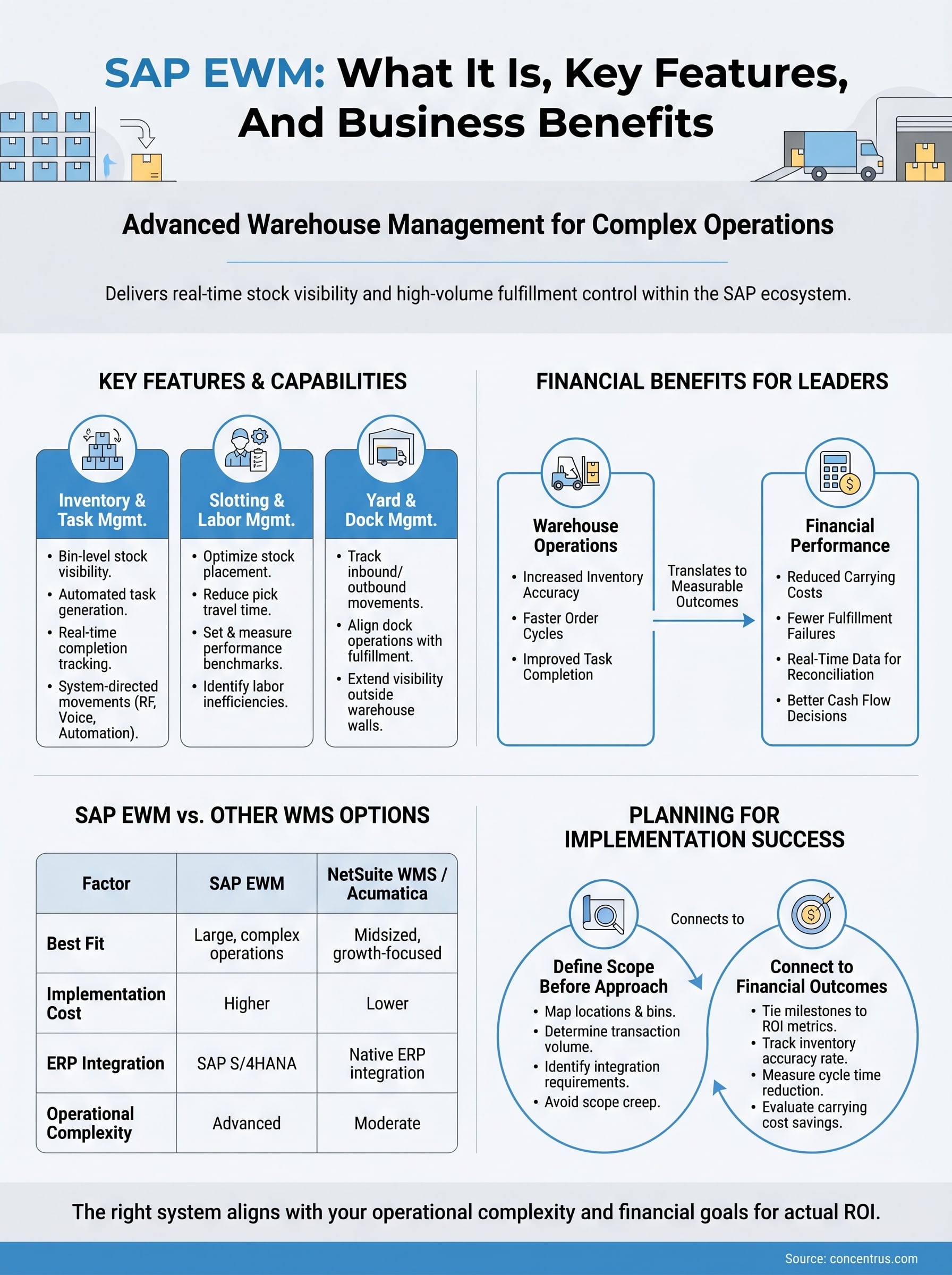
SAP EWM delivers a broad set of capabilities that go well beyond basic inventory tracking. Understanding the specific features available helps you evaluate whether the platform fits your operational complexity and justifies the investment.
Inventory and task management
The system gives you bin-level inventory visibility and automated task generation based on warehouse rules you define. Every putaway, pick, and transfer gets assigned as a structured task, so workers always know exactly what to do and managers can track completion rates in real time.
When every warehouse task is system-directed, you dramatically reduce the risk of human error affecting stock accuracy and order fulfillment.
Slotting, labor, and yard management
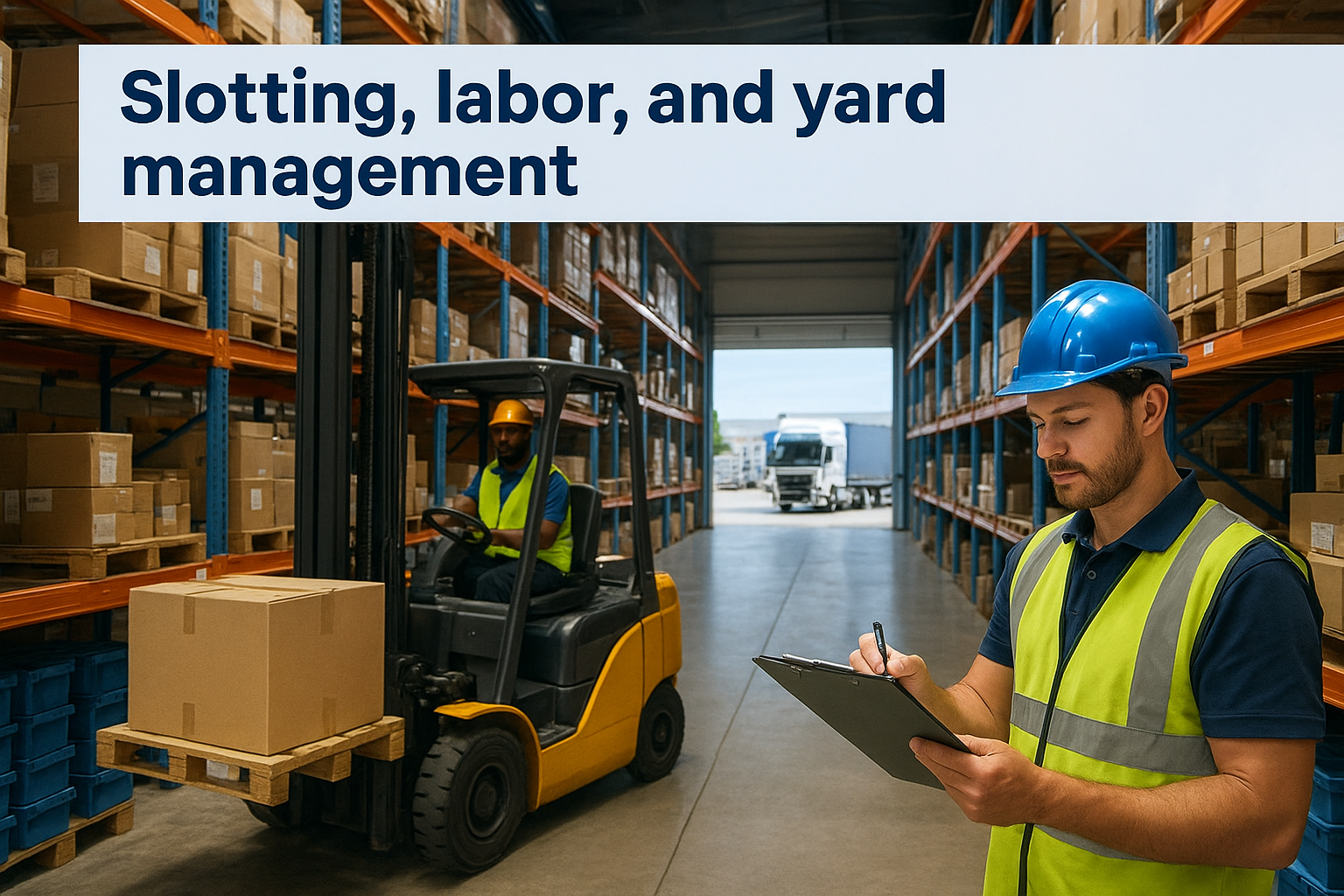
Slotting optimization lets you position fast-moving items in the most accessible warehouse locations, reducing pick travel time and improving throughput. SAP EWM also includes labor management tools that allow you to set performance benchmarks, measure actual output, and identify inefficiencies before they affect your cost structure. Yard management extends visibility outside the four walls of your warehouse, tracking inbound and outbound truck movements to keep your dock operations aligned with fulfillment timelines.
SAP WM vs SAP EWM and other WMS options
SAP previously offered a simpler warehouse module called SAP WM (Warehouse Management), which handled basic stock placement and transfer orders. SAP has officially retired WM in favor of SAP EWM, which delivers significantly deeper functionality including bin-level tracking, labor management, and yard management. If you’re still running SAP WM, migration to EWM is not a question of if, but when.
Choosing the right warehouse management system means matching the platform’s complexity to your actual operational needs, not simply selecting the most feature-rich option available.
How SAP EWM compares to other WMS options
NetSuite WMS and Acumatica offer warehouse management capabilities that are natively integrated with their broader ERP financials, making them a strong fit for midsized companies that want unified data across finance, inventory, and operations without SAP’s implementation complexity and cost. The table below highlights the key differences:
Factor
SAP EWM
NetSuite WMS / Acumatica
Best fit
Large, complex warehouse operations
Midsized, growth-focused businesses
Implementation cost
Higher
Lower
ERP integration
SAP S/4HANA
Native ERP integration
Operational complexity
Advanced
Moderate
Your best option depends on your current system landscape, growth trajectory, and how much warehouse complexity your operations genuinely require.
How to plan an SAP EWM implementation
Planning an SAP EWM implementation requires more than mapping your warehouse layout. Before any configuration begins, you need a clear picture of your current operational gaps, your data quality, and how tightly your warehouse workflows need to connect with your financial and procurement processes.
Define scope before selecting an approach
Start by documenting your warehouse complexity before committing to a platform or an implementation approach. The three areas that most directly shape your scope are:
Number of storage locations and bin-level management requirements
Daily transaction volume and peak throughput demands
Integration requirements between your WMS and ERP financials
Scope creep is the leading cause of WMS implementation failures, and it almost always starts with unclear requirements defined too late in the process.
Connect implementation milestones to financial outcomes
Every phase of your implementation should tie back to a measurable financial metric, whether that’s inventory accuracy rate, order cycle time, or carrying cost reduction. Building those metrics into your project plan from day one keeps the team accountable and gives you a clear way to evaluate whether the system is delivering actual ROI once it goes live.
What to do next
SAP EWM is a powerful platform for organizations running complex, high-volume warehouse operations. If your business is deep in the SAP ecosystem, EWM gives you bin-level control, labor visibility, and real-time inventory accuracy that basic warehouse modules cannot match. The key is making sure the platform’s depth aligns with your actual operational needs and that every implementation phase connects to a measurable financial outcome.
For many midsized companies, alternatives like NetSuite WMS or Acumatica deliver the warehouse management capabilities you need with a lower implementation burden and tighter native ERP integration. Choosing the right system means understanding your complexity, your data, and your financial goals before committing.
If you want guidance on which ERP and warehouse management solution fits where your business is going, talk to the ERP and ROI experts at Concentrus to map your options against your actual financial and operational goals.
If you're a CFO evaluating warehouse management technology, Manhattan WMS has probably landed on your shortlist. Manhattan Associates built its reputation on warehouse execution, and their platform powers some of the largest distribution operations in the world. But reputation alone doesn't answer the question that matters most: will this investment actually pay off for your business?
That's the question we help midsized companies answer every day at Concentrus. As NetSuite and Acumatica ERP implementation and rescue specialists, we've sat across the table from finance leaders who chose warehouse management tools without fully understanding how those tools fit, or don't fit, within their broader ERP ecosystem. The result is often disconnected systems, duplicated data, and ROI that never materializes. Whether Manhattan WMS is the right call or a costly detour depends entirely on your operational reality and how it aligns with your financial goals.
This guide breaks down what Manhattan WMS actually does, where it excels, where it falls short, and how to evaluate it against alternatives that may integrate more tightly with your existing ERP investment. We'll cover features, costs, competitor comparisons, and the ROI considerations that should drive your decision, so you can move forward with clarity instead of assumptions.
Why Manhattan WMS matters to CFOs in 2026
Supply chain disruption has not gone away. Tariff pressures, labor shortages, and rising customer expectations have pushed warehouse efficiency from an operational footnote to a board-level conversation. For CFOs at midsized companies, the question is no longer whether to invest in warehouse technology, it's whether a platform like Manhattan WMS justifies the cost and complexity it brings with it.
The supply chain pressure driving WMS adoption
Warehouse management systems have moved up the priority list because margins are thinner and order accuracy is now a competitive differentiator. Customers, whether they're retail buyers or B2B distributors, expect faster fulfillment with fewer errors. When your warehouse runs on spreadsheets, whiteboards, or a legacy ERP module, you absorb the cost of that gap through chargebacks, expedited shipping, and returns.
The warehouses that consistently outperform in 2026 are not the ones with the most square footage, they're the ones with the tightest connection between inventory data and financial reporting.
Manhattan Associates built their platform specifically for high-volume, high-complexity distribution. Retailers, third-party logistics providers, and large manufacturers have relied on it for decades because it handles multi-node fulfillment, labor management, and slotting optimization at a scale that most warehouse tools cannot match.
What Manhattan WMS actually costs at midsized scale
This is where many finance leaders get caught off guard. Manhattan WMS is an enterprise-tier platform, and its pricing reflects that. Implementation costs typically start in the high six figures and can climb well past seven figures depending on the complexity of your distribution network, the number of warehouse locations, and the level of customization required.
Annual licensing and support adds another significant line item to your budget. For a midsized company running two or three warehouse locations, this raises an immediate question: are you buying more platform than your operation actually needs? Manhattan is engineered for the Fortune 500 distribution center, not the 200,000-square-foot facility that ships 1,500 orders per day.
Why ERP integration is the real financial risk
Even if Manhattan WMS fits your warehouse complexity, the ROI picture shifts dramatically based on how well it connects to your ERP system. A WMS that runs as an island produces real-time inventory data that your finance team cannot act on. Purchase orders, landed costs, and demand signals stay siloed, which means your financial close takes longer and your inventory valuations stay unreliable.
For companies running NetSuite or Acumatica, this integration gap is a known cost driver. Middleware connectors and custom API builds require ongoing maintenance, and every system update on either side creates a regression risk. Before you commit to any WMS investment, your team needs to map exactly how warehouse transactions will flow into your financial statements without manual reconciliation.
How Manhattan WMS works in day-to-day operations
Manhattan WMS manages warehouse activity from the moment inventory arrives at your dock to the moment it ships out the door. The platform assigns receiving tasks, putaway locations, pick paths, and packing instructions to workers in real time based on order priority, inventory position, and labor availability. Every transaction gets logged, which gives warehouse managers a live view of what's happening on the floor without walking it.
What the system controls at the task level
Workers interact with Manhattan WMS through handheld scanners, mobile devices, or voice-directed equipment, depending on your facility setup. The system calculates the most efficient pick path for each order and adjusts dynamically when priorities change. If a high-priority shipment comes in mid-shift, the system re-sequences tasks automatically rather than waiting for a supervisor to intervene.
The real value of a well-configured WMS is not in the technology itself, it is in how quickly your team can execute without making decisions that should be handled by the system.
Labor management is one of the areas where Manhattan's platform separates itself from lighter WMS tools. It tracks engineered labor standards, measures individual worker productivity against those standards, and flags deviations before they compound into fulfillment delays or overtime costs.
How warehouse data reaches your financial team
This is the step that most implementation plans underestimate. Manhattan WMS generates transaction-level data, including inventory adjustments, cost-per-pick metrics, and shrinkage events, that your ERP system needs to produce accurate financial statements. When that data transfer runs on a scheduled batch sync, your finance team is always working with numbers that are hours behind reality, which creates problems during month-end close.
Real-time API connections between your WMS and ERP solve this, but they require deliberate planning and ongoing maintenance, not an afterthought integration bolted on after go-live.
How to tell if Manhattan WMS fits your business
Not every warehouse operation needs enterprise-grade WMS software, and buying the wrong tier of platform is just as costly as running no WMS at all. Before you commit budget to a full Manhattan WMS evaluation, run your operation through a set of honest fitness questions. The answers will tell you quickly whether you're looking at the right tool or spending evaluation time on a platform built for a scale you haven't reached yet.
Signs Manhattan WMS fits your operation
Manhattan WMS delivers its strongest ROI in high-volume, high-complexity environments where the cost of inefficiency is large enough to offset significant implementation and licensing expenses. If your warehouse ships tens of thousands of orders per day, manages multiple fulfillment nodes, or operates under strict retailer compliance requirements, the platform's labor management and slotting optimization features can generate measurable savings.
The fit question is not whether Manhattan WMS is capable, it clearly is. The question is whether your operational complexity justifies the investment relative to alternatives that integrate more cleanly with your ERP.
You also benefit most from Manhattan's feature depth if your workforce is large enough to see a return on engineered labor standards tracking. A facility with 20 pickers will not recoup that investment the same way a facility with 200 will.
Signs you need a different approach
If your company runs one or two warehouse locations and processes under 5,000 orders per day, a native WMS module inside NetSuite or a mid-market alternative will likely cover your needs at a fraction of the cost and integration risk. The implementation timeline alone for Manhattan can consume 12 to 18 months, and a midsized operation often cannot absorb that disruption without significant impact to customer service and cash flow.
Consider whether your ERP partner can extend your current platform before adding a standalone WMS to your technology stack.
How to plan ERP and automation integrations
Your ERP is the financial backbone of your operation, and any WMS you add sits downstream from it. Before you get deep into a Manhattan WMS evaluation, you need a clear picture of how warehouse transactions will flow into your general ledger, inventory valuation, and purchasing workflows. Integration planning is not a technical checkbox, it is a financial risk management exercise that directly determines whether your WMS investment produces the ROI you are targeting.
Map your data flows before you select a vendor
Inventory adjustments, receiving confirmations, and shipment confirmations all need to reach your ERP in a timeframe that supports accurate financial reporting. Start by documenting every transaction type your warehouse generates and identifying which ones trigger a financial event in your system of record. This exercise gives your ERP partner and your WMS vendor a shared integration map to work from before contracts are signed.
The integration architecture you build between your WMS and ERP will either compress your financial close or extend it, so design this correctly before you commit budget.
Skipping this step is the most common reason ERP and WMS projects miss their ROI targets. When data gaps appear after go-live, the cost to repair them escalates quickly because both systems are already in production and your team is already dependent on the outputs those systems generate.
Understand automation dependencies in your fulfillment stack
Modern warehouse operations rely on conveyor controls, dimensioners, and robotic picking systems that generate their own data streams. Each of those systems needs to connect to your WMS, and your WMS needs to pass that data upstream to your ERP without delays that distort your inventory position or force manual reconciliation at month-end.
If you run NetSuite or Acumatica, native connectors or certified middleware partners will reduce your integration maintenance burden compared to custom API builds that break during platform updates. Ask every vendor you evaluate to walk you through their specific integration architecture with your ERP before advancing them past the shortlist stage.
How to build an ROI case and avoid cost traps
Building an ROI case for any WMS starts with total cost of ownership, not just the licensing number a vendor puts in front of you. Manhattan WMS carries significant implementation, integration, and ongoing support costs that midsized finance leaders frequently underestimate when they first model the investment. Before you approve a budget, you need to account for every dollar the project will consume across its full lifecycle, including the productivity loss your team absorbs during a 12 to 18 month go-live cycle.
Calculate the true total cost of ownership
Software licensing and implementation fees are only the starting point for your cost model. Add middleware maintenance, training time, custom development for ERP integration, and the internal labor your finance and operations teams will dedicate to the project. For midsized companies evaluating Manhattan WMS, that full number often looks very different from the initial vendor quote.
If your cost model only includes what the vendor charges, you are missing half the picture before the project even starts.
Your cost model should also include a risk buffer for scope creep and integration rework, which are the two most common drivers of budget overruns in WMS projects. Build a realistic range, not a single number, and stress-test it against a scenario where go-live is delayed by six months.
Tie WMS metrics to financial outcomes
Every operational metric your WMS tracks needs a direct line to a financial KPI your CFO dashboard already measures. Pick-accuracy rates matter because they reduce chargebacks and returns. Labor productivity metrics matter because they compress overtime costs and improve margin. If you cannot draw that line clearly, the metric is noise.
Build your ROI model around three to five financial outcomes you can measure before and after implementation, such as inventory carrying costs, order fulfillment cycle time, and cost per shipment. That framework gives your board a credible payback timeline and gives your team a performance target to work toward from day one.
Next steps for a confident decision
Evaluating Manhattan WMS against your actual operational complexity and ERP environment is the work that separates a sound investment from an expensive mistake. You now have a framework to assess fit, model total cost of ownership, and tie warehouse metrics directly to financial outcomes your board cares about. Use that framework before you sign anything.
Your next move is to pressure-test your current ERP setup against the integration requirements any WMS will demand. If you run NetSuite or Acumatica and you're not certain your system is configured to support that kind of data flow, that gap needs to close first. A poorly integrated WMS will cost you more than no WMS at all, and the time to find that out is before go-live, not after.
Talk to a Concentrus ERP specialist to map your warehouse integration needs against your financial goals before you commit budget.
Warehouse inefficiencies bleed margin. Mispicks, inventory discrepancies, and slow fulfillment cycles compound into real financial losses that show up on your P&L every quarter. For midsized companies running NetSuite, the question isn’t whether you need better warehouse operations, it’s whether NetSuite WMS is the right tool to get you there, or if a third-party alternative […]
Inventory is one of the largest working capital investments on a midsized company’s balance sheet—and one of the easiest places for margin to quietly erode. NetSuite inventory management gives finance leaders real-time visibility into stock levels, costs, and fulfillment across the entire supply chain. This guide explains how NetSuite actually works end to end, how it impacts cash flow and margins, and what CFOs need to know to turn inventory from a cash drain into a strategic advantage.
We Are Experts at Generating ROI for our Clients Through Custom Integration of NetSuite and Acumatica ERP Software