


Your sales team logs deals in NetSuite, but their inboxes live in Outlook. That gap creates duplicate data entry, missed follow-ups, and finance leaders who can’t trust the customer history behind the numbers. A proper netsuite outlook integration closes that gap by syncing emails, contacts, and calendar events between the two systems automatically.
So what does that actually mean in practice? It means every email tied to a customer record shows up in NetSuite without anyone copying and pasting, every meeting scheduled in Outlook reflects on the account timeline, and your team stops guessing which system holds the real story. This kind of outlook netsuite integration typically runs through NetSuite’s native connector or a third-party sync tool, depending on how deep you need the integration to go.
In this article, we’ll break down exactly how NetSuite integration with Outlook works, the setup options available, and what to weigh before you commit to one. If you’re evaluating this as part of a larger ERP rollout or trying to fix a system that never quite delivered on its promise, understanding this integration is a good place to start.
Why NetSuite Outlook integration matters for finance teams
Finance leaders don’t care about email sync for its own sake. They care about the numbers behind it. When sales reps and account managers work out of Outlook all day, the details that matter to revenue recognition, collections, and forecasting often never make it into NetSuite. A netsuite outlook integration fixes that by making sure customer communication and financial records live in the same place, which means fewer surprises when you’re closing the books.
The cost of disconnected systems
Without this connection, your team ends up doing double work: logging a call in NetSuite, then following up in Outlook, then hoping someone remembers to note the outcome back in the system of record. That gap creates real risk. A collections rep might not see that a customer already promised payment over email. A sales manager might close a deal without realizing a support issue is still open. Every one of these small disconnects chips away at the data visibility CFOs need to trust their reports.
When email and ERP data live in separate silos, your financial reporting is only as good as your team’s memory.
What integration gives finance teams back
Once Outlook and NetSuite talk to each other, finance gets a clearer, faster picture of what’s actually happening with customers and vendors. Consider what changes:
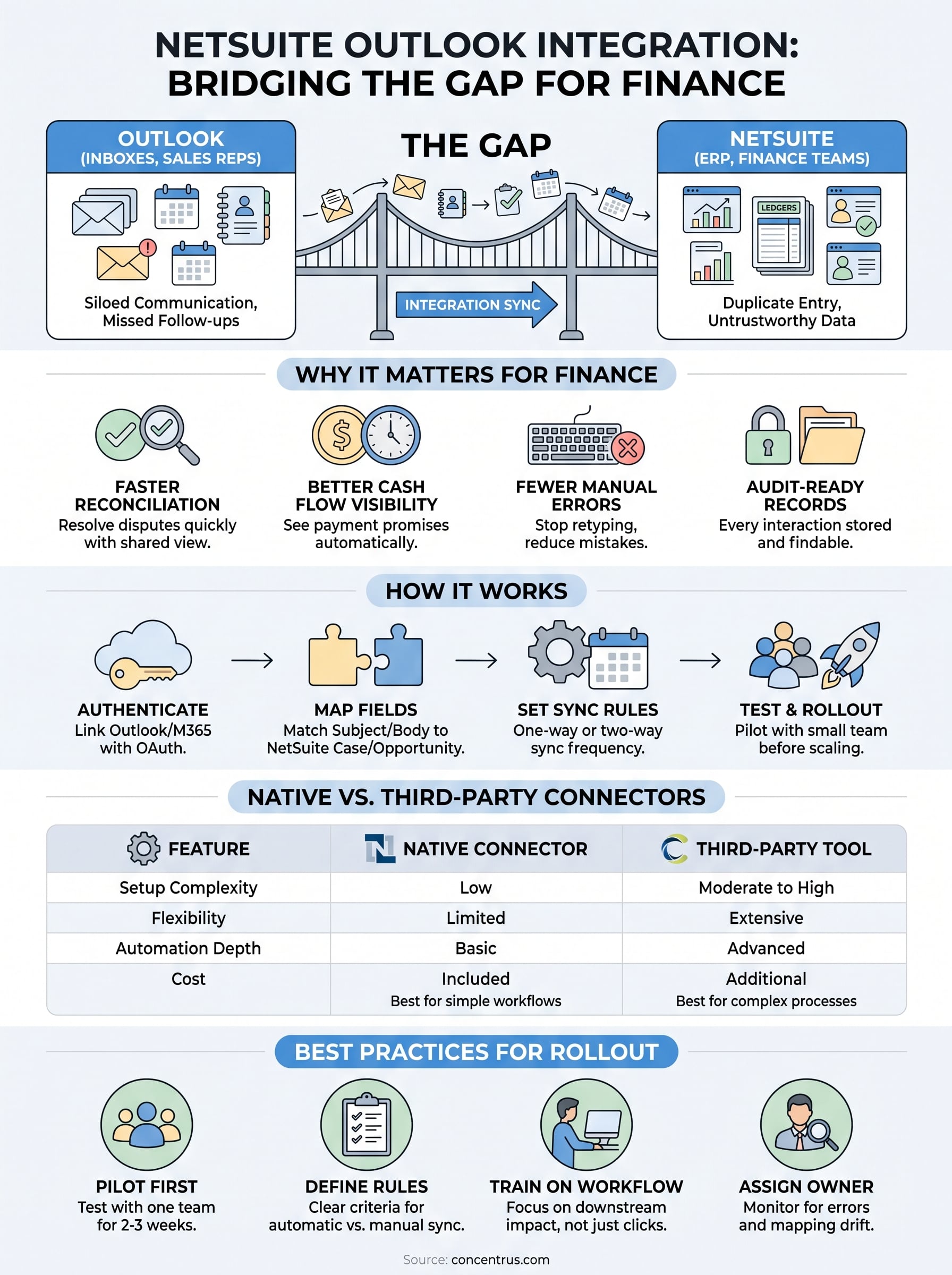
- Faster reconciliation: Support and billing teams see the same email thread, so disputes get resolved without back-and-forth digging through inboxes.
- Better cash flow visibility: Collections staff can see payment promises and disputes logged automatically against the account, not buried in someone’s personal inbox.
- Fewer manual errors: Reps stop retyping contact details or copying meeting notes, which cuts down on the data entry mistakes that throw off reporting.
- Audit-ready records: Every customer interaction tied to a transaction is stored where auditors and finance can actually find it.
These outcomes matter more for midsized companies than they might seem at first glance. You don’t have the headcount to manually cross-check every email against every invoice, so the systems need to do that work for you. Integration isn’t a convenience feature here, it’s part of how you keep your ERP investment accountable to actual financial outcomes.
How NetSuite Outlook integration works
Underneath the surface, this netsuite outlook integration relies on a sync engine that maps fields between the two platforms. Emails, contacts, tasks, and calendar events get tagged to specific NetSuite records, usually customer or lead entries, so anything that happens in Outlook shows up automatically where finance and sales both look for account history.

Most setups follow a similar sequence, whether you’re using NetSuite’s native tool or a connector from the Concentrus Partner Network™:
- Authenticate the connection: Link your Outlook or Microsoft 365 account to NetSuite using OAuth credentials.
- Map the fields: Decide which Outlook fields (subject, body, attendees) correspond to NetSuite fields (case, opportunity, contact).
- Set sync rules: Choose whether sync runs one-way or two-way, and how often it refreshes.
- Test with a small group: Run the integration with a handful of users before rolling it out company-wide.
The integration only works if the mapping matches how your team actually sells and services customers, not just how the software vendor imagined it.
Getting this right takes some planning up front. Skipping the mapping step is where most rollouts go sideways, because a sync that pulls in every email regardless of relevance just recreates the clutter you were trying to eliminate. Done properly, though, this outlook netsuite integration becomes invisible in the best way: your team keeps working in Outlook, and NetSuite quietly stays current.
Native connector vs third-party integration tools
NetSuite ships with a native Outlook connector called NetSuite for Outlook, and for many midsized teams it covers the basics fine. It syncs contacts, tasks, and calendar events, and it lets reps log emails to NetSuite records with a couple of clicks. The catch is that native tools tend to lag behind on customization. If your sales process needs custom fields synced, or you want automated two-way sync without manual logging, you’ll hit limits fast.

Third-party connectors, including the ones vetted through the Concentrus Partner Network™, fill those gaps. Tools like Celigo build deeper integrations that handle complex field mapping, multi-directional sync, and automation triggers the native connector can’t touch. That flexibility comes at a cost though: more setup time, an added subscription, and another vendor relationship to manage.
The right choice depends less on price and more on how much manual work your team is willing to tolerate every day.
| Factor | Native Connector | Third-Party Tool |
|---|---|---|
| Setup complexity | Low | Moderate to high |
| Field mapping flexibility | Limited | Extensive |
| Automation depth | Basic | Advanced |
| Ongoing cost | Included with NetSuite | Additional subscription |
| Best for | Small teams, simple workflows | Growing teams, complex sales processes |
Before picking either path, map out what your reps actually need synced day to day. Teams that outgrow the native connector usually feel it first in missed follow-ups and inconsistent contact records, not in some dramatic system failure.
Best practices for rolling out the integration
Getting a netsuite outlook integration live is only half the job. Rollouts fail more often from poor adoption than from bad technology, so plan for how your team will actually use it, not just how it gets configured. Rushing straight to a company-wide launch without testing the mapping against real workflows is the fastest way to end up with a sync nobody trusts.
Start small and build confidence before you scale. A phased approach catches problems while the stakes are low:
- Pilot with one team first: Pick a sales or collections group that already struggles with follow-up gaps, and let them test the sync for two to three weeks.
- Set clear sync rules: Decide upfront what gets logged automatically versus what reps flag manually, so inboxes don’t flood with irrelevant records.
- Train on the workflow, not just the tool: Show reps how logging an email changes what finance sees downstream, not just which button to click.
- Assign an internal owner: Someone needs to watch for sync errors and field mapping drift after go-live, or small issues turn into bad data fast.
A rollout that skips training usually produces a system nobody uses correctly, which defeats the point of integrating in the first place.
Before expanding beyond the pilot, review what the pilot group actually logged versus what the integration captured automatically. Gaps there tell you whether your field mapping matches reality or needs another pass. Only then does a broader outlook netsuite integration rollout make sense across departments.
Connecting your inbox to your ERP
Getting Outlook and NetSuite talking to each other isn’t a nice-to-have anymore, it’s a basic requirement for finance teams that need to trust their own data. Whether you go with the native connector or a third-party tool, the real work happens in the planning: mapping fields to match how your team actually sells and services customers, then testing before you scale. Skip that groundwork and you’ll end up with a sync that adds noise instead of clarity.
Done right, this integration becomes one of those quiet wins that makes every other financial process run smoother, from collections to forecasting to audit prep. Guaranteed ROI on an ERP investment doesn’t come from the software alone, it comes from making sure the systems around it actually support how your people work.
If you’re weighing this integration as part of a bigger NetSuite rollout or trying to fix one that’s underdelivering, talk to Concentrus about building it into your ROI Roadmap™.