

If your team still keys in purchase orders by hand or chases down shipment confirmations by email, you already know the cost. Manual document handling eats staff hours, introduces errors, and delays the cash cycle your CFO is watching closely. A properly built edi netsuite integration fixes this by letting your trading partners’ systems talk directly to NetSuite, no rekeying required.
At its core, netsuite edi integration connects your ERP to the EDI network your customers and vendors use, so purchase orders, invoices, and shipment notices move automatically between systems. The result is fewer keying errors, faster order-to-cash cycles, and real-time visibility into what’s actually happening on the supply chain and finance side of the business.
This article breaks down what edi integration netsuite setups actually involve: how the technology works behind the scenes, which documents typically get automated first, and what a realistic implementation looks like for a midsized company. Whether you’re evaluating EDI for the first time or troubleshooting a connection that isn’t delivering the ROI you expected, you’ll walk away with a clear picture of how the pieces fit together.
Why NetSuite EDI integration matters for finance leaders
For most finance leaders, EDI starts as an operations problem and ends up on their desk anyway. When a purchase order sits in someone’s inbox for two days before it gets entered, that delay ripples into fulfillment, invoicing, and ultimately collections. A well-executed netsuite edi integration removes that lag entirely, and the financial impact shows up fast: shorter order-to-cash cycles, fewer disputed invoices, and cleaner data feeding your monthly close.
The cash flow case for automation
Manual document handling doesn’t just cost labor hours, it costs cash. Every day a shipment notice or invoice sits unprocessed is a day your days sales outstanding creeps up. Retailers and large distributors also penalize vendors who can’t meet EDI compliance requirements, and those chargebacks come straight out of margin. Concentrus has seen midsized manufacturers and distributors lose thousands of dollars a month to fines that a proper EDI connection would have prevented entirely.
A late shipment notice doesn’t just annoy a customer, it delays the invoice, the payment, and your cash forecast.
What changes when documents move automatically
Once purchase orders, invoices, and advance ship notices flow directly into NetSuite, your team stops re-keying data and starts reviewing exceptions instead. That shift matters more than it sounds. Staff who used to spend their mornings on data entry can focus on collections, forecasting, or vendor negotiations, work that actually moves the needle on profitability. The table below shows the difference finance leaders typically see after moving from manual processing to an integrated EDI setup.
| Metric | Manual document handling | Automated EDI integration |
|---|---|---|
| Order entry time | Hours per batch | Minutes, near real-time |
| Invoice error rate | 3-8% typical | Under 1% |
| Days sales outstanding | Higher, delayed billing | Lower, faster invoicing |
| Chargeback exposure | High, compliance misses | Low, automated compliance |
| Staff hours on data entry | Significant | Minimal |
Visibility CFOs can actually use
Beyond speed, integrated EDI gives finance leaders something manual processes never could: real-time visibility into order status, inventory commitments, and receivables, all inside the same system they already use for reporting. Instead of waiting on a warehouse manager to confirm a shipment happened, you can see it reflected in NetSuite the moment the trading partner sends the notice. That visibility feeds directly into cash forecasting and helps you answer the question every CFO gets asked in a board meeting: where does our cash actually stand right now.
Getting this right isn’t just a technical exercise, it’s a financial one. Concentrus builds every ERP engagement around a ROI Roadmap methodology that ties integrations like EDI directly to measurable outcomes, so an EDI project isn’t judged on whether documents move, but on whether it actually shortens your cash cycle and reduces the labor cost tied to processing them. That distinction, treating EDI as a financial lever rather than an IT checkbox, is what separates integrations that pay for themselves from ones that just sit there working quietly in the background.
How NetSuite EDI integration works
Understanding the mechanics helps you evaluate any integration proposal a vendor puts in front of you. At a high level, EDI integration works by translating structured documents, purchase orders, invoices, ship notices, between the format your trading partner’s system produces and the format NetSuite can read as a native record. That translation layer is what makes the whole thing feel automatic to your team, even though several distinct steps happen behind the scenes every time a document moves.

The magic isn’t the document itself, it’s the translation layer that turns a partner’s file into a NetSuite record without a human touching it.
The trading partner connection
Before any data reaches NetSuite, it travels through a trading partner network, usually a Value Added Network (VAN) or a direct AS2 connection, using standardized formats like ANSI X12 in North America or EDIFACT internationally. Your partner’s system sends a document in one of these formats, and it lands in a mailbox your integration platform monitors continuously. This handshake layer is largely invisible to your finance team, but it’s where compliance requirements, retailer-specific formatting rules, and delivery confirmations get enforced.
Mapping and validation inside NetSuite
Once a document arrives, an EDI translator converts it into a readable format, then a mapping engine matches each field to the corresponding NetSuite record type. A typical inbound purchase order moves through a sequence like this:
- Partner sends X12 850 (purchase order) via VAN or AS2
- Translator converts the EDI file into XML or CSV
- Mapping engine matches item codes, quantities, and pricing to NetSuite fields
- Business rules validate the data against your item master and pricing tables
- NetSuite creates a sales order automatically, flagging exceptions for review
Exceptions matter here. No integration handles every edge case perfectly, and a well-built system routes mismatched item numbers or pricing discrepancies to a queue your team reviews manually, rather than letting bad data flow silently into your financials.
Which EDI documents and transactions get automated
Most companies don’t automate every possible EDI transaction on day one. They start with the documents that create the most friction: purchase orders, invoices, and shipment notices. A well-scoped edi netsuite integration typically covers this core trio before expanding into acknowledgments, inventory advices, or remittance data. Concentrus recommends starting narrow and proving ROI on the highest-volume documents before automating edge-case transactions that see occasional use.
The core order-to-cash trio
Every EDI transaction has a standardized number under the ANSI X12 framework, and knowing what each one triggers inside NetSuite helps you scope a project realistically.
| EDI Transaction | Document | What happens in NetSuite |
|---|---|---|
| 850 | Purchase order | Creates a sales order automatically |
| 855 | PO acknowledgment | Confirms order details back to the buyer |
| 856 | Advance ship notice | Updates fulfillment status and tracking |
| 810 | Invoice | Generates or matches invoice records |
| 997 | Functional acknowledgment | Confirms receipt of a transmitted document |
| 940/945 | Warehouse shipping order/advice | Syncs with third-party logistics fulfillment |
Getting these six document types running reliably covers the vast majority of transaction volume for most manufacturers, distributors, and retailers using netsuite edi integration.
Automate the documents with the highest volume first, everything else can wait until you’ve proven the ROI.
Beyond the basics
Once the core documents are stable, many companies extend automation to remittance advices (820), inventory inquiries (846), and debit or credit memos (812), especially if they work with large retail partners who mandate them. Retail-specific requirements also often demand label formatting and routing guide compliance layered on top of standard document automation. Scaling into these secondary transactions rarely requires rebuilding the integration from scratch, it usually means adding new mapping rules to the platform you already have in place. Handling this expansion thoughtfully, rather than bolting on every requested document at once, keeps the system maintainable and keeps your team from drowning in exception queues nobody has time to review.
How to choose the right EDI integration approach
The right setup depends less on brand names and more on your transaction volume, trading partner requirements, and how much internal IT capacity you actually have. A company processing a few hundred purchase orders a month has different needs than a distributor pushing thousands through dozens of retail partners with strict compliance mandates. Before you sign a contract, map out your document volume, your partner list, and whether any of those partners require specific formatting or label compliance.
Pick the integration approach that matches your volume and partner complexity, not the one with the flashiest demo.
Native tools, VANs, and managed services
Three broad paths exist, and each trades setup cost against ongoing flexibility. Native NetSuite EDI SuiteApps work fine for simple, low-volume needs but often struggle once retail-specific mapping rules pile up. A Value Added Network gives you broader partner reach but usually requires more hands-on mapping management. A managed integration platform, the kind Concentrus typically recommends through its Partner Network, handles mapping updates and partner onboarding for you, which matters most when your trading partner list keeps growing.
| Approach | Best for | Tradeoff |
|---|---|---|
| Native SuiteApp | Low document volume, few partners | Limited flexibility for retail mandates |
| Direct VAN connection | Established EDI teams | Requires in-house mapping expertise |
| Managed integration platform | Growing partner networks | Higher upfront cost, less internal lift |
Questions to ask before you commit
Asking the right questions upfront saves you from a costly re-implementation later. Run through this list with any vendor or partner:
- Does the platform support onboarding new trading partners without custom development each time?
- How are exceptions routed, and who resolves them?
- What’s the average time to add a new EDI document type?
- Does pricing scale with transaction volume or partner count?
Evaluating vendors this way keeps the decision grounded in your actual edi netsuite integration requirements rather than a generic feature list.
Common EDI integration pitfalls and how to avoid them
Even a well-scoped edi netsuite integration can underperform if a handful of predictable mistakes creep in during setup or maintenance. Most of the failures Concentrus gets called in to fix trace back to the same handful of causes, not exotic technical problems. Recognizing these patterns before you sign off on a go-live saves you months of chasing exceptions later.
Skipping the exception handling design
Teams often build the happy path, the perfect purchase order with matching item codes and pricing, and forget to design what happens when a document doesn’t match. Without a clear exception queue and an owner assigned to review it daily, mismatched orders sit unprocessed, and your team ends up back on email chasing down what should have been automatic.
An integration without exception handling isn’t automation, it’s just a faster way to create a backlog.
Underestimating partner-specific requirements
Every retail trading partner has its own quirks: label formats, routing guide rules, specific field mappings that deviate from the standard. Assuming one mapping template covers every partner is a common and expensive mistake. Build in time during implementation to test against each partner’s actual specifications, not just the generic ANSI X12 standard.
Treating go-live as the finish line
A few pitfalls show up consistently across midsized implementations:
- No monitoring in place to catch failed transmissions before they cause a chargeback
- Mapping rules never updated when a partner changes their requirements
- No one assigned ownership of the integration after the consultant leaves
- ROI never measured, so the business case fades and budget dries up
Ownership matters here more than most companies expect. Someone on your finance or operations team needs to monitor transaction volume, error rates, and partner compliance scores on an ongoing basis, not just during the first ninety days. Concentrus builds this accountability into every engagement through the ROI Roadmap methodology, so metrics get tracked long after the integration goes live, and the project stays tied to measurable financial outcomes rather than fading into background infrastructure nobody watches.
Turning EDI into a financial advantage
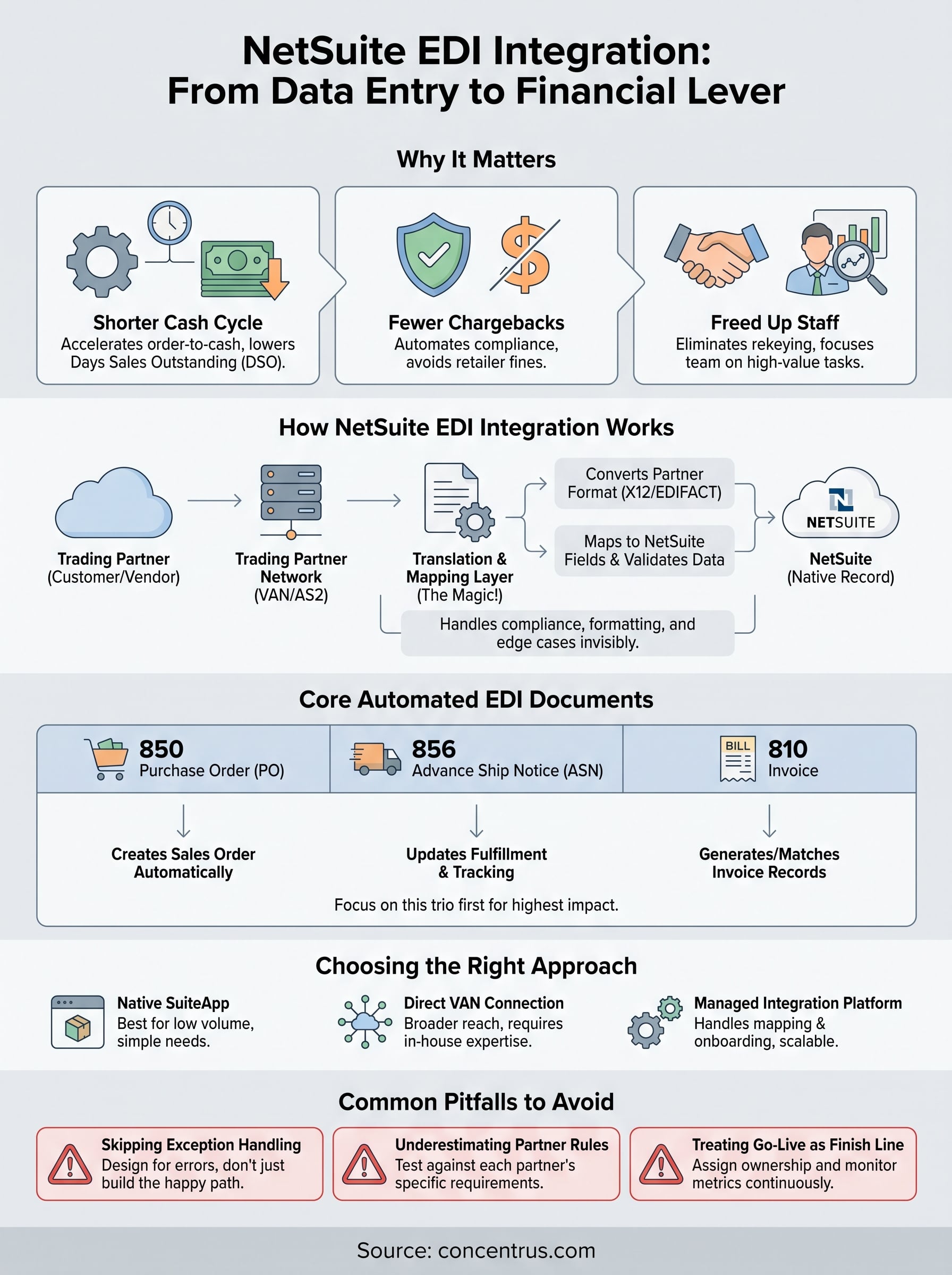
A solid edi netsuite integration isn’t a technical milestone you check off and forget. It’s a financial lever that shortens your cash cycle, cuts chargeback exposure, and frees your team from data entry that adds no value. Get the document mapping right, plan for exceptions, and assign real ownership after go-live, and the automation keeps paying off long after the consultants leave.
But none of that happens by accident. Companies that treat EDI as background plumbing end up with the same silent failures and stalled ROI Concentrus gets called in to fix. Companies that treat it as a measurable financial initiative see faster closes, cleaner data, and fewer surprises in the board meeting.
If you’re evaluating an EDI project, rescuing a stalled one, or just want your NetSuite investment to actually deliver the numbers you promised your board, talk to Concentrus about building an integration tied to real financial outcomes.