

Warehouse inefficiencies bleed margin. Mispicks, inventory discrepancies, and slow fulfillment cycles compound into real financial losses that show up on your P&L every quarter. For midsized companies running NetSuite, the question isn’t whether you need better warehouse operations, it’s whether NetSuite WMS is the right tool to get you there, or if a third-party alternative makes more sense for your business.
The answer depends on your warehouse complexity, growth trajectory, and how tightly you need your WMS tied to your financial data. At Concentrus, we’ve guided dozens of midsized companies through this exact decision as part of our NetSuite ERP implementations and optimizations. We’ve seen both sides, companies that thrive on NetSuite’s native WMS and companies that need something more specialized. That hands-on experience shapes everything in this guide.
Below, we break down NetSuite WMS features, pricing, pros and cons, and the most viable alternative WMS solutions that integrate with NetSuite. By the end, you’ll have a clear picture of what fits your operations and the financial insight to back that decision up with your leadership team.
What NetSuite WMS is and what it includes
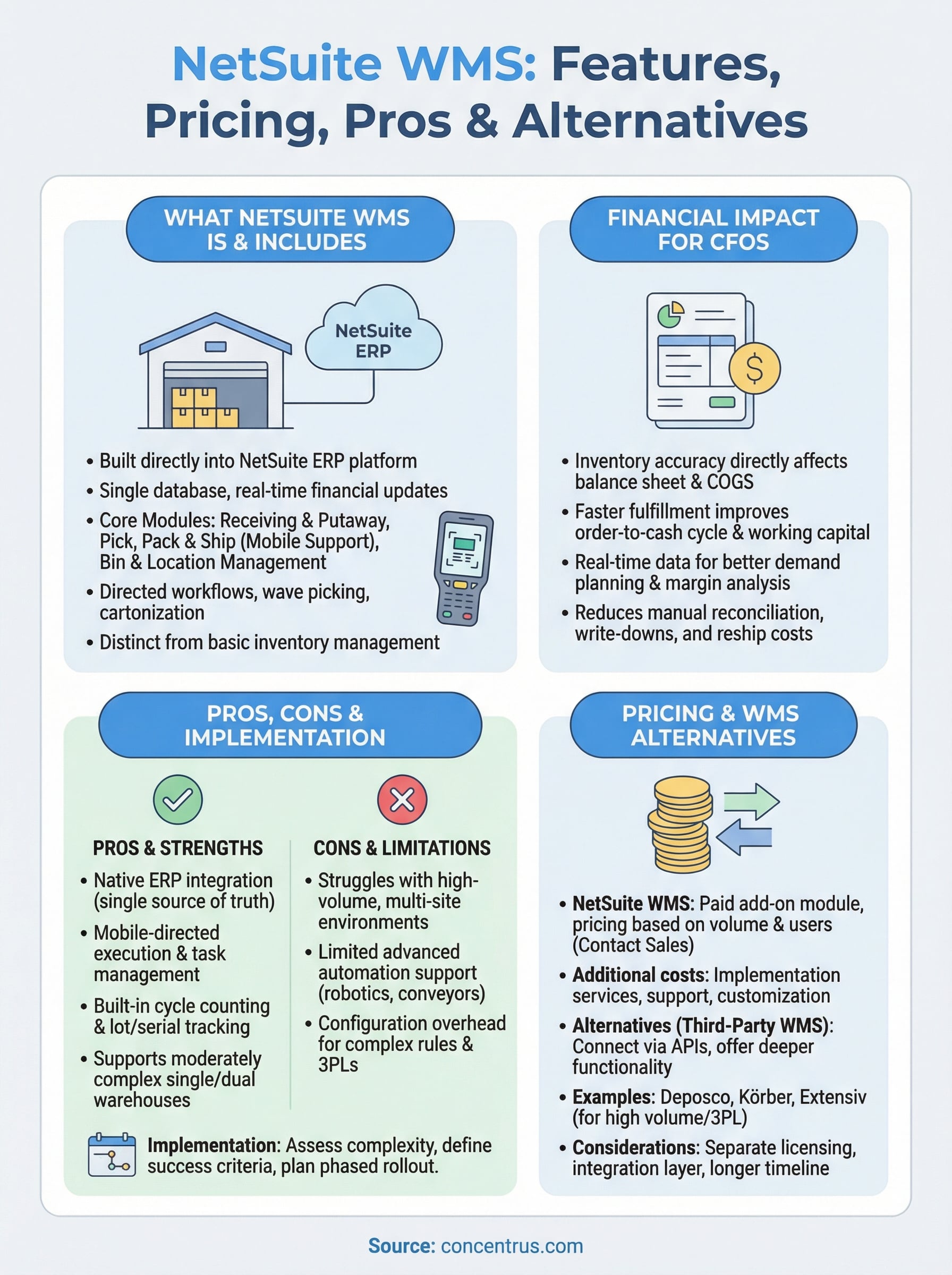
NetSuite WMS is a warehouse management module built directly into the NetSuite ERP platform. Rather than operating as a separate system that syncs data on a schedule, it shares the same database as your financials, inventory, order management, and procurement records. That single-platform design means every warehouse transaction, pick confirmation, or receiving event updates your books in real time, without an integration layer sitting in between.
The core modules inside NetSuite WMS
NetSuite WMS organizes warehouse operations into several functional areas, each designed to reduce manual handling and improve accuracy across the fulfillment cycle. At the receiving end, the system supports putaway rules and directed putaway, which means it tells your warehouse staff exactly where to place incoming inventory based on rules you define, such as product type, velocity, or zone assignment.

On the outbound side, the module handles pick, pack, and ship workflows with mobile device support. Warehouse workers use handheld scanners to receive step-by-step instructions, confirm picks by scanning barcodes, and flag discrepancies on the spot. This cuts mispick rates significantly compared to paper-based or spreadsheet-driven processes. The system also supports wave picking and cartonization, which allow you to group orders for efficient batch fulfillment and calculate optimal carton sizes before packing begins.
Accurate pick confirmation at the warehouse floor level means your inventory counts and customer-facing order statuses stay aligned without manual reconciliation after the fact.
Bin and location management is another core component. You can define multi-level location structures, such as warehouse, aisle, rack, shelf, and bin, and track inventory at each level. This gives you precise visibility into where every unit sits at any given moment, which matters most when you’re running multiple SKUs with similar attributes or managing lot and serial number tracking.
What sets it apart from basic inventory management
Many people assume that NetSuite’s standard inventory management covers the same ground as its WMS module, but the two operate at different levels of granularity. Standard inventory management in NetSuite handles quantities, locations at a high level, and basic reorder points. The WMS module goes deeper by adding directed workflows, mobile execution, and real-time bin-level tracking.
The practical difference shows up most clearly in high-volume or multi-step fulfillment environments. With basic inventory management, your team decides how to pick and where to put stock based on tribal knowledge or printed pick lists. With the netsuite wms module, the system enforces consistent processes, sequences tasks by efficiency, and captures confirmation at each step. That shift from reactive to directed operations is where accuracy gains and labor cost reductions actually come from.
The module also supports task management and work prioritization, so supervisors can assign and monitor warehouse tasks from a queue rather than coordinating verbally. Cycle counting capabilities let you schedule rolling counts by zone or bin, which reduces the disruption of full physical inventories and keeps your on-hand quantities accurate throughout the year.
One important point to understand is that NetSuite WMS is available as an add-on to the base NetSuite platform, not included by default in standard licensing. Your access to specific features can also vary depending on how your instance is configured and which edition of NetSuite your company is on. That distinction matters when you start modeling the cost and build-out timeline for a WMS rollout.
Why NetSuite WMS matters for CFOs
Warehouse operations don’t live in a silo separate from your financial statements. Every inventory discrepancy, delayed shipment, or mispick ripples through your cost of goods sold, your working capital, and your customer retention numbers. For CFOs at midsized companies, the decision to implement netsuite wms is less a technology choice and more a financial controls decision.
Inventory accuracy ties directly to your balance sheet
Your inventory valuation sits on the balance sheet as a real asset. When your physical counts don’t match your system records, you’re carrying an asset value that isn’t accurate, which means your financial statements aren’t accurate either. Shrinkage, phantom inventory, and write-downs all trace back to weak warehouse processes.
Warehouse accuracy isn’t just an operations metric. It’s an accounting problem that compounds every time you close a period with bad inventory data.
NetSuite WMS enforces bin-level tracking and scan-confirmed picks, which means your system records reflect actual physical movements rather than assumed ones. That accuracy feeds directly into your cost accounting, your landed cost calculations, and your period-end closes. Fewer adjustments mean faster closes and more confident numbers.
Fulfillment speed and working capital are connected
Slow fulfillment extends your order-to-cash cycle. When orders sit in pick queues longer than they should, you delay the invoice trigger, which delays payment collection, which tightens your available cash. That connection between warehouse throughput and cash flow is easy to miss until you map your fulfillment timeline against your days sales outstanding.
Faster, more accurate fulfillment also reduces the cost of customer service escalations, returns processing, and reship expenses. Each of those line items carries a direct labor and freight cost that most finance teams undercount because they’re distributed across multiple GL accounts. Consolidating that visibility through better warehouse execution brings those costs into clearer focus.
Real-time data changes how you report and plan
When your warehouse transactions post in real time to your financials, you stop relying on batch updates or manual reconciliations to understand where inventory stands. Demand planning, reorder timing, and margin analysis all improve when the underlying data reflects what’s actually happening on the warehouse floor right now, not what happened two days ago when a sync ran.
How to evaluate and implement NetSuite WMS
Before you make any decision about netsuite wms, you need a clear picture of what your warehouse actually requires today and what it will require in two to three years. Jumping straight to a vendor demo or a licensing conversation before you’ve mapped your own operations almost always leads to a misaligned rollout and budget surprises you could have avoided.
Assess your warehouse complexity first
Start by documenting your current warehouse workflows in honest detail. How many SKUs do you manage, how many orders do you ship per day, and how many warehouse staff are touching inventory at any given time? If your team relies on paper pick lists, manual counts, and verbal coordination to run daily operations, that’s a signal your complexity is high enough to benefit from directed workflows. If you run a single small warehouse with straightforward single-step fulfillment, a lighter approach may serve you better.
The gap between what a WMS can do and what your team will actually use is where most implementation failures begin, so match the tool to the real workflow, not the ideal one.
Also look at your lot and serial number tracking requirements, your return processing volume, and whether you manage inventory across multiple warehouse locations. Each of those factors adds configuration complexity and affects how much of the WMS module you’ll actually activate on day one.
Define success criteria before implementation begins
Implementation goes sideways when there’s no agreed definition of what good looks like. Before any configuration work starts, define specific, measurable targets: a pick accuracy rate, a cycle count frequency, a reduction in days to fulfill. Tie those targets back to financial outcomes so your leadership team can see the ROI connection, not just the operational improvement.
You should also map out your integration requirements at this stage. Even though NetSuite WMS shares a database with your financials, you may still need to connect external shipping carriers, 3PL partners, or EDI systems. Knowing that upfront prevents scope creep mid-project.
Plan a phased rollout rather than a full cutover
A phased rollout lets your team absorb process changes incrementally instead of flipping every workflow at once. Start with receiving and putaway, stabilize that before moving to pick and pack, then layer in advanced features like wave picking or cartonization once your team has built confidence with the core system.
Features, strengths, and limitations
Understanding where netsuite wms delivers real value and where it hits a ceiling helps you make a defensible decision before any contracts are signed. The module has a well-defined sweet spot, and knowing whether your operation fits inside that range saves you from a rollout that underdelivers on its core promises.
Where NetSuite WMS performs well
The strongest case for NetSuite WMS is native ERP integration. Because the module runs on the same platform as your financials and order management, every warehouse transaction posts to the correct GL account without a middleware layer translating data between systems. That reduces reconciliation work at period end and gives your finance team a single source of truth for inventory value and cost of goods.
The mobile execution layer is another genuine strength. Warehouse staff receive directed task instructions on handheld devices, scan to confirm each step, and flag discrepancies before they compound into inventory errors. Teams that move from paper pick lists to mobile-directed workflows typically see measurable accuracy gains within the first few months of going live.
The real financial benefit shows up not in the technology itself, but in the reduction of write-downs, reship costs, and manual reconciliation hours that drain margin quietly over time.
Cycle counting, bin-level tracking, and lot and serial number management are all built in without requiring separate add-ons. For midsized companies that manage regulated products or need traceability for recall or audit purposes, having those capabilities natively available inside NetSuite reduces both cost and configuration complexity.
Where it falls short
NetSuite WMS works well for single or dual-warehouse operations with moderate fulfillment complexity, but it starts to strain under high-volume, multi-site distribution environments. Companies shipping thousands of orders daily across several locations often find that the system’s task sequencing and labor management tools lack the depth that purpose-built WMS platforms provide.
Advanced automation support is another area where limitations surface. If your operation uses conveyor systems, automated storage and retrieval systems, or robotics, you may find that native NetSuite WMS integration with those hardware layers requires significant custom development. Third-party WMS platforms built specifically for warehouse automation tend to offer more mature connectors and vendor support for those environments.
Configuration overhead also increases as your requirements grow. Complex wave release rules, carrier-specific packing logic, and multi-client 3PL scenarios push toward the edges of what the module handles cleanly out of the box.
Pricing and WMS alternatives for NetSuite
Understanding cost before you commit to any warehouse solution protects your project budget and prevents the kind of scope surprise that derails implementations. NetSuite WMS pricing is not publicly listed, which means you need to go through Oracle NetSuite’s sales process to get a number tied to your specific configuration, user count, and add-on requirements.
What NetSuite WMS actually costs
NetSuite WMS is sold as a paid add-on module on top of your base NetSuite license, and the cost varies based on your transaction volume, number of warehouse users, and which advanced features you activate. Most midsized companies can expect the WMS module to add several hundred to a few thousand dollars per month to their existing NetSuite bill, depending on configuration depth and the scope of implementation services required.
Implementation costs often run higher than licensing costs, so budget for both the software and the professional services needed to configure workflows, train staff, and go live correctly.
You should also factor in ongoing support and any customization work needed to fit the module to your specific processes. Off-the-shelf configuration covers the basics, but companies with complex fulfillment rules or automation requirements typically need additional development hours that extend the initial project cost.
Third-party WMS options that connect with NetSuite
Several purpose-built WMS platforms integrate with NetSuite through APIs or certified connectors, giving you warehouse functionality that goes deeper than the native module without abandoning your ERP investment. Deposco and Körber are two commonly evaluated options for midsized operations that need more advanced labor management, multi-site support, or third-party logistics capabilities. Both platforms offer more granular task sequencing and automation hardware support than NetSuite’s native WMS provides.
For companies managing high order volumes or operating in 3PL environments, Extensiv offers a warehouse platform built specifically for those scenarios, with NetSuite integration available. Each of these alternatives introduces a separate licensing contract, an integration layer to maintain, and a longer implementation timeline, which adds cost and complexity compared to running the native module.
The right choice comes down to matching the tool’s capability to your actual operational requirements. If your warehouse is moderately complex and you want tighter financial alignment, the native module is likely sufficient. If your complexity is high and growing, a specialized platform will deliver stronger long-term returns.
Next steps
You now have a clear framework for evaluating netsuite wms against your actual warehouse requirements, not just a vendor’s feature list. The decision comes down to three factors: your fulfillment complexity, the level of financial integration you need, and whether your growth trajectory pushes you toward a specialized platform or makes the native module the right fit.
Start by auditing your current warehouse error rates, fulfillment cycle times, and period-end reconciliation hours. Those numbers tell you where your operation is losing margin and give you a baseline to measure improvement against. From there, build your business case around specific financial outcomes, not just operational gains.
If you want expert guidance on whether NetSuite WMS fits your business, or if your current ERP isn’t delivering the ROI you expected, talk to the NetSuite ERP specialists at Concentrus. We’ll help you connect the right warehouse solution to a measurable financial result.