

NetSuite Intercompany Customers and Vendors: How to Set Up Automated Intercompany Management Correctly
For finance leaders and NetSuite administrators, intercompany accounting is one of the easiest places for ERP complexity to become expensive. If intercompany entities are not configured correctly, organizations can run into posting errors, broken transaction flows, reconciliation headaches, and compliance issues during consolidation.
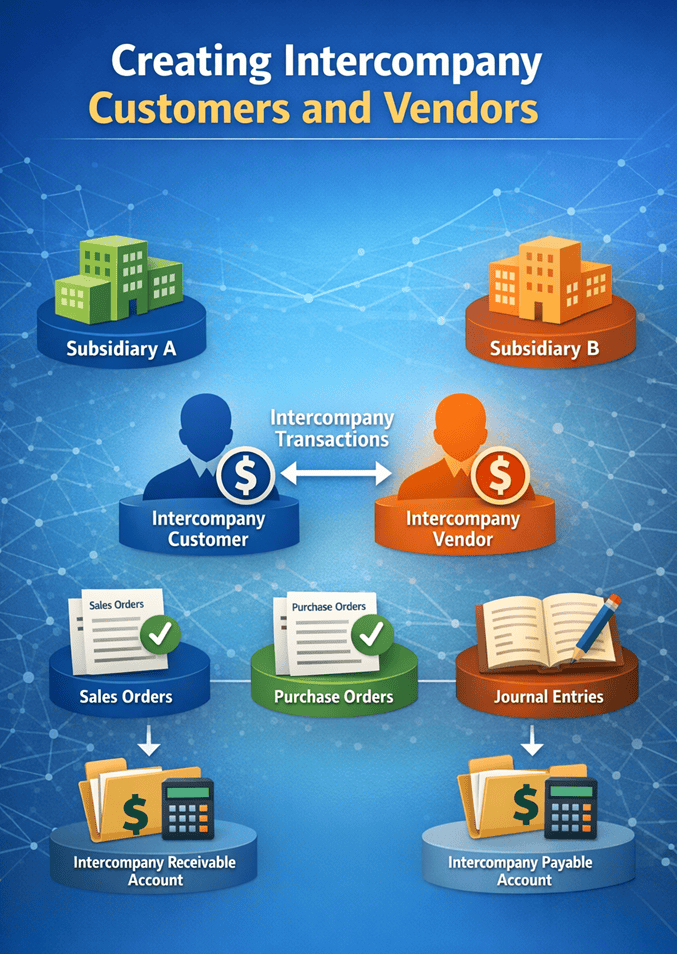
That is why understanding how NetSuite intercompany customers and vendors work is critical. In NetSuite OneWorld, intercompany customers and vendors are the entity records that represent the buying and selling sides of transactions between subsidiaries. They are not ordinary customer and vendor records. They exist specifically to support intercompany sales orders, purchase orders, journal entries, and elimination-ready accounting workflows inside a multi-subsidiary environment (Oracle, n.d.-a).
If your company uses Automated Intercompany Management, the setup becomes even more important because NetSuite relies on these configurations to process transactions accurately across subsidiaries. Done right, intercompany entities create a cleaner, more scalable accounting framework. Done poorly, they introduce avoidable friction into every cross-subsidiary transaction.
What Are Intercompany Customers and Vendors in NetSuite?
NetSuite defines intercompany customers and vendors as entity records assigned to one or more subsidiaries for use in intercompany transactions. These records represent the buyer and seller when one subsidiary transacts with another subsidiary inside the same corporate structure (Oracle, n.d.-a).
This means the records are functional stand-ins for the related subsidiaries. For example, if Subsidiary Canada buys from Subsidiary U.S., NetSuite needs an intercompany customer in the selling subsidiary to represent the buyer and an intercompany vendor in the buying subsidiary to represent the seller. Oracle’s guidance is clear that the default receivables account for an intercompany customer must be an intercompany receivables account, while the default payables account for an intercompany vendor must be an intercompany payables account (Oracle, n.d.-a; Oracle, n.d.-b).
That account structure matters because intercompany balances must be tracked separately from third-party balances. NetSuite’s intercompany accounts are designed to record and later eliminate balances between subsidiaries during consolidation, which is foundational for accurate financial reporting in OneWorld (Oracle, n.d.-b).
Required Features Before You Set Up Intercompany Entities
Before companies proceed with Automated Intercompany Management, NetSuite requires certain features to be enabled. Oracle states that users of Automated Intercompany Management must enable the Multi-Subsidiary Customer feature. If the account also uses the Multiple Currencies feature, then the Multi-Currency Vendor and Multi-Currency Customer features must also be enabled (Oracle, n.d.-c; Oracle, n.d.-d).
This is not a minor technical note. It affects whether NetSuite can correctly generate and maintain representing entities across subsidiaries. Oracle specifically explains that the Multi-Subsidiary Customer feature is required for generating representing entities and that multi-currency support is also necessary when multiple currencies are in use (Oracle, n.d.-d).
For finance and ERP leadership teams, the lesson is simple: do not start intercompany configuration by creating entities first. Start by validating feature readiness. If prerequisite features are missing, the downstream setup will be incomplete or unstable.
Why Intercompany Accounts Must Be Configured Properly
Intercompany customers and vendors are not enough on their own. Their default accounts must also be configured correctly. Oracle notes that intercompany receivable and payable accounts are used to track amounts between subsidiaries so those balances can be eliminated during the intercompany elimination close process (Oracle, n.d.-b).
This is one of the most important accounting controls in the process. If teams accidentally use standard AR or AP accounts instead of intercompany-specific accounts, they risk mixing related-party transactions with external balances. That creates reporting confusion and makes eliminations harder. Oracle also notes that AR and AP accounts used for intercompany purposes have specific restrictions and eligibility rules for intercompany transactions (Oracle, n.d.-e).
From a CFO standpoint, this is where implementation discipline matters. Intercompany accounting is not just about getting transactions entered. It is about preserving the integrity of consolidated financial statements.
Where Intercompany Customers and Vendors Are Used
Once configured, intercompany entities are used across several key transaction types in NetSuite. Oracle explains that intercompany entities are selected on sales orders and purchase orders for intercompany transactions, and they can also be specified on advanced intercompany journal entry lines when intercompany receivable or payable accounts are used (Oracle, n.d.-a; Oracle, n.d.-f).
That last point matters because advanced intercompany journal entries are often used when businesses need to record more complex cross-subsidiary activity. Oracle describes advanced intercompany journal entries as a OneWorld record type that supports posting debits and credits between an originating subsidiary and multiple receiving subsidiaries, with support for changing the transaction currency if needed (Oracle, n.d.-g).
So the operational reality is this: intercompany entities are not isolated master data records. They are active parts of your transaction architecture. If they are wrong, transaction processing breaks or becomes unreliable.
Example: How a Canada and U.S. Subsidiary Relationship Should Work
A practical example makes this easier to understand. Oracle’s intercompany setup guidance explains that if Subsidiary Canada purchases a product from Subsidiary U.S., you should create:
- A customer record in Subsidiary U.S. to represent Subsidiary Canada, the buyer
- A vendor record in Subsidiary Canada to represent Subsidiary U.S., the seller (Oracle, n.d.-a)
In this setup, the intercompany customer belongs to the U.S. subsidiary but represents Canada. The intercompany vendor belongs to the Canada subsidiary but represents the U.S. subsidiary. This is what allows the system to mirror the buyer-seller relationship correctly from each side of the transaction.
That structure may feel counterintuitive at first, but it is exactly how NetSuite creates transaction clarity between entities that belong to the same corporate group.
Why the “Represents Subsidiary” Field Matters
A key part of manual setup is the Represents Subsidiary field. Oracle instructs administrators to customize the customer and vendor forms to include this field before manually creating intercompany customers and vendors (Oracle, n.d.-a).
This field is essential because it tells NetSuite which subsidiary the customer or vendor record is standing in for. Without it, the record cannot properly function as an intercompany entity. In other words, the Represents Subsidiary field is the link that turns a standard entity record into a usable intercompany representation.
For implementation teams, that means form customization is not optional. It is a prerequisite to manual setup. Too many teams overlook this and then wonder why intercompany records are incomplete.
How to Manually Create Intercompany Customers in NetSuite
Oracle’s documented process for manually creating an intercompany customer starts by navigating to Lists > Relationships > Customers > New and selecting the custom intercompany customer form (Oracle, n.d.-a).
The record should include:
- A company name that clearly follows an intercompany naming convention
- The subsidiary to which the customer record belongs
- The Represents Subsidiary value for the subsidiary being represented
- A default receivables account that is an intercompany receivables account (Oracle, n.d.-a)
This naming convention is more important than many companies realize. A clean naming structure reduces confusion for AP, AR, procurement, and accounting teams. Without a clear convention, intercompany entities can look like regular external entities, which introduces user error.
How to Manually Create Intercompany Vendors in NetSuite
For intercompany vendors, Oracle instructs users to go to Lists > Relationships > Vendors > New, select the custom intercompany vendor form, and complete similar fields (Oracle, n.d.-a).
The vendor record should include:
- A company name that identifies it as an intercompany vendor
- The owning subsidiary
- The Represents Subsidiary value for the related internal seller
- A default payables account that is an intercompany payables account (Oracle, n.d.-a)
This is the mirror image of the intercompany customer setup. Together, these records create the transaction relationship needed for cross-subsidiary purchasing and selling inside NetSuite.
Best Practices for Intercompany Entity Setup
The hard truth is that intercompany configuration often fails because teams treat it as data entry rather than accounting architecture. The best practice is to approach intercompany entity setup with financial control in mind.
First, validate that all required features are enabled before any build begins. Second, standardize naming conventions so users can identify intercompany entities quickly. Third, confirm that every default receivable and payable account is an approved intercompany account. Fourth, test sales orders, purchase orders, and advanced intercompany journal entries before going live. Fifth, ensure Finance owns the accounting logic, while the ERP admin or partner handles system execution.
That approach creates fewer posting issues, cleaner elimination cycles, and better month-end close performance.
Final Takeaway
NetSuite intercompany customers and vendors are foundational to accurate multi-subsidiary accounting. They represent the buyer and seller in transactions between subsidiaries, support intercompany sales and purchasing workflows, and help ensure balances flow to the right intercompany receivable and payable accounts.
If your business uses Automated Intercompany Management, the setup is even more important. The required features, entity records, form customizations, and account structures all need to align. Otherwise, intercompany activity becomes harder to manage, reconcile, and eliminate.
The bottom line is straightforward: intercompany setup is not just a NetSuite admin task. It is a finance control issue. When configured correctly, intercompany entities make cross-subsidiary accounting cleaner, faster, and more scalable. When configured poorly, they create friction that shows up everywhere from transaction entry to consolidated reporting.
References
Oracle. (n.d.-a). Creating intercompany customers and vendors. Oracle NetSuite Help Center. (Oracle Docs)
Oracle. (n.d.-b). Intercompany accounts. Oracle NetSuite Help Center. (Oracle Docs)
Oracle. (n.d.-c). Prerequisites to automatically create representing entities. Oracle NetSuite Help Center. (Oracle Docs)
Oracle. (n.d.-d). Defining intercompany preferences. Oracle NetSuite Help Center. (Oracle Docs)
Oracle. (n.d.-e). Accounts receivable and accounts payable. Oracle NetSuite Help Center. (Oracle Docs)
Oracle. (n.d.-f). Making advanced intercompany journal entries. Oracle NetSuite Help Center. (Oracle Docs)
Oracle. (n.d.-g). Advanced intercompany journal entry. Oracle NetSuite Help Center. (Oracle Docs)
Send the next blog and I’ll keep the same format and standard.