

Excess inventory drains cash. Stockouts kill sales. And somewhere in between lies the balance that separates profitable operations from margin-eroding chaos. For CFOs at midsized companies, mastering inventory management best practices isn’t optional, it’s the difference between scaling confidently and scrambling constantly.
The numbers back this up. Companies with optimized inventory processes see 20-30% reductions in carrying costs while maintaining the stock levels customers expect. Yet many finance leaders inherit systems that track inventory in spreadsheets, disconnected databases, or underutilized ERP modules that never delivered on their original promise.
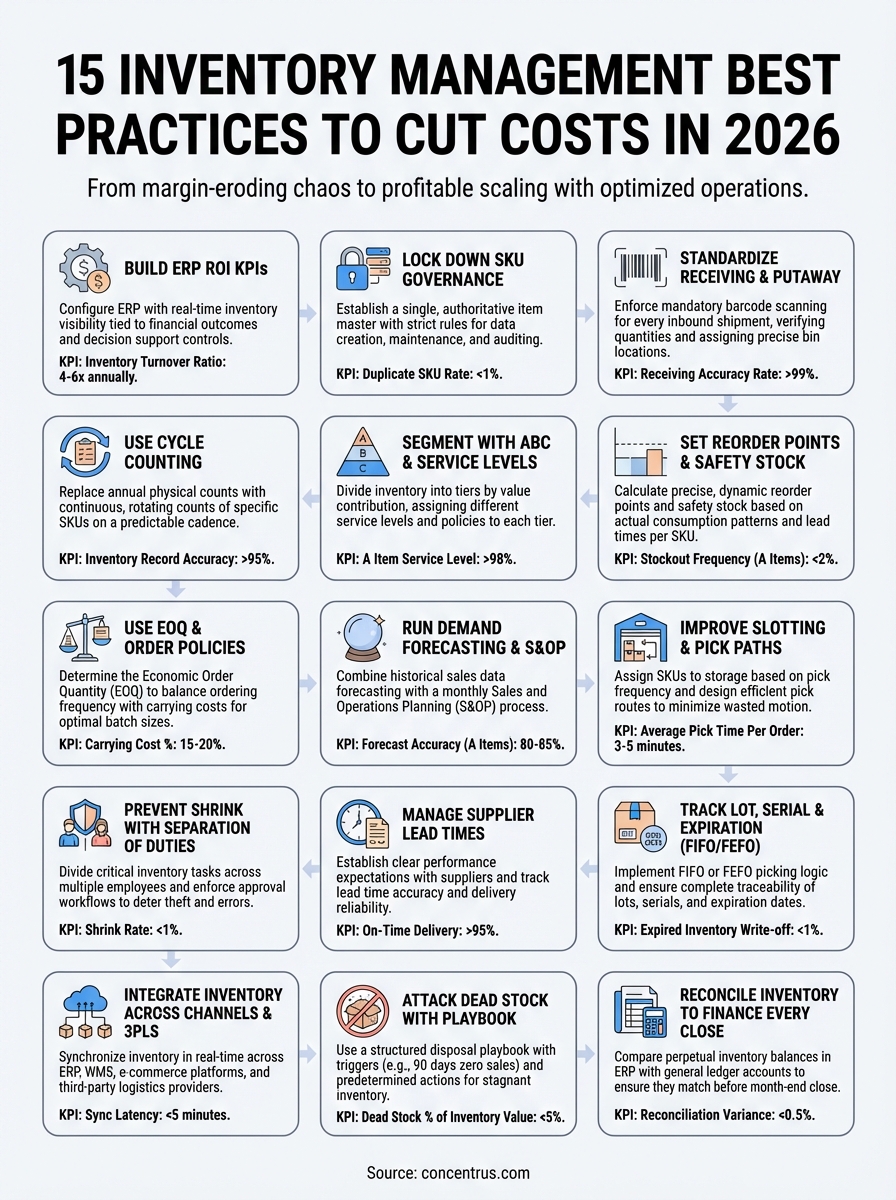
This guide breaks down 15 proven practices that midsized companies are using to cut inventory costs and improve cash flow in 2026. At Concentrus, we’ve helped organizations align their inventory operations with properly configured ERP systems, and we’ve seen these strategies deliver measurable financial outcomes when execution matches intent. Here’s what actually works.
1. Build inventory control into your ERP with ROI KPIs
Your ERP system should be the single source of truth for inventory decisions, not a passive record keeper. Most finance leaders inherit inventory modules that track quantities but fail to connect those quantities to financial outcomes like cash flow, margins, or carrying costs. The first step in implementing inventory management best practices is turning your ERP into an active tool that measures what matters.
What it is
This practice means configuring your NetSuite or Acumatica ERP to enforce real-time inventory visibility and tie every transaction to predefined financial KPIs. Instead of running month-end reports to see what went wrong, you build controls that flag variances as they happen. Your system becomes a decision support tool that shows exactly how much capital is tied up in stock, which SKUs are eating into margins, and where stockouts are creating revenue leaks.
“An ERP without ROI accountability is just expensive software. Build the metrics into the workflow, not into the cleanup.”
How to implement it
Start by mapping your current inventory pain points to specific KPIs: excess stock, long cash conversion cycles, or fulfillment delays. Work with your implementation partner to configure dashboards that surface these metrics at the transaction level, not just in summary reports. Set up automated alerts when inventory levels breach thresholds tied to your working capital targets. Ensure that purchasing, warehousing, and finance teams are using the same data definitions and can see the same real-time views.
KPIs and targets to track
Focus on inventory turnover ratio (target 4-6x annually for most industries), days inventory outstanding (aim for 30-60 days), and carrying cost as a percentage of inventory value (benchmark at 15-25%). Track stockout frequency and the revenue impact of each incident. Monitor obsolescence rates monthly, flagging items that haven’t moved in 90 days. Calculate cash tied up in inventory and compare it to your EBITDA or revenue targets to maintain balance.
Mistakes to avoid
Don’t configure KPIs in isolation from your finance team. Inventory metrics that don’t align with cash flow goals will create busywork, not business value. Avoid customizing your ERP beyond necessity, which increases costs and complicates future upgrades. Never assume your team will adopt new dashboards without training. And don’t wait until quarter close to review performance, when you have no time to correct course.
2. Lock down item master data and SKU governance
Clean item master data is the foundation of effective inventory management best practices. Every product in your system needs consistent naming conventions, accurate unit costs, and reliable lead times. When SKU data is wrong or duplicated, your reorder points fail, your inventory counts mismatch, and your financial reports become guesswork. Most midsized companies let item data decay over time because no one owns the process, and that sloppiness compounds into costly mistakes.
What it is
SKU governance means establishing strict rules for how new items are added to your ERP and how existing records are maintained. You create a single, authoritative item master that defines every product attribute, from supplier codes to warehouse locations. Data standards ensure that your purchasing team, warehouse staff, and finance leaders all reference the same information without contradictions or duplicates.
How to implement it
Assign one person or team to act as the item master gatekeeper. No one else should have permission to create or modify SKU records without approval. Build a standardized form or workflow in your ERP that captures all required fields before a new item goes live. Schedule quarterly audits to catch duplicates, outdated descriptions, or incorrect cost information. Train every department on the financial consequences of bad data.
“One duplicate SKU can throw off your entire inventory balance. Governance isn’t paperwork, it’s profit protection.”
KPIs and targets to track
Monitor duplicate SKU rate (aim for less than 1% of total items). Track item setup cycle time to ensure new products launch without delays. Measure data completeness scores for critical fields like unit cost, supplier, and category. Flag items with missing or outdated information and resolve issues within 48 hours.
Mistakes to avoid
Don’t let multiple users create SKUs without oversight. Avoid vague naming conventions that lead to confusion or duplication. Never skip the cleanup of legacy data before launching new inventory policies. And don’t treat item master governance as a one-time project when it requires ongoing discipline.
3. Standardize receiving, putaway, and barcode scanning
Inconsistent warehouse processes create inventory discrepancies that ripple through your entire financial close. When your team receives shipments using different methods, records locations inconsistently, or skips barcode scans, your system data becomes unreliable. These process gaps lead to phantom inventory, misplaced stock, and the expensive fire drills that consume warehouse and finance time every month.

What it is
This practice establishes a repeatable workflow for every inbound shipment. Your team scans every item as it arrives, verifies quantities against purchase orders in real time, and assigns precise bin locations before the product enters your available inventory. Barcode scanning replaces manual entry, eliminating typos and ensuring that your ERP reflects actual physical stock at every step.
How to implement it
Start by documenting your current receiving and putaway steps, then identify where manual processes introduce errors. Deploy mobile barcode scanners or handheld devices connected directly to your ERP. Train your warehouse staff to complete each transaction in the system before moving to the next task. Build mandatory scan checkpoints that won’t let users bypass location assignments or quantity confirmations. Test the workflow with a pilot SKU category before rolling it out across all inventory.
“Manual receiving creates manual problems. Enforce scanning at every checkpoint, and your inventory accuracy will follow.”
KPIs and targets to track
Measure receiving accuracy rate (target 99% or higher). Track putaway cycle time from dock to shelf and aim for same-day completion. Monitor scan compliance percentage to ensure your team isn’t skipping steps. Calculate inventory accuracy variance between system records and physical counts after implementing standardized processes.
Mistakes to avoid
Don’t roll out new procedures without proper training and hands-on practice. Avoid purchasing barcode hardware that doesn’t integrate directly with your ERP. Never allow workarounds or offline data entry that bypass your scanning requirements. And don’t assume one training session will stick when consistent reinforcement and audits are necessary.
4. Use cycle counting instead of annual fire drills
Annual physical inventory counts shut down operations, drain resources, and deliver accuracy numbers that are already weeks out of date by the time you finish. Smart inventory management best practices replace this disruptive ritual with cycle counting, a continuous process that keeps your records accurate year-round without halting business. Your team counts small portions of inventory on a rotating schedule, catching discrepancies before they compound into financial reporting problems.
What it is
Cycle counting divides your inventory into segments and counts a different portion each day or week. Instead of shutting down your warehouse once a year, you verify specific SKUs on a predictable cadence. High-value or fast-moving items get counted more frequently, while slow movers cycle through less often. This approach maintains perpetual inventory accuracy without the chaos and cost of full facility shutdowns.
How to implement it
Start by categorizing your SKUs based on value and velocity. Schedule high-priority items for weekly or monthly counts, medium-tier items quarterly, and slow movers semi-annually. Assign specific count zones to individual team members and build the schedule directly into your ERP workflow. Investigate every variance immediately rather than letting discrepancies accumulate. Use the same barcode scanning tools your team already uses for receiving and putaway to streamline the process.
“Cycle counting turns accuracy into a habit, not an event. Small corrections every week beat one painful reckoning every year.”
KPIs and targets to track
Monitor inventory record accuracy (target 95% or higher). Track cycle count completion rate to ensure your schedule stays on track. Measure average variance per count and flag SKUs with repeated discrepancies. Calculate time spent per count to optimize team efficiency and workload balance.
Mistakes to avoid
Don’t count items randomly without a structured plan. Avoid investigating variances in batches rather than resolving them immediately. Never let cycle counting become an extra task that falls behind when operations get busy. And don’t skip root cause analysis when the same SKUs show consistent inaccuracies.
5. Segment inventory with ABC and service levels
Not all inventory deserves equal attention. Your high-value SKUs that generate most of your revenue require tighter controls and more frequent reviews than the slow-moving items collecting dust in the back corner. ABC segmentation is one of the most effective inventory management best practices because it directs your team’s time and capital toward the products that actually drive financial performance.

What it is
ABC analysis divides your inventory into three tiers based on value contribution. A items represent roughly 20% of your SKUs but generate 70-80% of your revenue. B items make up 30% of SKUs and contribute 15-20% of revenue. C items account for 50% of your SKU count but only 5-10% of sales. You assign different service level targets to each tier, ensuring that your most critical products stay in stock while you minimize capital tied up in less important items.
How to implement it
Run a Pareto analysis in your ERP to rank SKUs by annual sales value. Assign each item to A, B, or C categories and configure different inventory policies for each tier. Set service levels at 98-99% for A items, 95-97% for B items, and 90-95% for C items. Review classifications quarterly as demand patterns shift and products move between categories.
“ABC segmentation stops you from managing every SKU like it’s equally important. Focus your energy where the revenue lives.”
KPIs and targets to track
Measure service level achievement by category (target 98% or higher for A items). Track inventory turnover by tier and expect A items to turn 8-12 times annually. Monitor carrying cost percentage for each segment and aim to reduce C item investment by 20-30%.
Mistakes to avoid
Don’t segment once and forget to reassess as your product mix evolves. Avoid setting the same service levels across all tiers, which wastes capital on low-value items. Never let C items accumulate without regular obsolescence reviews. And don’t ignore gross margin when classifying items, as high-volume products with thin margins may not deserve A-level treatment.
6. Set reorder points and safety stock by item
Generic reorder triggers leave you guessing when to replenish stock. You either order too early and tie up cash in inventory you don’t need yet, or you wait too long and face stockouts that kill sales. Setting precise reorder points and safety stock levels for each SKU transforms guesswork into calculated inventory management best practices that balance service levels with working capital efficiency.
What it is
A reorder point tells your system when to trigger a purchase order based on current stock levels, demand velocity, and supplier lead time. Safety stock acts as a buffer against demand spikes or delivery delays. Instead of applying blanket minimums across all products, you calculate these parameters individually for each SKU based on actual consumption patterns and the cost of running out.
How to implement it
Pull historical usage data from your ERP for each SKU over the past 6-12 months. Calculate average daily demand and multiply it by your supplier’s lead time to establish baseline reorder points. Add safety stock based on demand variability and your target service level for that item’s ABC category. Configure your ERP to automatically flag or generate purchase requisitions when stock drops below these thresholds.
“Reorder points calculated from real data prevent both stockouts and excess inventory. Let your usage history drive the math.”
KPIs and targets to track
Monitor stockout frequency (target less than 2% for A items, 5% for B items). Track excess inventory percentage to ensure safety stock isn’t oversized. Measure order trigger accuracy by comparing actual replenishment timing against planned reorder points. Calculate days of supply on hand and maintain 30-60 days for most SKUs.
Mistakes to avoid
Don’t use the same reorder logic for every product regardless of demand patterns. Avoid setting safety stock based on gut feel rather than statistical analysis. Never let reorder points remain static when demand seasonality or supplier lead times change. And don’t ignore the financial impact of carrying excess safety stock across hundreds of low-value C items.
7. Use EOQ and order policies to cut carrying costs
Ordering too frequently drives up procurement costs through excessive purchase orders and freight charges. Ordering in bulk ties up capital in excess inventory that sits on shelves for months. Economic Order Quantity (EOQ) and structured order policies help you find the optimal balance, reducing both ordering frequency and carrying costs while maintaining adequate stock levels.
What it is
EOQ is a formula that calculates the ideal order quantity that minimizes the combined cost of ordering and holding inventory. It factors in your annual demand, cost per order, and carrying cost percentage to determine the most economical batch size for each SKU. Order policies extend this concept by setting rules for how frequently you review and replenish inventory, whether that’s fixed order periods, fixed quantities, or demand-driven triggers.
How to implement it
Calculate EOQ for your A and B items using your ERP’s demand history and actual ordering costs (including procurement time, shipping, and receiving labor). Configure order policies in your system that automatically suggest these optimal quantities when reorder points hit. Review EOQ calculations quarterly as demand patterns shift or supplier terms change. Test different policies (weekly reviews vs. monthly batches) to find what works best for each product category.
“EOQ turns ordering into a science instead of a reflex. Calculate the sweet spot between ordering too often and holding too much.”
KPIs and targets to track
Monitor total carrying cost percentage (target 15-20% of inventory value). Track purchase order count per month and aim to reduce it by 20-30% after implementing EOQ. Measure average order size and ensure it aligns with calculated optimal quantities. Calculate inventory turnover improvement as order policies take effect.
Mistakes to avoid
Don’t apply EOQ blindly to every SKU without considering storage constraints or expiration dates. Avoid using outdated ordering costs that don’t reflect current labor and freight rates. Never set EOQ once and forget to recalculate as business conditions evolve. And don’t ignore volume discounts from suppliers that might justify larger batch sizes than EOQ suggests.
8. Run demand forecasting and a simple S&OP cadence
Reactive ordering burns cash and creates chaos. You buy too much of what customers don’t want and run out of what they do. Demand forecasting paired with a structured Sales and Operations Planning (S&OP) process shifts your inventory decisions from reactive guessing to proactive planning. This combination of inventory management best practices helps you align purchasing, production, and sales around a single demand plan that protects margins while meeting customer expectations.

What it is
Demand forecasting uses historical sales data and known factors (seasonality, promotions, market trends) to predict future consumption by SKU. S&OP is the monthly cadence where your sales, operations, and finance teams review that forecast, adjust for business realities, and commit to an execution plan. Together, they create visibility into future inventory needs so you can order smarter and avoid both excess stock and stockouts.
How to implement it
Start with your ERP’s built-in forecasting tools, which analyze trailing 12-month demand and project forward using statistical models. Run a simple monthly S&OP meeting where sales shares pipeline insights, operations confirms capacity, and finance validates the cash flow impact. Adjust your forecast based on this input, then push updated demand signals to your purchasing team. Keep the process lean, focus on A and B items, and resist the urge to overcomplicate with elaborate planning software before you’ve mastered the basics.
“Forecasting without S&OP alignment is just a spreadsheet exercise. The meeting is where numbers become decisions.”
KPIs and targets to track
Measure forecast accuracy (target 80-85% for A items, 70-80% for B items). Track forecast bias to identify consistent over or underestimation. Monitor S&OP meeting completion rate and ensure it happens monthly without skipping. Calculate inventory reduction percentage after implementing forecasting compared to your previous reactive approach.
Mistakes to avoid
Don’t forecast every SKU with the same intensity when C items don’t warrant the effort. Avoid running S&OP as a finance-only exercise without sales and operations input. Never use forecast numbers as rigid mandates rather than planning guidelines that adjust as reality unfolds. And don’t skip the monthly cadence when business gets busy, as that’s exactly when you need it most.
9. Improve warehouse slotting and pick paths
Wasted motion in your warehouse translates directly to wasted labor dollars. When your team walks extra steps to pick orders, searches for misplaced inventory, or navigates inefficient layouts, you’re paying for time that doesn’t add value. Optimizing warehouse slotting and pick paths cuts fulfillment costs, reduces errors, and speeds up order cycle times without requiring expensive automation or facility expansions.
What it is
Warehouse slotting assigns each SKU to a specific storage location based on its pick frequency, size, and relationship to other commonly ordered items. Pick path optimization designs the most efficient route through your facility to complete orders with minimal travel distance. Together, these inventory management best practices ensure your fastest-moving products sit closest to packing stations and your order pickers follow logical sequences that eliminate backtracking.
How to implement it
Analyze your order history to identify which SKUs get picked most frequently. Move these A items to prime locations near your shipping area at waist height for easy access. Place B items in secondary zones and store bulky or slow-moving C items in less accessible spots. Map standard pick routes through your warehouse and train your team to follow the same sequence. Use your ERP to generate pick lists sorted by location sequence rather than order number.
“Every extra step your picker takes costs you time and money. Design your layout around velocity, not convenience.”
KPIs and targets to track
Monitor average pick time per order (target 3-5 minutes for standard orders). Track travel distance per pick and aim to reduce it by 20-30% after slotting optimization. Measure picking accuracy rate (target 99% or higher). Calculate orders picked per labor hour and expect 15-20% improvement with optimized paths.
Mistakes to avoid
Don’t slot inventory once and never adjust as demand patterns shift. Avoid cluttering prime locations with slow-moving inventory just because it arrived recently. Never design pick paths without input from the team doing the actual work. And don’t ignore vertical space utilization when floor locations become scarce.
10. Prevent shrink with clear controls and separation of duties
Inventory shrinkage drains profits through theft, errors, and process breakdowns that often go undetected until your annual count reveals the damage. When the same person who receives inventory also counts it, records it, and ships it, you create opportunities for mistakes or misconduct that no system can catch. Building separation of duties into your warehouse operations is one of the most fundamental inventory management best practices for protecting your assets and maintaining accurate records.
What it is
This practice divides critical inventory tasks across multiple people so no single employee controls an entire transaction from start to finish. One person receives shipments, another verifies counts, and a third updates the system. Physical access controls restrict who can enter storage areas, and your ERP enforces approval workflows that require manager sign-off for adjustments, transfers, or write-offs. These layers create accountability and make unauthorized activity obvious.
How to implement it
Map every inventory transaction in your warehouse and identify where single-person control creates risk. Assign receiving duties to one team member and cycle counting to another. Require supervisor approval for all inventory adjustments above a dollar threshold. Lock high-value storage areas and limit access to essential personnel only. Configure your ERP to log every transaction with user IDs and timestamps that create an audit trail.
“Shrink thrives in environments where one person handles everything. Separate the duties, and you’ll separate legitimate errors from intentional ones.”
KPIs and targets to track
Monitor shrink rate as a percentage of inventory value (target less than 1-2%). Track unauthorized adjustment frequency and investigate any patterns. Measure access control violations through door logs or badge scans. Calculate inventory variance by employee to identify training needs or potential issues.
Mistakes to avoid
Don’t trust without verification, even with long-term employees. Avoid granting system admin rights to warehouse staff who don’t need them. Never skip the audit trail review when discrepancies appear. And don’t implement controls that slow operations to a crawl when simpler segregation of duties achieves the same protection.
11. Manage supplier lead times and vendor performance
Unreliable suppliers sabotage even the best inventory management best practices. When vendors miss delivery dates or ship incorrect quantities, your reorder points and safety stock calculations become meaningless. You end up emergency ordering at premium prices, disappointing customers with backorders, or carrying excess buffer stock to compensate for supplier unpredictability. Tracking and managing vendor performance transforms your supply chain from a liability into a competitive advantage.
What it is
This practice establishes clear performance expectations with every supplier and monitors their actual delivery against those commitments. You track lead time accuracy, on-time delivery rates, quality defects, and responsiveness to changes. Your ERP becomes the scorecard that reveals which vendors deserve more business and which ones need improvement plans or replacement.
How to implement it
Start by documenting the promised lead time for each supplier in your ERP item records. Configure your system to track actual delivery dates against purchase order due dates automatically. Schedule quarterly vendor reviews where you share performance data and discuss improvement opportunities. Build backup supplier relationships for your A items so you’re never dependent on a single source. Use your leverage with consistent suppliers to negotiate better terms or shorter lead times.
“Vendor performance data turns procurement from relationship management into financial optimization. Track it, share it, and act on it.”
KPIs and targets to track
Monitor on-time delivery percentage (target 95% or higher). Track average lead time variance by supplier and flag those exceeding seven days. Measure defect rate per vendor and expect less than 2%. Calculate total cost of ownership including rush freight and quality issues, not just unit price.
Mistakes to avoid
Don’t let vendor relationships prevent you from addressing poor performance with data. Avoid single-sourcing critical items without backup options. Never accept vague delivery promises without specific lead time commitments. And don’t ignore smaller suppliers who might outperform your major vendors on reliability.
12. Track lot, serial, and expiration with FIFO or FEFO
Products with expiration dates, lot numbers, or serial codes require tracking discipline that generic inventory management best practices can’t address. When you sell expired food, ship recalled components, or lose visibility into which batch caused a quality issue, the financial and legal consequences multiply fast. FIFO (First In, First Out) and FEFO (First Expired, First Out) methodologies ensure you move the right inventory at the right time while maintaining complete traceability.
What it is
FIFO picks inventory based on receipt date, ensuring older stock ships before newer arrivals. FEFO prioritizes items by expiration date regardless of when they arrived, critical for perishables or regulated products. Lot tracking groups inventory by production batch so you can trace quality issues or recalls to specific manufacturing runs. Serial number tracking assigns unique identifiers to individual units for warranty management and asset accountability.
How to implement it
Configure your ERP to capture lot numbers, serial codes, or expiration dates at receiving before items enter available inventory. Enable FIFO or FEFO picking logic in your warehouse module so the system automatically selects the correct inventory batch when fulfilling orders. Train your team to scan lot or serial information during every transaction, from putaway through shipping. Schedule weekly reports that flag inventory approaching expiration and trigger disposal or markdown workflows before products go bad.
“Lot and serial tracking turn inventory from a commodity into a traceable asset. The discipline prevents expensive recalls and compliance failures.”
KPIs and targets to track
Monitor expired inventory write-off percentage (target less than 1% of inventory value). Track lot traceability compliance rate and aim for 100% on regulated items. Measure average days to expiration at sale and maintain at least 30-day buffers for perishables. Calculate recall response time and ensure you can identify affected inventory within four hours.
Mistakes to avoid
Don’t skip lot capture at receiving when your team gets busy. Avoid mixing lots in the same bin location, which makes accurate picking impossible. Never rely on manual date checking when your ERP can enforce FEFO logic automatically. And don’t treat lot tracking as optional for non-regulated items when quality issues can still damage your reputation.
13. Integrate inventory across channels, WMS, and 3PLs
Selling through multiple channels while storing inventory in different warehouses or using third-party logistics providers creates data silos that destroy visibility. Your Shopify store shows stock that your Amazon channel already sold, or your 3PL reports numbers that don’t match your ERP, leading to overselling, disappointed customers, and frantic phone calls to figure out what you actually have available. True inventory management best practices require real-time synchronization across every system that touches your stock.

What it is
Integration connects your ERP with every external system that manages or sells your inventory. Your warehouse management system (WMS) updates your ERP immediately when items move, your e-commerce platforms pull live availability, and your 3PL providers send transaction data automatically. This creates a single, accurate view of inventory regardless of where it sits physically or which channel sells it.
How to implement it
Start by mapping every system that creates, moves, or sells inventory. Use native integrations or middleware platforms to build real-time connections between your ERP and these external systems. Configure two-way data flows so inventory updates push immediately in both directions. Test with a pilot SKU group before rolling out across your full catalog to catch sync issues early.
“Integrated inventory prevents the expensive problem of selling what you don’t have. Real-time data beats manual reconciliation every time.”
KPIs and targets to track
Monitor sync latency and target updates within 5 minutes of transactions. Track oversell incidents and aim for zero occurrences monthly. Measure inventory accuracy variance between systems and expect less than 2% discrepancy. Calculate reconciliation time saved compared to manual processes.
Mistakes to avoid
Don’t rely on nightly batch updates when real-time sync is available. Avoid custom integrations that break with system updates. Never run parallel systems without a master data source. And don’t skip testing sync failures and error handling before going live.
14. Attack dead stock with a clear disposal playbook
Dead stock eats cash and warehouse space while delivering zero return. Every SKU sitting unsold for six months represents capital you could redeploy into products that actually move, yet most companies let obsolete inventory accumulate because they lack a systematic disposal process. Attacking dead stock requires a structured playbook that identifies stagnant items early and executes disposal decisions before losses compound.
What it is
A disposal playbook defines specific triggers and actions for dealing with inventory that stops selling. You establish clear thresholds (90 days no movement, 180 days for slow categories) and predetermined responses for each threshold: markdowns, bundle offers, liquidation sales, donations, or disposal. The playbook removes emotion and indecision from a process that directly impacts your cash flow and margins.
How to implement it
Create a monthly dead stock report in your ERP that flags items with zero sales in the past 90 days and low movement in 180 days. Build a decision matrix that assigns each aging category to a specific action: 10-20% markdown at 90 days, 40-50% clearance at 120 days, liquidation or donation at 180 days. Schedule quarterly disposal meetings where your operations and finance teams review flagged items and execute the playbook decisions without debate.
“Dead stock decisions get harder the longer you wait. A playbook forces action before obsolete inventory becomes a write-off.”
KPIs and targets to track
Monitor dead stock as a percentage of total inventory value (target less than 5%). Track average days to disposal decision from initial flagging and aim for 30 days. Measure recovery rate on liquidated items (target 40-60% of original cost). Calculate warehouse space freed from aggressive dead stock management.
Mistakes to avoid
Don’t hold obsolete inventory hoping demand returns when carrying costs exceed recovery value. Avoid emotional attachment to discontinued products or slow sellers. Never skip the quarterly disposal review when operations get busy. And don’t treat all dead stock the same when seasonal items require different timing than genuinely obsolete products.
15. Reconcile inventory to finance every close
Inventory valuation errors wreck your financial statements and destroy confidence in your reported margins. When your warehouse count doesn’t match your general ledger balance, your CFO faces uncomfortable questions about asset accuracy and internal controls. Most finance teams discover these mismatches too late in the close process to fix them without delaying reporting, creating month-end chaos that repeats every cycle. This final practice in inventory management best practices ensures your operational data and financial records stay aligned every single close.
What it is
Inventory reconciliation compares your perpetual inventory balance in your ERP against your general ledger to confirm they match down to the dollar. You verify that every inventory transaction (receipts, shipments, adjustments, and write-offs) properly posted to your financial accounts with correct valuations. This process catches costing errors, missing journal entries, or system glitches before your financials go out the door.
How to implement it
Schedule a formal reconciliation three days before your close deadline, giving yourself time to investigate and correct variances. Run standard reconciliation reports from your ERP that compare inventory subledger totals against GL account balances by location and category. Document and resolve every difference above your materiality threshold before signing off on the close. Train your operations team to complete all transactions by a hard cutoff date so finance isn’t chasing late entries.
“Inventory reconciliation belongs at the start of your close process, not the end. Find the variances when you still have time to fix them.”
KPIs and targets to track
Monitor reconciliation variance percentage (target less than 0.5% of inventory value). Track days to complete reconciliation and aim for same-day resolution. Measure unreconciled item count at close and expect zero material discrepancies. Calculate close cycle time improvement as reconciliation discipline takes hold.
Mistakes to avoid
Don’t wait until the final close day to reconcile when you have no time to investigate. Avoid treating small variances as immaterial without understanding their root cause. Never let operations continue posting transactions after the close cutoff without proper period controls. And don’t skip the reconciliation when the month feels clean, as that’s exactly when hidden issues accumulate.
Next steps
These 15 inventory management best practices deliver measurable cost reductions when you implement them systematically rather than cherry-picking easy wins. Your CFO role demands that every dollar tied up in inventory works as hard as possible, and these strategies give you the framework to make that happen throughout 2026 and beyond.
The challenge most midsized companies face isn’t knowing what to do, it’s executing these practices within an ERP system that actually supports them. Your NetSuite or Acumatica platform should enforce these disciplines automatically rather than requiring manual workarounds that inevitably decay over time and create the same problems you’re trying to solve.
At Concentrus, we help finance leaders configure their ERP systems to deliver guaranteed ROI through properly implemented inventory controls. If your current setup leaves you fighting spreadsheets and month-end surprises, schedule a consultation to see how we align ERP functionality with your inventory cost reduction goals.