

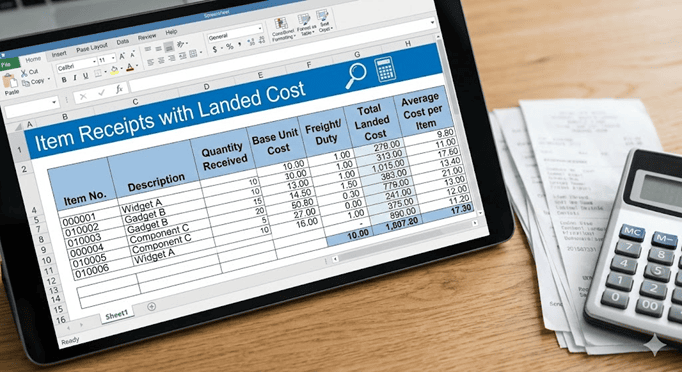
What is Landed Cost?
- Additional expenses incurred when purchasing inventory
- Contribute to the total cost of goods sold
- Affects inventory valuation
Examples:
- Shipping Charges
- Freight fees
- Origin and destination charges
- Import fees
- Duty fees (excise and customs)
- Taxes
- Insurance
- Handling charges
You wish to create a Saved Search to show the Total Value and Average Cost of each item on Item Receipts with Landed Costs.
Requirement
- Show Landed Costs added to an Item through Item Receipts
- Breakdown of costs of inventory
- Summary of Landed Costs
System Limitation
- No standard report available that shows breakdown of Landed Costs added to transactions
- Not possible to add Landed Cost information to inventory related reports
Solution
I. Identify Cost Categories – Landed Cost
- Navigate to Setup > Accounting > Accounting Lists
- Filter:
- Type: Select Cost Category
- View records and list all cost categories with Cost Type of ‘Landed Cost’
Example: Freight and Insurance


II. Create Saved Search
- Navigate to Lists > Search > Saved Searches > New
- Click Transaction
- Search Title: Enter Title
- Click Criteria
- Click Standard
- Filter:
- Select Type
- Description: is Item Receipt
- Click Set
- Select Account Type
- Description: is Other Current Asset
- Click Set
- Select Landed Cost Per Line
- Description: is True
- Click Set
- Select Type
- Click Results
- Click Columns
- Field:
Note: For every required filed use the drop-down menu to select it and once adjusted click Add if needed.
- Select Date
- Summary Type: SelectMaximum
- Select Type
- Summary Type: Select Group
- Select Document Number
- Summary Type: Select Group
- Select Item
- Summary Type: Select Group
- Select Amount
- Summary Type: SelectMaximum
- Select Formula (Currency)
- Summary Type: Select Sum
- Custom Label: Enter Sum of Landed Cost Allocated per Item
- Formula: Enter MAX(CASE WHEN ({memo} LIKE ‘%XXXX%’) THEN {amount} else 0 END)+MAX(CASE WHEN ({memo} LIKE ‘%YYYY%’) THEN {amount} else 0 END)
- Note: Add all the formula of all the Landed Cost Categories
- Select Formula (Currency)
- Summary Type: Select Sum
- Custom Label: Enter Total Value per Item
- Formula: Enter MAX({amount})+MAX(CASE WHEN ({memo} LIKE ‘%XXXX%’) THEN {amount} else 0 END)+MAX(CASE WHEN ({memo} LIKE ‘%YYYY%’) THEN {amount} else 0 END)
- Note: MAX({amount})+formula for Total Landed Costs
- Select Quantity
- Summary Type: Select Maximum
- Select Formula (Currency)
- Summary Type: Select Sum
- Custom Label: Enter Average Cost per Item
- Formula: Enter (MAX({amount})+MAX(CASE WHEN ({memo} LIKE ‘%XXXX%’) THEN {amount} else 0 END)+MAX(CASE WHEN ({memo} LIKE ‘%YYYY%’) THEN {amount} else 0 END))/MAX({quantity})
- Note: (MAX({amount})+formula for Total Landed Costs)/MAX({quantity})
- TOTAL ONLY
- Total Landed Costs = ABS(CASE WHEN {account} LIKE ‘%Landed%’ THEN {amount} ELSE 0 END)
- Total Value per Item = ({amount})+ABS(CASE WHEN {account} LIKE ‘%Landed%’ THEN {amount} ELSE 0 END)
- Average Cost per Item = (SUM({amount}+ABS(CASE WHEN {account} LIKE ‘%Landed%’ THEN {amount} ELSE 0 END)))/MAX({quantity})
10. Click Save & Run